 MetaTrader 5
 Experts
 지표
지표
 라이브러리
라이브러리
 유틸리티
유틸리티
 위젯
위젯
 규칙
규칙
MetaTrader 4용 Expert Advisor 및 지표 - 79
 트레이딩 로봇은 자동으로 시장거래를 수행하는 반면 지표는 가격을 더 잘 분석하고 가격 행동을 예측할 수 있게 해줍니다.
이러한 어플리케이션을 사용하면 MetaTrader 4에서 더 많은 기회를 포착하는 동시에 보다 정보에 입각한 방식으로 거래를 수행할 수 있습니다.
트레이딩 로봇은 자동으로 시장거래를 수행하는 반면 지표는 가격을 더 잘 분석하고 가격 행동을 예측할 수 있게 해줍니다.
이러한 어플리케이션을 사용하면 MetaTrader 4에서 더 많은 기회를 포착하는 동시에 보다 정보에 입각한 방식으로 거래를 수행할 수 있습니다. 
"Visual Range - Spread Indicator". This Indicator is an Essential Tool for Manual trading. it helps to avoid "off price" and "bad" entries caused by abnormally High spreads. ...................................................................................................................... At the Market Opening and News Reports - the Size of the Spread can go temporarily widely High. The Indicator shows the current Size of the Spread visually on the chart and its distance from the current pr
FREE

IMP
The Panel presents a number of indicators in abbreviated form: 2 oscillators, 2 trend and 1 volume indicator. Location - upper left corner.
Indicators values and colors can be customized by the user. Combined with other market analysis, can greatly improve trading results. This Indicator is a suitable tool for beginners and professional traders as one.
Metta Trader 4 Indicator Version _1.0
FREE
CoralPage is a simple little utility to add navigation controls to your chart. You can now easily step through the symbols in the Market Watch without having to click-and-drag a symbol from the Market Watch onto your chart. It's a simple but indispensable time-saver! Click move to the first, previous, next or last symbol in the Market Watch. Shift-click to go the the previous or next symbol that has an open order. CoralPage is completely free. If you like this, please check out my other prod
FREE

LyfUD指标专门 为黄金设计的趋势指标 ,也可以用于任何金融工具。用于及时反映多空力量,由U线和D线组成, 波动以0为中轴偏离运行, U线为快线D线为慢线。 LyfUD指标可以和 绝大多数策略结合使用 ,能够更加有效的把握风控。 U线和D线采用价格行为市场追踪算法,能及时反映市场方向, 可用在任意货币。 特性: 1. U线、D线在0轴上方,买入信号参考。 2. U线、D线 在0轴下方 ,卖出信号参考。 3. U线、D 线极限背离转向,行情可能出现反转。 4. 滞后性低,能及时反映趋势。 致力于结合其他指标,LyfUD和 均线、Pinbar 等搭配使用能迅速找到一些合理的关键位。 LyfUD只作为参考依据,其风险与作者无关。未经作者同意,禁止他售。
FREE

Moving indicator. It is written so that it doesn't signal when two moving averages cross. Easy to operate. It performed well on European and Asian currencies. Designed for long-term and medium-term types of trading. Индикатор мувингов. Написан так что даёт сигнал при пересечении двух скользящих. Прост в управлении. Хорошо себя показал на европейских и азиатских валютах. Рассчитан на долгосрочный тип торговли.
FREE

This indicators when combine with its slave version can help you a better view in backtesting visual mode. https://www.mql5.com/en/market/product/61574 They will help you in developing a multi time frame trading strategy. 1) Run backtest in visual mode 2) Add the master indicator to the backtesting chart 3) Add the slave indicators to other charts of the same symbol with different time frames. Run the backtest and you will see all the charts auto scrolling.
FREE

Order management can become difficult, especially when many orders are open at the same time, long and short. With the standard tools from Metatrader, only one order can be changed at the time.
In case you want to change the stop loss level or the take profit level of all your open orders this tool is for you. This tool allows to change easily the Take Profit level of ALL the open orders with a simple "Drag and Drop" on the chart.
All the orders with the same chart symbol will be modified. Add t
FREE

Todays High and Low
This indicator draws lines at the highest price of the day and at the lowest price of the day. Both lines are ended with labels with the maximum and minimum prices written. Lines and labels are moved according to the chart progress in real time. The indicator works on all chart time intervals. You can change and set colors and shift the chart. The indicator allows you to observe the price movement on the chart and not lose sight of the price maxima and minima achieved.
FREE

The Hong Kong Stock Exchange Session's Hours
This indicator facilitates observing the currency pair's quotations during subsequent parts of the stock exchange session live. Before the session starts, a rectangle is drawn on the chart but not filled in with color. It means the extent of the session duration. Before the first bar enters the rectangle of the session, a sound signal or pop-up window will notify us that the session will just start. When the price graph crosses the edge of the sessi
FREE

The Bombay Stock Exchange Session's Hours
This indicator facilitates observing the currency pair's quotations during subsequent parts of the stock exchange session live. Before the session starts, a rectangle is drawn on the chart but not filled in with color. It means the extent of the session duration. Before the first bar enters the rectangle of the session, a sound signal or pop-up window will notify us that the session will just start. When the price graph crosses the edge of the session
FREE

History Exporter can help to export your orders history from MT4 account. After that you can use another data analysis tools to get what you want. File format is .csv file, the content such as below OrderID,Symbol,Type,Lots,OpenTime,OpenPrice,StopLoss,TakeProfit,CloseTime,ClosePrice,Commission,Swap,MagicNo,Comment,ProfitUSD,ProfitPips,NetProfit,Duration,(Days),(HH:MM:SS), 21520206,EURCHF,buy,0.05,2020.03.10 08:06:15,1.06304,0.00000,0.00000,2020.03.11 13:37:38,1.06015,-0.60,-0.05,28282888,RedRab
FREE

Th3Eng Chart shadow indicator is a tool helps you to display another symbol on the current symbol in candles style or line. You can type the second symbol name in the setting and select the drawing mode { candles or line }. Also, the indicator displays the spread and current price of both pairs on the left top side corner of the chart.
setting: 1- Symbol: Insert The second symbol name. 2- Drawing mode: Choose the draw mode from (Candles or line). 3- Show spreads: true\false to display the pric
FREE
In addition to the MA of the set period, the MAs of the two higher timeframes with the same period are displayed on the chart simultaneously (though in a simulated way). No matter which timeframe you switch to, it will display the MA for that timeframe as well as the MAs for the two higher timeframes. Additionally, it will show the 200 MA as well!
To display the MA for the higher timeframes on the current chart, you need to set the MA calculated using the Moving Average indicator. If you try to
FREE
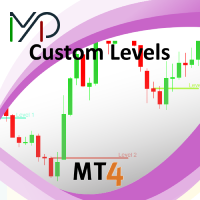
This utility identifies certain candle open times on chart, this can help you to see your favorite candle open and use it as it fits in your strategy. This tool is very useful for intraday charting and indicating your sessions. ___________________________________________________________________________________
Disclaimer: Do NOT trade or invest based upon the analysis presented on this channel. Always do your own research and due diligence before investing or trading. I’ll never tell you what
FREE

Trend indicator derived from T3 moving averages. The cloud is bounded by a fast T3 and slow T3 lines. Buying/Selling opportunities above/below cloud. The fast and slow T3 MA lines can also be used as dynamic support/resistance for more aggressive entries. Use default values for best settings. The number of look back bars is user defined. This indicator can be used in combination with other strategies such as price action. Suitable for all time frames. Prerequisites: T3IndiSlow and T3IndiFast in
FREE

Magneto Power MA - трендовый осциллятор. Основан на классическом индикаторе moving average, но при этом имеет нестандартный способ интерпретации. Здесь нет никаких фокусов с пересечениями мувингов, только гибридная работа MA и волатильности инструмента. При этом при должной настройке может составить конкуренцию дорогим и сложным аналогам. По гистограмме индикатора легко определить текущую тенденцию, а так же исчерпало себя движение цены или ещё нет. Настройки индикатора аналогичны классическому
FREE

特徴: このツールはDOWやNIKKEIなど500や1000ポイントがラウンドナンバーの 指数を取引する際に表示するように開発しました。 もちろんメジャー通貨でも表示はされます。
更新頻度を制限しているのでチャート表示が遅くなるということは ありません。
XMでDOWを取引される場合、Main Levelsを10000 Sub Levelsを5000にしてください。
各パラメータの説明: Number to display lines:表示するライン数を設定します。 Main Levels:メインレベルをポイントで指定します。 Main Line Color:メインラインの色を設定します。 Main Line Style:メインラインで使用されるラインを設定します。 Show Sub Lines:サブラインを表示するか設定します。 Sub Levels:サブレベルをポイントで指定します。 Sub Line Color:サブラインの色を設定します。 Sub Line Style:サブラインで使用されるラインを設定します。 Update Frequency(600
FREE

마진 스트레스 지수(MSI)는 트레이딩 계좌의 현재 부담을 가능한 한 정확하게 나타내기 위해 만들어졌습니다. 100% 값은 마진을 전혀 사용하지 않는 계좌를 의미하며, 마진 사용량이 증가함에 따라 값은 비례적으로 감소합니다. 0% 값은 최대 마진 스트레스 상태에 있는 트레이딩 계좌를 나타냅니다. 또한 Expert Advisor는 마진, 사용 가능 마진, 마진 레벨, MSI 및 자산(Equity)의 최대값과 최소값을 저장합니다. ________________________________________ The Margin Stress Index (MSI) was created to represent the current load on a trading account as accurately as possible.
A value of 100% indicates an account with no margin usage, and the value decreases proportionally
FREE
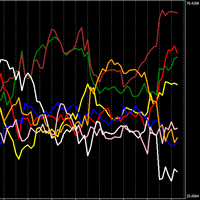
개별 통화의 강세를 보여주는 강력한 지표입니다.
높을수록 통화가 강해지고, 반대로 낮을수록 약해집니다.
거래 전략 N1: 선 교차점에서 오픈 포지션을 취하고, 한 쪽이 상승하고 다른 쪽이 하락할 경우 상승하는 통화에 대한 포지션을 오픈합니다.
거래 전략 N2: 가장 강한 통화를 매수하고 가장 약한 통화를 매도하는 오픈 포지션.
설정에서 기간을 변경할 수 있습니다. 저는 기본 기간(TIMEFRAME 1 HOUR)과 기간 24를 사용합니다. 또한 TIMEFRAME 1 MINUTE와 기간 1440을 사용합니다.
개별 통화의 강세를 보여주는 강력한 지표입니다. 높을수록 통화가 강해지고, 반대로 낮을수록 약해집니다. 거래 전략 N1: 선 교차점에서 오픈 포지션을 취하고, 한 쪽이 상승하고 다른 쪽이 하락할 경우 상승하는 통화에 대한 포지션을 오픈합니다. 거래 전략 N2: 가장 강한 통화를 매수하고 가장 약한 통화를 매도하는 오픈 포지션. 설정에서 기간을 변경할 수 있습니다. 저는
FREE
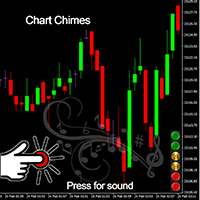
거래를 소리의 교향곡으로 만드는 MT4/MT5 표시기인 Chart Chimes를 소개합니다! 하루 종일 차트를 보는 데 지치셨나요? 거래하는 동안 기분을 좋게 유지하기 위해 약간의 기분 전환이 필요하십니까? 글쎄, Chart Chimes가 당신을 덮었습니다!
Chart Chimes를 사용하면 해당 버튼을 누를 때마다 얼굴에 미소를 짓고 발걸음을 옮길 재미있는 소리가 들립니다. 의기양양한 트럼펫이나 잔잔한 하프 소리를 배경으로 거래하는 것을 상상해보세요. 마치 자신만의 개인 오케스트라가 여러분을 응원하는 것과 같습니다!
그러나 Chart Chimes는 단순히 재미있는 오락거리가 아닙니다. 거래하는 동안 집중하고 참여하는 데 도움이 되는 강력한 도구입니다. 사운드를 사용자 지정하는 기능을 통해 거래 스타일과 선호도에 맞는 고유한 사운드 환경을 만들 수 있습니다. 정지 손실을 고수하기 위해 약간의 알림이 필요하십니까? 심판의 휘슬을 흉내내는 소리를 설정하지 않겠습니까! 또는 불꽃놀이
FREE

Summorai Trading assistance 이 인디케이터는 최대 5개의 서로 다른 심볼의 이동 평균을 합산하여 차트에 편리하게 표시합니다. 사용 방법: 인디케이터를 차트에 끌어다 놓고 마켓 워치에 표시된 심볼 이름을 정확히 입력하세요. 이를 통해 항상 글로벌 트렌드를 파악할 수 있습니다. 사용 예: 인디케이터 차트에서 DAX40을 거래할 때 Nasdaq100, S&P500, Dow30을 추가하여 트렌드를 확인하는 것이 좋습니다. 예 2: XRP를 거래하지만 BTC와 ETH를 추적하여 예기치 않은 상황을 피하고 싶을 때. 행복한 거래 되세요! 이 인디케이터를 평가해 주세요. 제 다른 EA도 확인해 보세요: https://www.mql5.com/en/users/oferdvir/seller
FREE
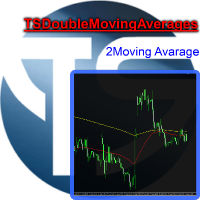
Useful indicator that incorporates two moving averages, for your favorite trading strategy. Moving averages are fully configurable, Period, Method, Color, Etc Just place it on your favorite timeframe.
The benefits you get : Never redesigns, does not retreat, never recalculates. Works on forex and CFD, timeframe from M1 to Monthly. Easy to use. Convenience for your trading.
FREE
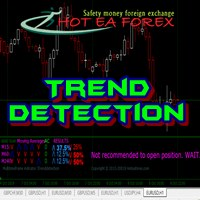
Recognizing trends is one of the most important analytical skills in trading. Not only technical traders, those who are fundamentally leaning to make the forex trend as the basis of analysis to determine entry trading. However, learning how to look at forex trends is not as simple as it seems. If you want signal accuracy to estimate the direction of the next price, then there are advanced methods in learning how to look at forex trends that you need to know. Strategy SIMPLE HOw to read trend mar
FREE
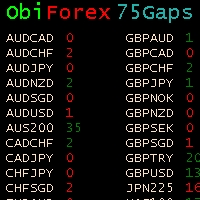
Gaps Size 75 - Market Gap Indicator The Gaps Size 75 indicator reveals the gaps between the current day and the previous day, aiding your trading decisions. It is designed for the "END OF WEEK GAPS" strategy, allowing you to identify potential opportunities. This indicator supports up to 75 currency pairs, with additional pairs available upon request. The columns are color-coded for easy interpretation. For inquiries regarding the weekend gaps strategy, kindly send a private message. Gaps Size 7
FREE

Moving Averages Divergence 3x3 Indicator uses the crossover technique for signaling the market trend and the trade opportunities as well. It applies 3 formats of the same indicator and allows them to plot the crossover signals which are interpreted as the trade signals along with the direction of the market trend. Moving Averages Divergence 3x3 Indicator can be applied to trade all kinds of forex currency pairs within the financial markets. Although, this indicator works well o
FREE
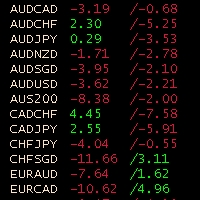
Obiforex Swaps Explore Obiforex Swaps, a robust tool that provides information on the swaps for both short (sell) and long (buy) positions. This indicator is particularly valuable when implementing the "triple swap" strategy, enhancing your trading capabilities. The program is specifically designed to support the first 75 currency pairs, offering a broad range of trading opportunities. We recommend using reputable brokers such as TITANFX and ICMARKETS for optimal performance. If your currency pa
FREE
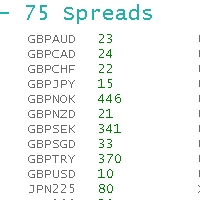
ObiForex 75 Spreads Discover a powerful indicator showcasing instant spreads for 75 currency pairs. Unlock valuable insights for informed trading decisions and optimize your strategies. The indicator features 3 columns, providing a comprehensive view of the spreads. Spread reading can be effectively used with macroeconomic news. Share your strategies! For optimal performance, install the indicator on the USDJPY currency pair. Experience the capabilities of ObiForex 75 Spreads and elevate your tr
FREE

我很高兴欢迎您来到我的产品页面 面板初次加载会服从后台设置,面板控制交易管理凌驾于后台之上。请注意交易方向的管理,正确的交易方向是交易市场生存的根本,这点很重要。 Ea交易有2种策略Sto,MA和用户在面板打开的执行订单,同时也支持移动端下单(下单基础请服从后台自行设置手数)、移动端预下单功能。 Sto策略单量密度大,是激进策略;MA策略较缓和。
此EA可全自动化交易,设置偏向于辅助手控交易。 ============Basic settings============= Magic EA 交易品种(trading variety) 点差(Spreads) 点差系数(Spread coefficient) =============conditions for execution==== 交易模式(Choosing strategy) 打开新系列订单(Open new series) //是否允许,否的话会停止打开新阶段订单。关闭状态适合运行预交易功能,也就是控制运行,一阶段一结。。 开多(Trade Sell) //处于关闭状态会停止一切开Sell方向单子。 开
FREE

Risk Management Panel is unique to tool calculate your risk quickly and place trades based on your account money. There are two options for the user Account Equity Account Balance Tools like these is specially useful when you have to take a quickly decision about your trade but dont have the time to calculate the risk. It works with magic number. So the advantage is a trade placed by this panel could be manipulated by the other expert advisors as well
FREE

The indicator allows you to trade binary options. The recommended time frame is М1 and the expiration time is 1 minute. The indicator suitable for auto and manual trading. A possible signal is specified as a arrows above/under a candle. You should wait until the candle closes! Arrows are not re-painted Trade sessions: LONDON and NEWYORK section Currency pairs: GRB/USD Working time frame: M1 Expiration time: 1 minute. The indicator also shows good results when using the martingale strategy - "Mar
FREE

Use Forex Trading Profit Tracker to keep a record of your earnings across accounts. This indicator will show a dashboard in the Meta Trader chart to show for the profit or loss money in your account. It’s easy to see just how much money you’re making matched betting with the Forex Trading Profit Tracker. Key features: Track your profit over time Check out your stats. Track expected profits against actual profits. Export account history to Excel.
MT5 version(*): https://www.mql5.com/en/market/
FREE
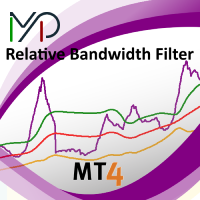
MP Relative Bandwidth Filter (RBF) is created to be used to identify your trading zones based on volatility. This easy to use technical indicator attempts to compare between Bandwidth of higher length and ATR of lower length to identify the areas of low and high volatility: Relative Bandwidth = Bandwidth / ATR The Bandwidth is based on Bollinger Band which its length ideally needs to be higher and ATR length needs to be ideally lower. After calculating Relative Bandwidth, the Bollinger Band is
FREE

The Ultimate Indicator For Trading Trend This indicator clearly shows you the strength of the market in one direction or the other, which means that you can trade knowing you are either with or against the market. When used in conjunction with the +3R principles you are sure to have some serious results. The +3R Principles Routine - This is when you trade and how often Rules - This is the rule you follow Risk:Reward - This is the percentage amount of your account which is at risk Whether you t
FREE

ForexBob 1 Click Button is very impresive forex tool for scalpers: 1. Helpful in Closing multiple trades in just Single Click. 2. Scalper can benefits the most who always eager to close multiple trades in averaging and lock the profits fast. 3. It helps to avoid latency and so profits can be locked where we need. 4. Easy to Install, same as we install any expert advisor. 5. Speed of closing trades depends on your broker's server speed.
If you find any improvements we are open to your feedback
FREE

Description: Automatic Equity Manager EA manages the whole account equity. You need to set it up on its own chart. -----------------------------------------------------------------------------------------------------------------------------------------
Parameters: EquityGainPercent = 3 (This automatically closes all trades when your equity shows a gain of X percent.) ---------------------------------------------------------------------------------------------------------------------------------
FREE

This indicator is a tool to measure the relative strength of different currency pairs. It used a user selected base currency as a comparing standard, and evaluate all other major currencies base on their relative strength/weakness. the stronger one currency compare to the base currency, the higher its value. Base currency has a fix strength value of 50.
Indicator parameters Strength Period - Change the strength period in the settings affects the number of bars used for calculation. The higher t
FREE
A script for group removal of orders of a given type. To delete, drag the script onto the chart and in the pop-up window select the type of orders to be deleted and click OK. Settings
Types of orders to delete - order types to be deleted or closed ALL_PENDING - OP_BUYLIMIT, OP_SELLLIMIT, OP_BUYSTOP, OP_SELLSTOP ALL_LIMIT - OP_BUYLIMIT, OP_SELLLIMIT ALL_STOP - OP_BUYSTOP, OP_SELLSTOP ALL_MARKET - OP_BUY, OP_SELL ALL_LIMIT_BUY - OP_BUYLIMIT ALL_LIMIT_SELL - OP_SELLLIMIT ALL_STOP_BUY - OP_BUYSTOP A
FREE

The Starting Points indicator for MetaTrader 4 is a technical analysis tool that shows the monthly, weekly, and daily starting points, as well as the 1000-point and 500-point levels, in the forex market. The indicator is displayed as a series of horizontal lines that represent the starting points and levels. Benefits of Using the Starting Points Indicator Identify potential trend changes: The Starting Points indicator can help traders identify potential trend changes by highlighting areas wher
FREE

The indicator shows support and resistance levels as horizontal lines. It shows the highs and lows of former days, weeks and month in every chart.
How to work with support and resistance levels show the EA Limit Scalper and the Universal Moving Average Expert Advisor (UniMA EA) .
When the tip of the coursor is on a line (mouseover) it shows the real value of the level and which high or low is shown, see explanation below.
The indicator must be installed like an expert advisor ! To se
FREE

This is a free version of our Great tool with limited functions. The ChartChanger is a great utility tool to reduce the number of open charts on your terminal. There is three section to it: Symbols, Time frames and Templates. You need only one chart to be open and still you can scroll up to multiple ones. Symbols: With the push of a button you can change from one symbol to another, and your applied indicators will stay on the next chart. For the symbols there is an auto detection mode, or you ca
FREE

This indicator allows you to find out how much the price can pass on the current bar. It looks for the average ATR value for the previous 5 bars and draws 2 price boundaries. You can use it on any timeframe of any instrument.
Based on this indicator, you can set stop loss and profit levels, as well as use it in other good strategies.
Do not forget to use risk management while trading!
FREE

This indicator helps the trader to make the final decision. When you have already decided in which direction the price will unfold, it remains as accurate as possible to determine the reversal itself. This is the task performed by the Konkov indicator. The indicator is installed on M1 and M5 charts. Indicator parameters: for M1 chart time_frame1 5 time_frame2
FREE
This indicator allows to hide ATR oscillator (on all MT4 timeframes) from a date define by the user, with a vertical line (Alone) or a panel (with "Hidden Candles"). Indicator Inputs: Period Information on "Average True Range" indicator is available here: https://www.metatrader4.com/en/trading-platform/help/analytics/tech_indicators/average_true_range ************************************************************* Hey traders!! Give me your feeds! We are a community here and we have the same
FREE
This indicator allows to hide MACD oscillator (on all MT4 timeframes) from a date define by the user, with a vertical line (Alone) or a panel (with "Hidden Candles"). Indicator Inputs: Fast EMA Period Slow EMA Period Signal SMA Period Apply To Information on "MACD" indicator is available here: https://www.metatrader4.com/en/trading-platform/help/analytics/tech_indicators/macd ************************************************************* Hey traders!! Give me your feeds! We are a community h
FREE
This indicator allows to hide moving average (on all MT4 timeframes) from a date define by the user with a vertical line (Alone) or a panel (with "Hidden Candles"). Indicator Inputs: MA Period MA Shift MA Method MA Apply To Information on "Moving Average" indicator is available here: https://www.metatrader4.com/en/trading-platform/help/analytics/tech_indicators/moving_average ************************************************************* Hey traders!! Give me your feeds! We are a community h
FREE

Narcis Trader is an expert designed for managing trades and facilitating trading. Attention, the application does not work in the strategy tester. Download Real
Its features include: Determining the trade volume based on the selected trader's risk. Setting specific and fixed stop-loss and take-profit levels. Defining the take-profit level based on the specified risk-to-reward ratio (r/r). Entering trades using static and dynamic lines based on the predetermined risk. Position closure management
FREE

Alert Relay Helper (EA) – MT5 & MT4
Encrypted bridge that forwards indicator alerts to external messengers * in real-time. Plug-and-play utility – simply attach it to one chart. Zero trading functions – does not open, modify or close orders. End-to-end AES-256 encryption – only custom indicators that support the same key can broadcast messages (e.g. VWAP Ultimate Pro v1.20+). Multi-platform – MT5 build 4150+, MT4 build 1380+. Before you turn it on : Open Tools > Options >
FREE

This indicator shows the value of returns in the selected time frame .
They are calculated as logarithm of returns , rather than price or raw returns. For small returns, arithmetic and logarithmic returns will be similar. The benefit of using returns, versus prices, is normalization. It is possible measures all variables in a comparable metric despite originating from price series of unequal values.
Inputs You can display data both as a Histogram or a Line It's also possible to display th
FREE

Watch a few videos in the playlist, turn on subtitles, and select a translation into your language. MOPS ( Managing Open PositionS ) is an expert advisor for managing open trades. Its key features include sending notifications to Telegram and automatically closing all positions when specified virtual take-profit and stop-loss levels are reached for all currency pairs, a specific pair, or a "magic number." The advisor not only sends sound alerts and push notifications to the mobile app but also
FREE

이것은 전략 테스터에서 효율적인 테스트 및 분석을 가능하게 하는 재생 속도 관리 도구입니다. 전략 테스터의 사용성을 향상시키고, 거래 전략의 개발 및 평가를 간소화하는 수단으로 사용될 수 있습니다.
도구의 특징: 재생 속도 제어: 사용자는 전략 테스터의 재생 속도를 자유롭게 변경할 수 있으며, 빨리 감기, 속도를 올려서 재생하거나 원하는 지점에서 일시 정지할 수 있습니다. 한 바, 한 틱 앞으로: 'Next Bar' 버튼을 사용하여 사용자는 한 번에 한 바씩 앞으로 나아갈 수 있습니다. 또한, 더 상세한 분석을 위해 한 틱씩 앞으로 나아가는 것도 가능합니다. 시간대 및 통화 쌍의 동기화: " Practice Simulator Sync (무료)"를 사용하면 다양한 시간대 및 통화 쌍과 동기화하여 재생할 수 있습니다. 이를 통해 MTF 및 다른 통화 조건을 동시에 볼 수 있습니다. 자동 일시 정지: 매일 특정 시간(예: 시장 개장 시)에 멈추어 그 지점부터 움직임을 분석할 수 있습니다
FREE

This is an expanded version of my Daily Sacrifice EA that closes old losing trades at the expense of a portion of your profits. This helps to slowly work away drawdown and accelerate the closure of martingale grids
*** Pro Features *** Include/Exclude symbols. These fields are empty by default, but if populated allow you to include only specific symbols or alternatively exclude specific symbols Execute on an hourly interval. Allows the EA to be ran every so many hours rather than on a fixed
FREE

ExportRange 는 지정한 시간대의 캔들 데이터를 CSV 형식으로 저장하는 유틸리티 스크립트입니다. 각 캔들의 최고가, 최저가, 범위(차이), 시간, 인덱스를 추출하여 분석용 데이터로 활용할 수 있습니다. 통계 분석이나 변동성 연구가 필요한 사용자에게 적합합니다. 스크립트를 차트에서 실행하면, 설정한 개수만큼의 바 데이터를 불러오고 결과를 터미널의 Files 폴더에 CSV 파일로 저장합니다. 바 개수와 시간대는 입력 파라미터로 설정할 수 있으며, 현재 차트의 시간대를 그대로 사용할 수도 있습니다. 주요 기능 지정한 개수의 과거 바 데이터를 CSV로 내보내기 High, Low, Range(High - Low) 저장 현재 차트 시간대 사용 가능 외부 분석 도구에 적합한 CSV 형식 출력 출력 항목
생성되는 CSV 파일에는 다음 항목이 포함됩니다. Timeframe Index Datetime High Low Range Range 값은 가격 차이로 저장되며, 필요 시 후처리 과정에서
FREE

Price Change Indicator Introduction The Price Change Indicator is a powerful tool designed to help traders identify significant price movements over a specified period. By calculating and visualizing percentage changes between current and historical prices, it allows traders to quickly spot potential trading opportunities when markets show unusual volatility or momentum. Features Real-time monitoring of price changes Visual histogram display when changes exceed threshold Text display showing cur
FREE

The indicator automatically calculates the balanced price value. It shows in which direction and by how much the balanced price value is currently shifted. Works on all timeframes, on any currency pairs, metals and cryptocurrencies. Can be used when working with binary options. Distinctive features Not redrawn; Simple and fast setup; Clear interpretation of readings; Works on all timeframes and on all symbols; Suitable for trading currencies, metals, options and cryptocurrencies (Bitcoin, Liteco
FREE

Handle orders for different magic -1 for all magic, 0 for manual orders, 1-XXXXXX for EAs For example, if you want to control orders from EA with magic 3333, your manual orders, type 0;3333 Close on exact time, example. close order every XX:15 --> Close all on 00:15, Close all on 11:15, Close all on 12:15... Close on Loss, close the loss for single order, close the loss for the whole magic number.
Parameters Description (-1 for all magic)(0 for manual orders)
List of the magic to check - 0;1;2
FREE
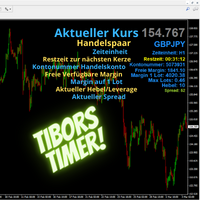
Tibors Timer - Indikator zur Übersicht und Klarheit im Chart
Dieser Indikator wurde von mir geschrieben, da ich oftmals die wichtigsten Informationen während eines Trades bzw. im Chart mühevoll suchen musste. Bitte täglich neu in den Chart ziehen. Er zeigt folgendes an: - Akuteller Kurs - Aktuelles Handelspaar - Die Zeiteinheit - Die Restzeit zur nächsten Kerzenbildung - Die Nummer des Handelskontos - Die Frei Verfügbare Margin - Margin auf 1 Lot - Der Aktuelle Hebel - Der Aktuelle Spprea
FREE

Who needs this tool? 1-If you are a Martingale Trader, You need to look at this tool
2-If you are a Trend price channel Trader, you need to look at this tool Smarty Semi Automated EA This tool is a great help for scalpers who use grid or martingale. It is a next-generation smart trading tool. You adjust its trading parameter then you push a button to do all trading for you. However, it is a semi-automated EA so It does not start orders by its own. How it is working? The tool was designed to
FREE
MSP_Bridge 는 AI Grok 4를 RiskKILLER AI Navigator 에 연결하는 무료 유틸리티입니다. 이는 AI 기반의 다중 시간대 시장 방향 및 전략 어시스턴트 입니다.
이 번들을 통해 귀하의 트레이딩 스타일에 맞춰진 AI 기반 트렌드, 심리 및 거시 분석을 통한 기관 수준의 인사이트를 얻을 수 있습니다.
RiskKILLER AI Navigator [ MT5 - MT4 ]
트레이딩 성과는 프로처럼 시장을 이해하는 데 있습니다. 그것이 바로 RiskKILLER_AI Navigator 가 제공하는 것입니다: MQL5에서는 제공되지 않는 AI 기반 트렌드, 시장 심리, 그리고 거시경제 분석을 통해 여러분의 트레이딩 스타일에 맞는 기관급 인사이트를 얻으세요.
핵심 이점 다양한 시간대와 자산에 걸친 실시간 시장 방향 AI 기반의 거시 지표, 뉴스, 심리 분석 여러분의 트레이딩 스타일(수동 또는 자동)에 기반한 맞춤형 조언 RiskKILLE
FREE

The script closes all positions for which the profit is more than 5 pips. Checks all open positions for all pairs (you can run it on any chart). The terminal must have the "Algo trading" mode enabled.
It is effective if there are many open positions that need to be closed quickly.
The script does not replace a trailing stop or an advisor. The script checks all open deals and closes those that meet the condition (profit is more than 5 pips) once at the time of launch.
For the subsequent closi
FREE
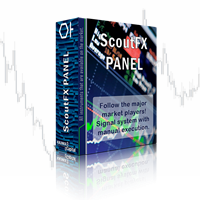
ScoutFX Panel is created to make manual trading and decision making process easier for the traders who prefer manual trading. This trading panel will help you to make a market entry decision by displaying the majority of trades statistics. Using this data, trader can easily determine the market entry direction or to make corrections for used trading strategy based on statistics.
ScoutFX Panel notifies the trader about reached percent of sell or buy overtake for each instrument, via voice noti
FREE

Automation for setting up Stop Loss, Take Profit and Trailing Positions can be opened with all platforms MetaTrader 4 MetaTrader Android MetaTrader iOS MT4 Web Trader The Expert Advisor will arrange Trailing of trades Market Execution Pending Order (Buy Stop, But Limit, Sell Stop, Sell Limit)
Input Parameters (all in pips) Take Profit - take profit value. Stop Loss - stop loss value. Trailing Start - trailing start. Trailing Step - trailing step/stop. Lock Start - lock start (first time trailin
FREE

This Expert Advisor closes all open positions and pending orders. It is possible to close only buy or sale orders, market or pending orders, positions with profit or loss.
You can to get source code from here .
Parameters CloseAllBuy - close buy positions. CloseAllSell - close sell positions. CloseMarketOrders - close market orders. DeletePendingOrders - delete pending orders. CloseOnlyProfit - close only profitable orders. CloseOnlyLoss - close only loss-making orders. ClearChart - clear the
FREE

즉시 Discord 알림. 차트에서 직접 가격 레벨을 설정하고 가격이 이를 돌파하면 메시지를 받으세요. 레벨 추가는 한 번의 클릭으로 가능합니다. 마우스로 라인을 드래그하여 원하는 가격 레벨을 정확하게 설정할 수 있습니다. 편리한 제어 패널: 모든 활성 알림이 목록에 표시됩니다
라인을 드래그하여 레벨을 수정할 수 있습니다
불필요한 알림은 한 번의 클릭으로 삭제하거나 "Clear All Alerts"를 사용해 모두 한 번에 제거할 수 있습니다
알림은 트리거된 후 자동으로 제거됩니다
차트에서 알림 라인을 숨기는 옵션
사용자 지정 알림 텍스트 지원 (예: crossed, reached, touched)
Dark/Light 모드 지원 작동 방식: Add Alert를 클릭
차트에 가격 레벨 라인이 표시됩니다
원하는 가격 레벨로 이동합니다
가격이 해당 레벨을 돌파하면 - Discord에서 메시지를 받게 됩니다 간편한 설정: Discord에서 텍스트 채널을 생성하고 Webhook URL을 복사하
FREE

MAs COMBO - MT4용 간단하면서도 강력한 이동 평균 지표를 만나보세요! 이 맞춤형 지표는 단순 이동 평균의 스마트한 조합을 기반으로 제작되어 최소한의 노력으로 고확률 거래 설정을 파악하는 데 적합합니다.
거래 초보자라도 이 지표의 직관적인 로직 덕분에 명확하고 수익성 있는 거래 신호를 빠르게 포착할 수 있습니다. 패턴 인식 기능이 매우 직관적이어서 초보자와 숙련된 트레이더 모두 바로 활용할 수 있습니다!
이 지표를 선호하는 이유: 1. 미리 구성된 입력 설정이 제공되어 복잡한 설정 없이 바로 사용할 수 있습니다. 2. 사용자 지정 가능한 색상으로 차트를 원하는 스타일에 맞게 설정할 수 있습니다. 3. 내장된 매개변수가 이동 평균 설정과 관련된 모든 복잡한 작업을 처리하여 시간과 추측을 줄여줍니다.
모든 거래 스타일에 적합: 1. 장기 거래를 원하시나요? 더 높은 시간대에 사용하면 추세 확인과 수익 증대에 효과적입니다. 2. 단기 스캘핑을 원하시나요? 더 낮은 시간대(
FREE
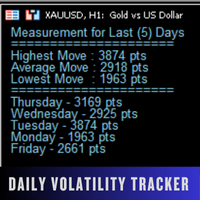
Daily Volatility Tracker is a practical and lightweight indicator designed to help traders monitor and analyze market volatility based on historical daily price movements. Whether you're a day trader, swing trader, or scalper, understanding how much a market moves per day is critical for: Choosing the right pairs to trade Setting accurate stop-loss and take-profit levels Adapting to changing market conditions MT5 Version - https://www.mql5.com/en/market/product/134960/ Join To Learn Market Dept
FREE

Abiroid Multi Slope indicator allows you to calculate a Slope Histogram for any line of any indicator . Histogram is for 1 slope line only, but slope values can be calculated for 3 lines total. To have multiple histograms, add as many Slope indicators for custom indicators as you like on chart. You just need to provide the Indicator name, buffer value, slope's period and max number of bars back. By default it has slope calculation for TDI_v4.ex4 indicator. There is no way to specify parameters f
FREE

Tired of manually adjusting stops? This powerful EA automatically secures your profits with dynamic trailing stops, protecting gains while letting winners run. No trade openings – just effortless risk management for your existing positions. Why Traders Love This EA Never Miss Profits Again Auto-locks gains as price moves in your favor. Eliminates emotional decisions – sticks to your predefined rules. Three Smart Trailing Modes Choose the method that fits your strategy: F
FREE
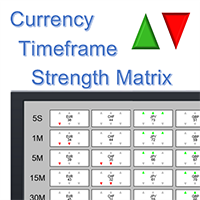
Note: this product is a free limited version of the full featured product Currency Timeframe Strength Matrix . It only includes AUD, CAD, CHF currencies instead of all 8 currencies. It includes only 5S, 1M, 5M time frames instead of all 8 (5S, 1M, 5M, 15M, 30M, 1H, 4H, 1D).
What is it? The Currency TimeFrame Strength Matrix is a simple and comprehensive Forex map that gives a snapshot of what is happening in the Forex market at the very present time. It illustrates the strength and momentum ch
FREE

Alfa for MT4: 당신의 스마트 트레이딩 커맨드 센터 지루한 작업에 작별을 고하고, 의사 결정에 집중하세요. 여러 차트 창을 옮겨 다니느라 지치셨나요? 주문 관리가 어려워 기회를 놓치거나 손실을 본 적이 있으신가요? Alfa 가 이를 위해 만들어졌습니다. 이것은 단순한 도구가 아닌, MT5/MT4 플랫폼에 배치된 당신의 트레이딩 커맨드 센터 로, 반복적인 작업에서 해방시켜 시장 기회를 포착하는 데 집중할 수 있도록 자동화와 지능화를 제공합니다. 핵심 기능, 트레이딩 핵심 문제점 해결 파노라마式 포지션 관리
"한 눈에 전체 상황 파악, 한 번의 클릭으로 효율적인 청산."
모든 주문과 포지션을 실시간으로 집약하여 손익 현황을 한눈에 파악할 수 있습니다. 한 번의 클릭으로 전체 청산 , 수익 포지션만 청산 , 손실 포지션만 청산 을 지원하여 시장 변동 시 빠르게 대응하고 이익을 단단히 고정시키는 데 도움을 줍니다. 심화된 손익 통계
"통계 그
FREE

Trade Space PRO Профессиональная торговая панель для MT4. Главное ПРЕИМУЩЕСТВО - все настройки выведены на график символа. Запоминаются автоматически для каждого символа отдельно. Трейдинг/риски/блок контроля новостей и тайминга/панель сигналов . Вся важная информация отображается на панелях. Вам нужно только открыть позицию одним щелчком мыши. Управление открытой позицией так же просто, насколько это возможно: вы можете легко настроить уровни Стоп Лосса (S/L) и Тейк Профита (T/P). В о
FREE
MetaTrader 마켓은 거래로봇과 기술지표를 판매하기에 최적의 장소입니다.
오직 어플리케이션만 개발하면 됩니다. 수백만 명의 MetaTrader 사용자에게 제품을 제공하기 위해 마켓에 제품을 게시하는 방법에 대해 설명해 드리겠습니다.
