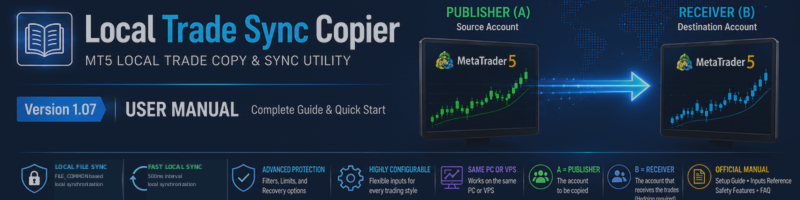

Local Trade Sync Copier is a local MetaTrader 5 trade synchronization utility designed to synchronize trading activity from a Publisher account (A) to one or more Receiver accounts (B) running on the same PC or VPS.
This product does not provide trading signals, entry strategies, investment advice, or automatic trade decisions. It only synchronizes trading activity created on the Publisher account according to the configured settings.
How It Works
The same Local Trade Sync Copier EA is installed in both MetaTrader 5 terminals.
Account A operates as the Publisher / Source.
Account B operates as the Receiver / Destination.
The Publisher writes synchronization data locally, and the Receiver reads that data through MetaTrader 5's shared FILE_COMMON environment.
Communication between the Publisher and Receiver is therefore local to the same machine. No external copy server or cloud copy service is used for synchronization between terminals.
Important: Normal internet access is still required for each MetaTrader 5 terminal to connect to its broker and execute trades.
System Requirements
The Publisher and Receiver MT5 terminals must run on the same physical PC or the same VPS.
Each trading account should use its own MetaTrader 5 terminal.
The Receiver account must use Hedging mode. Netting accounts are not supported for Receiver operation because the copier uses ticket-level position management, split orders, and partial-close synchronization.
Algorithmic Trading must be enabled in MetaTrader 5 for the Receiver to execute synchronized trading operations.
The Publisher and Receiver must use the same ChannelName .
Source and destination symbols must be correctly configured in SourceSymbols and DestinationSymbols .
Quick Start
- Install Local Trade Sync Copier in both MT5 terminals. On account A, set OperatingMode = COPIER_ACCOUNT_A_PUBLISHER . On account B, set OperatingMode = COPIER_ACCOUNT_B_RECEIVER .
- Set the same ChannelName on both terminals. The default value is Main .
- Configure SourceSymbols and DestinationSymbols . For example, if both brokers use the same symbol name, use USDJPY on both sides. If the destination broker uses a suffix, you can map names such as USDJPY → USDJPY+ .
- On the Receiver, set EnableTrading = true when you are ready to allow real trade execution. The default is false for safety.
- Confirm that Algo Trading is enabled and that the Receiver account is a Hedging account.
- Open a small test position on the Publisher account and confirm that the corresponding position appears on the Receiver account before using the product with normal trading volume.
Supported Synchronization
Local Trade Sync Copier supports market positions, pending orders, position closes, volume changes and partial closes, and SL/TP synchronization according to the selected settings.
One Publisher can also synchronize to multiple independent Receiver accounts on the same PC or VPS. Each Receiver can use its own lot-sizing settings, symbol mapping, and Receiver configuration.
Execution prices may differ between brokers because each broker has its own quotes, spreads, liquidity, execution conditions, Stops Level, Freeze Level, contract specifications, and trading rules. Exact identical execution prices are therefore not guaranteed.
SL / TP Synchronization
CopyStopLoss and CopyTakeProfit control whether SL and TP are synchronized.
The default ProtectionPriceMode is:
PROTECTION_RELATIVE_DISTANCE
In this mode, the distance between the Publisher entry price and its SL/TP is transferred to the Receiver position. Because the Publisher and Receiver may enter at different prices, the final SL and TP price values on the two accounts may not be identical.
This is intentional.
If the requested SL or TP is too close to the current Receiver market price and violates the Receiver broker's Stops Level, the protection level is not forced at an invalid price. The EA retries that protection independently when it becomes valid.
If the Receiver market price has already crossed the intended copied SL or TP before that protection can be attached, v1.07 closes the mapped Receiver position for safety instead of leaving it open without the requested protection.
Receiver Reopening Control
The default setting is:
ReopenIfReceiverClosed = false
With this safety-oriented setting, if a mapped Receiver position is independently closed, the copier does not continuously recreate the same Receiver position merely because the original Publisher position is still open.
Users who specifically require target-volume restoration behavior can review this setting carefully before changing it.
Lot Sizing
The product supports both fixed multiplier and balance-ratio based lot sizing.
The default mode is:
LOT_FIXED_MULTIPLIER
Additional controls are available for contract-size correction, balance-based sizing, account-unit scaling, currency conversion, maximum copied volume, maximum volume per order, broker minimum lot handling, and target-volume rounding.
Because broker contract specifications can differ significantly, users should always verify the resulting Receiver lot size on a demo account before live use.
Price Difference Control
Optional price-difference controls are available for:
New entries, startup/existing-position synchronization, and position closes.
These controls can defer an operation when the Receiver price is outside the configured acceptable adverse-distance range.
They are disabled by default.
Pending Orders
Pending-order synchronization can be enabled or disabled with:
CopyPendingOrders
The default value is true .
Pending-order prices and protection levels are also subject to the Receiver broker's trading restrictions, including Stops Level and Freeze Level. An operation may therefore be retried instead of being forced at an invalid price. The code explicitly evaluates Stops Level and Freeze Level separately for pending orders.
Existing Positions at Startup
SyncExistingOnStartup determines whether positions already present on the Publisher when the Receiver starts should be considered for synchronization.
The default is:
false
Users should understand this setting before restarting or introducing a Receiver into an account that already contains active Publisher positions.
Strategy Tester Demo
EnableStrategyTesterDemo is provided for Strategy Tester demonstration and product verification.
The Strategy Tester demo is not a replacement for a real two-terminal Publisher/Receiver test. Actual synchronization between two accounts should be verified using separate MT5 terminals in an appropriate demo environment.
Important Safety Notes
Always test the product on demo accounts before live use.
Different brokers can produce different entry prices, spreads, Stops Levels, contract sizes, minimum lots, execution timing, and available symbols.
Local Trade Sync Copier is a synchronization utility. It does not guarantee identical execution results, identical profit/loss, or identical account performance between Publisher and Receiver accounts.
Users remain responsible for their broker settings, account configuration, lot sizing, risk management, and trading decisions.
Full User Manuals
The complete manuals contain the Quick Start guide, terminology, all input parameters in the same order as displayed in MT5, lot-sizing examples, SL/TP behavior, pending-order behavior, troubleshooting, and important limitations.
English:
Local Trade Sync Copier v1.07 - User Manual
日本語:
Local Trade Sync Copier v1.07 - 日本語ユーザーマニュアル
Please download the attached ZIP file. It contains both the English and Japanese PDF user manuals.