Time Window Basket Trader
- Experts
-
Fernando Altair Kuhn
 Trader and MQL5 developer from Brazil. I build MetaTrader 5 tools for risk control and trade execution: lot calculators, loss limits, stop managers, a trade copier and strategy builders. Every product shows its limits and its tester results with real costs. No profit promises. Support through MQL5
- Versione: 1.1
- Aggiornato: 6 novembre 2026
- Attivazioni: 10
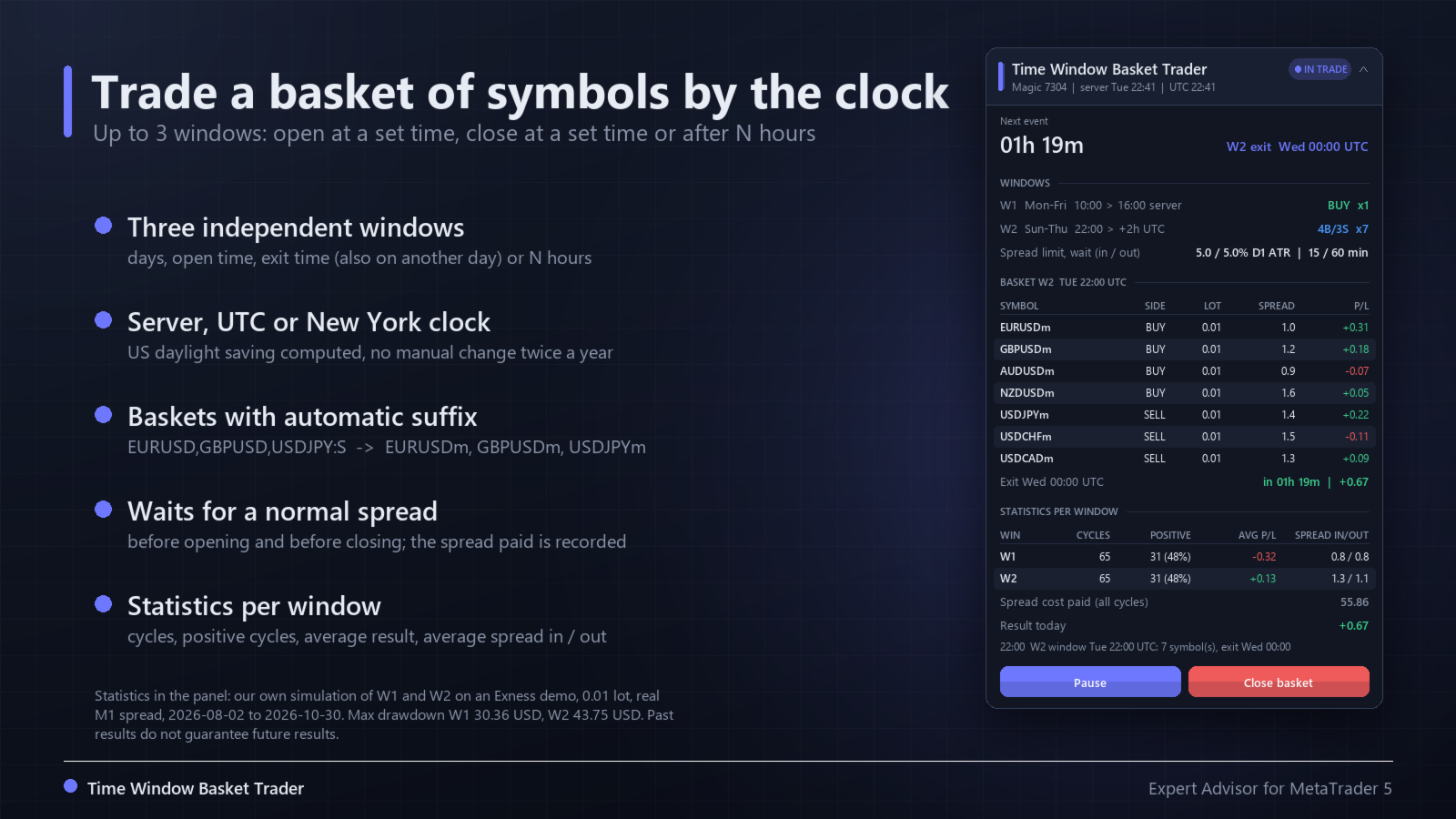
Time Window Basket Trader opens a basket of symbols at a time you choose and closes it at a time you choose. It is a tool to build and test your own time based ideas (session opens, fixings, rollovers, weekday effects) on one symbol or on a basket. It does not contain a secret strategy and it does not promise profit.
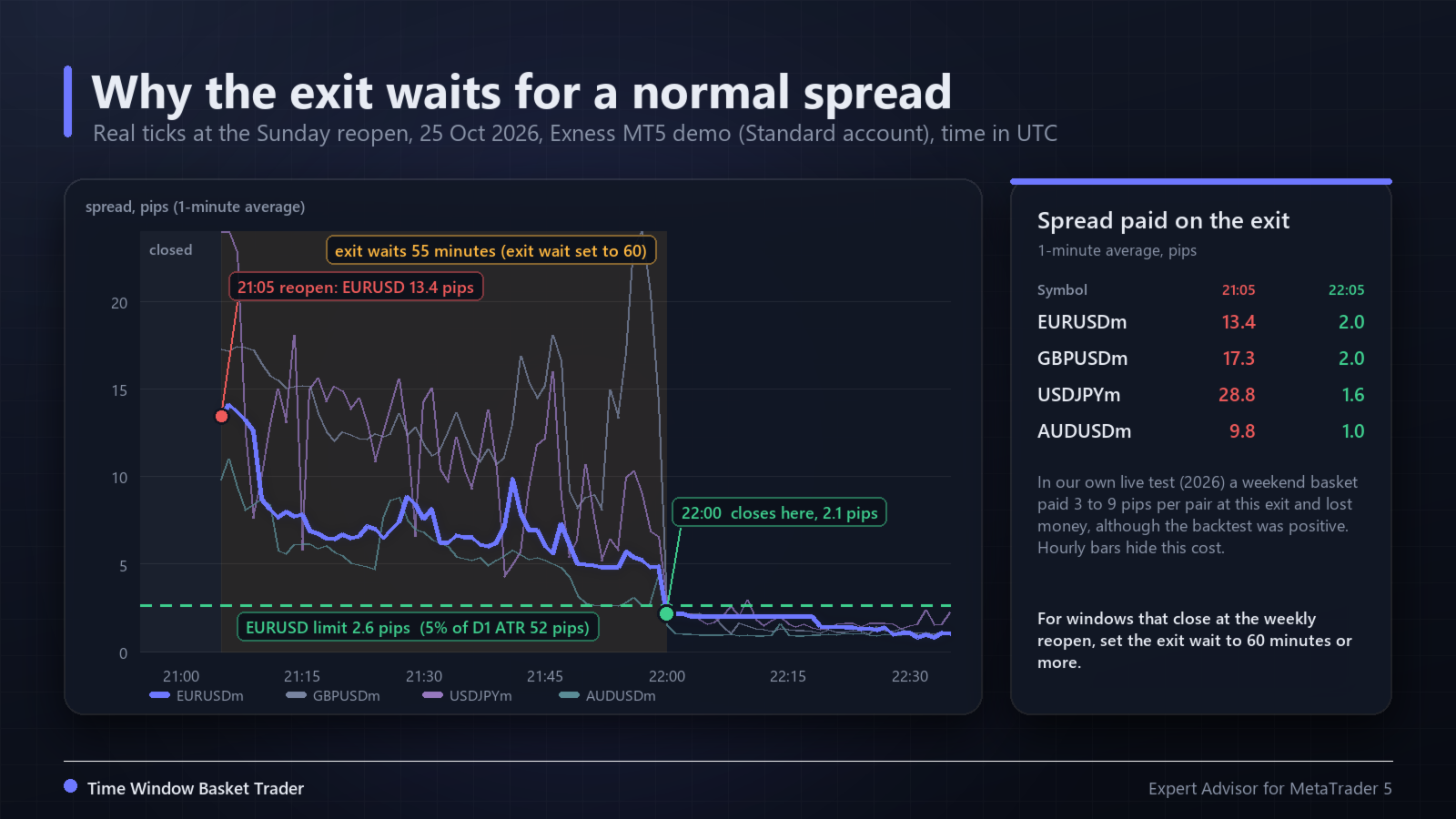
It was built after a long study of session and weekend strategies on forex baskets. The main lesson of that study: the real cost at the session open and close, mostly the wide spread at the Sunday reopen, removed results that the hourly bar backtest showed. That is why this robot waits for a normal spread before opening and before closing, and records the spread it paid on each side.
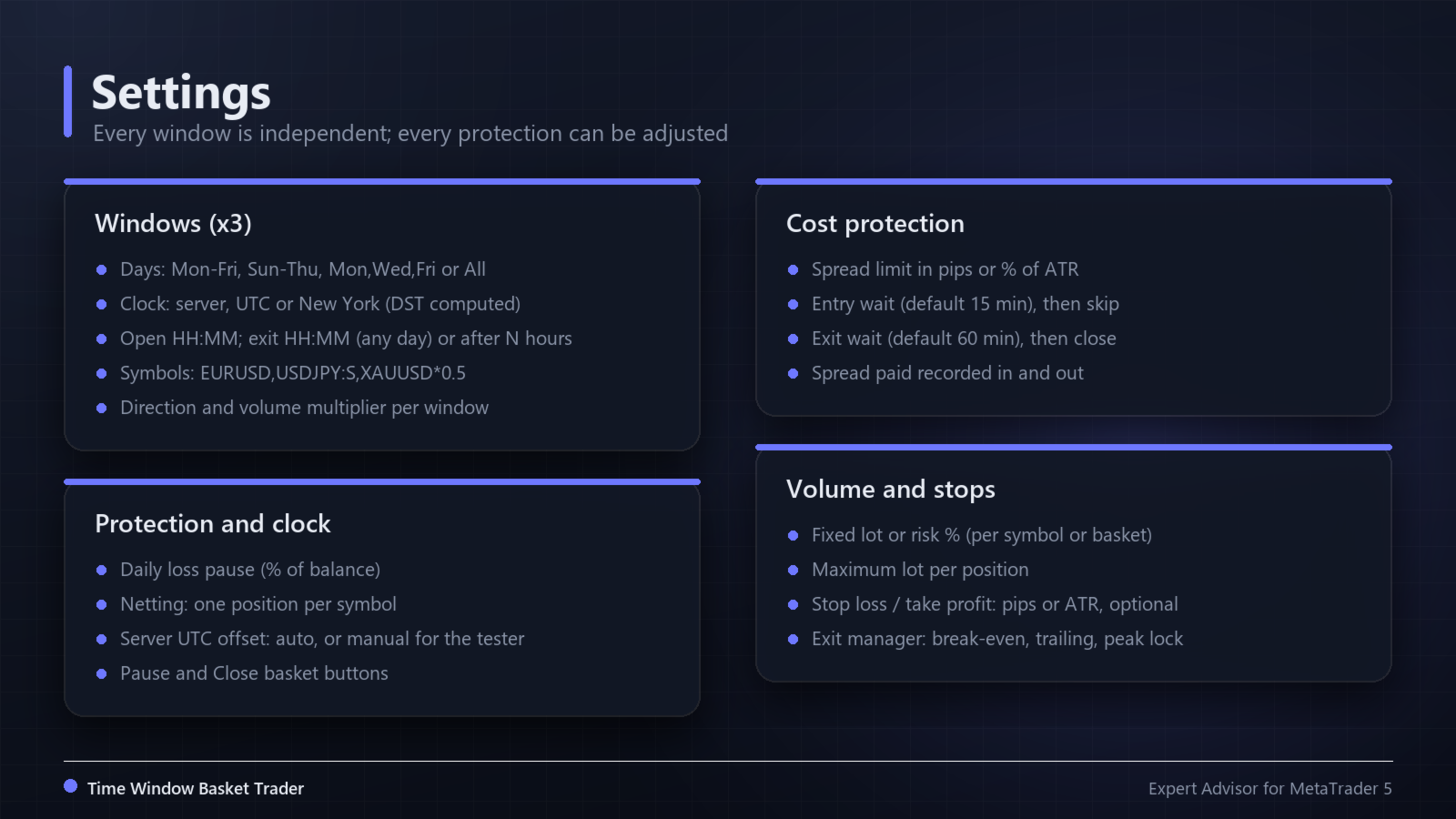
Windows (up to 3, independent)
- Days: Mon-Fri, Sun-Thu, Mon,Wed,Fri, Fri, All.
- Open time HH:MM.
- Exit at a time of day, on the first day after the open or on a chosen weekday (for example Friday 20:00 to Sunday 22:00), or after N hours.
- Direction: buy or sell, with an optional direction per symbol.
- Volume multiplier per window and per symbol.
Symbols
Write the list without the broker suffix: EURUSD,GBPUSD,USDJPY:S,XAUUSD*0.5 . The suffix of your account is found automatically (EURUSD becomes EURUSDm, EURUSD.r, etc.). :B buys, :S sells, :R reverses the window direction, *0.5 multiplies the volume. An empty list trades the chart symbol. Symbols that do not exist are reported in the journal and ignored.
Clock
- Each window uses server time, UTC or New York time. New York daylight saving is computed (second Sunday of March to first Sunday of November), so a window that follows New York does not need to be changed twice a year.
- On a live chart the server UTC offset is read automatically. In the Strategy Tester it cannot be detected: set it by hand (hours, plus 1 hour during US daylight saving if your broker follows New York).
Cost protection
- Spread limit in pips or in percent of the ATR (default 5% of the daily ATR, so it fits forex, gold and indices with one value).
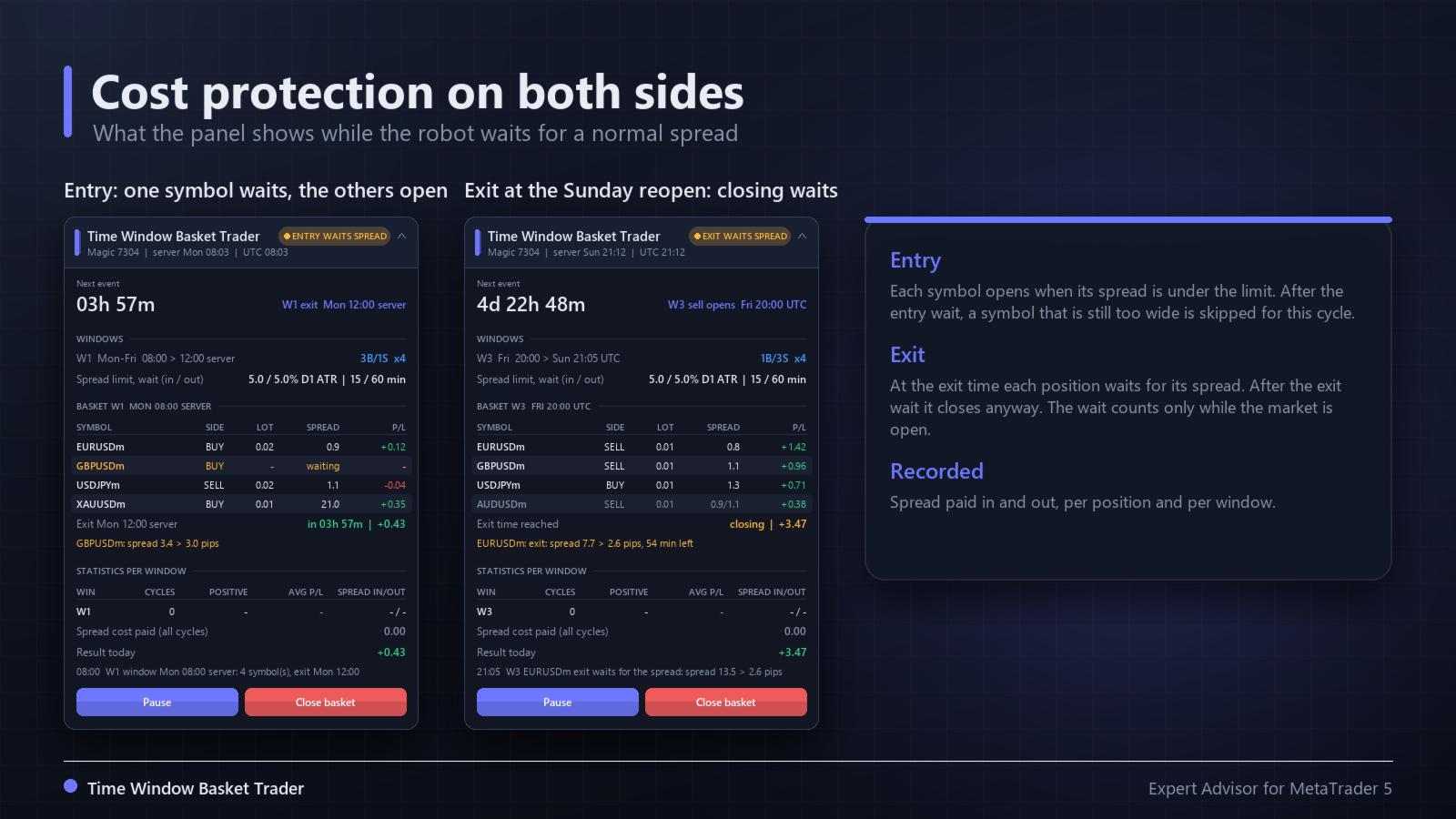
- Entry: each symbol opens when its spread is under the limit, checked on every tick. After the entry wait (default 15 minutes) a symbol that is still too wide is skipped for this cycle.
- Exit: at the exit time each position waits for its spread to come back under the limit. After the exit wait (default 60 minutes) it closes anyway. The wait counts only while the market is open.
- The spread paid on the entry and on the exit is shown per position and per window, with the total spread cost in money.
Measured example (screenshot 2, real ticks, Sunday reopen of 25 Oct 2026): EURUSD opened with a 13.4 pip spread and needed 55 minutes to come back to 2 pips. For windows that close at the weekly reopen, set the exit wait to 60 minutes or more.
Volume and stops
- Fixed lot per symbol (never below the symbol minimum) or risk percent of equity, for each symbol or split across the basket. Risk sizing uses the stop distance, or 1 ATR when no stop is set. Optional maximum lot.
- Stop loss and take profit in pips or ATR multiples, both optional. Distances are widened to the broker stop level when needed.
- Optional exit manager: break-even, ATR trailing stop and a lock of a fraction of the best profit.
- Daily loss pause: no new basket after the robot loses a set percent of the balance in the day (closed plus floating).
Hedging and netting accounts
By default a symbol that this robot already holds is skipped by another window. On a hedging account you can allow one position per window. On a netting account a symbol that already has any position (also manual or from another robot) is always skipped, so the robot never adds to or reduces a position that is not its own.
Panel
- Next event with a countdown (next open or next exit).
- Windows with days, times, clock and direction.
- Current basket in a table: symbol, side, lot, spread paid, result, plus the reason when a symbol waits.
- Statistics per window: cycles, positive cycles, average result per cycle, average spread in and out, total spread cost.
- Pause button (no new baskets; exits and stops keep working) and Close basket button with a confirmation click.
- After a restart the open baskets are rebuilt from the positions (the comment keeps the window and the open time).
Strategy Tester
With the default inputs window 1 buys the chart symbol Monday to Friday at 10:00 server time and closes at 16:00, 0.01 lot, stop at 1.5 daily ATR. This is a demonstration of the mechanics, not a recommended strategy. Our own simulation of exactly this window on EURUSD, August to October 2026 with real M1 spread, gave 65 trades, 31 positive, a net result of -20.67 USD at 0.01 lot and a maximum drawdown of 30.36 USD. Test your own ideas with "1 minute OHLC" or real ticks, and check the spread columns.
Limitations
- A time window is not an edge by itself. Most time based ideas do not survive real costs; expect long series of losing cycles.
- The tester uses the spread stored in the bars. At reopens and rollovers the real spread can be much wider than the bars show, and slippage is not modeled.
- Gaps can jump over a stop loss. Holding over the weekend adds gap risk and swap.
- The terminal must be running with Algo Trading on, at the open and at the exit.
- Up to 16 symbols per window.
Inputs
- Window 1, 2, 3: enabled, days, clock, open time, exit rule, exit day, exit time, exit after N hours, direction, symbols, volume multiplier
- Volume: lot mode, fixed lot, risk percent, risk for the whole basket, maximum lot
- Stops: stop loss and take profit (off, pips, ATR), ATR timeframe and period
- Spread protection: unit (off, pips, percent of ATR), entry limit and wait, exit limit and wait
- Exit manager: on or off, ATR timeframe and period, evaluation, start, trailing distance, peak fraction and start
- Protection: daily loss pause, same symbol in two windows, maximum slippage
- Clock: server UTC offset auto or manual, manual offset, US daylight saving
- General: magic number (default 7304), reset statistics, panel corner and offsets
Risk warning
Trading involves a high risk of loss. Past results, including backtests and simulations, do not guarantee future results. Test every configuration on a demo account first and trade only money you can afford to lose.