Breakout Lab Strategy Builder
- Experts
-
Fernando Altair Kuhn
 Trader and MQL5 developer from Brazil. I build MetaTrader 5 tools for risk control and trade execution: lot calculators, loss limits, stop managers, a trade copier and strategy builders. Every product shows its limits and its tester results with real costs. No profit promises. Support through MQL5
- Versione: 1.0
- Attivazioni: 10
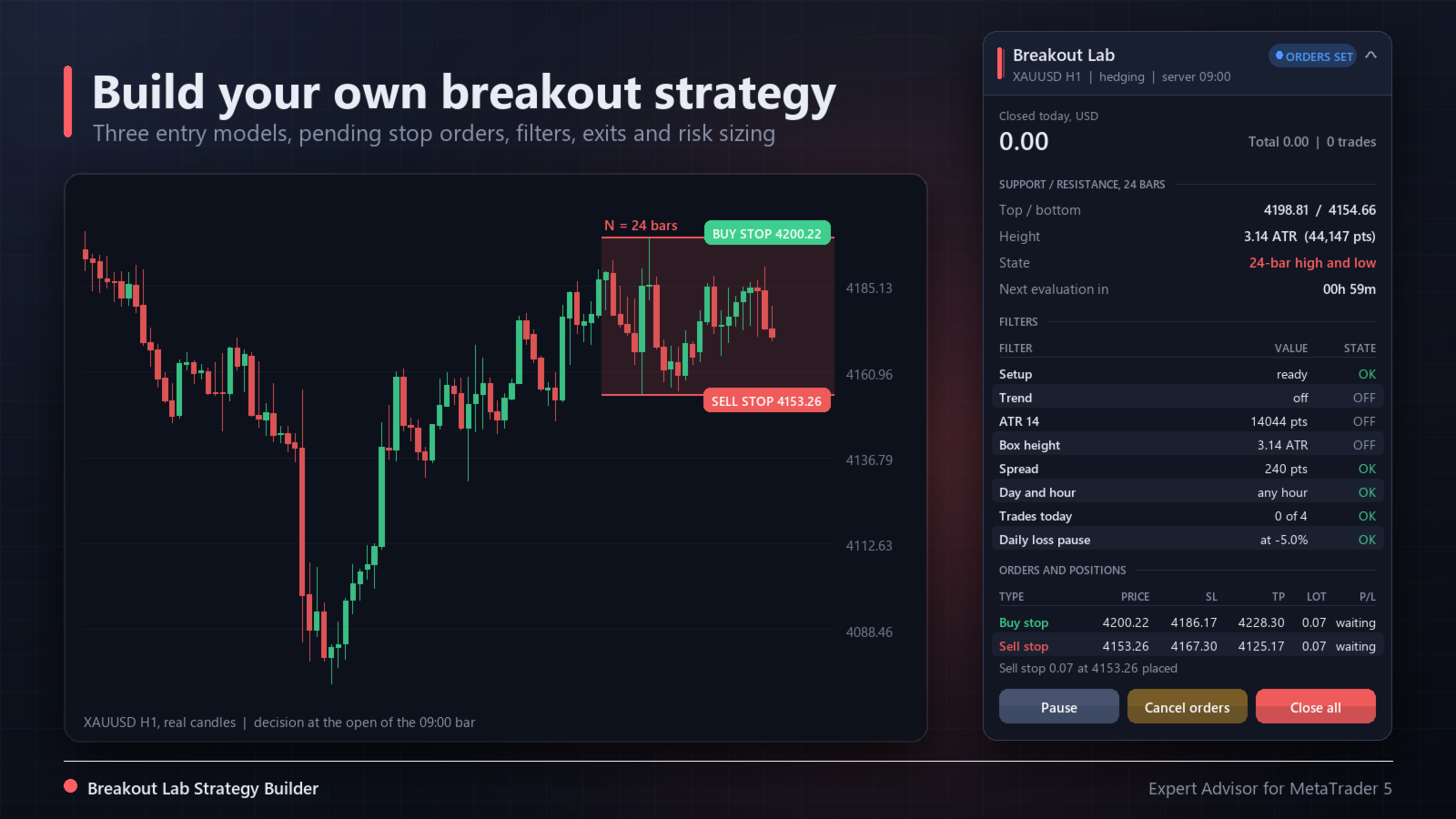
Breakout Lab Strategy Builder is an Expert Advisor for building and testing your own breakout strategies with pending stop orders. You choose the entry model, the filters, the exits and the risk; the robot places, moves and cancels the orders by those rules and shows every decision on a panel and on the chart.
It is a tool, not a ready-made profitable system. Please read the section Honest note before buying.
Honest note
- Many popular robots for gold are breakout systems. We rebuilt the typical rules (highest high / lowest low of N bars, opening range of the London and New York sessions, ATR stops and targets, trailing stop) and tested them on XAUUSD H1 from October 2021 to 2026 with the real spread and swap of one broker. None of the fixed combinations we tested made money after costs.
- The default settings exist so the robot trades in the Strategy Tester and so you have a starting point. They are not a recommendation. In our own simulation of the defaults on XAUUSD and EURUSD H1 (August to October 2026) they lost money.
- So this product is sold for what it is: a builder to try your own ideas quickly, with correct order handling, and to see in the tester whether an idea survives the costs of your broker. Past results, in the tester or live, do not guarantee future results.
Three entry models
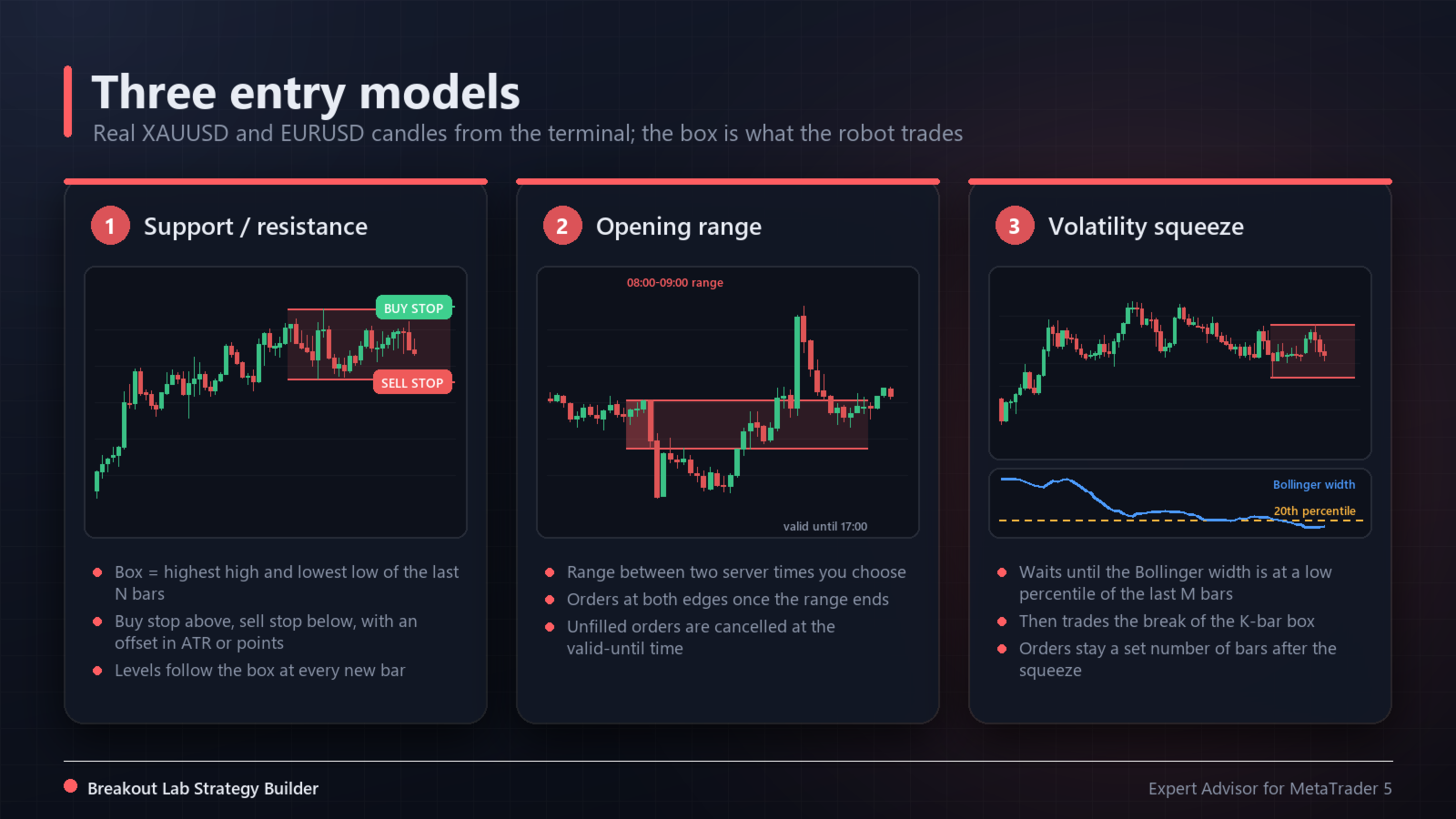
- Support / resistance: the box is the highest high and the lowest low of the last N closed bars. A buy stop goes above the box and a sell stop below it, with an offset in ATR and/or points. The levels follow the box at every new bar.
- Opening range: the box is the high and low between two server times you set (for example 08:00 to 09:00). After the range ends, stop orders are placed at both edges; unfilled orders are cancelled at the valid-until time.
- Volatility squeeze: the robot waits until the Bollinger Band width is at or below a chosen percentile of the last M bars. Then it trades the break of the box of the last K bars, and keeps the orders for a set number of bars.
Filters
- Direction: buy and sell, buy only or sell only.
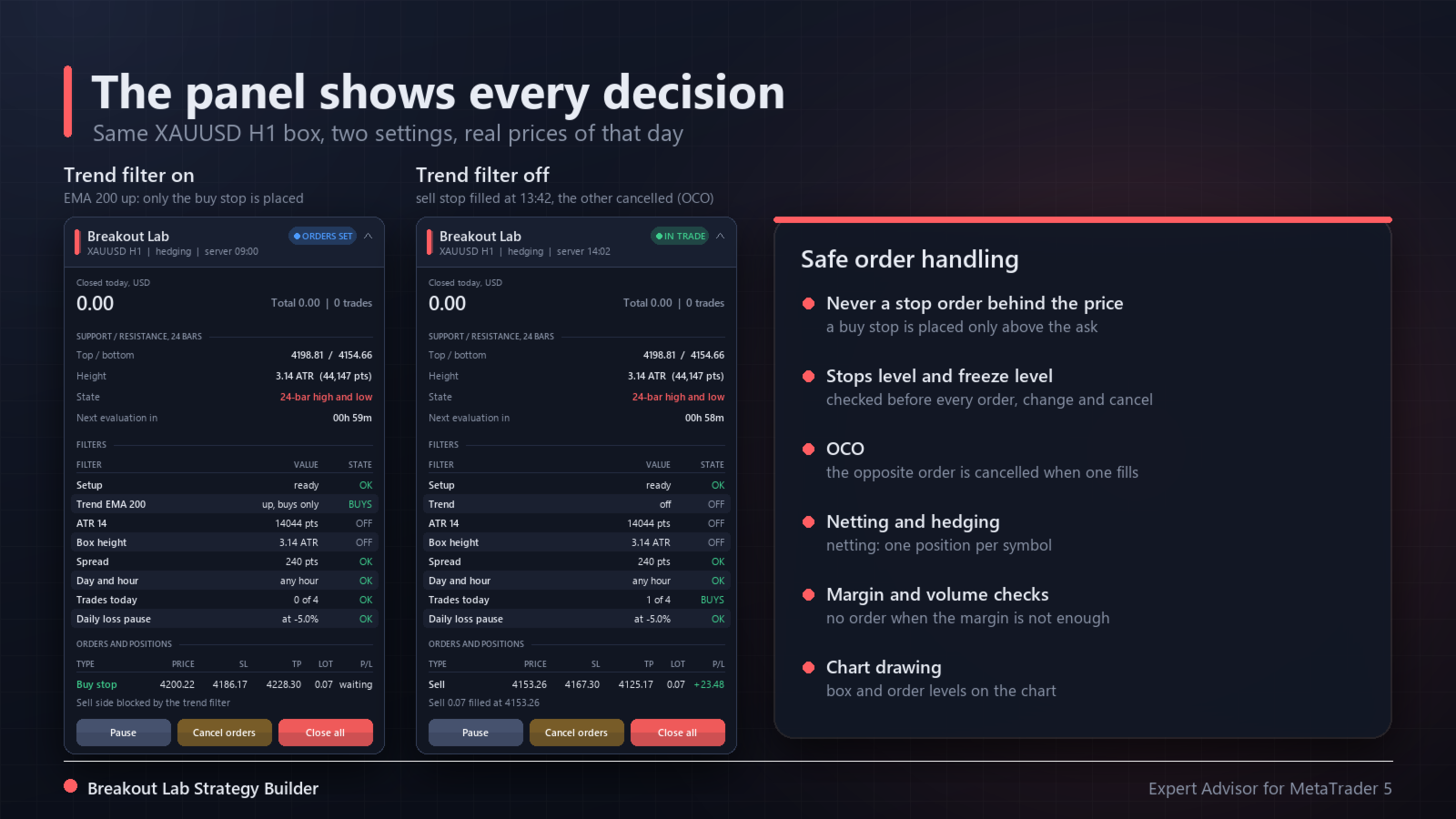
- Trend: off, or with the trend (buy only above a moving average, sell only below; period and method are inputs).
- ATR minimum and maximum in points, and box height minimum and maximum in ATR.
- Maximum spread in points and as a share of the ATR.
- Days of the week and entry hours (server time). Orders can be deleted outside the hours.
- Maximum trades per day and one trade per direction per day.
- Daily loss pause: no new orders after a daily loss of a chosen percent (closed and open trades of this robot).
Exits
- Stop loss: ATR multiple, points, or the opposite edge of the box.
- Take profit: none, ATR multiple, points, multiple of the stop (R), or multiple of the box height.
- Break-even and ATR trailing stop after a chosen profit, optional lock of a fraction of the best profit, and an optional time exit.
- Friday close at a set time (positions and orders), no new orders on Saturday.
Order handling
- A stop order is never placed behind the price: a buy stop only above the ask, a sell stop only below the bid. If the price is already past the level, the robot waits instead of entering late.
- Stops level and freeze level are respected before every new order, change and cancel. Volumes are rounded to the symbol step; margin and the symbol volume limit are checked first.
- OCO: when one side fills, the opposite order is cancelled. On hedging accounts you may keep it; on netting accounts it is always cancelled, because an opposite fill would close the position.
- One trade at a time per symbol. On netting accounts the robot does not place orders while the symbol has a position from another source.
- Unfilled orders can be cancelled after N bars. After a trade closes, no new order is placed on the same bar.
- Rejected requests are retried at most once a minute and written to the journal at most once a minute.
Risk
- Fixed lot, or a percent of the equity lost if the stop is hit (the lot is rounded down).
- Maximum lot. Optional use of the minimum lot when the risk lot is smaller, only if the minimum lot risks at most 3 times the chosen amount; otherwise the order is skipped.
Panel and chart
- Status: waiting, orders set, in trade, paused, daily loss pause.
- Active model, box top and bottom, box height in ATR and points, state of the setup, time to the next evaluation.
- Every filter with its value and state (OK, BLOCK, OFF, buys only, sells only).
- Pending orders and positions in a table: price, stop, target, lot, profit.
- Closed result today and total for this symbol, and the last action.
- Buttons: Pause / Resume, Cancel orders and Close all (the last two need a confirmation click).
- The box is drawn on the chart as a rectangle, with the pending order levels.
How to use it
- Attach it to one chart per symbol. The robot trades the chart symbol; the signal timeframe is an input (default: the chart timeframe).
- Build your rules with the inputs and test them in the Strategy Tester, ideally with "Every tick based on real ticks", on several years and on your broker's data.
- Look at the number of trades, the largest drawdown and the longest losing streak, not only at the final profit. Test the same settings on a period you did not use to choose them.
- Run it on a demo account first.
Weak points and limitations
- Breakout strategies have many false breakouts. With a target of two stops, losing more than half of the trades is normal, and long losing streaks (8 to 12 in a row) happen.
- In quiet, ranging markets breakouts often reverse. In fast news moves, stop orders can fill with slippage, and gaps can skip the stop loss.
- The spread and the swap of your broker decide a lot. Spreads widen at the daily rollover and around news.
- Opening range times are in server time. If your broker changes the server time for summer, the range moves with it.
- The terminal must be running with Algo Trading on. If you remove the robot, its pending orders stay on the account until you cancel them.
- Results in the tester depend on the modelling mode and on the history quality, and can differ from live trading.
Inputs
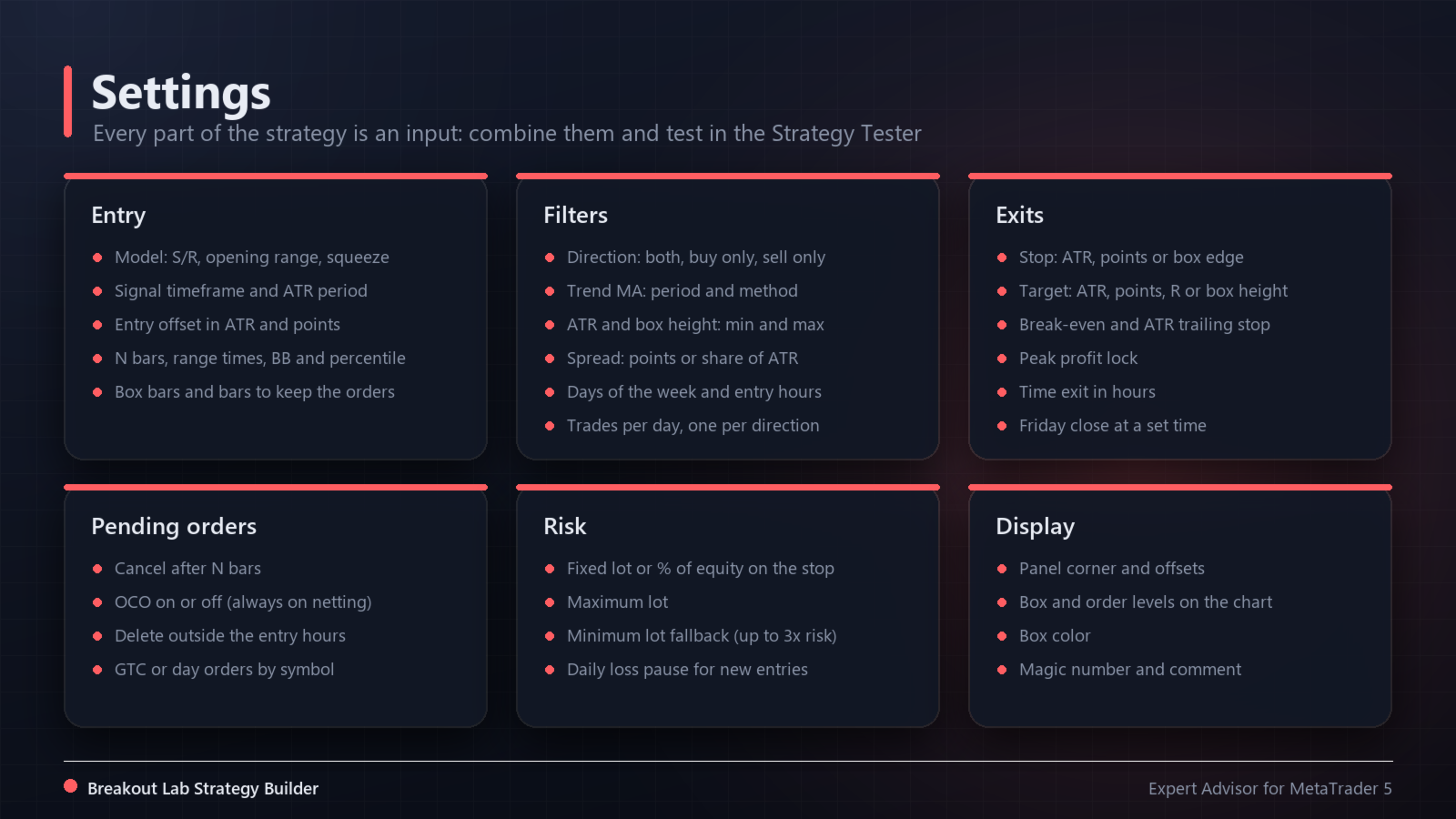
- Entry model: model, signal timeframe, ATR period, entry offset in ATR and in points.
- Model 1: N bars (default 24). Model 2: range start, range end and valid-until (hour and minute). Model 3: Bollinger period and deviation, percentile lookback M, squeeze percentile, box bars K, bars to keep the orders.
- Filters: direction, trend filter, MA period and method, ATR min/max, box height min/max, spread max (points and ATR), days of the week, entry hours, delete outside hours, maximum trades per day, one per direction.
- Exits: stop mode and values, target mode and values, break-even/trailing start, trailing distance, peak lock fraction and start, time exit, exit evaluation (closed bar or every tick), Friday close time.
- Pending orders: cancel after N bars, OCO.
- Risk: lot mode, risk percent (default 1%), fixed lot, maximum lot, minimum lot fallback, daily loss pause (default 5%), magic number (default 7303), comment.
- Display: panel corner and offsets, draw the box, box color.
Risk warning
Trading leveraged products such as forex, metals and CFDs carries a high risk of losing money. This robot does not guarantee any result, and no setting is known to be profitable in the future. Only trade money you can afford to lose, and test every setting on a demo account before using it on a live account.