SqueezeBreakout
- Indicatori
-
Shi Yuan Wang
 Sviluppo indicatori personalizzati, Expert Advisor (EA), script e strumenti di trading per MetaTrader 4 e MetaTrader 5, nonché indicatori per TradingView (Pine Script).
Cosa posso fare per te: - Versione: 1.2
Squeeze Breakout Signals
Overview
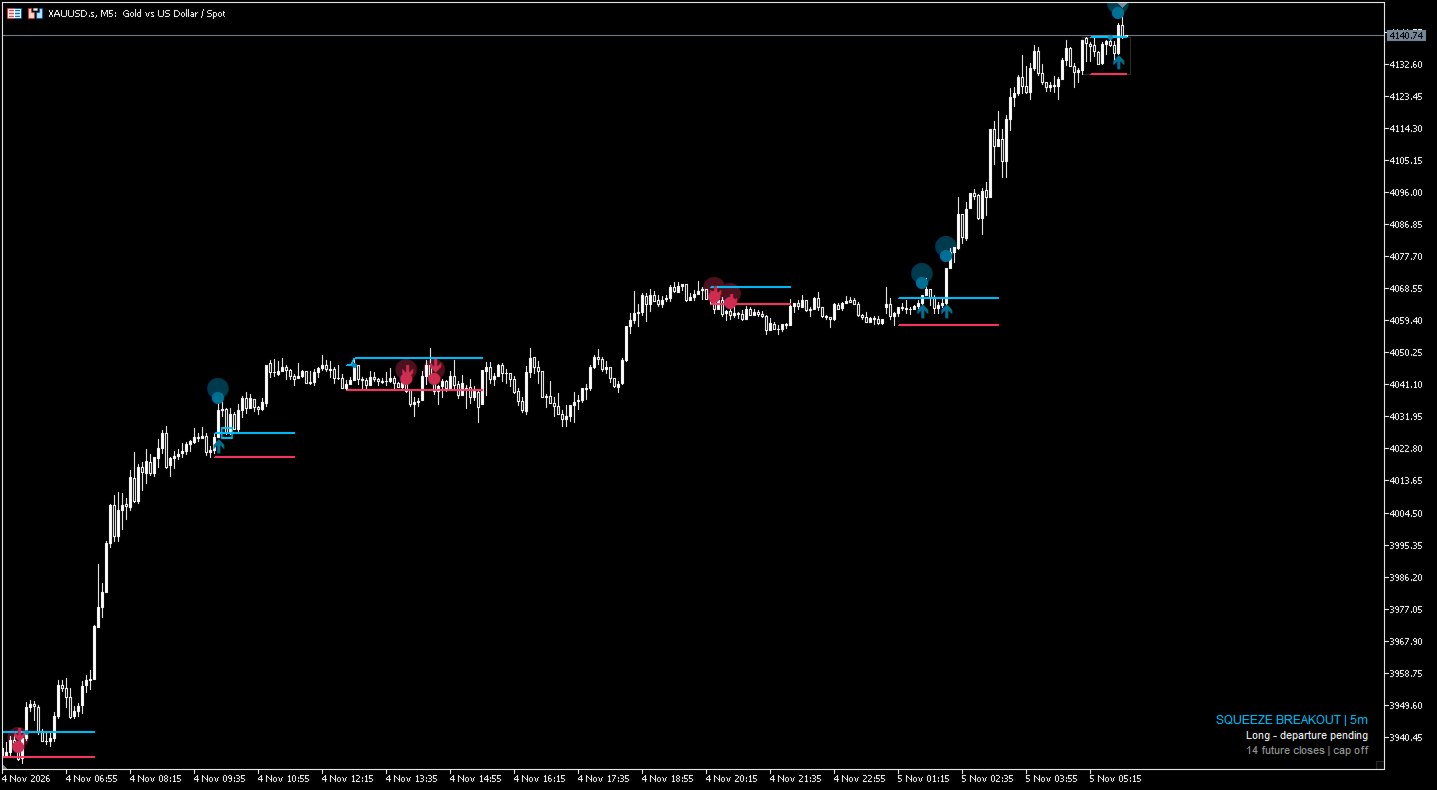
Squeeze Breakout Signals is a chart indicator for MetaTrader 5. It studies a series of closed bars, marks a short period of reduced price movement, and then keeps the resulting price area on the chart while it follows how price leaves or returns to that area. When a close occurs outside the area under the selected settings, the indicator draws a long or short mark on the chart and can show a terminal alert.
The indicator only adds information to the chart. It does not open, modify or close positions, and it contains no position management or risk control functions. It is an analysis tool. It is not trading advice, it does not guarantee any profit or result, and past chart behaviour does not indicate future results.
Chart elements
- Upper and lower range edges, drawn in the bull and bear colours and adjusted automatically for the chart background.
- A rectangle for the current structure, dotted while the range is forming and solid while it is being observed.
- Rectangles for finished structures, kept according to Previous Structures.
- Long and short entry arrows. With Signal Effects set to Enhanced, a soft two-layer halo is added at the mark.
- Smaller context marks near the range edges for price touching or returning to an edge before an entry mark appears.
- Optional dashed extension guides, shown when Max Entry Extension is above zero and Structure Effects is set to Enhanced.
- A status panel that can be placed in any chart corner or turned off. It shows the timeframe, the current phase and the number of closed bars left in the watch period. Phase text is in English, for example Waiting for compression, Range watch, Long breakout and Long retest.
- Data Window readouts in English, such as Setup Phase, Compression Width Ratio, Eligible Future Closes, Event Edge, Event Distance (TR) and Reference Mean TR. They also show the exact upper and lower edges and the long and short entry limits.
- A terminal alert on the latest closed bar when an entry mark appears. The alert text contains the symbol, timeframe, direction, closing price and the event type, which is BREAKOUT or RETEST.
How to use
Place the compiled indicator in the Indicators\Market folder of the terminal and drag it onto a chart from the Navigator. Products purchased in the Market are installed by the terminal. The indicator uses only price data already available in the terminal. It does not require external files, dynamic libraries or web requests.
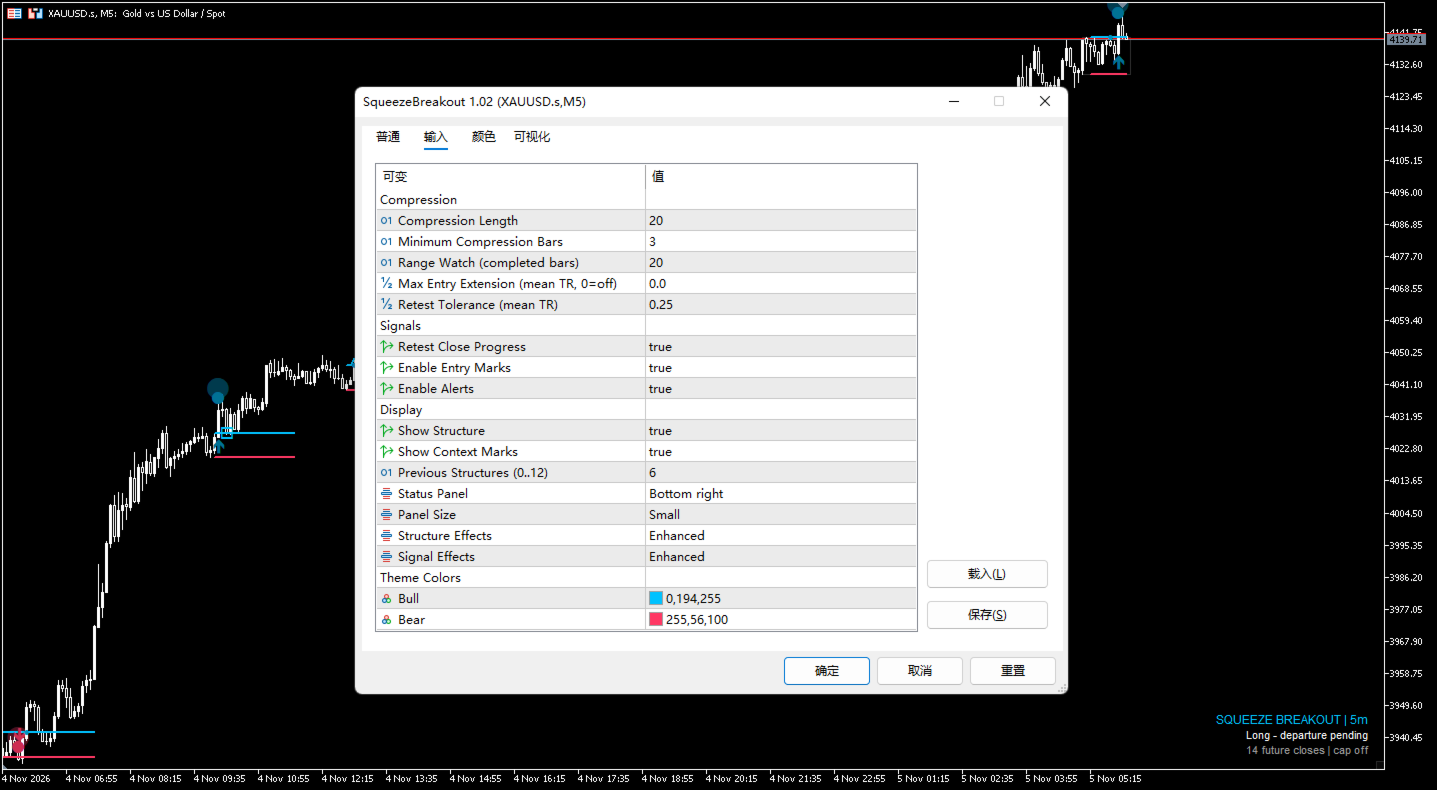
Settings are changed in the Inputs tab of the indicator properties. The chart is recalculated after the settings are applied. Marks are based on closed bars. The current forming bar does not create new entry marks or alerts, and an existing mark is not rewritten by price changes inside that bar.
If Compression Length, Minimum Compression Bars, Range Watch or Previous Structures is set outside its allowed range, the indicator prints an English message at initialization and does not load. Use the ranges listed under Input parameters.
The demo version can be examined in the visual mode of the Strategy Tester before the indicator is used on a live chart. The demo version is provided by the Market service under the platform rules, and no function is restricted by the seller.
For questions, use the product comments or the mql5.com messaging system. No third-party contact details are provided in this description.
Input parameters
All input parameter names, output messages and text in screenshots are in English. The groups below follow the Inputs tab.
Compression
- Compression Length: 20, range 5 to 200. Number of closed bars used to measure the recent range and its scale.
- Minimum Compression Bars: 3, range 2 to 20. Number of consecutive bars with reduced price movement required before a range is treated as ready.
- Range Watch (completed bars): 20, range 1 to 200. Number of closed bars a range stays under observation before it is archived.
- Max Entry Extension (mean TR, 0=off): 0.0. Optional distance limit from a range edge, expressed in range units. Zero turns the limit off; when set, two dashed guides are drawn.
- Retest Tolerance (mean TR): 0.25. Width of the tolerance area around an edge used when price returns to it.
Signals
- Retest Close Progress: true. When enabled, a retest mark also requires the closing price to continue in the direction of the mark on that bar.
- Enable Entry Marks: true. Draw long and short entry arrows.
- Enable Alerts: true. Show a terminal alert when an entry mark appears on the latest closed bar.
Display
- Show Structure: true. Draw the range edges and the structure rectangle.
- Show Context Marks: true. Draw the smaller marks near the range edges.
- Previous Structures (0..12): 6. Number of finished ranges kept on the chart.
- Status Panel: Bottom right. Choose None, Bottom right, Top right, Bottom left or Top left.
- Panel Size: Small. Choose Small, Medium or Large.
- Structure Effects: Enhanced. Choose Normal or Enhanced. Enhanced shows the dashed extension guides when a distance limit is set.
- Signal Effects: Enhanced. Choose Normal or Enhanced. Enhanced adds the two-layer halo around entry marks.
Theme Colors
- Bull: C'0,194,255'. Base colour for long elements.
- Bear: C'255,56,100'. Base colour for short elements.
Both colours are adjusted automatically for contrast against the chart background, so the marks stay readable on dark and light charts.
Notes
The indicator does not place trades and does not evaluate trading results. The settings affect chart marks and alerts only; they do not change positions in the terminal. All necessary information is provided on this page. Product support is available through the product comments or the mql5.com messaging system.