PEN Trade Manager
- Utilità
- Versione: 3.21
- Attivazioni: 8

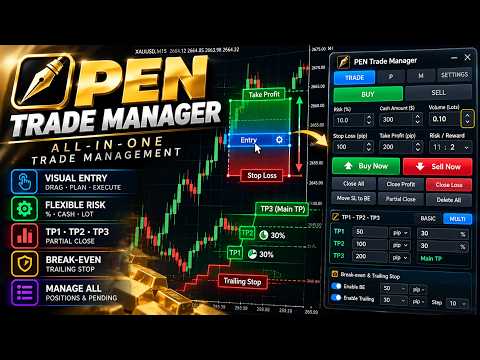
Its main purpose is simple: help traders plan a trade visually, calculate risk accurately, execute orders quickly, and manage open positions from one clean interface.
At the center of PEN Trade Manager is the PEN system — a visual trading tool that allows you to place and adjust your Entry, Stop Loss, and Take Profit directly on the chart. Instead of calculating levels manually, simply move the PEN and the EA automatically updates risk, position size, and Risk/Reward information in real time.
Multiple PENs can be created at the same time, allowing you to prepare several independent trading scenarios before entering the market.
Only five copies are available at the special price of $35. The final price will be $150
- Pen Trade Manager MQL5 public Group: https://www.mql5.com/en/messages/032d4c5f8955dd01
Visual Trade Planning
Create a PEN directly on the chart and visually adjust:- Entry Price
- Stop Loss
- Take Profit
- Risk/Reward
- Trade Direction
- Position Size
This makes it possible to move from trade analysis to execution without repeatedly entering prices manually.
Advanced Risk Management
PEN Trade Manager provides several position-sizing methods:- Fixed Lot
- Risk % of Equity
- Fixed Cash Risk
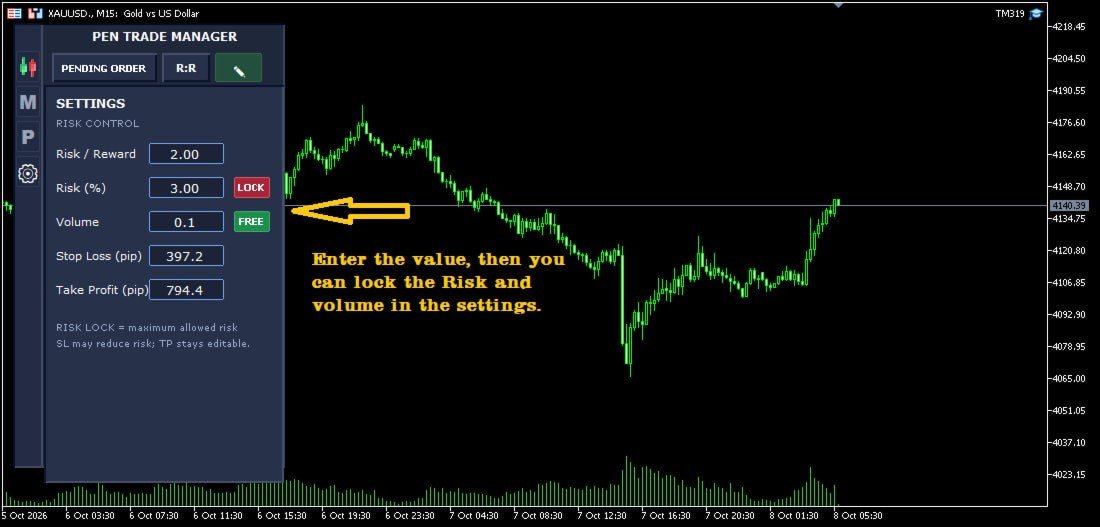
The Risk Lock system adds another layer of protection by controlling the maximum allowed trading risk. When additional exposure is added, the EA can recalculate risk and help keep the position within the configured risk limit.
This risk management system can also monitor trades opened outside the EA.
External Trade Management
Trades do not have to be opened directly through PEN Trade Manager.
The EA can detect and manage positions opened from:
- MetaTrader 5 Mobile
- MetaTrader Web Terminal
- Another MT5 terminal
- Manual trading
- Other external sources
Pending Order Management
PEN can also be used to prepare and place pending orders directly from the chart.
Supported order types include:
- Buy Limit
- Buy Stop
- Sell Limit
- Sell Stop
Position Management
PEN Trade Manager includes dedicated tools for managing individual positions.
You can configure:
- Break Even
- Trailing Stop
- TP1 / TP2 / TP3
- Partial Close by percentage
- Partial Close by volume
- Profit Target in account currency
- Profit Target by percentage
Fast Trade Management
Frequently used actions are available directly from the main trading panel, including:- Buy / Sell
- Move Stop Loss to Break Even
- Close 50%
- Close All
- Close Profitable Positions
- Close Losing Positions
- Delete Pending Orders
These tools are designed to reduce repetitive manual operations when managing several positions.
Multi-Symbol Management
PEN Trade Manager is not limited to the chart where the EA is attached.
The Manager and Protect systems can monitor positions across multiple symbols, allowing a single instance of the EA to manage trades from different markets.
It can be used with Forex, Gold, Indices, Commodities, Crypto and other instruments supported by your broker.
Designed for Practical Trading
PEN Trade Manager combines visual trade planning with automated risk and position management.
Whether you trade directly from your desktop, prepare pending orders in advance, or open positions from your phone while the EA runs on a VPS, PEN Trade Manager is designed to keep your trading workflow organized and your risk under control.
Plan the trade. Execute with precision. Manage the position. Protect the risk.