DCA Machine Pro Edition
- Experts
- Versione: 3.0
- Aggiornato: 13 luglio 2026
- Attivazioni: 5

DCA_Machine Pro Edition
Exclusive Features
In addition to all features available in the Basic Edition, the Pro Edition introduces advanced customization and risk-management tools designed for experienced traders seeking greater flexibility and performance optimization.
Input Parameters
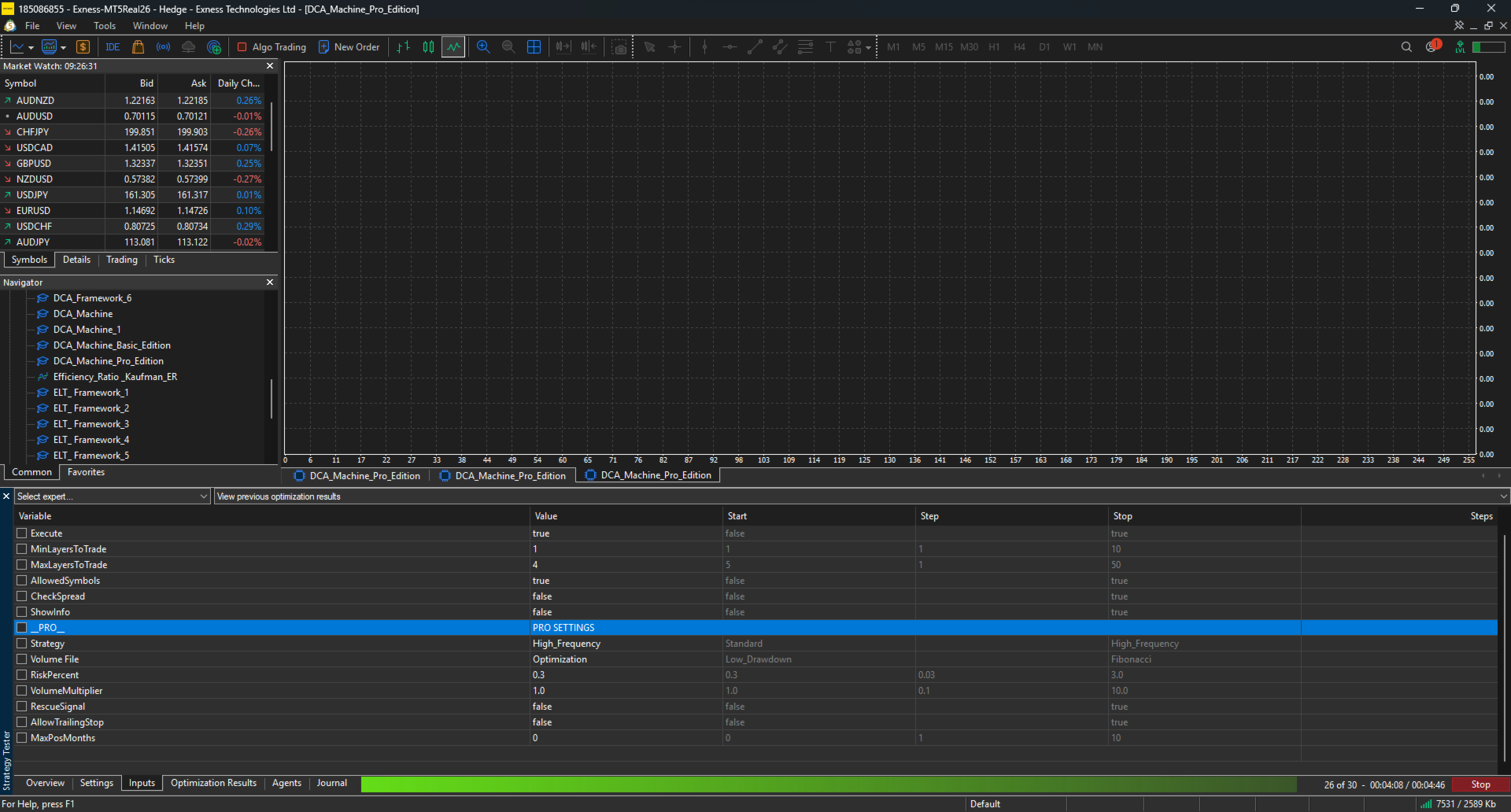
Execute
Enable or disable new trade execution.
-
true = EA is allowed to open new trades.
-
false = EA will not open new trades.
This option is useful when you want to temporarily pause trading without removing the EA from the chart.
MinLayersToTrade
Defines the minimum number of grid layers required before the EA starts managing and trading a basket.
If the number of layers is below this threshold, the EA will avoid trading actions in order to maintain sufficient basket structure for profitable exits.
This helps improve the efficiency of the grid recovery mechanism.
MaxLayersToTrade
Defines the maximum number of grid layers allowed.
This is one of the most important risk management features of DCA_Machine.
By limiting the maximum number of positions, traders can control account exposure and prevent excessive risk accumulation during prolonged market movements.
Many users consider this feature highly valuable because it provides a simple and effective way to control drawdown and overall account risk.
AllowedSymbols
Enable or disable trading only on the predefined list of carefully selected symbols.
-
true = Trade only the symbols that have been extensively tested and validated for stability and consistency.
-
false = Trade any symbol of your choice.
Please note that trading symbols outside the recommended list may not be suitable for the DCA_Machine Basic strategy model.
If you wish to customize symbol selection and access more advanced filtering capabilities, upgrading to the Pro or Premium edition is recommended.
CheckSpread
Enable or disable spread protection.
When enabled, the EA will only enter trades when spread conditions remain within acceptable levels.
This helps avoid entries during:
-
High-impact news events
-
Sudden volatility spikes
-
Low-liquidity market conditions
-
Abnormal spread widening
Spread protection is designed to improve execution quality and reduce unnecessary trading risk.
ShowInfo
Enable or disable the on-screen information panel.
When enabled, the EA displays detailed operational information directly on the chart, allowing traders to monitor trading activity and EA status more conveniently.
Strategy
Select between two trading modes:
Standard
The Standard strategy prioritizes stability, consistency, and lower market exposure.
Key characteristics:
-
More conservative trade entries
-
Lower trading frequency
-
Reduced account stress during volatile conditions
-
Suitable for long-term stable growth
High_Frequency
The High_Frequency strategy is designed for traders who prefer more active market participation.
Key characteristics:
-
Approximately twice the trade frequency of Standard mode
-
More opportunities during ranging and sideways markets
-
Increased trade activity while maintaining controlled risk management
-
Suitable for active traders seeking enhanced profit potential
Volume File
Select from three professionally designed volume progression models.
Low Drawdown
A conservative volume escalation model focused on capital preservation.
Features:
-
Safer volume progression
-
Prioritizes profitability from the first few positions
-
Reduced drawdown pressure
-
Ideal for conservative traders
Optimization
A balanced model optimized through extensive historical testing across multiple market environments.
Features:
-
Optimized profit-to-risk ratio
-
Thoroughly validated through backtesting
-
Designed to maintain stability during varying market conditions
-
Recommended for most users
Fibonacci
A more aggressive volume progression model based on Fibonacci growth principles.
Features:
-
Faster recovery capability
-
Higher potential profitability
-
Increased capital requirements
-
Best suited for larger accounts and prolonged ranging markets
RiskPercent
Adjusts the overall trading risk relative to account equity.
Recommended settings:
-
0.2 – 0.6: Conservative and stable operation
-
Above 0.6: Higher exposure and increased trading volume
Higher values may result in:
-
Larger position sizes
-
Increased number of active positions
-
Longer floating drawdown periods
-
Greater account volatility
Proper risk management is strongly recommended.
VolumeMultiplier
Applies a multiplier to the volume calculated by the EA.
Example:
-
Calculated volume = 0.01
-
VolumeMultiplier = 2
Result:
-
Executed volume = 0.02
This feature allows traders to scale exposure while preserving the EA's internal position-sizing logic.
RescueSignal
Activates the advanced rescue-entry mechanism.
Rescue positions are placed at greater distances from existing positions to maximize the probability of entering near exhaustion zones where market retracements are statistically more likely.
Benefits:
-
Improved basket recovery potential
-
Reduced clustering of entries
-
Enhanced flexibility during prolonged market movements
AllowTrailingStop
Enables intelligent trailing stop management.
When activated, the EA applies a predefined trailing mechanism designed to secure profits and accelerate basket exits.
Particularly useful when:
-
The basket contains 3–4 positions
-
The market begins reversing in favor of the basket
-
Faster capital recycling is desired
MaxPosMonths
Defines the maximum holding period for open positions.
After the specified number of months, positions may be automatically closed as part of a portfolio cleanup process.
Example:
-
MaxPosMonths = 6
Open positions older than six months become eligible for liquidation.
This feature may be beneficial when:
-
Swap costs are significantly negative
-
Positions remain open for unusually long periods
-
Account maintenance and capital efficiency are priorities
For accounts with low swap costs, this feature should be used carefully and only when necessary.
Video User Guide (English):
Risk Disclosure
Trading Forex and CFDs involves a high level of risk and may not be suitable for all investors. The use of leverage can work both for and against you. Before deciding to trade, you should carefully consider your investment objectives, level of experience, and risk tolerance.
Past performance, backtesting results, optimization reports, and forward testing results are not indicative of future performance. No trading system, strategy, or Expert Advisor can guarantee profits or eliminate the risk of loss.
DCA_Machine is a trading tool designed to assist in trade execution and risk management. Users remain fully responsible for all trading decisions and the management of their trading accounts.
Only trade with capital that you can afford to lose.