ExportTradingDeals
- Utilità
- Versione: 1.0

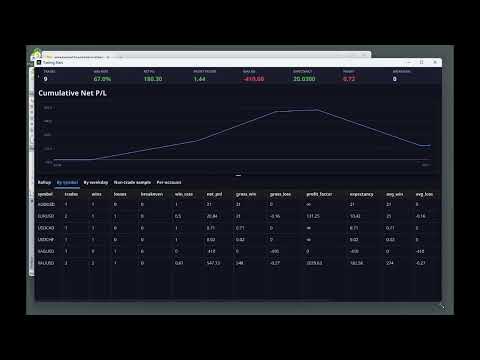
ExportTradingDeals is a MetaTrader 5 script that exports your complete deal history to a CSV file. The file is consumed directly by the Trading Stats desktop application to produce charts and statistics about your trading performance. Trading Stats is a free, open-source application; pre-built Ubuntu / Debian and Windows packages are available on the project releases page (search: alinsoare/trading-stats on GitHub).
What it does
When you run the script, it reads all deals from your account history within the selected date range and writes them to a CSV file in the MetaTrader shared files folder. The file is always overwritten, so re-running the script gives you an up-to-date snapshot at any time.
Output file location
The CSV is written to MQL5\Files\trading_stats\deals_<login>.csv inside the MetaTrader terminal data folder. One file is created per account login number. Open the MetaEditor file manager or use File → Open Data Folder to browse to this path.
Main features
- Full history export. Exports every deal type: buy, sell, balance, credit, commission, swap, and other non-trade entries. A dedicated column flags non-trade deals so they can be filtered in the dashboard.
- Configurable date range. Choose a custom start date or export from the earliest available server history. By default the end of range is always the current server time, but a fixed end date can also be set.
- One file per account. The output filename includes your account login number, so running the script on multiple accounts never overwrites a previous export.
- Standard CSV format. Columns: ticket, time, time_msc, type, entry, symbol, volume, price, commission, swap, profit, magic, comment, position_id, reason, login, server, is_non_trade. Compatible with Excel, Python pandas, and the trading-stats application.
- Safe on repeated runs. The file is opened with FILE_WRITE which truncates and rewrites. Running the script twice does not produce duplicates.
How to use
Drag the script from the Navigator onto any chart. The input dialog opens where you can set the history start date and choose whether to use the current server time or a fixed end date. Click OK and the script runs instantly. A message in the Experts log confirms how many rows were written and the full file path.
Input parameters
History from — start of the export range as a datetime value. Set to 0 (default) to begin from the earliest deal available on the server.
History to now — when enabled (default), the export always ends at the current server time. Disable this to use the custom end date below.
History to (custom) — end of the export range when History to now is disabled. Set to 0 to fall back to the current server time.
Notes
If the trading_stats subfolder does not yet exist, the script creates it automatically. The export runs on the history loaded in the terminal; if the server has not delivered older history yet, scroll the chart back or use Tools → History Center to load more data before running the script.
Trading Stats is a free, open-source desktop application. Pre-built Ubuntu / Debian (.deb) and Windows installer packages are available on the releases page of the project (search: alinsoare/trading-stats on GitHub). No build step is required when using a pre-built package.
Support
For questions, use the comments section on this product page or contact the author through the MQL5 messaging system.