
Artemis FX HFT Throttle
- Experts
- Versione: 2.20
- Aggiornato: 28 giugno 2026
- Attivazioni: 20

Artemis FX HFT Throttle EA
Artemis FX HFT Throttle EA è un Expert Advisor per MetaTrader 4 pensato per i trader che desiderano un’automazione FX a breve termine con una disciplina di esecuzione professionale integrata. Invece di inviare ordini illimitati al broker, Artemis combina una logica di trading FX basata sul simbolo del grafico con Artemis Throttle Guard, un livello dedicato di controllo dell’esecuzione progettato per gestire la frequenza delle richieste, limitare le raffiche di trading, gestire gli errori del broker e ridurre comportamenti di esecuzione imprudenti.
Per impostazione predefinita, l’EA non è limitato a una sola coppia. Collegalo al grafico FX scelto e Artemis traderà quel simbolo. È disponibile anche una whitelist opzionale di simboli per i trader che preferiscono limitare l’attività a coppie specifiche.
Novità nella V1.1
La versione 1.1 introduce un importante aggiornamento in termini di usabilità, sicurezza e gestione delle operazioni per Artemis FX HFT Throttle EA. Questo aggiornamento include un menu delle impostazioni più pulito e riorganizzato, la modalità Balanced come profilo predefinito più sicuro, input basati su pip attivati di default, gestione ATR migliorata per le principali coppie FX, avvisi di sicurezza sul magic number, toggle di rischio più chiari, Spread Guard, TimeExit solo in profitto, Throttle Safety Close e set file aggiornati per le coppie principali.
L’ultima configurazione candidata V1.1 ora si concentra sul trading delle principali coppie M5 in modalità Balanced Low Risk. Le impostazioni predefinite integrate sono allineate con il setup EURUSD Balanced Low Risk M5, mentre vengono forniti set file aggiuntivi per le coppie principali con nomi chiari e specifici per ogni coppia. Questi set file a basso rischio utilizzano una frequenza di trading controllata, modalità a una posizione, protezione giornaliera contro le operazioni perdenti, filtro dello spread medio, Spread Guard, Throttle Guard e gestione tramite trailing stop.
I test precedenti della V1.1 includevano il monitoraggio di break-even e Protected Exit; tuttavia, gli attuali set file M5 a basso rischio utilizzano il trailing stop invece del break-even per ridurre le piccole uscite protette in perdita durante i test. Le opzioni break-even e Protected Exit rimangono disponibili per gli utenti che desiderano configurarle manualmente.
Consigliamo di effettuare prima dei test su un conto demo per confermare che le impostazioni di TP, SL, trailing stop, spread e ATR siano adatte al proprio broker. Le condizioni dei broker variano ed è impossibile testare ogni variante di broker. Feedback e suggerimenti per set file specifici per broker sono benvenuti nell’area commenti, e le richieste reali di nuove funzionalità saranno prese in considerazione.
Artemis Throttle Guard
La caratteristica distintiva di questo EA è Throttle Guard. Invece di consentire un’attività ad alta frequenza non controllata, offre al trader un controllo diretto su come l’EA interagisce con il broker. I limiti configurabili includono il numero massimo di richieste di trading al giorno, limiti giornalieri separati per i tentativi di OrderSend, OrderClose, OrderModify e OrderDelete, tempo minimo tra le azioni, numero massimo di azioni al minuto e protezione contro errori consecutivi.
I tentativi falliti possono opzionalmente essere conteggiati nei limiti giornalieri. I contatori persistono dopo il riavvio del terminale e si azzerano automaticamente al cambio del giorno server del broker. Un blocco throttle opzionale si attiva quando vengono raggiunti i limiti giornalieri. La V1.1 aggiunge anche Throttle Safety Close, che può aiutare a ridurre l’esposizione aperta se viene raggiunto un blocco throttle mentre un’operazione gestita da Artemis è ancora aperta.
Gestione del rischio
Artemis FX include un livello di gestione del rischio che supporta dimensionamento della posizione a lotto fisso o a percentuale di rischio, stop loss e take profit, numero massimo di operazioni aperte, lotto massimo per operazione, lotti totali massimi, limite di perdita giornaliera, limite di drawdown giornaliero, limite di rischio aperto e numero massimo di operazioni perdenti giornaliere.
La V1.1 migliora quest’area con toggle ON/OFF più chiari e un layout delle impostazioni più organizzato. Gli attuali set file Balanced Low Risk M5 utilizzano la modalità a una posizione, un massimo di una posizione aperta per grafico e un limite giornaliero di operazioni perdenti per aiutare a ridurre sessioni ripetutamente negative. Sono disponibili anche controlli opzionali per il blocco del target di profitto e la chiusura di emergenza di tutte le operazioni in caso di violazione del rischio.
Controllo dell’esecuzione
I filtri di qualità dell’esecuzione includono spread massimo, spread medio, durata massima dello spread, controllo dello slippage, periodi di cooldown dopo la chiusura e dopo una perdita, un limitatore di tentativi e una finestra di errore del broker. La diagnostica di stop level e freeze level viene mostrata direttamente nella dashboard per aiutare a identificare vincoli di esecuzione lato broker prima che causino problemi.
La V1.1 aggiunge Spread Guard per la protezione contro i picchi di spread e migliora la configurazione basata su pip, rendendo più semplice gestire valori di TP, SL, spread e ATR in termini FX normali anziché soltanto in punti broker.
Programmazione e pausa per notizie
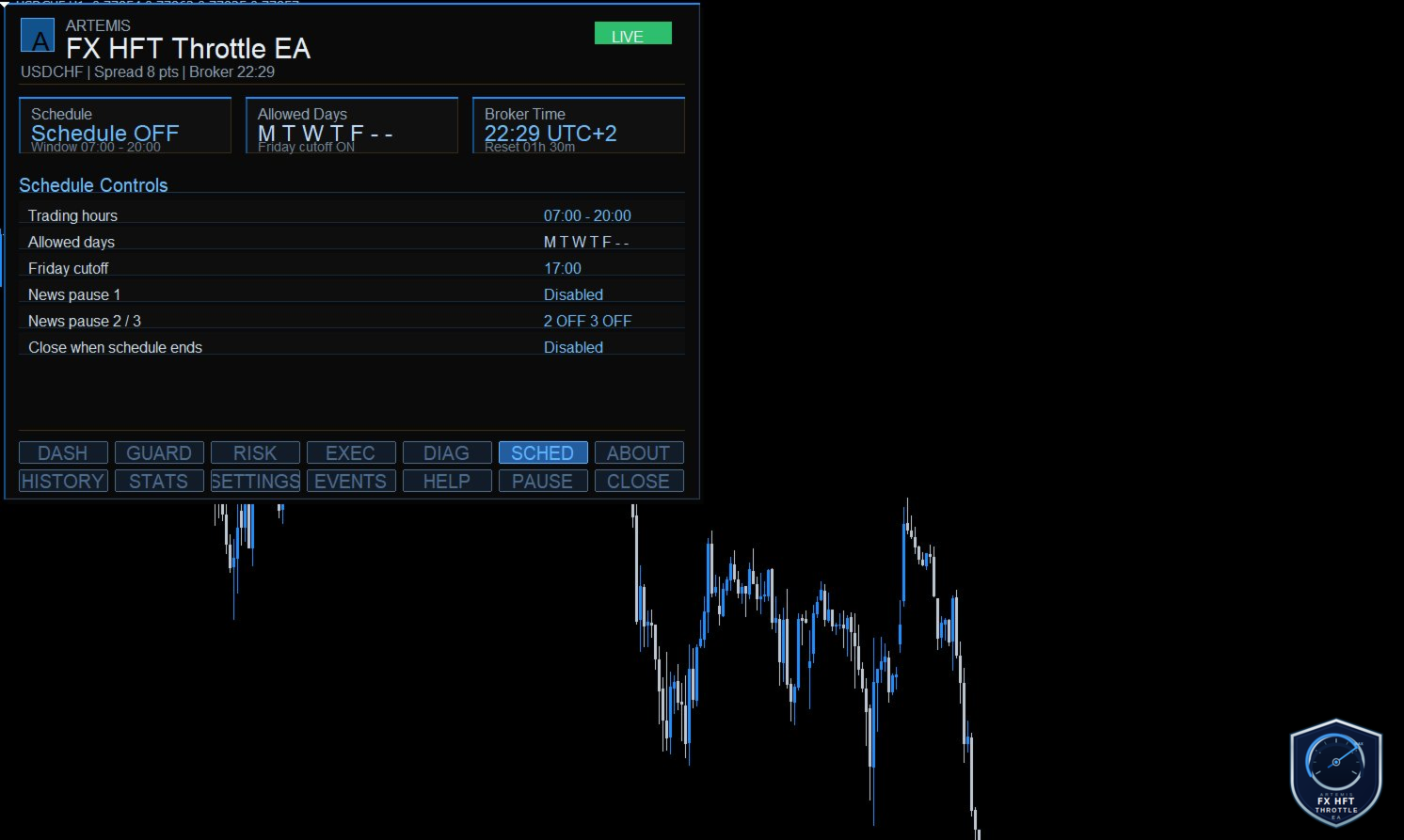
L’attività di trading è controllata tramite filtri configurabili per giorni della settimana, orario di inizio e fine, cutoff del venerdì, una finestra manuale di pausa per notizie e ulteriori finestre di pausa personalizzate. L’orario del server broker viene mostrato nel pannello, così le impostazioni di programmazione sono facili da verificare.
(Abbiamo programmato il miglioramento di questa funzione notizie per la v1.2.)
Dashboard e controlli runtime
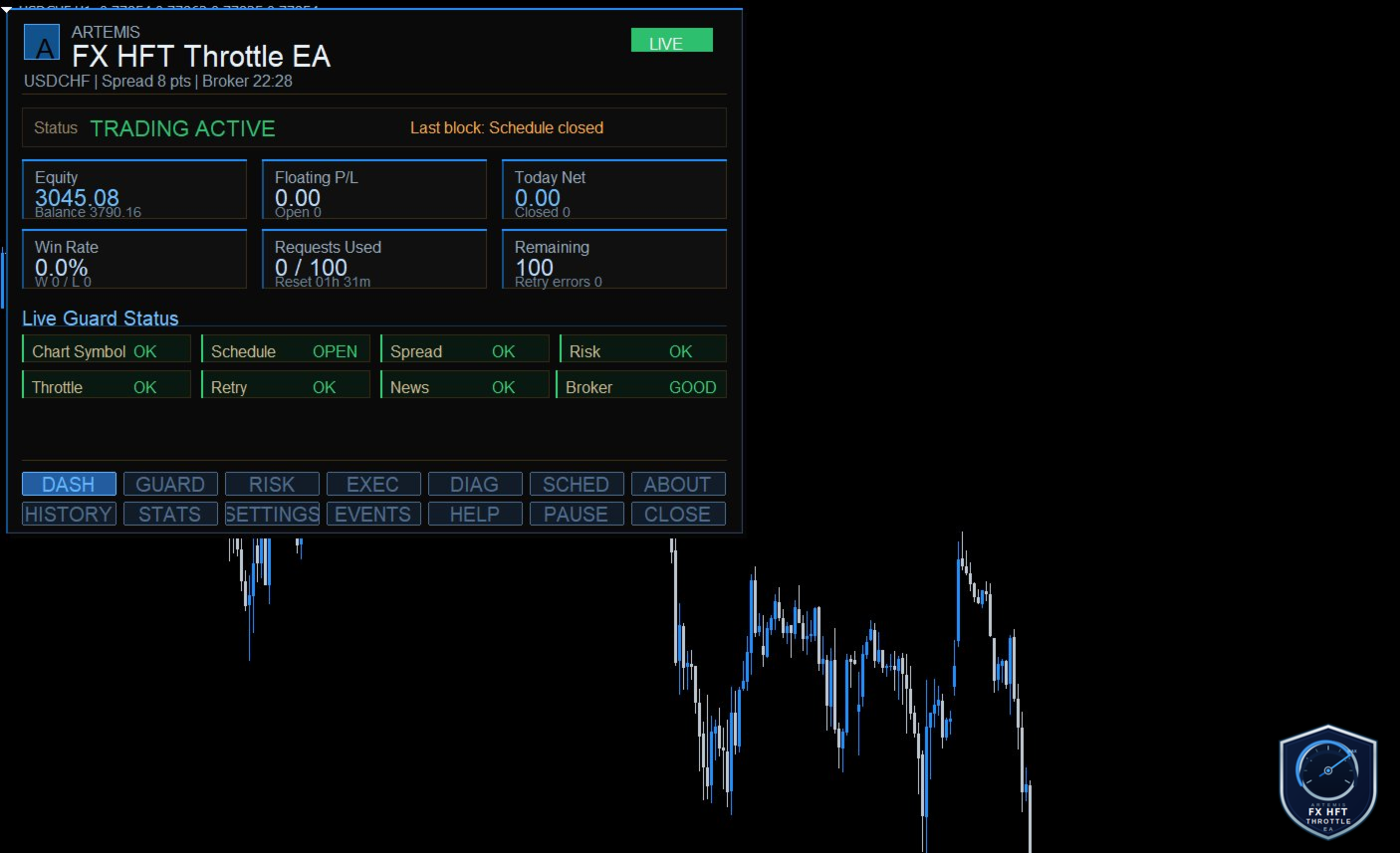
Artemis FX include una dashboard blu e argento a più schede con sezioni dedicate a stato del conto, utilizzo di Throttle Guard, esposizione al rischio, condizioni di esecuzione, diagnostica broker, impostazioni di programmazione, storico operazioni, statistiche di performance, configurazione EA, registro eventi runtime e riferimento di aiuto.
La V1.1 aggiorna le diciture della dashboard e migliora diverse schede, incluse RISK, EXEC, DIAG e SETTINGS. Anche la dicitura dello stato è stata modificata da LIVE ad ACTIVE per evitare confusione tra uso demo, live e tester.
Due pulsanti runtime — Pause/Resume e Close — permettono al trader di sospendere il trading o chiudere tutte le posizioni gestite direttamente dal grafico senza modificare le impostazioni di input.
Set file e uso consigliato
La V1.1 include set file aggiornati per le principali coppie FX, incluso un pacchetto Balanced Low Risk M5 MAJORS. Questi file sono nominati chiaramente per coppia e utilizzano commenti alle operazioni nel formato:
Artemis FX HFT <PAIR>
Gli attuali set file M5 a basso rischio sono progettati per dare priorità a qualità e controllo rispetto alla massima frequenza. Utilizzano profilo Balanced, modalità a una posizione, trailing stop attivato, break-even disattivato di default, TimeExit solo in profitto, protezione giornaliera contro operazioni perdenti, filtro dello spread medio, Spread Guard, Throttle Guard e Throttle Safety Close.
Gli utenti alle prime armi dovrebbero collegare l’EA al grafico FX scelto, caricare il set file corrispondente alla coppia ed eseguirlo prima su un conto demo. Controllare le schede DIAG, EXEC, RISK e GUARD per confermare condizioni dello spread, cifre del broker, stop level, stato del throttle e impostazioni di programmazione prima di utilizzare dimensioni di lotto reali.
Importante
Le prestazioni variano in base a spread del broker, commissione, slippage, qualità dell’esecuzione, simbolo, timeframe, tipo di conto e condizioni di mercato. Nessun Expert Advisor può garantire profitti, evitare perdite o garantire l’accettazione da parte del broker. Testare sempre accuratamente su demo prima di utilizzare fondi reali, usare dimensioni di lotto prudenti e monitorare attentamente le prestazioni.




















































L'utente non ha lasciato alcun commento sulla valutazione.