AutoJournal MT4

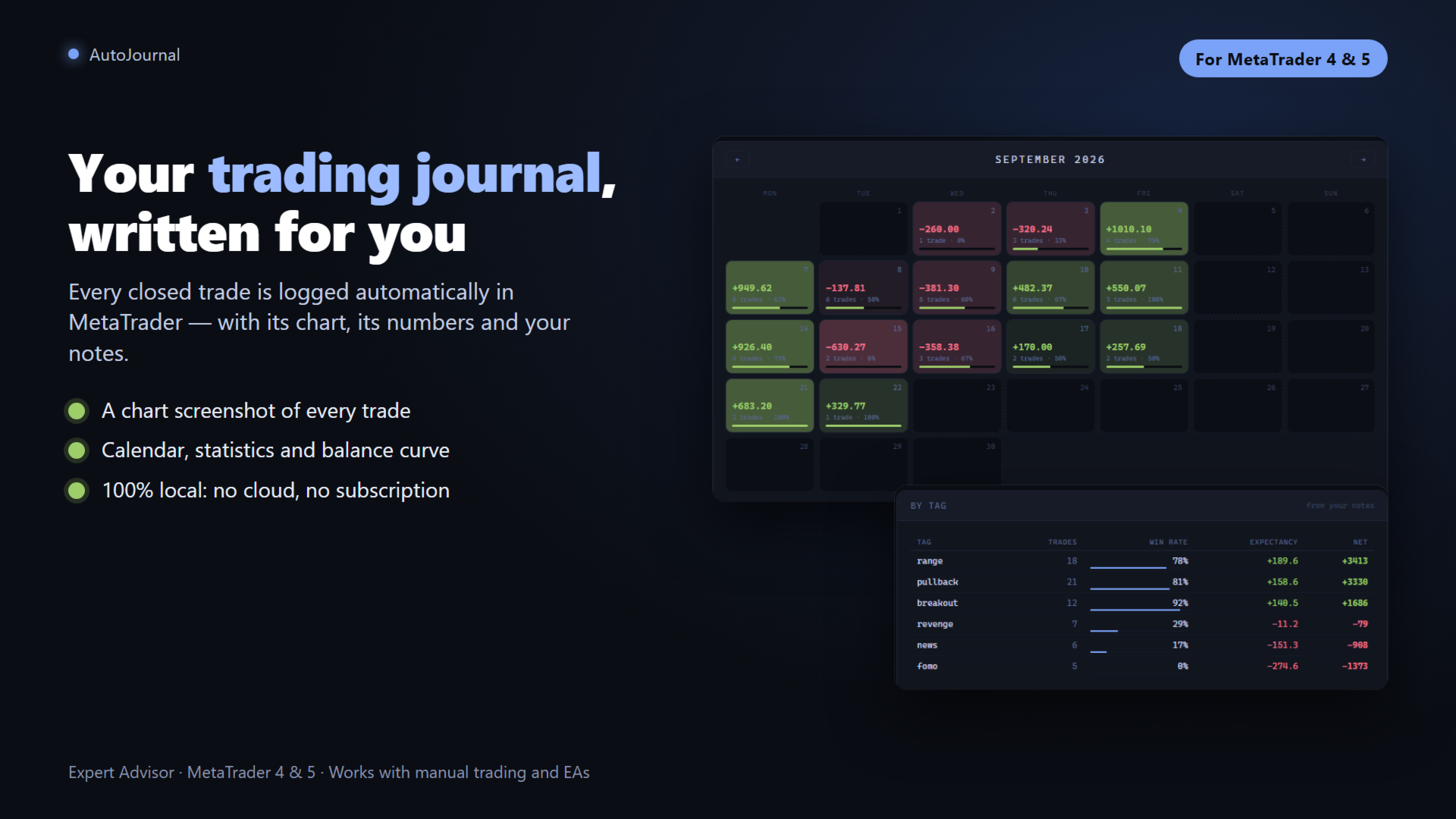
AutoJournal MT4 è un Expert Advisor che opera silenziosamente in background e costruisce un diario di trading completo e professionale in formato HTML, completamente locale, completamente automatico e interamente tuo. Ogni volta che un'operazione viene chiusa, AutoJournal salva uno screenshot del grafico, genera una scheda operazione con tutte le metriche rilevanti e aggiorna il diario senza alcuna azione manuale.

Nessun abbonamento. Nessun server esterno. Nessuna connessione internet dopo il caricamento iniziale. Tutti i file vengono salvati localmente nella cartella MQL4\Files e si aprono in qualsiasi browser.

Cattura Automatica per Operazione

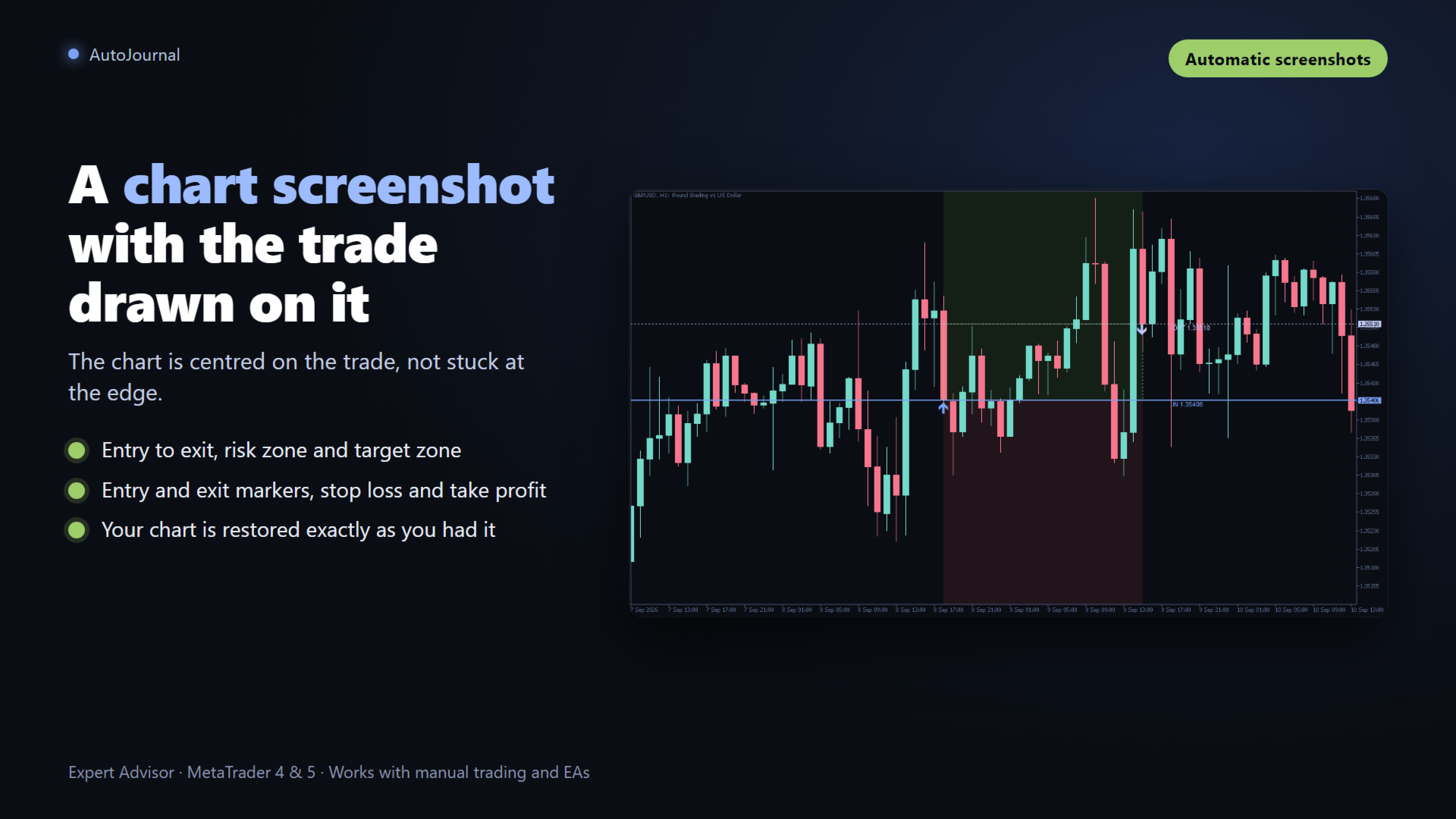
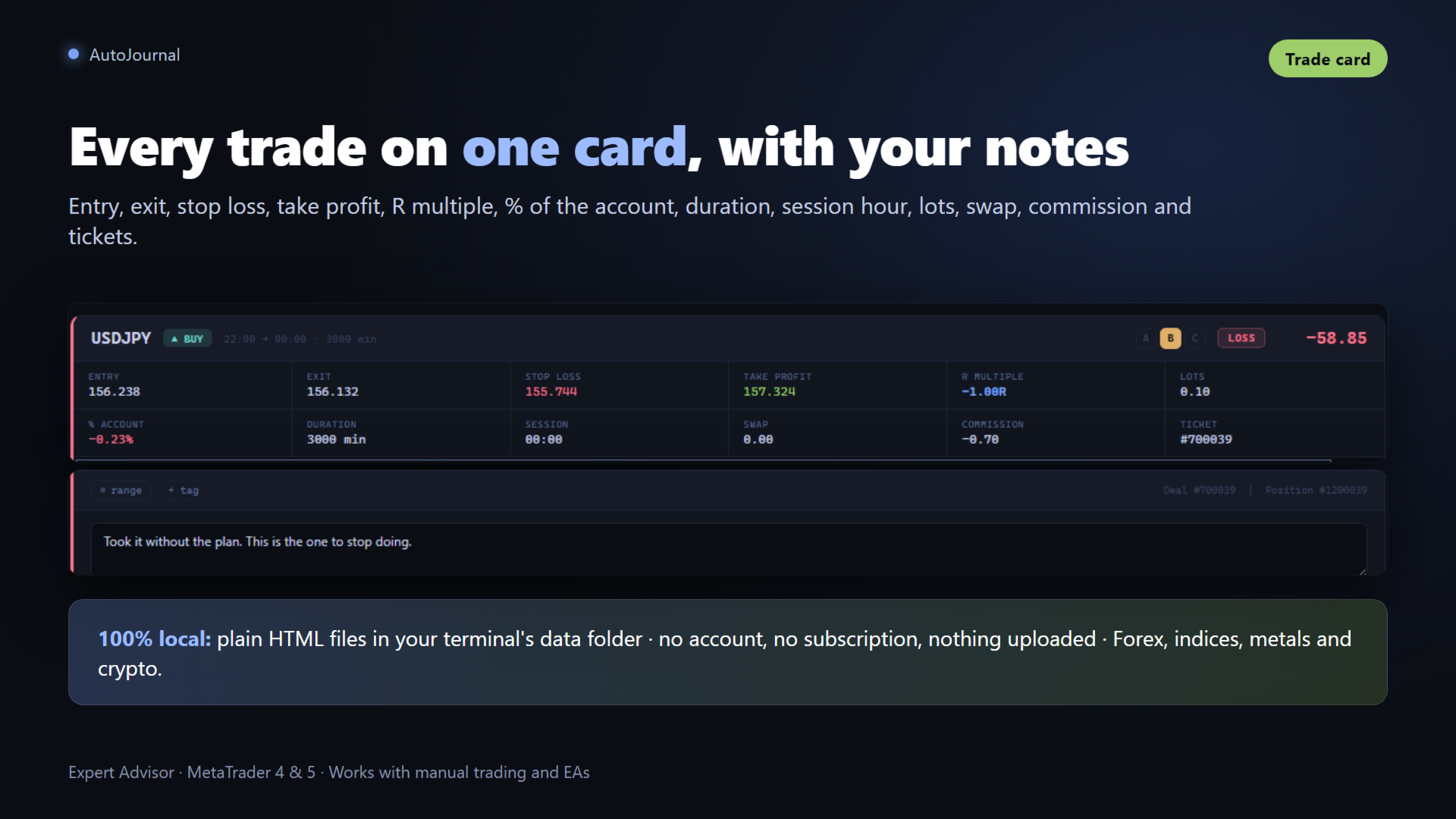
Quando un'operazione viene chiusa, AutoJournal individua il grafico corrispondente, disegna la linea di ingresso in blu, quella di uscita in grigio, lo Stop Loss in rosso tratteggiato e il Take Profit in verde tratteggiato, cattura lo screenshot e rimuove le linee. L'intero processo richiede meno di un secondo. Ogni scheda operazione include prezzo di ingresso e uscita, durata, lotti, rapporto R:R, P&L, swap, commissione e percentuale del conto.

Supporto Multi-Simbolo

Installa l'EA su ogni grafico. Ogni istanza elabora solo il proprio simbolo, generando zero duplicati e garantendo che gli screenshot corrispondano sempre al grafico corretto senza sottrarre il focus ad altri grafici aperti.

Storico Completo al Primo Avvio

Ad ogni avvio, AutoJournal analizza lo storico del conto per il giorno corrente e scrive le operazioni non ancora presenti nel diario. Le voci sono identificate dal numero di ticket per evitare duplicati.

Calendario Interattivo e Curva di Equity

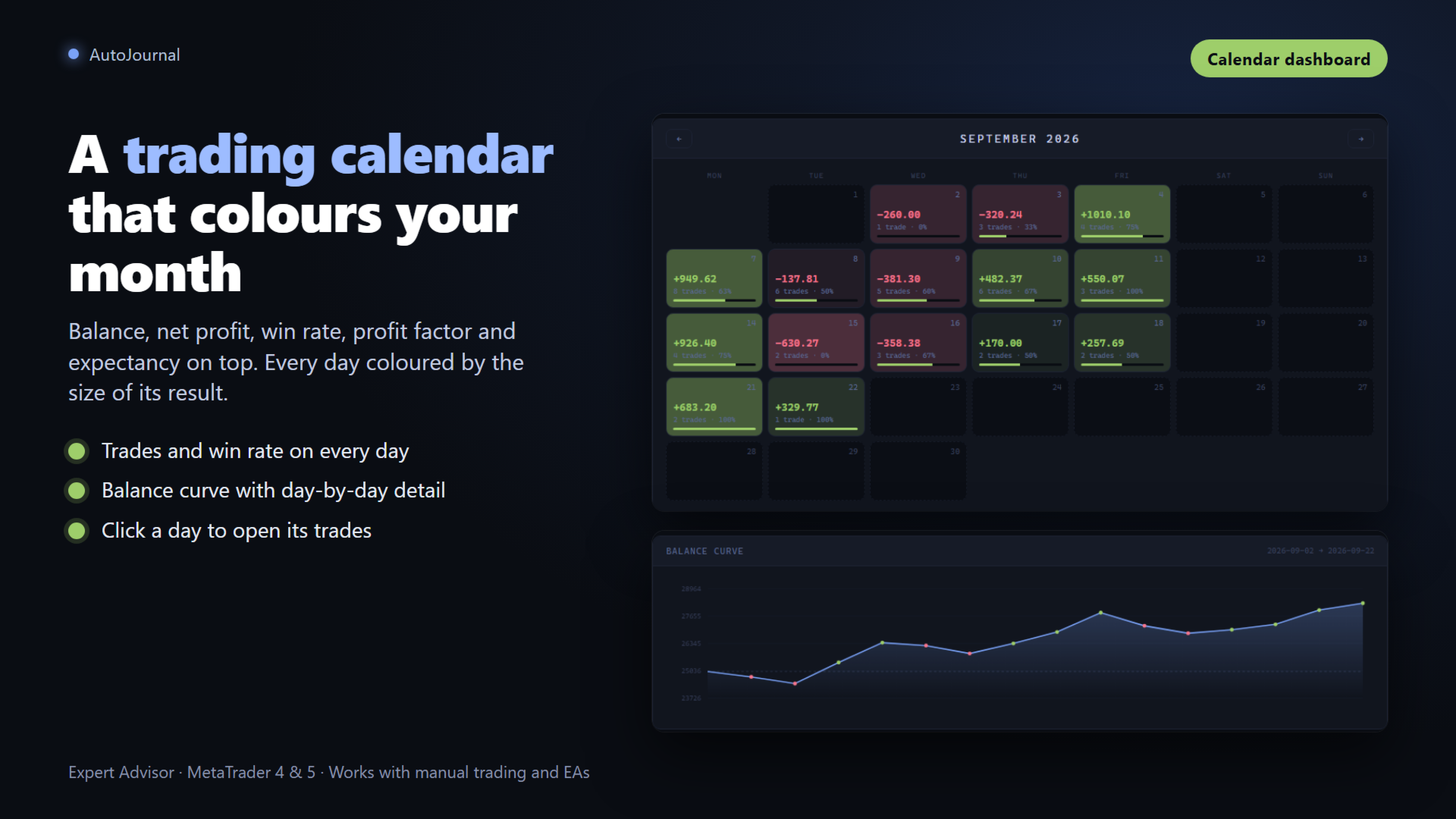
Il file index.html mostra un calendario mensile con il P&L giornaliero, il win rate, il numero di operazioni e il miglior e peggior giorno del mese. Clicca su qualsiasi giorno per vedere i dettagli completi della sessione. La curva di equity viene ricostruita automaticamente da tutti i dati storici su disco. Passa il mouse su qualsiasi punto per vedere data, saldo cumulato, netto giornaliero, numero di operazioni e win rate in quel momento.

Note per Operazione

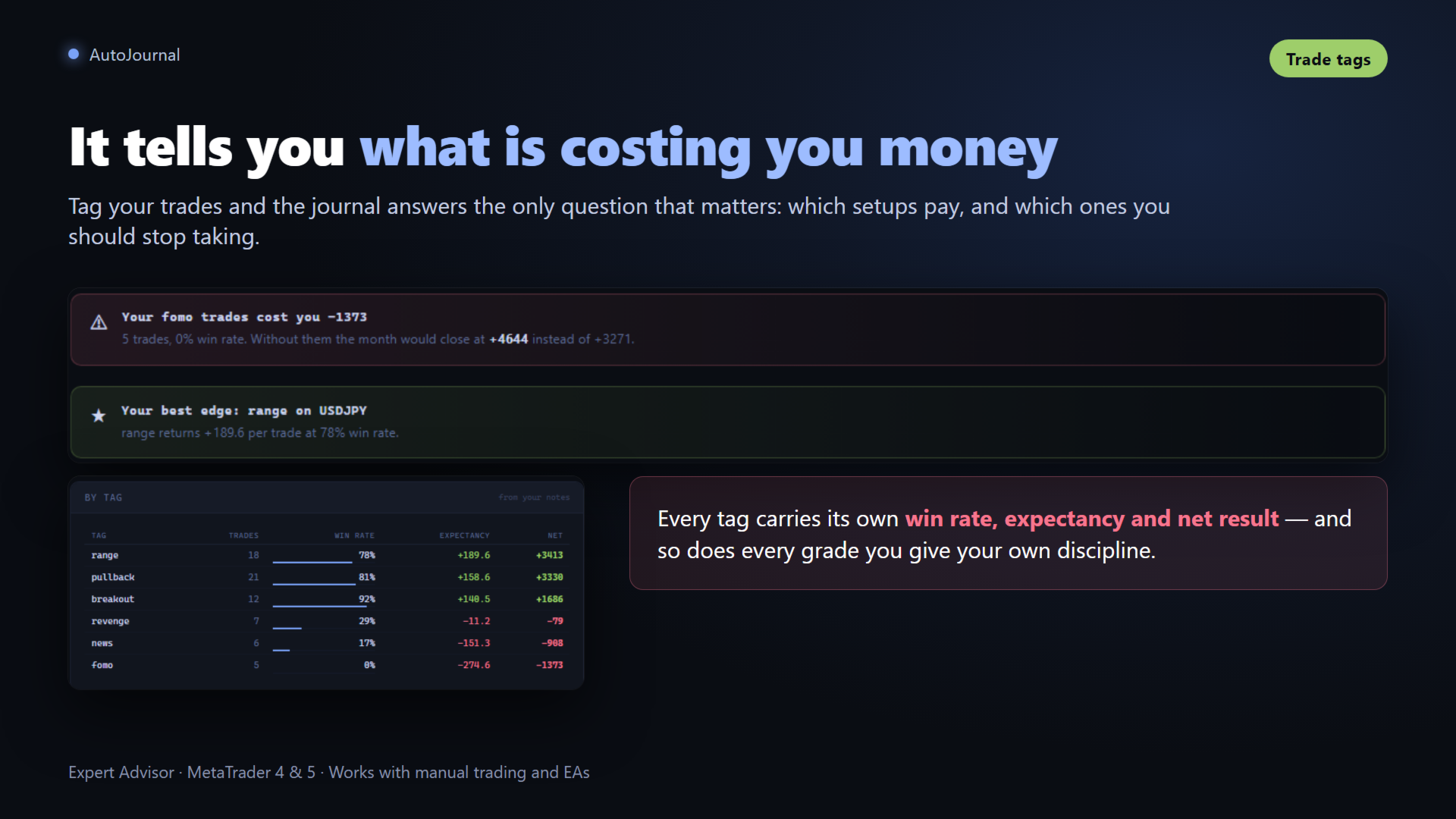
Ogni scheda operazione include un'area di testo che si salva automaticamente in localStorage. Scrivi il tuo ragionamento, le tue emozioni, gli errori o le lezioni direttamente nella pagina del diario, senza bisogno di altre applicazioni.

Come Funziona

Collega l'EA a qualsiasi grafico, uno per simbolo se operi su più coppie, e imposta il timeframe sul quale vuoi che venga effettuato lo screenshot. Non è necessario operare in quella finestra, ma sarà da lì che verrà catturato lo screenshot con quel timeframe. Opera normalmente e il diario si aggiorna automaticamente ad ogni chiusura di operazione. Apri MQL4\Files\AutoJournal\index.html nel tuo browser per visualizzare il diario completo.

Parametri

Root folder in MQL4\Files imposta il nome della cartella radice del diario, con valore predefinito AutoJournal. Save screenshot .png abilita o disabilita lo screenshot automatico del grafico per operazione.

Compatibilità: MetaTrader 4 | Tutti i simboli: Forex, Indici, Metalli, Crypto


Prodotti consigliati
Smoothing Oscillator   is an ea based on the Smoothing oscillator indicator.  https://www.mql5.com/es/market/product/59187 This ea uses the indicator's trend exhaustion signal to initiate a countertrend strategy. The system has a costly lotage, although it can have more than one operation open at a time It does not require large capital or margin requirements to be operated. You can download the demo and test it yourself.  Very stable growth curve as result of smart averaging techniques. "Safet
DD Stopper
Michail Manelidis
DD Stopper for MT4 | Protect Your Account from Excess Drawdown DD Stopper is a lightweight and powerful risk management utility for MetaTrader 4 that automatically closes all trades when your account drawdown reaches a defined amount in USD. Protect your capital. Trade with discipline. Eliminate emotional decisions. What This Tool Does DD Stopper continuously monitors your account and: Tracks real-time drawdown (Balance vs Equity or floating loss) Closes all open trades instantly when the
FREE
Hallo traders! Just finished a telegram utility which can be of interest for smartphone live traders. What is offered inside? Main settings of EA is simple and standard you can use any pair available in MetaTrader. Mainly it was created this for BTCUSD but will work with any pair. What is the main I wanna show: we have always fresh info from market inside buttons refreshing: After start it has 0.00 lots and it will not allow trade by accidental touch. You need to add a Risk + and get 0.01 :) In
Plot History Mt4, uno script indispensabile per il trader che analizza la cronologia di trading del tuo terminale di trading e del conto eseguito da consulenti esperti. Il metodo di analisi si basa sul diagramma dei simboli su cui viene eseguito lo script oltre al numero di magia, un'analisi specifica o completa di tutte le magie utilizzate da uno o più esperti. Lo script analizza i dati commerciali e li può tracciare sul grafico, stampare informazioni commerciali dettagliate nel registro degli
Automatic calculation of a trading lot taking into account Stop Loss (in pips) and the percentage of risk from the account balance. The Expert Advisor panel is located on the chart at the top left. On the panel of the advisor, you can select the size of the stop loss in pips and the percentage of risk from the balance. You can set the deviation from the current price in pips for pending orders. The red color indicates the amount in the deposit currency that you can lose when the stop loss is
Expert Slider for MetaTrader 4 Expert Slider is one of the most widely used experts in the Forex financial market and Metatrader 4. Using this expert, you can easily design several slides for yourself and save several currency pairs with different templates, and according to the timer used for Each slide you set, view different currency pairs with the desired template and continue your analysis and reviews. In the technical specifications section of this expert, there are many options that can b
Prendi il controllo del tuo portafoglio forex. Vedi istantaneamente dove ti trovi, cosa sta funzionando e cosa ti sta causando dolore! VERSIONE MT5 DISPONIBILE QUI: https://www.mql5.com/en/market/product/58658 Il dashboard di Trade Manager è progettato per mostrarti a colpo d'occhio dove si trova attualmente ogni posizione che hai nel mercato forex e rendere più facile la comprensione della gestione del rischio e dell'esposizione alle valute. Per i trader che scalano gradualmente il mercato co
Booster Seven
David Gaganidze
Полуавтоматический торговый робот Booster Seven помогает трейдеру торговат, решения о торговле в направленнии Buy или Sell принимает трейдер. У робота на графике выведенны функции Buy, Sell, Buy Stop, Sell Stop, Buy Limit, Sell limit и AUTO S/L. Также статистические параметры торговли. При выборе функции Buy торговля начнется открытием позиции Buy начальным лотом, имеющим соответствующие Stop Loss и Take Profit. Новая позиция открывается, когда цена на указанный пункт превысит отметку предыдушег
Managing trades MT4
David Julio Cuenca Oliver
Managing Trades 3.0 MT5 version:  https://www.mql5.com/en/market/product/172666?source=Site With Managing Trades 3.0, you can manage your trades quickly and efficiently. It features an intuitive visual interface with large buttons, allowing you to manage your trades as quickly as possible. With Managing Trades 3.0 you can: - Open a Buy and Sell order instantly with a single click, using any lot size you want. You can also optionally set Stop Loss and Take Profit. - Close all open trades in
This  is utility for Closing All trades or Closing All Buy Trades Or Closing All Sell Trades based on button clicked. Advantages and features of  Product is as follows Closes trades very fast  customised based on traders frequently encountered situation .This is very simple utility  which can be used by beginner or  advanced trader . Trader just need click   button like "Close All" "Close Buy" Or "Close Sell" and their request is executed.
Newton s third law MT4
Marta Gonzalez
1 (1)
According to Sir Isaac Newton's 3rd law, every action has its reaction and every movement must be compensated by an opposite movement of equal magnitude. The market cannot be oblivious to this physical principle, so when the force of gravity in the market of the big sharks hides like the sun behind the horizon, the night session allows us to see this law in all its splendor. This EA takes advantage of this movement to trade in the night session . Newton´s third law is designed to operate in the
Modify SELL orders
Hafis Mohamed Yacine
Modify SELL orders v1.0    Managing Orders   During trading, you may need to modify   orders, i.e.   to change stop levels or  take profit. This can be done with one click with  the script Modify SELL orders v1.0 The script modifies all orders (market )  with specified Take Profit and Stop Loss.(pip or price) If the take profit or(and) stop loss is incorrect, then the value is not changed. Parameters script : Take Profit (PIP) Stop Loss (PIP) Take Profit (price) Stop Loss (price)
Boom Coded News MT4
Muhammad Faiz Fathi Bin Mohd Marzuki
This EA does not make entry,you must setup first. After setup this EA will execute order based on input parameter. For MT5 version : CLICK HERE TO BUY MT5 VERSION EA BOOM CODED NEWS Time-Locked Entry System Executes one precise market order exactly at your predefined MT4 server time (HH:MM:SS). Single Trade Per News Designed to avoid overtrading — ideal for news. Recommended on high impact news like NFP,CPI,FOMC and other red high impact news Auto-Off After Entry EA can automatic
The EA trades on morning star pattern . Best time frame 30 mins, Any pair any broker no limited, recommend minimum deposit 500$ SETTING Candle_size_pips - Minimum size of previous candle. Lots - start lot. Multiple_lots - Multiply lot for next order. Max_lots -    maximum lot. Grid_boost -  Frequency of opening position (Less more order). Grid_minimum_pips - Check distance grid from last order. TP_pips - take profit, in pips. SL_money - Stop loss in money. Number order for DD Reduction Algoritm
Ciao a tutti.  Voglio dirti un po ' di questo pannello per il trading sul mercato dei cambi finanziari. Il pannello è scritto nel linguaggio di programmazione MQL4 ed è progettato per aiutare ad aprire ordini di mercato su posizioni specifiche. Funziona sia con gli ordini ordinari che con quelli in sospeso. Cioè, apre ordini di vendita e acquisto come Buy, Sell, BuyLimit, SellLimit, BuyStop, SellStop. E apre anche una rete di ordini in sospeso e, inclusi gli ordini grid, ovvero, ordini in sospe
Daily Trading Dashboard – MT4 Indicator A compact and efficient tool that displays your daily trading statistics directly on the chart. Designed for traders who need a clear overview of their performance without switching screens. Key Features Real-time calculation of today’s profit/loss (with green/red color coding) Display of trade count and total trading volume Lightweight 280×160 px panel with clean blue design Automatic updates every few seconds Optional filtering by Magic Number or Comment
FREE
捞金团快捷平仓脚本 一键平仓 一键盈利 一键下单 一键平止盈 一键平亏损 EA 安装路径 在 C:\Program Files (x86)\TMGM MT4 Terminal\MQL4\Experts 请主语在你本地的安 装路径 安装 请自行查找本地路径 左侧为资金管理以及账户信息 , 右侧为脚本操作 方便快捷 手工加多 手工加空 可以快速实现下单 , 在 EA 设置里面修改 . 其他快捷按钮可以实现各种功能您只需点击就可以快速平仓 , 删除挂单 , 停止 ea 等操作 . 声音提醒功能 可以实现 手机提醒 邮箱提醒 和 声音提醒 以及弹出提醒 重要点位 4 种提醒方式 左侧为资金管理以及账户信息 , 右侧为脚本操作 方便快捷 手工加多 手工加空 可以快速实现下单 , 在 EA 设置里面修改 . 其他快捷按钮可以实现各种功能您只需点击就可以快速平仓 , 删除挂单 , 停止 ea 等操作 . 声音提醒功能 可以实现 手机提醒 邮箱提醒 和 声音提醒 以及弹出提醒 重要点位 4 种提醒方式
TaleSpin
Aleksandr Prokhorov
Hello dear friends! Autopilot "TaleSpin". The robot opens a grid of orders by trend. Uses a little martingel. Uses virtual StopLoss. Works on all pairs and timeframes. Input parameters: Turbo (if the deposit> = $ 300, it is much better) to turn it on when depositing less than 300 is not recommended (when turned on, it closes unprofitable transactions with a profit, as if they closed in plus, when turned off, it closes to zero, it’s better to use a very dangerous function with a very large
MT4 AI Chat
Thomas Bradley Butler
CHAT WITH AI ON MQL4 AND MT4.  THE PROMPT MUST CONTAIN MQL4 OR MT4, OTHERWISE IT WILL NOT RESPOND.  IT IS TRAINED ON MT4 AND MQL4 ONLY. NOTE THAT IT WILL ONLY WORK IN REAL TIME CHARTS, NOT IN BACKTEST.  In comments Add your API Key in the inputs and  add these to web request in Expert Advisor tab: This chatbot is a tool designed to help users to chat with the Meta Trader 4 (MT4) and MQL4 more efficiently. It's based on a powerful AI model called GPT-3.5, which is capable of understanding and gen
Magic Grid
Aliaksandr Charkes
4.54 (28)
Magic Grid is an indicator-free advisor that uses a grid strategy. The strategy is based on automatic reopening of grid pending orders, after closing their market positions (by Take-Profit, Stop-Loss or manually). Pending orders are placed with a specified step from the initial prices, which can be entered manually or generated automatically ( one time at the beginning of the trade ). The robot can trade on any time frame, on any currency pair, on several currency pairs, and on any number of di
FREE
Modify BUY order
Hafis Mohamed Yacine
Modify BUY orders_v1.0 Managing Orders   During trading, you may need to modify   orders, i.e.   to change stop levels or  take profit. This can be done with one click with  THE SCRIPT Modify BUY orders v1.0 The script modifies all orders (market )  with specified Take Profit and Stop Loss.(pip or price) If the take profit or(and) stop loss is incorrect, then the value is not changed. Parameters SCRIPT; Take Profit (PIP) Stop Loss (PIP) Take Profit (price) Stop Loss (price)
Advisor for semi-automatic trading with a virtual multi-level trail of take profit and stop loss, a trail of target profit, martingale functions, manual opening of orders, managing third-party orders, counting trading instruments, displaying current information and statistics on a chart. It is possible to set several levels of trailing take profit and stop loss and to each level to assign the percentage of partial closing of the order. The percentage of the lot when closing the level is calculat
Market information
Makarii Gubaydullin
Informazioni di mercato e statistiche dettagliate: analisi della volatilità e delle barre dei prezzi. Scopri il mio  # 1 Trade Assistant : 66+ funzionalità, incluso questo strumento  |   Contattami  se hai domande Specifica qualsiasi coppia di valute/strumento di trading per ottenere informazioni: Informazioni di mercato: Spread attuale; Swap per posizioni lunghe (acquisti); Swap per posizioni corte (vendite); Seleziona un timeframe e un numero di periodi per analizzare le variazioni di prezzo:
A Utility used for accounts with multiple open positions with Magic numbers added via Expert Advisors or manually. The Utility closes specific Magic number open positions when a certain profit in currency $ has been reached. The Utility also closes specific Magic numbers open positions with a break-even feature when the Expert Advisors or manually a certain amount of open positions has been placed. The Utility also closes all buy stops and sell stops when the "Take profit sum $" has been reache
FREE
SnowyOwlFree
RODION SLOTIN
3 (2)
The free version of the snowyowl trend adviser, which is based on determining combinations of candle patterns. A virtual trailing stop tracks each open order and groups open orders to close them simultaneously. In the free version, you can only work on one timeframe, while in the paid version, opening orders on the selected TF is a signal to open orders on lower TF.
FREE
Close Assistant
Gheis Mohammadi
5 (2)
Close Assistant (CA)  is a full featured utility for monitoring and closing a set of positions placed by trader or EA. It closes filtered orders in specified time or level or candle patterns or when a certain profit or loss of the total positions is reached. CA uses Zero Profit Lock function to save deposit when total profit falls to zero. Profit and loss levels can be set in fixed amount of account currency or percentage of balance or equity or margin. CA only monitors and works on filtered po
Total Trailing MT4
Konstantin Kulikov
This utility trails not each position separately, but the entire profit on the account (by money or by percentage). Activate_Trailing - activation of trailing by money or by percentage of profit.  Start_Trailing - the required profit value to start the trailing.  Size_Trailing - the size of the trailing stop. Min_Value_for_Close - the minimum profit value after the start of trailing to close positions (in case of a large negative gap to stay in the game).  Select_trades - selecting positions t
BFS Panel Control
Vladimir Smorodintsev
BFS Panel Control is an auxiliary panel for comfortable control and management of orders, combining orders of different instruments into related groups, with subsequent closing of groups according to specified conditions of profitability (or loss) and with a possible notification in Telegram. For example, you have a drawdown on several orders of the EURUSD, GBPUSD, USDJPY instruments, while you expect the BTCUSD instrument to grow strongly, you open a position with a large lot on the BTCUSD ins
Screener demo
Patrick Chalindar
Find pairs are good to trade. This demo version is unlimited and can be use with all functionalities, but displays only 3 results max. Up to 4 criteria. Candlestick patterns. Create your own screener with OR/AND conditions. Ex: (condition 1 OR condition 2) AND (condition 3 OR condition 4). From the result, simple click on the pair label displays the symbol in all charts you have. Load your own pair list. By default, the program works with: AUDCAD, AUDCHF, AUDJPY, AUDUSD, CADJPY, CADCHF, CHFJPY,
FREE
Risk Panel Pro v1
Saeed Hatam Mahmoudi
Risk Panel Pro (MT4) Risk Panel Pro is a Tool for MetaTrader 4 that automates placing Stop Loss and Take Profit based on a percentage of the account balance. It is a trade management utility; it does not provide trading signals and does not guarantee any profit. Main functions Auto-apply SL/TP on new orders using balance-based risk (default: SL 2%, TP 4%). Switch Automatic mode off to manage SL/TP manually. One-click buttons to apply SL or TP to existing positions at any time. Close Chart : clo
FREE
Gli utenti di questo prodotto hanno anche acquistato
Forex Trade Manager MT4
InvestSoft
4.98 (442)
Benvenuto a Trade Manager EA, lo strumento definitivo per la gestione del rischio , progettato per rendere il trading più intuitivo, preciso ed efficiente. Non è solo uno strumento per l'esecuzione degli ordini, ma una soluzione completa per la pianificazione delle operazioni, la gestione delle posizioni e il controllo del rischio. Che tu sia un principiante, un trader avanzato o uno scalper che necessita di esecuzioni rapide, Trade Manager EA si adatta alle tue esigenze, offrendo flessibilità s
Local Trade Copier EA MT4
Juvenille Emperor Limited
4.96 (110)
Sperimenta una copia di trading eccezionalmente veloce con il Local Trade Copier EA MT4 . Con la sua facile configurazione in 1 minuto, questo copiatore di trading ti consente di copiare i trades tra diversi terminali di MetaTrader sullo stesso computer Windows o su Windows VPS con velocità di copia ultra veloci inferiori a 0.5 secondi. Che tu sia un trader principiante o professionista, Local Trade Copier EA MT4 offre una vasta gamma di opzioni per personalizzarlo alle tue esigenze specifiche.
Strategy Builder offers an incredible amount of functionality. It combines a trade panel with configurable automation (covert indicators into an EA), real-time statistics (profit & draw down) plus automatic optimization of SL, TP/exit, trading hours, indicator inputs. Multiple indicators can be combined into an single alert/trade signal and can include custom indicators, even if just have ex4 file or purchased from Market. The system is easily configured via a CONFIG button and associated pop-up
Trade Assistant MT4
Evgeniy Kravchenko
4.43 (197)
It helps to calculate the risk per trade, the easy installation of a new order, order management with partial closing functions, trailing stop of 7 types and other useful functions. Additional materials and instructions Installation instructions   -   Application instructions   -   Trial version of the application for a demo account Line function -   shows on the chart the Opening line, Stop Loss, Take Profit. With this function it is easy to set a new order and see its additional characteris
PZ Trade Pad Pro MT4
PZ TRADING SLU
3.67 (3)
Effortlessly calculate lot sizes and manage trades to save time and avoid costly errors The Trade Pad Pro EA is a tool for the Metatrader Platform that aims to help traders manage their trades more efficiently and effectively. It has a user-friendly visual interface that allows users to easily place and manage an unlimited number of trades, helping to avoid human errors and enhance their trading activity. [ Installation Guide | Update Guide | Troubleshooting | FAQ | All Products ] One of the k
Il MT4 to Telegram Signal Provider è uno strumento facile da usare e completamente personalizzabile che consente l'invio di segnali a Telegram, trasformando il tuo account in un fornitore di segnali. Il formato dei messaggi è completamente personalizzabile! Tuttavia, per un uso semplice, puoi anche optare per un modello predefinito e abilitare o disabilitare parti specifiche del messaggio. [ Dimostrativo ]  [ Manuale ] [ Versione MT5 ] [ Versione Discord ] [ Canale Telegram ]  New: [ Telegram To
The product will copy all telegram signal to MT4   ( which you are member  ) , also it can work as remote copier.  Easy to set up, copy order instant, can work with almost signal formats, image signal, s upport to translate other language to English Work with all type of channel or group, even channel have "Restrict Saving Content", work with  multi channel, multi MT5 Work as remote copier: with signal have ticket number, it will copy exactly via ticket number. Support to backtest signal. How to
Trade Copier Global
Laszlo Tormasi
5 (15)
Trade Copier Global: The name speaks for itself. This copier allows you to copy orders between MT4 terminals even if they are not installed on the same computer. Features Copying trades between MT4 terminals around the world with a short delay. Automatically recognizes symbol prefixes. Can connect many Slaves to the same Master. Supports pending and market orders. Supports partial order close (with limitations, see below) Can send messages and notifications to the Slaves from the Master Several
TradePanel MT4
Alfiya Fazylova
4.84 (95)
Trade Panel è un assistente commerciale multifunzionale. L'applicazione contiene più di 50 funzioni di trading per il trading manuale e permette di automatizzare la maggior parte delle attività commerciali. Prima dell'acquisto, è possibile testare la versione dimostrativa su un conto demo. Scaricare la versione di prova dell'applicazione per un account dimostrativo: https://www.mql5.com/it/blogs/post/762419 . Istruzioni complete qui . Commercio. Consente di effettuare operazioni di trading con u
Scarica la versione di prova funzionante Copy Cat More (Gatto Copione) — Copiatore di Trade (Trade Copier) MT4 non è solo un semplice copiatore locale di trade; è un framework completo di gestione del rischio e di esecuzione (risk management and execution framework) progettato per le sfide di trading di oggi. Dalle challenge delle prop firm alla gestione di portafogli personali, si adatta a ogni situazione con la sua combinazione di esecuzione robusta, protezione del capitale, configurazione
Telegram to MT4 Multi-Channel Copier copia automaticamente i segnali di trading dai tuoi canali Telegram direttamente in MetaTrader 4. Nessun bot, nessuna estensione del browser, nessuna copia manuale. Ricevi un segnale su Telegram e l'EA apre l'operazione sul tuo terminale in pochi secondi. Il prodotto include due componenti: un'applicazione Windows che ascolta i tuoi canali Telegram, e questo Expert Advisor che esegue i segnali sul tuo terminale MT4. È disponibile anche una versione per MT5. G
News Filter EA MT4
Rashed Samir
5 (9)
News Filter EA: Advanced Algo Trading Assistant News Filter EA is an advanced algo trading assistant designed to enhance your trading experience. By using the   News Filter EA , you can integrate a Forex economic news filter into your existing expert advisor, even if you do not have access to its source code. In addition to the news filter, you can also specify   trading days   and   hours   for your expert. The News Filter EA also includes   risk management   and   equity protection   features
TradeMirror è uno strumento locale di copia degli ordini progettato per le piattaforme MT4/MT5, con supporto alla sincronizzazione delle operazioni in tempo reale. Tutorial Clicca sul link Tutorial di Trademirror per visualizzare altri tutorial. Vantaggi del Prodotto In linea con gli elevati standard di sicurezza, stabilità e privacy per i software finanziari, abbiamo ottimizzato tre aspetti fondamentali: Interfaccia grafica intuitiva per un utilizzo semplificato Protezione rafforzata della priv
RSI Divergence Scanner is a multi-timeframe and multi-symbol dashboard and alert that checks all timeframes and symbols to find divergences between price chart and RSI indicator. This divergence scanner is integrated with support and resistance zones so you can check the RSI divergences in the most important areas of the chart to find trend reversals in the price chart. Download demo version   (works on M 1,M5,M30,W1 timeframes) Full description of scanner parameters ->   click here . How to get
RS Trade Copier
Boris Sedov
5 (1)
RS Trade Copier - il local trade copier ultra-veloce con una vera interfaccia grafica. Smetti di inserire i numeri di conto manualmente. Addio alle interminabili liste di oltre 200 parametri nelle impostazioni. Uno strumento affidabile e flessibile per copiare operazioni di trading tra multipli terminali MT4 e MT5. È adatto sia a trader esperti e servizi di segnali, sia a investitori privati. Permette di sincronizzare il trading da uno o più Fornitori a uno o più Clienti con elevata precisione e
Telegram to MT4 Coppy
Sergey Batudayev
4.09 (11)
Da Telegram a MT4: la soluzione definitiva per la copia del segnale Semplifica il tuo trading con   Telegram su MT4   , l'utility all'avanguardia progettata per copiare i segnali di trading direttamente dai canali e dalle chat di Telegram sulla tua piattaforma MetaTrader 4, senza bisogno di DLL. Questa soluzione affidabile garantisce un'esecuzione impeccabile dei segnali con una precisione e opzioni di personalizzazione senza pari, risparmiando tempo e aumentando la tua efficienza. [ Instruction
Grid Manual MT4
Alfiya Fazylova
4.71 (17)
Grid Manual è un pannello di trading per lavorare con una griglia di ordini. L'utilità è universale, ha impostazioni flessibili e un'interfaccia intuitiva. Funziona con una griglia di ordini non solo nella direzione delle perdite, ma anche nella direzione dell'aumento dei profitti. Il trader non ha bisogno di creare e mantenere una griglia di ordini, lo farà l'utilità. È sufficiente aprire un ordine e il manuale di Grid creerà automaticamente una griglia di ordini per esso e lo accompagnerà fino
Copiatrice->Interazione dell'interfaccia comoda e veloce, gli utenti possono utilizzarla subito       ->>>> Si consiglia di utilizzarlo su computer Windows o VPS Windows Caratteristiche: Impostazioni di copy trading diversificate e personalizzate: 1. È possibile impostare diverse modalità di lotto per diverse fonti di segnale 2. È possibile impostare diverse fonti di segnale per il copy trading forward e reverse 3. I segnali possono essere impostati con commenti 4. Se calibrare il lotto in base
Visualizza immediatamente la cronologia delle tue operazioni chiuse per giorno e settimana, le tue operazioni aperte correnti e l'esposizione forex su un grafico! Utilizza la mappa di calore per identificare le operazioni redditizie e dove si trova il tuo drawdown attuale all'interno del tuo portafoglio di trading. Pulsanti di chiusura rapida Utilizza i pulsanti di chiusura rapida per chiudere ogni operazione su un singolo simbolo, chiudere singole operazioni per intero o ottenere profitti o p
Trade panel Sniper
Andrey Kaunov
5 (4)
Простая в управлении Торговая панель обеспечит безопасную торговлю. Вычислит объём сделки от заданного уровня Stop Loss и величины убытка. Поможет рассчитать сейф, и в ноль закрыть неверную сделку. Интуитивно понятный интерфейс делает панель удобной в управлении, освобождая внимание трейдера для принятия решения о входе в сделку. Программа сделает все расчёты за вас. Поэтому работа с помощью панели Снайпер - оптимальное решение для торговли с соблюдением Мани-менеджмента. А это главный ключ к по
Trader Evolution MT4
Siarhei Vashchylka
5 (2)
" Trader Evolution " - A utility designed for traders who use wave and technical analysis in their work. One tab of the utility is capable of money management and opening orders, and the other can help in making Elliott wave and technical analysis. Manual (Be sure to read before purchasing) | Version for MT5 Advantages 1. Trading in a few clicks. Immediate and pending orders are available in the panel 2. Money management. The program automatically selects the appropriate lot size 3. Simplifies
Auto Trade Copier
Vu Trung Kien
4.76 (85)
Auto Trade Copier is designed to copy trades to multiple MT4, MT5 and cTrader accounts/terminals with 100% accuracy. The provider and receiver accounts must be on the same PC/VPS. With this tool, you can copy trades to receiver accounts on the same PC/VPS. All trading actions will be copied from provider to receiver perfectly. This version can be used on MT4 accounts only. For MT5 accounts, you must use Auto Trade Copier for MT5 . Reference: - For MT4 receiver, please download Trade Receiver Fre
Close by percentage MT4
Konstantin Kulikov
5 (1)
Hello friends. I wrote this utility specifically for use in my profile with a large number of Expert Advisors and sets ("Joint_profiles_from_grid_sets" https://www.mql5.com/en/blogs/post/747929 ). Now, in order to limit losses on the account, there is no need to change the "Close_positions_at_percentage_of_loss" parameter on each chart. Just open one additional chart, attach this utility and set the desired percentage for closing all trades on the account. The utility has the following function
Drawdown Protector MT4
Konstantinos Kalaitzidis
5 (2)
La protezione dal prelievo viene utilizzata per gestire il prelievo massimo giornaliero desiderato. È uno strumento di grande valore per i trader, in particolare per i trader di società di prop, è necessario fare attenzione ai limiti di prelievo.    È un EA efficace e semplice da utilizzare per scopi di gestione del prelievo di capitale. Funziona bloccando nuove operazioni e chiudendo operazioni esistenti, quando il capitale fluttuante (non il saldo) supera il limite di perdita giornaliera impo
X2 Copy MT4
Liubov' Shkandrii
Veloce. Preciso. Innovativo. Tecnologico. Scopri la copia istantanea delle operazioni con il rivoluzionario X2 Copy MT4. Con solo 10 secondi di semplice installazione, otterrai un potente strumento per sincronizzare le operazioni tra i terminali MetaTrader su un singolo computer o Windows VPS con una velocità senza precedenti. Che tu gestisca più account, segua segnali o espanda la tua strategia, X2 Copy MT4 si adatta al tuo flusso di lavoro con una precisione e un controllo senza pari. Lavora p
Trendline PRO MT4 Trendline PRO MT4 è un Expert Advisor semi-automatizzato per MetaTrader 4 che esegue operazioni, gestisce ordini o invia avvisi da trendline e livelli del grafico creati dall'utente. L'Expert Advisor non genera segnali di trading e non include una strategia integrata. Tutte le entrate, uscite, impostazioni di rischio e regole di gestione sono definite dall'utente sul grafico. Il prodotto è progettato per trader che usano già trendline, livelli di breakout, supporto e resistenza
Custom Alerts AIO: Monitora tutti i mercati — senza alcuna configurazione Panoramica Custom Alerts AIO è una soluzione di monitoraggio dei mercati pronta all’uso che non richiede alcuna configurazione. Tutti gli indicatori necessari — FX Power, FX Volume, FX Dynamic, FX Levels, IX Power — sono integrati internamente. Non vengono mostrati grafici, rendendolo ideale per generare alert in tempo reale in modo discreto ed efficiente. Supporta tutte le classi di asset offerte dal tuo broker: Forex,
Candlestick Pattern Scanner is a multi-timeframe and multi-symbol dashboard and alert system that checks all timeframes and currency pairs for different candlestick patterns that are formed in them. Scanner is integrated with support and resistance zones so you can check the candlestick patterns in the most important areas of the chart to find breakout and reversal patterns in the price chart. Download demo version   (works on M30,D1,W1 timeframes and 20 symbols of Market Watch window) Read the
Che cos’è Telegram to MT4 Pro? Telegram to MT4 Pro copia automaticamente i segnali da canali e gruppi Telegram privati, pubblici e limitati direttamente sul tuo account MetaTrader 4 . Telegram to MT4 Pro è un copiatore di segnali professionale che copia automaticamente i segnali di trading da qualsiasi canale o gruppo Telegram direttamente sul tuo account MetaTrader 4 in tempo reale, con pieno controllo su ogni operazione. Il sistema è composto da due parti che lavorano insieme: Questo Expert Ad
Firstly , the script estimates how many Mx bars of the chart (on which this script is applied) the future trend will most likely continue and what is its quality. Secondly (and most importantly), the script is an auxiliary tool for the extremely mathematically advanced and extremely effective ScientificTrade indicator in trading. The script calculates the optimal averaging period, which is also equal to Mx, of the ScientificTrade indicator, which gives the maximum profit according to the strate
Altri dall’autore
Telegram to MT5 Multi-Channel Copier copia automaticamente i segnali di trading dai tuoi canali Telegram direttamente in MetaTrader 5. Nessun bot, nessuna estensione del browser, nessuna copia manuale. Ricevi un segnale su Telegram e l'EA apre l'operazione sul tuo terminale in pochi secondi. Il prodotto include due componenti: un'applicazione Windows che ascolta i tuoi canali Telegram, e questo Expert Advisor che esegue i segnali sul tuo terminale MT5. È disponibile anche una versione per MT4. G
Telegram to MT4 Multi-Channel Copier copia automaticamente i segnali di trading dai tuoi canali Telegram direttamente in MetaTrader 4. Nessun bot, nessuna estensione del browser, nessuna copia manuale. Ricevi un segnale su Telegram e l'EA apre l'operazione sul tuo terminale in pochi secondi. Il prodotto include due componenti: un'applicazione Windows che ascolta i tuoi canali Telegram, e questo Expert Advisor che esegue i segnali sul tuo terminale MT4. È disponibile anche una versione per MT5. G
AutoJournal MT5
Sergio Marquez Uroz
AutoJournal MT5 è un Expert Advisor che costruisce un diario di trading completo e professionale in formato HTML, operando silenziosamente in background in modo completamente automatico. Ogni volta che un'operazione viene chiusa, AutoJournal salva uno screenshot del grafico, genera una scheda operazione con tutte le metriche rilevanti e aggiorna il diario senza alcuna azione manuale. Nessun abbonamento. Nessun server esterno. Tutti i file vengono salvati localmente nella cartella MQL5\Files e s
QuickBar Pro MT4
Sergio Marquez Uroz
QuickBar Pro MT4 è un pannello di gestione del rischio ed esecuzione degli ordini progettato per i trader che hanno bisogno di velocità, precisione e un grafico pulito. A differenza dei pannelli tradizionali che ingombrano lo schermo, QuickBar Pro si integra come una barra degli strumenti compatta su una sola riga nella parte superiore del grafico, mantenendo sempre la piena visibilità del chart. Nessuna finestra mobile. Nessun pannello invasivo. Solo una barra discreta con tutto ciò di cui hai

QuickBar Pro MT5
Sergio Marquez Uroz
QuickBar Pro MT5 è un pannello di gestione del rischio ed esecuzione degli ordini progettato per i trader che hanno bisogno di velocità, precisione e un grafico pulito. A differenza dei pannelli tradizionali che ingombrano lo schermo, QuickBar Pro si integra come una barra degli strumenti compatta su una sola riga nella parte superiore del grafico, mantenendo sempre la piena visibilità del chart. Nessuna finestra mobile. Nessun pannello invasivo. Solo una barra discreta con tutto ciò di cui hai

Filtro:
Nessuna recensione
Rispondi alla recensione