
Lock30x XAUUSD
- Experts
-
Jarrod Emery
 I’m the founder of ExpertCodeFX and an MQL5 Expert Advisor developer focused on practical, testable automation for MetaTrader 5.
 - Versione: 2.830
- Aggiornato: 29 agosto 2026
- Attivazioni: 10
LOCK30X XAU AI EA v2.83
LOCK30X XAU AI EA v2.83 is an automated MetaTrader 5 Expert Advisor developed specifically for Gold trading on the M5 timeframe.
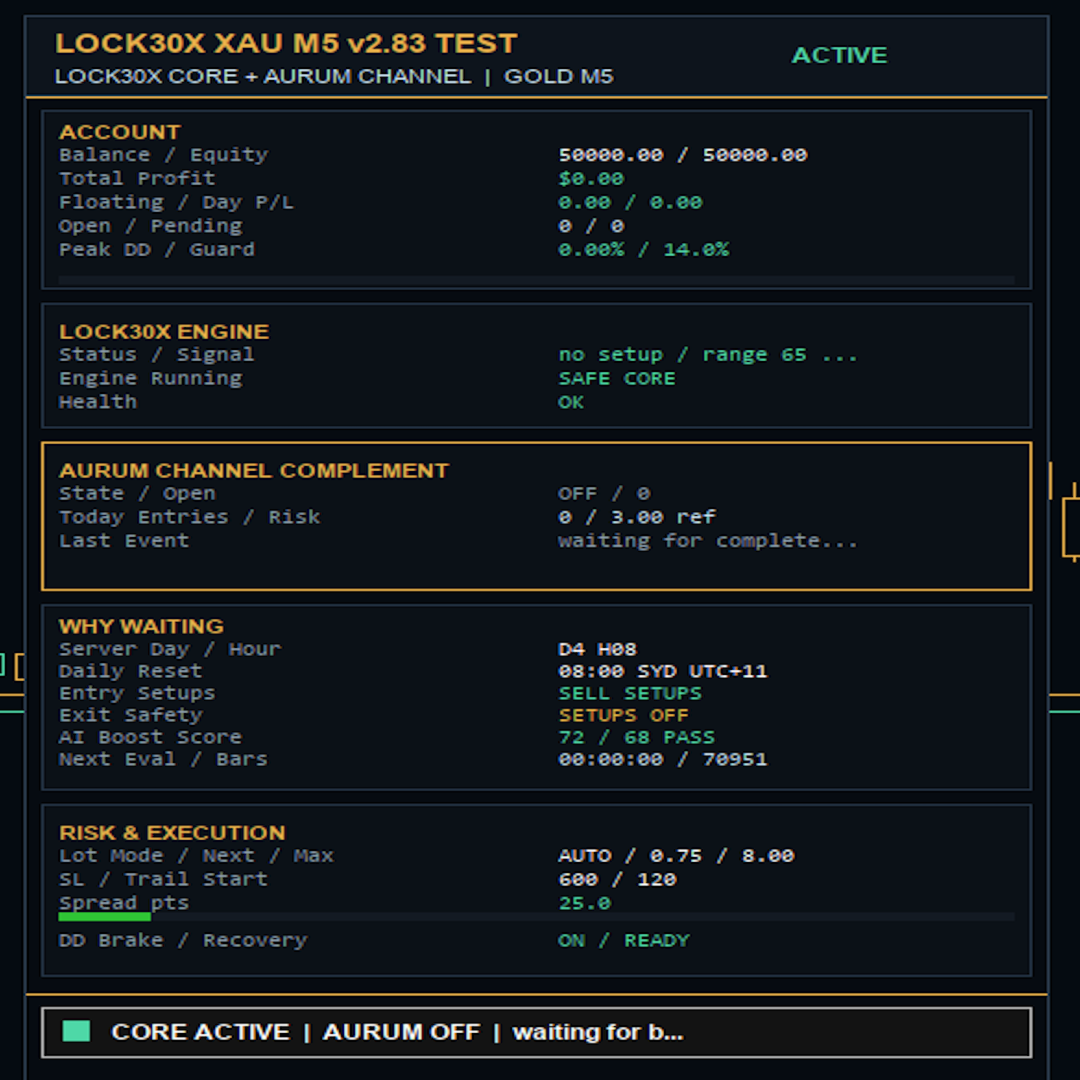
Version 2.83 retains the established LOCK30X completed-candle and pending-order framework while introducing an optional, separately identified Aurum Channel complement. It also adds a redesigned graphite and navy chart theme, clearer engine-status information and an expanded dashboard that allows the user to see whether the LOCK30X core and optional Aurum component are active, waiting or protected by a trading safeguard.
The EA performs its calculations locally inside MetaTrader 5. It does not require an external API, DLL, cloud signal, subscription service or outside trading application.
No external setfile is required for the first LOCK30X test. The EA can be attached and tested using its built-in inputs. The optional Aurum component is disabled by default in the current v2.83 profile and can be enabled only when the user deliberately chooses to test that additional engine.
MAIN IDEA
LOCK30X does not attempt to chase every tick. It evaluates completed M5 candles, checks the configured trading window, market conditions, account state and protection rules, then prepares an order only when the required conditions pass.
The core framework uses pending-order logic with configurable candle size, entry offset, order expiry, stop loss and trailing-stop management. It also includes account-based volume calculation, drawdown controls, daily-loss protection and on-chart status information.
The stock v2.83 core profile is sell-focused. Buy and sell controls remain available in the inputs, but users should not assume both directions are enabled without checking the loaded configuration.
LOCK30X CORE FRAMEWORK
The main LOCK30X framework includes:
- Completed M5 candle logic
- Pending-order entries
- Configurable buy and sell direction controls
- Directional broker-server-time filters
- Automatic account-based lot scaling
- Equity-based scaling support
- Drawdown brake controls
- Recovery-mode lot reduction
- Daily loss protection
- Spread and market-health checks
- Hybrid Profit Boost controls
- Local market-quality scoring
- H1 Expansion opportunity layer
- Maximum-hold and forced-exit safety controls
- Broker-aware volume normalization
- Live account, risk and trading-state dashboard
- Chart trade markers and temporary trade-event alerts
OPTIONAL AURUM CHANNEL COMPLEMENT
Version 2.83 introduces an optional Aurum Channel complement that can evaluate short completed-bar channel conditions during its configured broker-time session.
When the Aurum engine is enabled and all of its individual entry and protection conditions pass, it can open a separately identified XAUUSD market position. Aurum positions use their own magic-number identity and are shown separately from the LOCK30X core on the v2.83 dashboard.
The Aurum component includes controls for:
- Master enable or disable status
- Channel, velocity and pullback module selection
- Buy and sell permissions
- M5 signal timeframe
- Channel lookback and entry buffer
- Broker-time trading session
- Trading-day permissions
- Maximum daily entries
- Maximum simultaneous positions
- Engine cooldown
- Reference-equity or fixed-volume calculation
- Maximum position size
- Margin-usage limit
- Initial stop loss
- Trailing-stop activation and distance
- Optional break-even handling
- Maximum holding time
- Session-end closing option
- Maximum spread and slippage controls
- Aurum-specific daily-loss protection
- Drawdown-based volume reduction
- Hard equity protection
- Persistent protection state after restart
The Aurum Channel complement is optional. If it is disabled, the EA does not create new Aurum positions and the LOCK30X framework continues to operate according to its own inputs.
Enabling an additional engine can increase trade frequency, exposure, margin use and drawdown as well as potential return. It should be tested separately before being enabled on a live account.
NEW v2.83 CHART AND DASHBOARD
Version 2.83 introduces a new graphite and navy visual theme with separate accent colours for the two components:
- Mint accents for LOCK30X status
- Gold accents for Aurum Channel status
- Updated chart background and presentation
- Visible engine and protection state
- Temporary trade-event alerts
- Existing account, balance, equity, margin and risk information
- A dedicated AURUM CHANNEL COMPLEMENT dashboard card
The Aurum dashboard card can show:
- ON, OFF or LOCKED status
- Aurum-owned open positions
- Today's Aurum entries
- Reference-risk information
- The latest Aurum engine event
The dashboard is intended to make the EA's current state easier to understand. It can show whether the system is trading, waiting for a valid setup, blocked by an input or market condition, or locked by a protection rule.
LOCAL MARKET-QUALITY SCORE
LOCK30X includes a local market-quality score calculated inside MetaTrader 5. This is not a cloud artificial-intelligence service and does not connect to an external website.
The score can use internal market and account conditions such as candle range, candle-body strength, closing position, spread, drawdown, available daily profit cushion and recent trade behaviour.
The relevant inputs allow the required score and individual weights to be adjusted. Raising the required score can reduce trade activity. Lowering it can increase activity but may also increase risk.
TRADING WINDOWS
The LOCK30X core and the optional Aurum component use broker-server time, not the user's local computer time.
The built-in core contains configurable buy and sell windows. The Aurum component has its own configurable session start and finish. Because broker-server time can differ between brokers and can change with daylight-saving arrangements, users should always confirm the active hours in the Strategy Tester and on the chart.
Changing a direction or trading-hour setting can materially change trade count, drawdown and overall behaviour.
RECOMMENDED SETUP
Platform: MetaTrader 5
Symbol: XAUUSD, GOLD, XAUUSD.a, XAUUSDm or the broker's equivalent Gold symbol
Timeframe: M5
Recommended first test:
1. Open MetaTrader 5 and sign in with the MQL5 account used to obtain the EA.
2. Install or update LOCK30X through Market > Purchased.
3. Open the broker's XAUUSD or Gold-equivalent chart.
4. Select the M5 timeframe.
5. Attach one instance of LOCK30X XAU AI EA v2.83 to the chart.
6. Enable Allow Algo Trading in the EA settings.
7. Enable MetaTrader 5's main Algo Trading button.
8. Begin with the built-in inputs and leave the optional Aurum component disabled for the initial LOCK30X-only test.
9. Check the dashboard for the symbol, timeframe, spread, calculated lot size, engine status, daily guard and any waiting or locked reason.
10. Run a Strategy Tester backtest using the intended broker's own data before considering live use.
An older setfile is not required for the first test. Loading an old preset can overwrite the v2.83 stock inputs and may not contain values for the new Aurum or visual settings.
HOW TO CHANGE SETTINGS
Open the Inputs tab before attaching the EA. If the EA is already attached, right-click the chart, choose Expert List, select LOCK30X and open Properties.
Important input areas include:
Original LOCK30X Inputs
These control the main pending-order behaviour, candle threshold, entry offset, order expiry, stop loss, trailing-start level and trailing distance.
Auto Lot and Capital Detection
These control account-based volume calculation. When automatic scaling is enabled, the EA can calculate volume using account equity, reference balance, profit steps, margin limits and maximum-lot protection.
Adaptive Risk Controls
These settings can reduce volume during account drawdown and recovery periods. They are intended to reduce exposure while the account is under pressure, but they cannot prevent losses.
Daily Loss Protection
These settings control the daily-loss guard, reset time and whether the EA can delete pending orders or close positions when the configured cutoff is reached.
Hybrid Profit Boost
This is an additional selective opportunity layer. It should be adjusted carefully because it can increase activity, exposure and risk.
Local Market-Quality Filter
These settings control the locally calculated quality score. Increasing the minimum score can reduce trade activity. Reducing it can increase activity and may also increase drawdown.
Recent-Regime Guard
These settings can block selected directions, weekdays or opportunity layers after a configured date. Date and weekday controls should be changed only after testing because they can create materially different historical behaviour.
H1 Expansion Engine
This is a separate opportunity layer using H1 conditions. It can add continuation-style setups when its own trend, volatility, candle and trading-hour requirements pass.
Direction Filters
These controls determine whether buy or sell setups are allowed. The current stock v2.83 core profile is sell-focused, so check these inputs before testing.
Setup-Hour Filters
These determine the broker-server-time trading windows. Changing them can materially alter trade frequency and risk.
Stale-Trade Exit Safety
These inputs control optional maximum-hold and forced-hour exits for the LOCK30X framework.
Aurum Velocity Integration
These settings control whether the optional Aurum component can trade and which Aurum signal modules are enabled. The Aurum master switch is disabled by default in the current v2.83 profile.
Aurum Exit and Portfolio Protection
These settings control Aurum stop loss, trailing, break-even, maximum hold, spread, slippage, daily-loss limits, drawdown brakes, margin use and hard equity protection.
LOT-SIZE NOTES
The live volume shown on the dashboard may differ from the base lot input because the EA can adjust requested volume using:
- Broker minimum volume
- Broker maximum volume
- Broker volume step
- Account equity
- Free margin
- Automatic capital scaling
- Drawdown brake
- Recovery mode
- Margin-usage cap
- Maximum-lot protection
- Engine-specific risk settings
Always check the calculated volume, margin and engine status on the dashboard before allowing live trading.
Reducing a reference lot value does not guarantee a proportional reduction in drawdown. Entry timing, compounding, broker execution and account-protection state can change the resulting trade sequence.
BEFORE LIVE USE
Backtest the exact EA version and intended settings using the intended broker's data. Gold trading conditions can vary materially between brokers.
Before running live, confirm:
- Correct Gold symbol and suffix
- M5 chart timeframe
- Algo Trading enabled
- EA trading permission enabled
- Broker-server time
- Contract size
- Minimum and maximum volume
- Volume step
- Spread and commission
- Swap conditions
- Stop level and freeze level
- Account leverage
- Hedging or netting account mode
- Available margin
- Dashboard-calculated lot size
- Daily-loss protection settings
- Maximum-lot and margin caps
- Which LOCK30X directions are enabled
- Whether the optional Aurum component should remain disabled or be deliberately enabled
- Existing open positions and pending orders
Use a demo account before live use and monitor the Experts and Journal tabs for rejected orders, invalid stops, insufficient margin, blocked conditions or protection events.
RISK NOTICE
LOCK30X XAU AI EA v2.83 is automated trading software. It does not guarantee profit and cannot prevent every loss.
Gold, Forex and CFD trading involves substantial risk. Gold can move rapidly and may experience gaps, slippage, spread expansion, reduced liquidity and rejected or differently filled orders. Stop-loss orders can execute at a different price from the requested stop during a market gap or abnormal liquidity event.
Higher trade activity can create more opportunities, but it can also create deeper drawdowns, faster losing periods, higher transaction costs and increased margin pressure. Enabling the optional Aurum component adds another source of exposure and can materially change the EA's trade count and drawdown profile.
Historical results and backtests are simulations. They do not guarantee future performance and can change materially with broker data, modelling quality, spread, commission, swap, contract specifications, server time, leverage and execution.
Use the MetaTrader 5 Strategy Tester and a demo account before live use. Choose exposure appropriate for the account and monitor the EA after any broker, symbol, terminal, version, setfile or input change.
SUPPORT
For installation or technical support, contact ExpertCodeFX through the product Comments tab or the MQL5 messaging system.
When requesting support, include:
- Broker name
- Gold symbol
- Account leverage
- MetaTrader 5 build
- Chart timeframe
- Relevant EA input settings
- Messages shown in the Experts or Journal tabs
Never send passwords, activation credentials or trading-account login details.



























Good Robot