
Lock30x XAUUSD
- エキスパート
- バージョン: 2.910
- アップデート済み: 20 10月 2026
- アクティベーション: 10

LOCK30X XAU M5 — Version 2.910 RC5
LOCK30X XAU M5 is an automated MetaTrader 5 Expert Advisor built around four separately managed gold trading engines. It combines range-based setups, session trading, portfolio strategies and the Lock30x Core framework in one EA, with automatic account sizing and an integrated chart dashboard.
The principal trading profile is designed for USD-quoted gold, including XAUUSD and compatible broker-specific gold symbols. Version 2.910 also includes a Sessions profile for other chart symbols and execution handling for both hedging and netting accounts.
The supplied configuration is built into the EA. A separate setfile is not required to begin testing the default setup.
Signal calculations run locally inside MetaTrader 5 using broker market data. No external API key, DLL or cloud signal subscription is required.
Four gold trading engines
The full USD-gold profile contains four engines with separate trade identification and management.
| Engine | Function |
|---|---|
| A — Range | Evaluates price levels and range-based conditions across several timeframes, using pending orders, configurable entry distances, order expiry and trailing management. |
| B — Sessions | Combines timed-session opportunities and session-range breakouts, using market entries with session-specific holding and exit rules. |
| C — Portfolio | Combines multiple gold strategy components, including AurumTwelve12, Sovereign and isolated Trend Complement paths, with strategy-specific exposure and trade-management settings. |
| D — Core / Trend Complement | Contains the Lock30x completed-candle and pending-order framework, Hybrid Profit Boost and a separately managed Trend Complement component. |
All four main engine switches are enabled in the supplied USD-gold configuration. Each engine must still satisfy its own signal, direction, timing, sizing and execution conditions before an order can be placed.
An enabled engine may therefore remain idle while waiting for an eligible setup.
Signal timeframes and direction controls
An M5 chart is the intended starting layout for the gold setup. The engines also use their own internal timeframes.
The supplied Core signal timeframe is H1. This is controlled by the dedicated Core Signal Timeframe input and is displayed separately from the chart timeframe on the dashboard.
The H1 direction filter is enabled by default for selected Sessions, Portfolio and Core/Boost entries. It uses completed H1 candles, moving-average direction and a volatility buffer to assess entry direction.
Buy and sell permissions are configured separately within the engines. The supplied Core and Hybrid Boost settings enable buy setups and disable their corresponding sell setups. Other strategy components have their own direction permissions and can evaluate both directions.
Account and symbol behaviour
LOCK30X selects its operating profile from the chart symbol and handles orders according to the account’s position-accounting model.
| Setup | Operating behaviour |
|---|---|
| USD-quoted gold on a hedging account | Runs the selected gold engines with separately managed positions. |
| USD-quoted gold on a netting account | Runs the selected gold engines with new entries restricted to one outstanding symbol exposure at a time. |
| Other chart symbols, including EURUSD | Runs the Sessions profile, using completed H1 Average True Range calculations to scale stop distances to that instrument. |
The other-symbol Sessions profile is a separate configuration whose results should be evaluated independently from the gold portfolio.
On netting accounts, an existing position, pending order or unresolved entry request on the symbol blocks another new entry. Netting operation is intended for a symbol dedicated to this EA, as unrelated trading on the same symbol can affect the account’s combined position.
These operating rules apply consistently in live trading, demo accounts and the Strategy Tester.
Automatic account sizing
Automatic account sizing is enabled in the supplied configuration.
For the USD-gold profile, the EA scales reference lot sizes and applicable cash-based settings using a saved starting-capital baseline. Relevant calculations also account for the broker’s gold contract specifications and conversion into the account currency.
Percentage-risk strategies calculate position size from their configured cash-risk basis and the intended stop distance. Final volume remains subject to portfolio scaling, engine settings, broker volume increments and available margin.
The other-symbol Sessions profile uses native instrument calculations. In its optional fixed-lot mode, automatic scaling treats the entered lot value as native lots per 10,000 account-currency units.
A signal may be skipped when its calculated volume cannot meet the broker’s minimum size or available margin requirements. Automatic sizing does not guarantee identical exposure or results across different brokers.
Execution and trade management
LOCK30X checks order requests against relevant broker conditions, including permitted volume, volume steps, price precision, stop distances, trading sessions, available margin and supported filling policies.
Depending on the selected engine, trade-management features include pending-order expiry, initial stop loss, trailing stops, break-even handling and maximum-holding-time exits.
The Sessions profile for other symbols includes native broker stop-distance requirements and spread when calculating its stop and corresponding order size.
Engine A also includes an NFP window filter. Its default schedule uses estimated release timing; exact event timestamps can be supplied manually.
Protection options and factory settings
The EA includes configurable daily-loss controls, equity drawdown controls, adaptive entry-volume reduction and targeted sizing adjustments.
The master drawdown-protection switch is disabled in the supplied factory configuration. Engine controls that depend on this switch remain inactive until it is enabled.
The main defaults are:
-
Automatic account sizing: enabled.
-
Selected-entry H1 direction filter: enabled.
-
Master drawdown protection: disabled.
-
Adaptive entry-exposure reduction: disabled.
-
Targeted strategy-size reduction: disabled.
-
Additional H1 Expansion engine: disabled.
Individual trade stop-loss settings and broker execution checks are separate from these optional drawdown controls.
When enabled, the shared equity breaker retains its recorded equity peak and triggered halt across terminal restarts. Protection settings should be reviewed and tested with the intended account configuration.
Local market-quality filter
The Hybrid Profit Boost component includes a locally calculated, rule-based market-quality filter.
It evaluates factors such as candle range, candle-body strength, closing position, spread and the available daily profit cushion. Drawdown can also affect the score when the relevant protection controls are enabled.
The minimum required score is adjustable. Changing that threshold can alter which Boost setups qualify and how frequently the component trades.
Chart dashboard
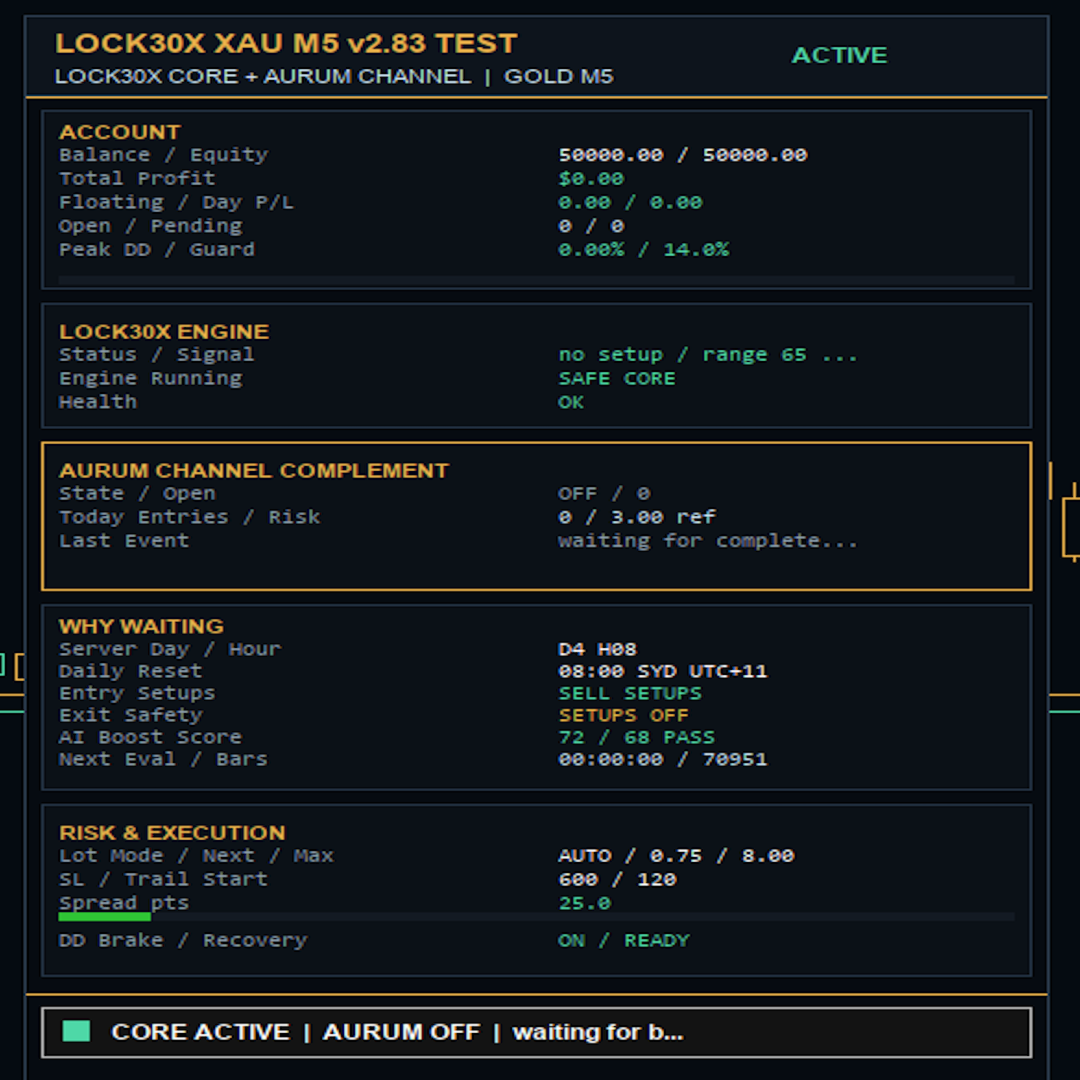
The integrated dashboard uses a dark navy and gold theme with four engine rows and colour-coded results.
It displays account balance and equity, EA results from available trade history, floating profit or loss, positions, pending orders, spread and per-engine results.
The panel also identifies the chart and Core timeframes, operating profile, sizing status, H1 filter state and drawdown-protection state.
Account drawdown is observed from attachment or visual-test start. EA history figures and exit-deal counts reflect the available account history and the enabled engines’ trade ownership.
Getting started
-
Install or update the EA in MetaTrader 5.
-
For the full gold profile, open the broker’s USD-quoted gold symbol and select an M5 chart.
-
Load the supplied default inputs. The Core Signal Timeframe should remain H1 for the default configuration.
-
Review the engine switches, automatic sizing, protection settings and broker-time mapping.
-
Backtest the exact version and settings using the intended broker’s data, then evaluate the configuration on a demo account before live use.
Strategy schedules use a UTC reference clock with configurable conversion to broker time. Confirm that the selected mapping matches the broker’s historical and current server-time convention, including daylight-saving changes.
Loading an older setfile can overwrite the current defaults. Review the resulting inputs and dashboard after any preset or version change.
Risk notice
Automated trading can result in losses. Gold, Forex and CFD prices can move rapidly, and execution can be affected by gaps, slippage, spread changes and liquidity.
Stop-loss and drawdown controls cannot guarantee a maximum realised loss. Historical results and backtests do not guarantee future performance.
Results can vary with broker data, contract specifications, leverage, trading costs, execution and input settings.
Support
For installation or technical support, contact ExpertCodeFX through the product’s Comments tab or the MQL5 messaging system.
Include the EA version, broker, symbol, account mode, leverage, relevant inputs and any messages from the Experts or Journal tabs. Never send passwords or account-access credentials.





























Good Robot