Quattro Grid MT5

Quattro Grid MT5 is a versatile trading system designed for the full or partial automation of various grid-based trading strategies (for hedging accounts). Additionally, this Expert Advisor can be viewed as a universal strategy builder, offering capabilities that go beyond simple grid trading. If you take the time to master its functionality, you can create more complex and customized systems. In other words, the strategy you implement does not necessarily have to be grid-oriented or fully automated.

The Expert Advisor can trade on any timeframe, on any currency pair, on several currency pairs, on any number of signs. It does not interfere with manual trading, trading of other Expert Advisors, or the operation of any indicators.

Allows you to adjust your settings on the fly, by default it works only with your own positions and orders, but with certain settings it can interpose not only with manual trading, but also with the trading of other advisors. It has a powerful information system with which it is possible to control the overall trading situation for the entire account.

Brief description of the main features of Quattro Grid MT5:

Deploy and support grids with a wide variety of settings

4 types of grids can be supported simultaneously:

  • BuyUp - a grid of pending orders of the BUY type, which unfolds UP from the initial price
  • BuyDown - a grid of pending orders of the BUY type, which unfolds DOWN from the initial price
  • SellUp - a grid of pending orders of the SELL type, which unfolds UP from the initial price
  • SellDown - a grid of pending orders of the SELL type, which unfolds DOWN from the initial price

Each grid has its own initial price. Initial prices can be set manually or generated automatically using several different algorithms. All grids can work completely independently of each other, and for each of them there is a separate block of settings, the principle of which is absolutely identical. 

Basic grid settings include:
  • Grid step size 
  • Take-Profit size for each grid order or position
  • Stop-Loss size for each grid order or position
  • Lot size for each grid order or position (supports various types of coefficients)
Types of coefficients supported: multiplication, division, addition, subtraction


Reopening closing positions
Automatic re-opening of closing grid positions. That is, if some market position is closed by take profit, stop loss or manually, a new pending order with the same settings will be immediately created in its place... and technically, such a grid can work indefinitely. At the same time, this functionality is optional and can be easily disabled in the settings.

A grid of pending orders allows you to open market positions as quickly as possible, and this is done even when the terminal is turned off. Moreover, after turning on the terminal, the adviser quickly regains control over the situation, issuing a report on the events that occurred.


Trading with Time Tracking
Two time range control modes are supported. Trading can be allowed either only within a given range (classic option), or outside a given range (if you need to block trading only for some time). Moreover, if you use several charts simultaneously for one currency instrument, you can set up scheduled trading in a variety of combinations. To do this, on each such chart, for each instance of the advisor, you must use different magic numbers (in addition to other different settings).


Trading with Profit and Loss tracking
This mode allows you to finalize a trade (any trade) upon reaching a specified level of profit or loss. The upper level is interpreted as take profit, the lower level as stop loss. At the same time, the use of at least one of these levels in this trading mode is mandatory! The values for them are set in the deposit currency (that is, taking into account the size of the lots), and profit is calculated taking into account positions that have already been closed since the start of trading (not only for existing positions).

After reaching any of the specified boundaries, the advisor stops auto-updating its grid levels. Mass closing of market positions or deletion of pending orders in a variety of combinations can also be carried out. To restart this mode, just turn it off and on again. 

                 
Trading within a given price range
This mode allows you to start and conduct trading within a set price range.

The following features are supported:
  • Trading only within a given price range
  • Placing a grid of pending orders when approaching a given price (or 1 order)
  • Trailing stop of specified price limits
  • Closing positions and deleting orders of a given type when going beyond the specified price limits
  • The ability to use this type of trading simultaneously with any other types of trading that the advisor supports. 

Phantom Mode 
This mode allows you to bypass the broker's limitation on the number of pending orders and use their absolute minimum to deploy and support grids with any number of grid levels and with any settings.

The general principle of this mode is that only closest pending orders  to the current market prices are placed (above and below) and this continues as long as the market prices are within the grid. At the same time, the entire mesh can be visualized at any time using special lighting.

In a normal situation, to fully support all types of grids at the same time, no more than 4 pending orders will be required, but it should be taken into account that we are talking about pending orders. The phantom mode does not control the current market positions, and they remain under the control of the trader and other settings of the advisor.

It is important that this mode can work correctly even with an uneven distribution of grid levels (when the step factor is used).


Binding initial prices to current market levels

For each grid, in the settings you can set the range for binding the initial grid price to current market levels. That is, as soon as the market price moves away from the initial price by a given distance, and this distance will accommodate an entire grid step (or several steps), the initial price will automatically move as close as possible to the current market price.

Further, the rest of the grid will be rebuilt after it - unnecessary pending orders will be deleted, and market positions that fall out of it will be considered obsolete. In this case, it is important to consider that without changes, the grid will only work if the step factor is not used. Otherwise, it is better to use phantom mode.

Also, using this functionality, you can implement some non-grid strategies. For example, if you specify only 1 grid order in the grid settings, then when moving the initial price, the advisor will place a new pending order each time and delete the old one (except for market positions). This is exactly how, for example, you can organize a trailing-stop of a single pending order (by grid steps) until it turns into a market position.

Other strategies are also possible...

General additional information
  • The advisor can be launched simultaneously on any currency pairs or even on the same one with different settings. Each order or position is marked with an individual comment, which contains both the opening price and the name of its instrument. You can also add a trader’s personal mark to the comment.

  • The advisor is not afraid of any interruptions in his work. With each new launch and unchanged settings, it picks up all its orders and issues a report on what happened to them during its inactivity. Alpha Grid also has a separate system of various alerts (text and graphic) that help you quickly understand what exactly is happening with your trading at any given time. 

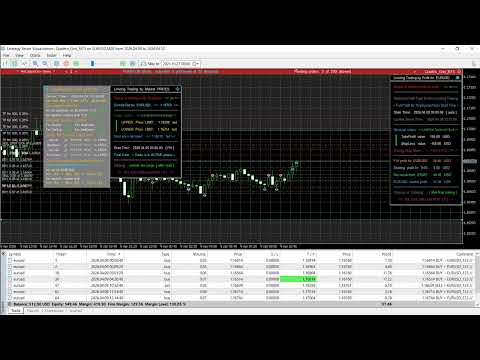
  • The informational (and some trading) capabilities of the advisor can be used during regular manual trading. At the same time, most information panels, buttons and notifications can be freely moved around the chart, some of them can be minimized and scaled. The color settings of the panels can be used for quick visual identification of a working advisor when used simultaneously on different charts.
Altri dall’autore
Master Grid MT5
Aliaksandr Charkes
4.5 (8)
Master Grid   MT5 is a multifunctional grid Expert Advisor designed to fully or partially automate various ideas related to grid trading (on a hedging account ). The Expert Advisor can trade on any timeframe, on any currency pair, on several currency pairs, on any number of signs. It does not interfere with manual trading, trading of other Expert Advisors, or the operation of any indicators. It allows you to adjust your settings on the fly, works only with your own positions and orders, and fo

Magic Grid MT5
Aliaksandr Charkes
4.14 (7)
Magic Grid MT5 is a non-indicator Expert Advisor using a grid strategy (on a hedging account). The strategy is based on automatic reopening of grid pending orders, after closing their market positions (by Take-Profit, Stop-Loss or manually). Pending orders are placed with a specified step from the initial prices, which can be entered manually or generated automatically (once at the beginning of the trade).   The robot can trade on any timeframe, on any currency pair, on several currency pairs,
User Grid MT5
Aliaksandr Charkes
User Grid   MT5  is a multifunctional grid Expert Advisor designed to fully or partially automate various ideas related to grid trading (on a hedging account) . The Expert Advisor can trade on any timeframe, on any currency pair, on several currency pairs, on any number of signs. It does not interfere with manual trading, trading of other Expert Advisors, or the operation of any indicators. It allows you to adjust your settings on the fly, works only with your own positions and orders. It has a
Magic Grid
Aliaksandr Charkes
4.54 (28)
Magic Grid is an indicator-free advisor that uses a grid strategy. The strategy is based on automatic reopening of grid pending orders, after closing their market positions (by Take-Profit, Stop-Loss or manually). Pending orders are placed with a specified step from the initial prices, which can be entered manually or generated automatically ( one time at the beginning of the trade ). The robot can trade on any time frame, on any currency pair, on several currency pairs, and on any number of di
FREE
Elastic Grid
Aliaksandr Charkes
4.86 (7)
Elastic Grid MT4 is a multi-functional grid Expert Advisor, designed for full or partial automation of various ideas related to grid trading. The EA trades on any timeframe and symbol. It can also trade several symbols with any amount of decimal places. It does not interfere with manual trading and other EAs' operation or any indicators. It allows to adjust its settings on the fly, works only with its own orders displaying all necessary data on them when needed, and for some situations it can be
User Grid MT4
Aliaksandr Charkes
User Grid   MT4  is a multifunctional grid Expert Advisor designed to fully or partially automate various ideas related to grid trading. The Expert Advisor can trade on any timeframe, on any currency pair, on several currency pairs, on any number of signs. It does not interfere with manual trading, trading of other Expert Advisors, or the operation of any indicators. It allows you to adjust your settings on the fly, works only with your own positions and orders. It has a clear information syste
Elastic Grid MT5
Aliaksandr Charkes
5 (3)
Elastic Grid MT5 is a multifunctional grid Expert Advisor designed to fully or partially automate various ideas related to grid trading (on a hedging account) . The Expert Advisor can trade on any timeframe, on any currency pair, on several currency pairs, on any number of signs. It does not interfere with manual trading, trading of other Expert Advisors, or the operation of any indicators. It allows you to adjust your settings on the fly, works only with your own positions and orders, and for
Alpha Grid MT5
Aliaksandr Charkes
3.67 (3)
Alpha Grid MT5  is a versatile trading system designed for the full or partial automation of various grid-based trading strategies (for hedging accounts). Additionally, this Expert Advisor can be viewed as a universal strategy builder, offering capabilities that go beyond simple grid trading. If you take the time to master its functionality, you can create more complex and customized systems. In other words, the strategy you implement does not necessarily have to be grid-oriented or fully automa
Filtro:
Nessuna recensione
Rispondi alla recensione