Institutional Exec Suite

Stop executing orders like a retail trader.

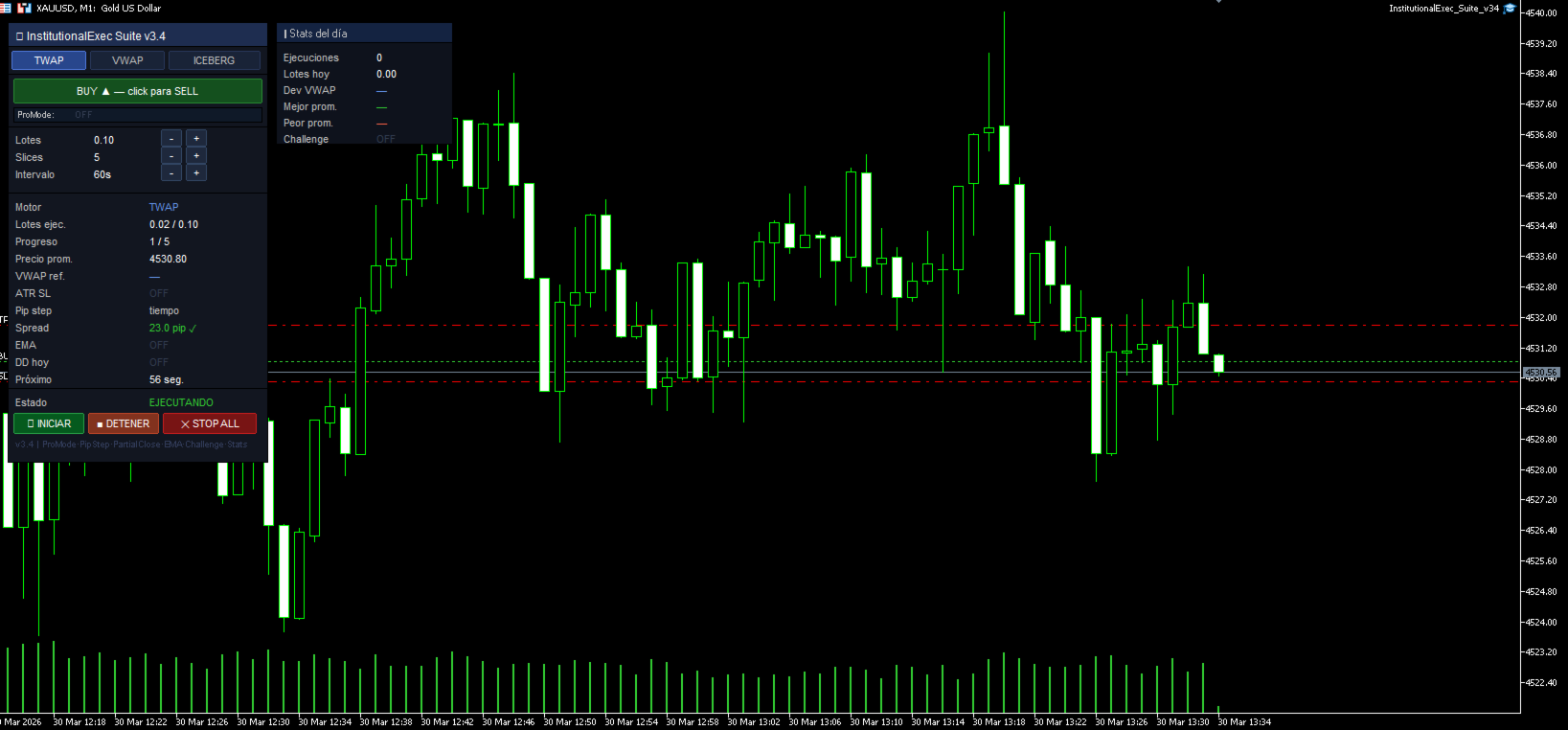
Institutional desks use TWAP, VWAP, and Iceberg algorithms to fill large orders without moving the market against them. InstitutionalExec Suite brings those same tools directly to your MT5 chart — in one unified panel, with one click.

═══ THREE PROFESSIONAL EXECUTION ENGINES ═══

▸ TWAP — Time / Price Weighted Average Splits your total order into equal parts distributed over time OR over price movement (pip-step mode).

Example — TWAP by time: 5 slices of 0.20 lots executed every 60 seconds → average entry price across the full period.

Example — TWAP by pips: Next slice fires every 10 pip move → entries distributed across price levels, not clock ticks.

▸ VWAP — Volume Weighted Average Price Observes tick volume during each interval and executes proportionally. More volume = more lots. Tracks the live VWAP of the session and shows your deviation at completion.

▸ ICEBERG — Hidden Order Execution Shows only a fraction of your real order to the market. When the visible chunk fills, the next launches automatically — with optional ±15% randomization to avoid detection by institutional algorithms.

Example: 5.0 lots total | 20% visible → market sees 1.0 lot → fills → 30s → 0.92 lots (randomized) → fills → your real size stays hidden throughout.

═══ PRO MODE — ONE SWITCH, FULL SYSTEM ═══

Set InpProMode = true and the EA becomes a fully integrated risk system:

✔ SL calculated automatically from ATR × multiplier ✔ Lot size = Risk% of balance ÷ ATR stop loss ✔ Slices auto-calculated respecting broker minimum lot ✔ Pip step = ATR × factor (adapts to current volatility) ✔ Break-even activates at ATR × 0.5 profit ✔ Trailing starts after break-even at ATR × 0.3 distance

Example with ProMode ON: Balance $10,000 | Risk 1% = $100 to risk ATR(14) = 120 pips → SL = 180 pips Lot size = $100 ÷ ($10 × 180) = 0.05 lots — calculated automatically. One parameter controls the entire system. No manual math needed.

═══ CHALLENGE MODE — PROP FIRM READY ═══

Select your prop firm profile and the EA configures itself:

FTMO: DD diario 5% | DD total 10% | Weekend block | Spread filter MyForexFunds: DD diario 4% | DD total 8% | Weekend block True Forex Funds: DD diario 5% | DD total 10% | Weekend block

These are not guidelines — the EA enforces them automatically. When the daily DD limit is hit, execution stops and positions close. No manual intervention needed.

═══ ALL FEATURES ═══

EXECUTION: ✔ TWAP by time — equal slices at fixed intervals ✔ TWAP by pips — slices triggered by price movement with fallback timer ✔ VWAP — volume-proportional execution with live VWAP tracking ✔ Iceberg — hidden orders with optional size randomization ✔ Partial close (TWAP exit) — exits in slices, same as entry

RISK MANAGEMENT: ✔ ProMode — ATR-based full system (SL + lots + pips + BE + trailing) ✔ ATR dynamic sizing — lot size auto-adjusts to current volatility ✔ Break-even automatic — moves SL to avg entry when profit target hit ✔ Trailing stop — on the full basket simultaneously ✔ Daily drawdown limit — auto-pause + close-all when limit hit ✔ Max simultaneous positions — prevents overexposure ✔ Emergency Stop — closes all positions in one click

FILTERS: ✔ Session filter — London / New York / Asia / Overlap / All ✔ EMA trend filter — blocks entries against the trend automatically ✔ Spread filter — no execution above configurable threshold ✔ Weekend block — enforces prop firm no-weekend rules

PANEL & UX: ✔ BUY/SELL toggle directly on chart — no properties window needed ✔ Lots / slices / interval editable from panel buttons ✔ Tabs switch engine (TWAP / VWAP / ICEBERG) in real-time ✔ Stats dashboard — daily executions, lots, best/worst VWAP deviation ✔ Alerts — sound / push notification / popup on completion ✔ CSV log — full execution record per slice (ATR, session, spread, price)

═══ RECOMMENDED SETUP ═══

Beginners — Manual mode:

  1. Set InpProMode = false
  2. Choose direction and total lots on the panel
  3. Select TWAP, 5 slices, 60 second interval
  4. Press INICIAR — the EA handles the rest

Prop firm traders — ProMode + Challenge:

  1. Set InpProMode = true | InpProRiskPct = 1.0
  2. Set InpChallengeMode = CHALLENGE_FTMO (or your firm)
  3. Set InpNoWeekend = true
  4. Press INICIAR — everything is automatic

═══ IMPORTANT ═══

This is an execution tool, not a signal generator. It does not decide when to trade — it executes YOUR decision more efficiently. You bring the analysis, the EA brings the execution.

No martingale. No grid. No averaging. No hidden logic.


InstitutionalExec Suite v3.4 — Professional execution for serious traders. No martingale. No grid. No averaging. Pure execution technology.
Altri dall’autore
Hotkey Trader
Juan Eduardo Verdala
Trading at the speed of 3 keystrokes Buy, sell and close trades in milliseconds. No clicks, no menus, no hesitation. Just press a key and the EA does the rest. 100% free — no subscription, no restrictions B Buy Market Instant buy at current market price S Sell Market Instant sell at current market price C Close All Closes every open position at once Built for traders who move fast and stay disciplined Scalpers, day traders and intraday operators who need to execute without friction. No bureaucra
FREE
Volume Profile Delta
Juan Eduardo Verdala
Stop guessing based on price alone. Visualize true institutional intent by measuring buying and selling pressure in real time. Here’s what you get with Volume Profile Delta: Per-Candle Volume Confirmation: Instantly analyze the volume Delta (Buy vs. Sell) on every single candle to validate trends. Identify Exhaustion and Strength: Detect when a trend is losing steam or when buying/selling power is building up for an imminent move. Clear Visual Signals: An intuitive lower histogram chart for q
FREE
HotKey Trader Pro
Juan Eduardo Verdala
Attention Professional Traders! Automate Your Success with Hot Trader Pro! Tired of struggling with risk management and emotional greed? We have the ultimate solution! Introducing the Hot Trader Pro EA : ️ Secure Your Profits! Our dynamic Trailing Stop and intelligent Auto-Lotting ensure you never walk away empty-handed. Your profit is protected! ️ Automate Your Trading! Precise Auto-Lotting and Trade Management free you from the stress of emotional decision-making. Let the EA do the he
FREE
Rsi Zeus
Juan Eduardo Verdala
Trading isn’t luck. It’s information. It’s precision. It’s power. If you’re using the same free, obsolete indicators as 95% of traders, you’re likely getting the same results: losses and frustration. A standard RSI tells you when something is "expensive" or "cheap," but it doesn’t tell you the exact moment to enter. This isn’t just another indicator. It’s a premium system designed to: - ️ Identify Real Market Strength: Don’t get trapped in false breakouts. - Entry Points with Olympic Precis
FREE
AntaresX Volume Profile
Juan Eduardo Verdala
Do you know the exact probability that price will reverse at each key market level? AntaresX Volume Profile calculates the POC, VAH and VAL for any period and shows you in real time the statistical percentage of price reversal or continuation from each level — directly on your chart. WHAT IS VOLUME PROFILE AND WHY IT MATTERS Volume Profile shows where the most volume was traded in a given period. The three key levels are: POC — Point of Control The price where the highest volume was tra
FREE
CandleTimer MultiTF
Juan Eduardo Verdala
How much time is left before the H1 candle closes — without leaving your M5 chart? CandleTimer MultiTF shows the remaining time of the current candle AND all timeframes from M1 to H4 — in one panel, in real time, updated every 500 milliseconds. WHAT IT SHOWS A compact panel in the corner of your chart with two sections: Main timer — current chart timeframe Large and visible. If you're on M15, it shows how long until that M15 candle closes. Multiframe panel — all timeframes simultaneously
FREE
Is your regression channel using the right length — or are you just guessing? Linear Regression Channel v4.0 automatically finds the optimal channel length using the R² coefficient — and draws the full history of previous channels so you can see how the price structure evolved over time. Auto Length by Maximum R² Instead of manually setting how many bars to use, the indicator tests all lengths between a configurable minimum and maximum, calculates the R² for each, and selects the one that best
FREE
Filtro:
Nessuna recensione
Rispondi alla recensione