TradeShield Auto Stoploss and Breakeven
- Utilità
- Versione: 1.0
- Attivazioni: 10

🛡️ Auto SL · Break-Even · Session TP Manager
Automatically sets Stop Loss, moves SL to Break-Even when profit is reached, and calculates Take Profit by R:R ratio based on trading session. You will never forget to set SL again.
⚙️ Core Functions
| 🔒 Stop Loss | Automatically applies a fixed SL to every new manual trade and pending order. Once set — never miss protection again. |
| ⚡ Break-Even | When price moves a set number of pips in profit, SL moves to entry + offset. Once triggered — locked permanently. Trade becomes risk-free. |
| 📊 Session TP (R:R) | Sets TP as a multiple of SL distance. EA detects Asia or EU/US session and applies different R:R ratios. Example: Asia = 3R · EU/US = 5R |
🎛️ Quick Panel
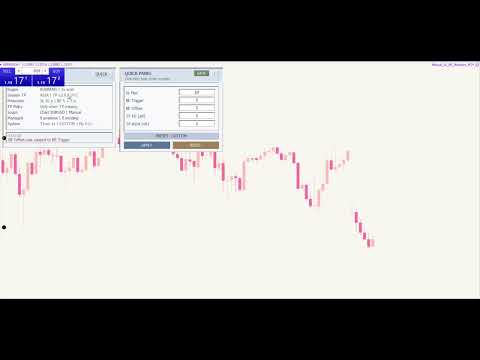
On-chart panel to adjust all parameters in real-time without recompiling:
- SL distance (pips)
- BE trigger distance (pips)
- BE offset (pips)
- TP multiplier EU/US (xR)
- TP multiplier Asia (xR)
Click any field → type new value → press Enter to apply instantly.
🎯 Risk Presets
5 built-in profiles for different trading styles. Cycle through with the PRESET button or apply custom values manually.
| Preset | Style |
| 🟢 Beginner Safe | Conservative protection, tight SL, low R:R |
| ⚡ Scalp | Tight stops for quick entries |
| 📅 Intraday | Standard day trading profile |
| 🌙 Swing | Wide stops for position trades |
| ⭐ My Preset | Save your custom values — recall with one click |
🌏 Session Time Zones
Supports 12 timezone presets with automatic DST calculation. No manual adjustment needed.
Vietnam · Thailand · Singapore · Japan · UK · Germany · US Eastern · US Central · US Pacific · UAE · Australia Sydney · UTC
🔧 Management Options
- Manual Only mode — manages only hand-placed trades (magic = 0), does not interfere with other EAs
- All Magic mode — manages every order on the chart
- Respect Manual TP — if you set TP yourself, EA will not override it
- Force Reset SL — continuously enforces fixed SL until Break-Even triggers
- Lock BE Once Triggered — once SL moves to BE, it stays permanently
📋 Dashboard
On-chart information panel shows:
- Engine status · Current session · Active R:R
- Protection levels (SL + BE) · TP policy
- Number of managed positions and pending orders
- Active preset name
Collapsible Quick Panel saves chart space when not needed.
✅ Installation
- Drag the EA onto your chart
- Select your timezone preset
- Choose a risk preset or enter custom values in the Quick Panel
- EA will automatically manage SL, BE, and TP for all new manual trades
💬 Support: If you have any questions, feel free to message me directly.