Mt5 multiorders panel
- Utilità
- Versione: 5.1
- Aggiornato: 13 marzo 2026
- Attivazioni: 5

EA Name: Advanced Manual Trading Panel with Martingale & Risk Management
Platform: MetaTrader 5
Description
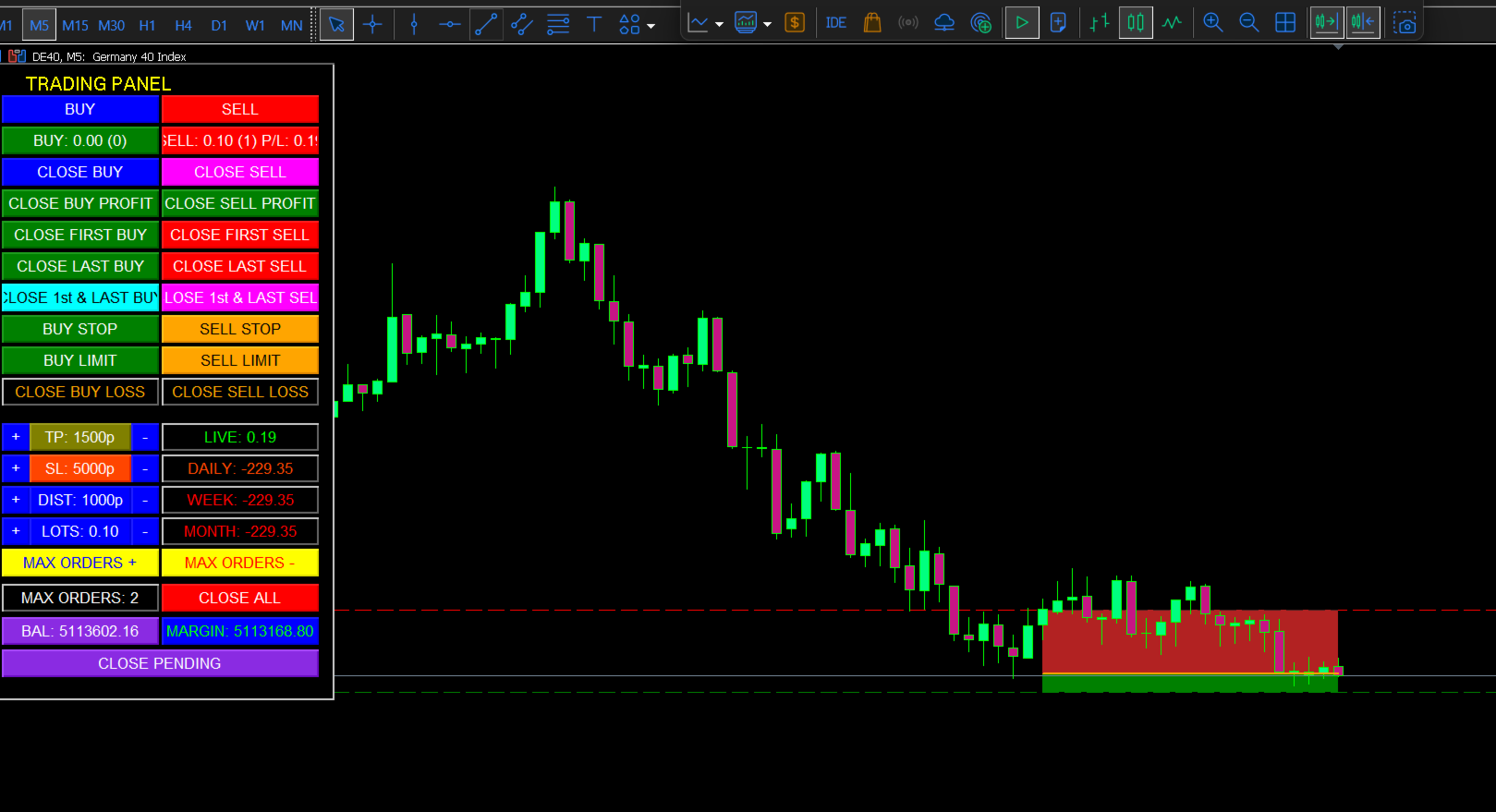
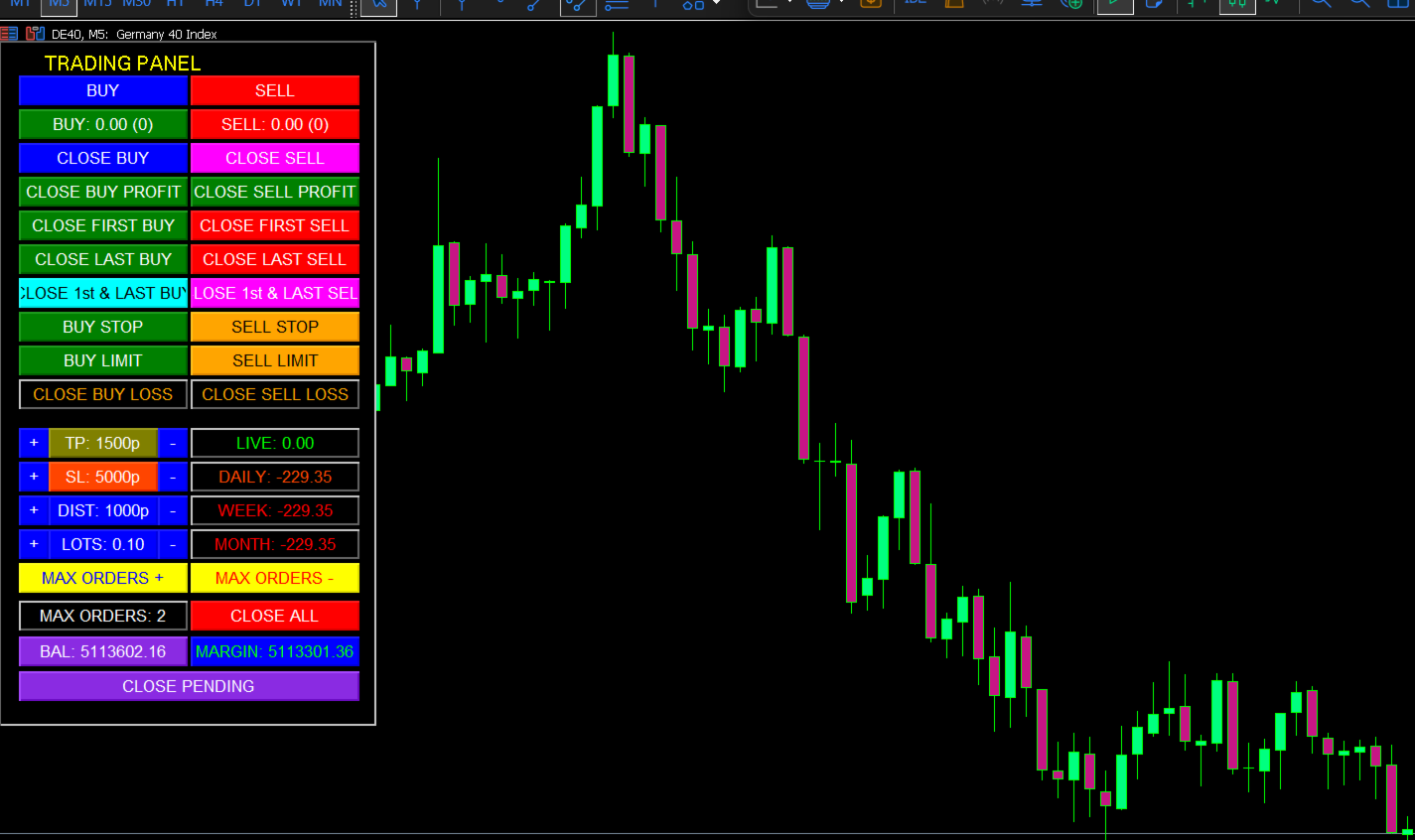
The Advanced Manual Trading Panel is a powerful and intuitive Expert Advisor designed for traders who want full control over their trading operations combined with automated risk management features. Whether you are a scalper, day trader, or swing trader, this panel provides an all-in-one solution to manage your positions efficiently directly from the chart.
With a clean and compact graphical interface, you can execute trades, adjust parameters, close orders selectively, and monitor performance—all with a single click. The panel also includes advanced features like Martingale strategy, dynamic Take Profit, Trailing Stop, and Breakeven to help you optimize your trading results.
Key Features
✅ Full Manual Control
-
Open BUY and SELL market orders instantly.
-
Place BUY STOP, BUY LIMIT, SELL STOP, and SELL LIMIT pending orders.
-
Close all positions or selectively close BUY/SELL orders, first/last orders, profitable/losing orders.
-
Close all pending orders with one button.
✅ Martingale System
-
Automatically opens new positions when the market moves against you, using a customizable lot multiplier and distance between orders.
-
Set the maximum number of orders to control risk.
-
Dynamic Take Profit decreases with each new order (configurable) to secure profits earlier.
✅ Advanced Risk Management
-
Trailing Stop with adjustable distance, step, and offset.
-
Breakeven feature: automatically moves Stop Loss to breakeven + offset once a predefined profit level is reached.
-
Stop Loss and Take Profit can be adjusted on the fly via the panel.
-
Lot size can be increased/decreased directly from the panel.
✅ Performance Monitoring
-
Real-time display of Live Profit for open positions.
-
Daily, Weekly, and Monthly profit history.
-
Account Balance and Free Margin always visible.
-
Color-coded buttons (green for profit, red for loss) for quick status recognition.
✅ Fully Customizable
-
All parameters (lot size, SL, TP, martingale distance, max orders, etc.) can be changed via the panel or input settings.
-
Option to enable/disable only BUY or only SELL trades globally.
-
Magic number support for multi-EA compatibility.
✅ User-Friendly Interface
-
Compact panel (320x580) that fits neatly on any chart.
-
Buttons are grouped logically: BUY section (left), SELL section (right), settings and performance at the bottom.
-
No external dependencies—pure MQL5 code.
How It Works
-
Attach the EA to any chart (works on any symbol and timeframe).
-
The trading panel appears on the top-left corner of the chart.
-
Use the buttons to:
-
Open market or pending orders.
-
Close specific positions (all BUY, all SELL, first/last, profitable/loss).
-
Adjust lot size, stop loss, take profit, martingale distance, and max orders on the fly.
-
-
Automated features (Martingale, Trailing Stop, Breakeven) run in the background based on your settings.
-
Monitor your live and historical performance directly on the panel.
Why Choose This EA?
-
Versatility: Perfect for both discretionary traders who want manual control and systematic traders who want automated risk management.
-
Risk Control: Martingale can be dangerous if not managed—our panel lets you set strict limits (max orders, decreasing TP) to keep risk in check.
-
Time-Saving: Execute complex order management tasks (like closing only profitable BUY orders) with a single click.
-
Transparency: See all your open positions, their average price, and total lots at a glance.
-
No Black Box: Full source code is available (if purchased), so you know exactly what the EA does.
Input Parameters (Customizable)
-
Global EA Enabled – Master switch.
-
Only Buy / Only Sell – Restrict trading direction.
-
Magic Number – Unique identifier for this EA.
-
Lot Size – Initial lot size for new orders.
-
Stop Loss / Take Profit – In points.
-
Max Orders – Maximum number of martingale levels.
-
Martingale Distance – Gap between orders (in points).
-
Take Profit Decrement – How much TP reduces per new order.
-
Min Take Profit – Lower limit for dynamic TP.
-
Lot Multiplier – Factor for increasing lot size in martingale.
-
Breakeven Start / Offset – Profit level to trigger breakeven and extra offset.
-
Trailing Stop Distance / Step / Offset – Parameters for trailing stop.
Requirements
-
MetaTrader 5 platform (build 2000 or newer).
-
Any trading account (hedging or netting).
-
Basic understanding of trading and risk management.
Take Control of Your Trading Today!
The Advanced Manual Trading Panel is more than just an EA—it’s your personal trading cockpit. Whether you want to execute precise manual entries or let the martingale system work for you, this panel provides the tools you need in a clean, efficient interface.
👉 Add to cart now and experience a new level of trading convenience and control!
Note: Trading forex and CFDs carries a high level of risk. Always test on a demo account first and use proper risk management.