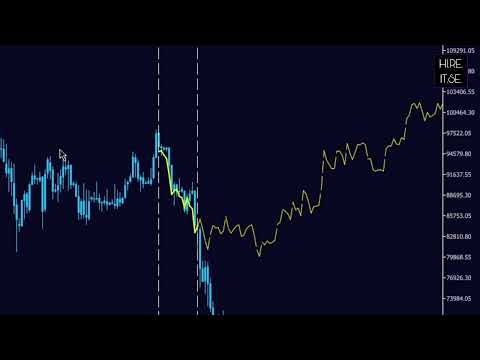
The Historical Similarity Matcher is a technical analysis indicator for MetaTrader 5. It scans historical price data to find segments that show statistical similarity to a user-selected reference period on the chart. When matches are found, the indicator displays the historical patterns and draws projections of potential future price movement based on how those historical segments continued.
This indicator is provided for educational and analytical purposes only. It does not constitute financial, investment, or trading advice. There are no guarantees of results or profitability. Past performance is not indicative of future results. Trading involves substantial risk of loss. Users are solely responsible for their own trading decisions and outcomes.
---------------------------------------------------------------------------------------------------------------------------------------------------
Features
- Identifies historical price segments with correlation to the selected reference period
- Supports direct and inverse pattern matching
- Displays multiple matching historical patterns (up to a configurable number)
- Draws individual projection lines for each match based on historical continuations
- Optional OpenCL support for faster calculation on compatible hardware (falls back to CPU if not available)
- Works on any timeframe and symbol
- Allows scanning on a different timeframe than the current chart
- Multi-Asset Mode: scans all symbols visible in the Market Watch window simultaneously, ranking matches across multiple instruments
- Provides buttons on the chart for starting the scan and exporting results
- Individual ON/OFF toggle buttons for each match, allowing selective display or hiding of specific projection lines and historical overlays
- HIDE ALL / SHOW ALL button for toggling all matches at once with a single click
- Real-time scan progress bar displayed on the SCAN button and chart comment, showing percentage completion during analysis
- Exports screenshots of each match and a CSV file with match details
---------------------------------------------------------------------------------------------------------------------------------------------------
How It Works
1. The user selects a reference period by placing two vertical lines on the chart or by setting dates in the inputs.
2. The "SCAN" button starts the analysis.
3. The indicator compares the reference period to historical segments using Pearson correlation on logarithmic returns.
4. In Multi-Asset Mode, the scan runs across all symbols in the Market Watch in addition to the current chart symbol.
5. Matches are ranked by correlation strength and filtered according to user settings.
6. For each displayed match:
- The historical pattern is overlaid on the reference period (yellow lines).
- A projection line is drawn forward from the current bar, scaled to current price levels.
7. Match information (date, asset symbol, and correlation) is shown on the chart.
8. During the scan, a live progress bar updates on the SCAN button (e.g. "SCAN 45%") and in the chart comment area.
---------------------------------------------------------------------------------------------------------------------------------------------------
- Multi-Timeframe
- Scan_Timeframe: Timeframe used for scanning (default: current chart timeframe)
- Visual Settings
- start_line_color: Color of the start vertical line
- end_line_color: Color of the end vertical line
---------------------------------------------------------------------------------------------------------------------------------------------------
How to Use
1. Attach the indicator to a chart.
2. Set the reference period using the vertical lines or date inputs.
3. (Optional) Enable Multi-Asset Mode to scan across all symbols in the Market Watch.
4. Click the "SCAN" button. A live progress bar will appear on the button and in the chart comment during the scan.
5. Review the displayed matches and projections.
6. Use the individual ON/OFF buttons next to each match to show or hide specific projections.
7. Use the HIDE ALL / SHOW ALL button to toggle all matches at once.
8. (Optional) Click the "CAPTURE" button to save screenshots and a CSV file to the MQL5/Files folder. When Multi-Asset Mode is active, the matched asset name is included in the filename and CSV.
---------------------------------------------------------------------------------------------------------------------------------------------------
Interpretation
Correlation values range from -1 to +1 (absolute value indicates strength):
- 0.9–1.0: Very strong similarity
- 0.7–0.9: Strong similarity
- 0.5–0.7: Moderate similarity
- 0.3–0.5: Weak similarity
- Negative values indicate inverse movement
---------------------------------------------------------------------------------------------------------------------------------------------------
Limitations
- Historical similarity does not predict future price movement.
- Markets change over time; past patterns may not repeat under current conditions.
- Unexpected events can invalidate any analysis.
- The indicator should be used together with other forms of analysis and proper risk management.
---------------------------------------------------------------------------------------------------------------------------------------------------
Technical Information
- Compatibility: MetaTrader 5 (build 3661 and later)
- Supported instruments: Any symbol
- Supported timeframes: All standard timeframe
- Version: 5.4
- Author: GEORGE
---------------------------------------------------------------------------------------------------------------------------------------------------
This indicator is intended only for personal analytical and educational use. Trading carries significant risk. Users must conduct their own research and are fully responsible for all trading decisions and outcomes.
© 2026 GEORGE. All rights reserved. For personal analytical and educational use only.