Supply And Demand Entry Signals
- Indicatori
-
Tochukwu Joseph Unaegbu
 I'm Tochukwu Unaegbu, a forex trader with over 7 years of experience in the markets. My approach centers on price action and smart money concepts, reading market structure, value, and institutional footprints (order blocks, fair value gaps, liquidity) rather than relying on lagging indicators or
 - Versione: 1.0
- Attivazioni: 20
Installation (5 Minutes)
Step 1: Install the Indicator
- Open MetaTrader 5
- Click File → Open Data Folder
- Navigate to MQL5 → Indicators
- Copy SupplyDemand_CleanSignals.mq5 into this folder
- Restart MT5 or press Refresh in Navigator
Step 2: Add to Chart
- Open your desired chart (any symbol, any timeframe)
- In Navigator panel, find Indicators → Custom
- Double-click SupplyDemand_CleanSignals
- Click OK (default settings work great)
Step 3: You're Ready!
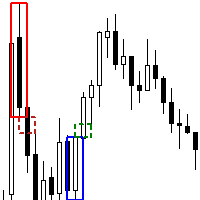
- Blue rectangles = Demand zones (potential BUY areas)
- Red rectangles = Supply zones (potential SELL areas)
- Wait for signal arrows to appear
📊 Reading Signals (2 Minutes)
BUY Signal
What You See:
- ↑ Green arrow below a candle
- Blue demand zone rectangle
- Green solid line (Entry price)
- Red dashed line (Stop Loss)
- Green dashed line (Take Profit)
What To Do:
- Wait for arrow to appear (appears on closed bar)
- Enter BUY on next candle open
- Set SL at red dashed line
- Set TP at green dashed line
SELL Signal
What You See:
- ↓ Red arrow above a candle
- Red supply zone rectangle
- Red solid line (Entry price)
- Red dashed line (Stop Loss)
- Green dashed line (Take Profit)
What To Do:
- Wait for arrow to appear (appears on closed bar)
- Enter SELL on next candle open
- Set SL at red dashed line
- Set TP at green dashed line
⚡ First Trade Example
Scenario: You see a green BUY arrow on EURUSD H1
Step-by-Step:
- ✅ Arrow appeared → Signal confirmed
- ✅ Check lines:
- Entry: 1.0850 (green line)
- Stop Loss: 1.0820 (red dashed line)
- Take Profit: 1.0895 (green dashed line)
- ✅ Risk calculation:
- Risk: 30 pips (1.0850 - 1.0820)
- Reward: 45 pips (1.0895 - 1.0850)
- RR: 1:1.5 ✓ Good!
- ✅ Open BUY order:
- Entry: Market execution or 1.0850
- SL: 1.0820
- TP: 1.0895
- Lot size: Based on your risk (1-2% of balance)
- ✅ Wait for SL or TP to hit
⚙️ Best Settings for Beginners
Leave everything default EXCEPT:
- AutoCleanup : true (keeps chart clean)
- CleanupAfterBars : 30-50 (removes old lines)
- SendAlerts : true (get notifications)
That's it! The indicator works perfectly with default settings.
💰 Position Sizing (Important!)
Never risk more than 1-2% per trade!
Example with $10,000 account:
- Risk per trade: 2% = $200
- Signal shows 30 pip stop loss
- Calculate lot size: $200 ÷ (30 pips × $10/pip) = 0.66 lots
Use a position size calculator or MT5 built-in calculator
✅ Pre-Trade Checklist (30 Seconds)
Before entering ANY trade, check:
- ☑️ Signal arrow present and confirmed
- ☑️ Candle is CLOSED (not forming)
- ☑️ Stop loss distance is reasonable
- ☑️ Risk-reward ratio is at least 1:1.5
- ☑️ Not during high-impact news (check economic calendar)
- ☑️ Higher timeframe trend (optional but recommended)
If ALL boxes checked → Trade is valid ✓
🎯 Trading Strategy (Simple)
Strategy: "Wait & Execute"
Rules:
- Wait for arrow signal
- Verify checklist (above)
- Enter on next candle open
- Set SL and TP as shown
- Hold until SL or TP hit
- NO adjustments, NO emotions
- Risk 1-2% per trade
That's it! Simple and effective.
📈 Recommended Timeframes
Best Results:
- H1 (1 Hour) ⭐⭐⭐⭐⭐ Best
- H4 (4 Hour) ⭐⭐⭐⭐⭐ Best
- M30 (30 Min) ⭐⭐⭐⭐ Good
- D1 (Daily) ⭐⭐⭐⭐ Good
Avoid (Too Noisy):
- M1-M5 (Too many false signals)
🚫 Common Mistakes to AVOID
❌ Mistake 1: Trading before arrow appears ✅ Fix: Wait for arrow on CLOSED bar
❌ Mistake 2: Ignoring stop loss ✅ Fix: ALWAYS use the SL shown
❌ Mistake 3: Moving SL wider when losing ✅ Fix: Accept losses as part of trading
❌ Mistake 4: Taking every signal ✅ Fix: Use pre-trade checklist
❌ Mistake 5: Risking too much per trade ✅ Fix: Never exceed 2% risk
❌ Mistake 6: Trading during news ✅ Fix: Check economic calendar
🔧 Troubleshooting
Problem: No zones appearing Solution:
- Wait 20-50 bars for formation
- Check BaseBarsMax setting (increase to 15)
- Verify ATR_Period is 14
Problem: Too many zones Solution:
- Increase RangeATRFactor to 2.0
- Decrease MaxZones to 10
Problem: No signals appearing Solution:
- Verify EnableSignals is true
- Wait for price to touch zones
- Check higher timeframe for trend
Problem: Arrows disappearing Solution:
- They DON'T disappear! Indicator never repaints
- Check if AutoCleanup removed lines (arrows stay)
- Refresh chart (F5)
📞 Support & Questions
Before contacting support:
- Check this guide
- Verify all settings
- Test on demo account
- Review the full manual
For support:
- Include screenshot
- Specify symbol and timeframe
- Describe exact issue
- Show your settings
🎓 Next Steps
Week 1: Demo trading only
- Take 10-20 trades
- Track results
- Learn the signals
Week 2: Small live trades
- Start with minimum lots
- Risk 0.5% per trade
- Build confidence
Week 3+: Normal trading
- Increase to 1-2% risk
- Follow strategy strictly
- Track performance
📊 Performance Tracking
Track These Metrics:
- Total trades taken
- Win rate (% winners)
- Average RR ratio
- Largest win/loss
- Profit factor
Goal:
- Win rate: 50-60%
- RR ratio: 1:1.5+
- Profit factor: >1.5
⚠️ Final Reminders
✅ DO:
- Test on demo first
- Use proper risk management
- Follow signals objectively
- Keep a trading journal
- Be patient
❌ DON'T:
- Skip the pre-trade checklist
- Risk more than 2%
- Trade during high-impact news
- Override the indicator
- Expect 100% win rate
🎯 Success Formula
1. Discipline → Follow rules every time 2. Risk Management → Never exceed 2% per trade 3. Patience → Wait for quality setups 4. Consistency → Trade the same way every time 5. Learning → Review and improve
Master these 5 → Consistent profits
You're now ready to trade! Start with demo, stay disciplined, and trust the process.
Good luck and happy trading! 📈
Questions? Review the full manual or contact support. Updates? Free lifetime updates included with purchase. Community? Join our trading community for tips and strategies.