Visual Eagle Indicator
- Indicatori
-
AL MOOSAWI ABDULLAH JAFFER BAQER
 To trade successfully we need to go through the proven path that others had gone and reached!
Here are 17 quotes from such successful investors:
1- Limit your size in any position so that fear does not become the prevailing instinct guiding your judgment.
Joe Vidich - Versione: 1.0
- Attivazioni: 5
Visual Eagle Momentum Indicator
Unlock Market Momentum and Pinpoint High-Probability Trades with Unmatched Clarity
Are you tired of cluttered charts and lagging indicators that leave you guessing? The Visual Eagle Momentum Indicator is a professionally developed trading tool designed to cut through the noise, providing clear, non-repainting buy and sell signals based on a unique and powerful momentum analysis engine. For just $30, you can equip yourself with an indicator that helps you spot turning points and trend shifts before they become obvious to the crowd.
How It Works: The Logic Behind the Eagle's Vision
The Visual Eagle is not just another simple oscillator. Its strength lies in its sophisticated, multi-step calculation process that intelligently analyzes the market's underlying momentum.
1. Advanced Price Smoothing:
Instead of using raw, erratic price data, the indicator first applies a smoothing algorithm (configurable as EMA, SMA, SMMA, or LWMA) to the typical price. This initial step filters out insignificant market noise, allowing the core engine to focus only on meaningful price movements.
2. Core Momentum Calculation:
The indicator calculates the momentum by measuring the change in the smoothed price over a user-defined period. This gives us the raw directional force of the market.
3. The Two Key Lines:
This is where the Visual Eagle truly sets itself apart. It calculates and plots two distinct lines in a separate window:
-
The Net Momentum Line (Lime/Red): This line represents the pure, cumulative momentum of the market over the analysis period. When it's rising, buying pressure is building; when it's falling, selling pressure is taking over.
-
The Dynamic Volatility Baseline: This second line is a unique calculation that represents the absolute, non-directional momentum. Think of it as a measure of total market energy or volatility. It acts as a dynamic baseline that the Net Momentum Line must cross to prove its strength.
4. High-Probability Signal Generation:
A trade signal is only generated under specific conditions. This crossover logic ensures that you are alerted only when a significant shift in market power occurs.
-
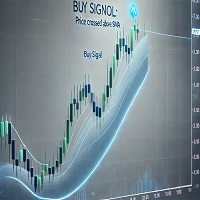
Buy Signal (Lime Up Arrow): A buy signal is triggered when the Net Momentum Line crosses decisively above the Dynamic Volatility Baseline. This indicates that bullish momentum is now strong enough to overcome the general market volatility, signaling a high-probability entry.
-
Sell Signal (Red Down Arrow): A sell signal is triggered when the Net Momentum Line crosses decisively below the Dynamic Volatility Baseline. This shows that bearish momentum has taken control, providing a clear signal to enter a short position.
Key Features
-
Clear and Intuitive Visuals: The color-filled "Momentum Zone" between the two lines gives you an immediate visual understanding of market conditions. Green indicates bullish dominance, while red indicates bearish control.
-
Non-Repainting Signals: The buy and sell arrows are confirmed on the close of the bar and will never repaint, giving you full confidence in their accuracy.
-
Built-in Signal Filter: The indicator includes an optional setting to define the minimum number of bars between signals, preventing over-trading during choppy market conditions.
-
Fully Customizable: Easily adjust the momentum period, smoothing method, and signal parameters to fit your specific trading style and the instrument you are trading.
-
Universal Compatibility: Works seamlessly on any currency pair, commodity, or index, and across all timeframes.
How to Trade with the Visual Eagle
-
Buy Signal: When a lime up-arrow appears, consider entering a long position at the opening of the next bar. Place your stop loss below the most recent swing low.
-
Sell Signal: When a red down-arrow appears, consider entering a short position at the opening of the next bar. Place your stop loss above the most recent swing high.
-
Confirmation (Recommended): For best results, use the Visual Eagle signals as confirmation with your existing trading strategy, such as identifying signals near major support and resistance levels or in the direction of the primary trend.
Input Parameters
-
Momentum Period: The core lookback period for the momentum calculation.
-
Smoothing Period & Method: Control the level and type of price smoothing.
-
Applied Price: The price data used for calculations.
-
Enable Bars Between Signals: Activate the signal frequency filter.
-
Bars to Wait Between Signals: Set the minimum number of bars before a new signal can appear.
-
Arrow Offset & Size: Customize the appearance of the signal arrows on your chart.
Take your trading to the next level. The Visual Eagle Momentum Indicator provides the clarity and precision you need to make more confident and profitable trading decisions. Add it to your arsenal today.