TrueTrendStarM TTSm25
- Indicatori
-
Ramthailu Alice
 Hi traders and Investors,
Welcome! Here,in this space,lets explore together the very good MT4/5 indicators and Expert Advisors and profitable forex trading strategies for common benefits.Your feedback is important and welcome!
Thanks - Versione: 1.2
- Aggiornato: 11 settembre 2025
- Attivazioni: 10
This is a mini One pair version of Advanced Detector of Trend Reversal and Continuance known as TrueTrendStarM(TTSm25). It is a sensitive and Predictive indicator of Price Trends for Professional traders.
( ATTENTION BUYERS:-Now the indicator is available for UNLIMITED TIME ONE TIME buy of just $500 ). Avail the Opportunity.
It detects high odds changes in Price Trend direction long before other indicator detects it. I have been working on it since 2019.
This is possible due to fractal nature of forex and other financial markets,which this indicator captures it consistently. It can generate Signals for all types of markets viz currency,crypto,metals,energy,Stock etc
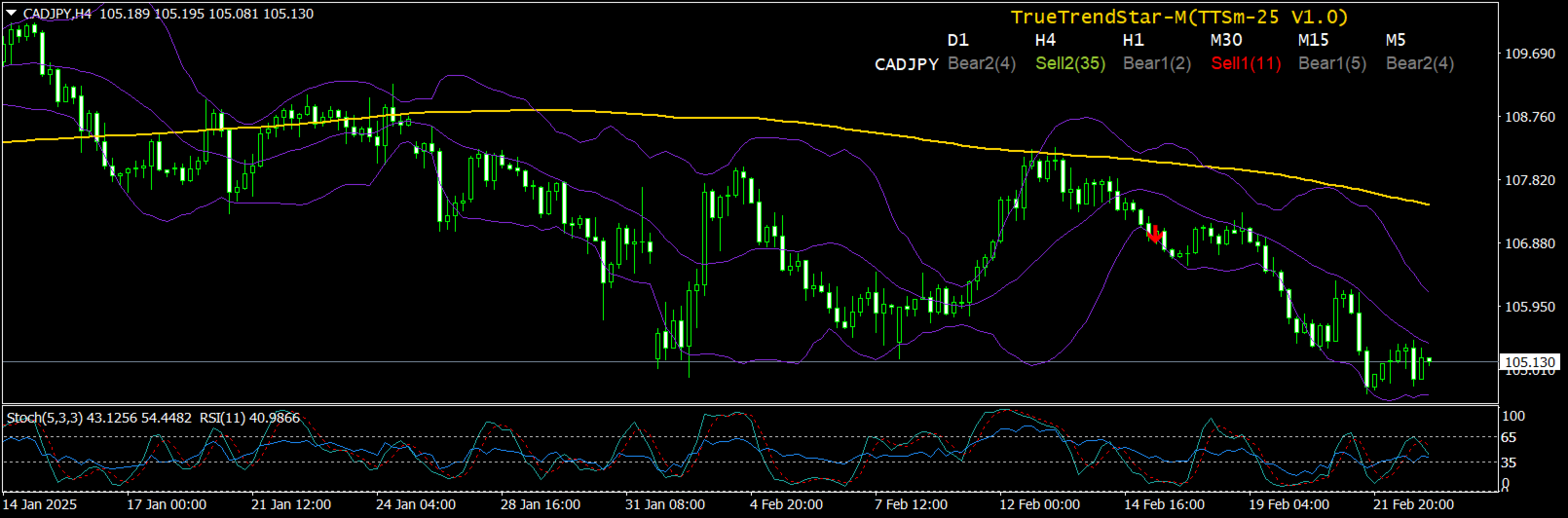
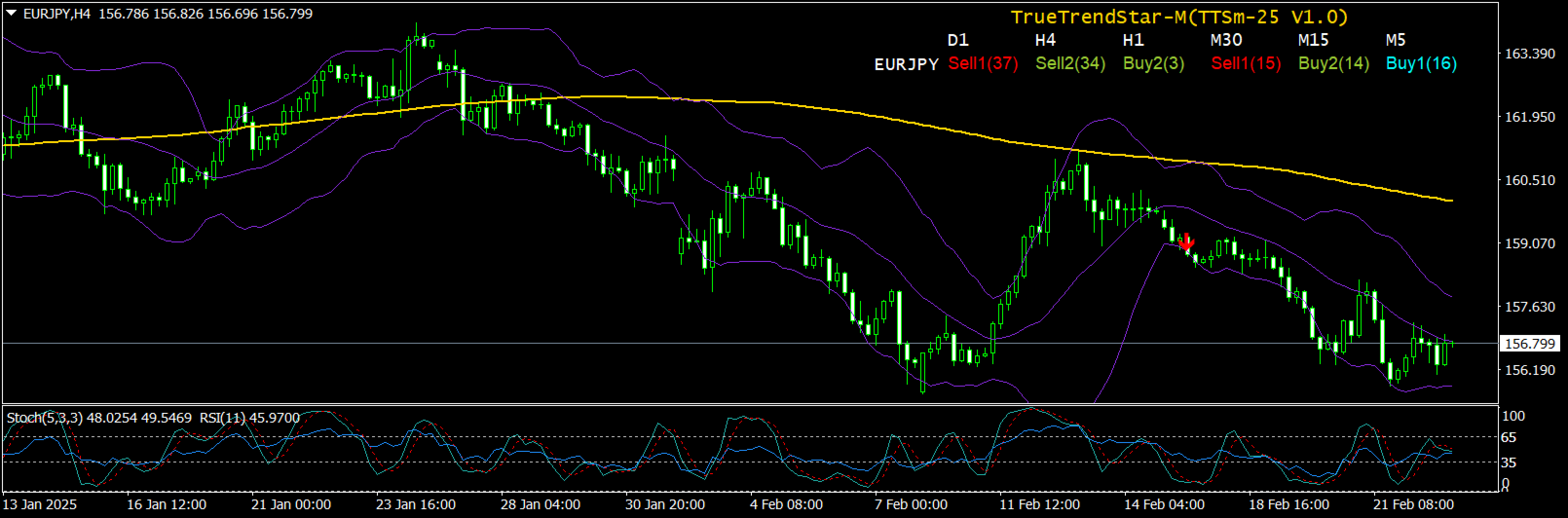
It used an accurate non-repainting custom indicator that scans the single selected currency pair 24hrs in all time-frames and captures the Trend status of currency pair in an elegant Dashboard. It also display arrows where the signal occurred for timely and pinpoint entry.
How will TTS indicator Show Changes in Trend?
TTS will show When:
- Up trend is starting
- Up trend is getting weaker
- Down Trend is starting
- Down trend is getting weaker.
The indicator signal is non-repainting and high probability and can be used effectively by any traders including Propriety firms.
One important thing the Trader will notice is the almost immediate movement of price towards the direction of the TTS signal because of its high probability nature.
TTS indicator important features
- High Probability Trade Signals
- Predicts Trend Direction
- Indicate Price Turning Points & Reversals
- Indicate Price Trend Continuance Points
- Capture short term & long term price action
- Indicate Trend Strength & Acceleration
- Indicate Signal Freshness
- Creates dynamic Support & Resistance levels at Signal points
- Comprehensive Market analysis tool
- Signals across Multi-timeframes(max 6 at a time)
- Analyze single selected pair
- Alert all Signals
I will like to welcome you to try out the high odds entry signal of TTS Indicator by Renting for 1 month and by following the Proven Strategy as given below, freely given, to help you out in your trading. Demo version is available but has inherent limitations by default, however you can familiarize with the indicator by testing the demo in strategy tester and see how Signals update in various time frames.Almost all signals are High Odds especially in higher time frame and TTS indicator Win Rate is consistent and very high.
Before loading the indicator Dashboard into a chart,make a Blank template without any indicators although not mandatory.Then the TTS indicator will load onto the chart without any problems.The background color as well as colors of Signals etc are completely user customizable.
TTS allows traders to adjust key settings to match their trading style:
- Custom Signal Colors: Modify the colors of Buy1, Buy2, Sell1, Sell2,Bull1, Bull2, Sell1 and Sell2 signal for better visibility.Also option given to customize color of header Row and Column.
- Selectible Forex Pairs: Focus on specific currency pair that match your strategy
- Time frame Selection: Customize which time frames(max 6) are displayed on the dashboard for easier monitoring, default as D1,H4,H1,M30,M15,M5 where each time frame header is separated by comma.
- Alert System: Set up notifications viz Pop Up, Email and Push, when new signals appear to avoid missing trade opportunities.Alert time interval can also be adjusted for convenience.(default at 3 times per time frame)
TTS continuously evaluates price behavior and market momentum to determine when trends are forming or reversing. It classifies signals into eight key types:
- Buy1 Signal: The first sign of an emerging high odds uptrend. This appears when market conditions indicate a shift toward bullish momentum.
- Buy2 Signal: A high odds uptrend signal after Accumulation Extension, Deep Correction or First Correction after Double Bottom/Top reinforcing the likelihood of continued price increase. This signal has strong Recoil energy.
- Sell1 Signal: The first indication of a high odds downtrend, appearing when bearish conditions develop.
- Sell2 Signal: A high odds Down trend signal after Distribution Extension, Deep Correction or First Correction after Double Bottom/Top reinforcing the likelihood of continued price decrease. This signal has strong Recoil energy.
- Bull1 Signal: Normal Bullish signal.A reversal signal if happen during/after Down trend.
- Bull2 Signal: Bullish signal.A Bullish continuance if happen during Uptrend or as Reversal signal during downtrend.
- Bear1 Signal: Normal Bearish signal.A Reversal signal if happen during/after Uptrend.
- Bear2 Signal: Bearish signal.A Bearish continuance if happen during Down trend or as Reversal signal during Uptrend.
- Buy1, Sell1: Normal Buy and Sell signals respectively.
- Buy2, Sell2: Somewhat Abnormal Buy and Sell signals respectively
-
Buy1 generally indicates start of
Inverse head and shoulder formations(Inv H&S) or
Double bottom(DB) or
Upswing(US)
which are all high probability patterns.
- Sell1 generally indicates start of
Head and Shoulder formation(H&S) or
Double Top(DT) or
DownSwing(DS)
which are all high probability patterns.
-
Buy2 generally indicates start of
Correction after Deep Accumulation Extension or
Abnormal Double bottom(DB) or
Upswing(US) to rejoin Uptrend
which are all high probability patterns .
-
Sell2 generally indicates start of
Correction after Deep Accumulation Distribution or
Abnormal Double Top(DT) or
Down Swing(DS) to rejoin Down trend
which are all high probability patterns .
- When Conflicting Signals occurs across time frames,generally Higher time frames signal prevails
- Uniformity of signals in adjacent time frames are significant
-
Shows the changes in price is sometimes from low time frame to high time frame or vice versa
-
Dashboard Signal in forex pair is significant to its Correlated pairs too and can be inspected for concurrence.
-
The Dashboard signal can be used as standalone signal however it may be complemented by compatible indicators like Bollinger band,Wave count indicators,Double Bottom or Top indicator,Oscillators like RSI & Stochastic and 200 periods Simple Moving Average.
-
The TTS indicator can be used on any time intervals on the chart, ranging from minute (M1) to monthly (MN).
-
Following these signals upto its Trend-End Zone can reap consistent pips.
-
Signals in Compatible time-frame can be more powerful confirmation of Trend Directions,Its Changes or Continuations.For example M5-M30,M30-H4 are Compatible time-frames
-
Clicking on Signal Label will open up the forex pair chart of the particular time-frame where one can trade the signal immediately.
-
Using the TTS Dashboard indicator's signals, precise entry points is indicated, with an average risk-to-reward ratio exceeding 1:2.
-
Occurence of Trend Change signal after sufficient trending or consolidation of prices is most probable for trend change .
Step-by-step video instructions explain how to work with the indicator using specific examples, even if you're doing it for the first time.
Each of these signals is carefully calculated using advanced algorithms that consider price action, volatility, and momentum.Multi-Timeframe Market Scanning
One of TTS’s standout features is its ability to analyze multiple time frames simultaneously. Instead of focusing on a single time frame, traders can view trend signals across various time horizons, gaining a broader perspective of market conditions.
This multi-time frame approach allows traders to:
✅ Identify long-term trend direction while executing trades on shorter time frames.
✅ Avoid false signals by ensuring trends align across multiple time frames.
✅ Spot high-probability trade setups where short-term and long-term trends match.
TTS displays this information on an intuitive dashboard, making it easy to check trend signals for different time frames at a glance.
How to Use TTS Effectively-Trade Execution Strategy:-- Compatible Time frame Signals Trend(CTST) strategy-For Example-EURUSD shows Sell2 signal in H4 time frame,Wait for Sell1 or Sell2 in M30 to open Sell trade.Close the trade when Buy1 or Buy2 shows up in M30min.Early exit can be done on Buy1 or Buy2 signals in 5min time frame too.Similarly for the Buy signals also.
- Main Trend Direction Scalping(MTDS) strategy-For example-GBPUSD show Buy1 or Buy2 signals in H4 time frame,wait for Buy1 or Buy2 in 5min time frame to open Buy trades.Close the trades when Sell1 or Sell 2 happens in 5min time frame.
- Positional Trend(PT) strategy-For example-USDCAD shows Buy2 signal in H4 time frame,then immediately enter Buy trade and wait for Sell1 or Sell2 signals in H4 to close the trades.For early exit,open trades can be exited when Sell1 or Sell2 signals happen in nearest lower time frame i.e H1.
- Low to High Swing Reversal(LTHS) strategy-For example-USDCHF shows Buy2 signal in H4 time frame and Sell2 signal in 5min time frame, then immediately enter sell trade trade and wait for Sell1 or Sell2 in nearest higher time frame i.e 15min time frame,and if happened,there is follow through and the trades can be hold longer as successful reversal trades.Trades can be closed if Buy1 or Buy2 happens in 5min time frame thereafter.
- Confirm Trend(CT) strategy-For example-EURUSD shows Bear2(1) signal in H4 time frame,then immediately enter Buy trade,wait for Buy1 or Buy2 signals in next lower time frame i.e H1 or M30,then close the trade.
- Buy and Hold(BH) strategy-For example-USDJPY shows Buy2 signal in H4 time frame,then wait for Buy1 or Buy2 signals in H1/M30/M15 time frames and add more Buy positions whenever signals happen in compatible lower time frames.Trades can be exited when Sell1 or Sell2 signal happen in H4 timeframe.
- Entry on TTS Signal and Exit on Other Indicators(ETEOI) strategy-For example-USDJPY shows Buy1 in M30 time frame,then enter Buy trade and Exit on Rsi or Stochastic Overbought signal in same time frame.
The above given trading strategies are tested and proven as reliably consistent.However, the TTS signals can also be used along with compatible indicators such as Bollinger Bands,Wave Count,Double Bottom and Top indicator,Oscillators like RSI/Stochastic and 200 period simple moving average.However,as explain above,the TTS signals alone is sufficient to trade the markets with high odds entries and exits.
Customization and SettingsTrueTrendStar allows traders to adjust key settings to match their trading style:
- Custom Signal Colors: Modify the colors of Buy1, Buy2, Sell1, and Sell2 signals for better visibility.
- Selectable Forex Pairs: Focus on a specific currency pair that match your strategy.
- Time frame Selection: Customize which time frames are displayed on the dashboard for easier monitoring(max 6).
- Alert System: Set up notifications when new signals appear to avoid missing trade opportunities.
✅ Non-Repainting Signals: Once a signal is generated, it remains fixed, ensuring transparency and accuracy.
✅ Multi-Time frame Analysis: See trend shifts across multiple time frames for better decision-making.
✅ Early Trend Detection: Get ahead of the market by identifying high odds reversals before traditional indicators.
✅ User-Friendly Dashboard: Quickly assess market conditions without needing complex analysis.
✅ Versatile Trading Application: Suitable for Scalping, Day trading, Positional trading , Swing trading and Buy & Hold trading.
TrueTrendStar is a powerful and reliable forex trading indicator designed to help traders identify trend changes early and trade with confidence. Its a combination of non-repainting trend signals, multi-time frame analysis, and an intuitive dashboard which makes it a must-have tool for both beginner and experienced traders to trade currencies professionally and profitably.
By integrating TTS into your trading strategy, you can improve market timing, minimize guesswork, and enhance your overall trading performance.
(In case of any doubt about the indicator or strategy,a buyer can contact the author through the messaging system of MQL5.Com site.)
Warm regards for your profitable trading success!
Note:: By design, The TTS indicator update after every time interval of 10 sec.