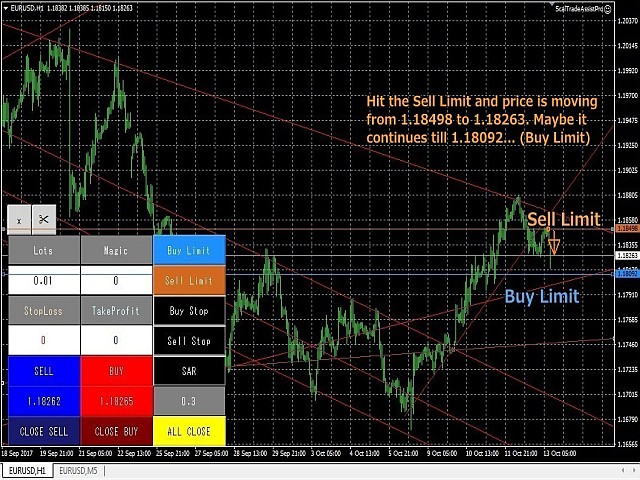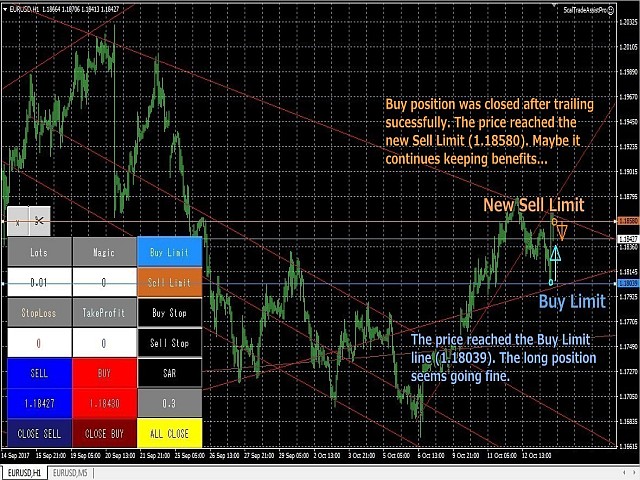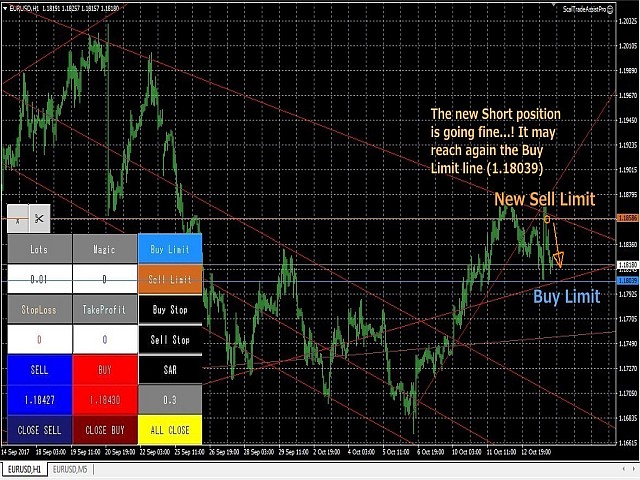
ScalTradeAssist Pro

5

ScalTradeAssistPro: Empowering Manual Forex Traders with Enhanced Support

The tool presents itself as a solution tailored to address specific scenarios, such as instances where brokers impose limitations on setting Stop Loss (SL) values in close proximity to the initial position value. Notably catering to the needs of scalping traders, ScalTradeAssistPro steps in with a unique capability—the ability to establish "virtual SL/TP" points.

This innovative feature calculates both the Stop Loss and Take Profit internally. As positions approach these virtual reference points, ScalTradeAssistPro intervenes by executing closing actions akin to conventional trading orders. It's this transformative functionality that justifies their virtual nature.

*If you see that the orders are not being placed, please check your spread setting, this tool watches it and never place orders if the spread is not matching.

Elevated Features in the Professional Version:

The professional iteration of ScalTradeAssistPro offers traders an extended array of tools, including the coveted "Trailing Stop" and "Break Even" mechanisms. Notably, users gain the capability to dispatch pending orders precisely to designated levels, augmenting their tactical flexibility. Moreover, the tool's synergy with "AutoOrderModifyEA Pro" is highlighted as a potent combination, endorsed wholeheartedly by the developers.

The recommendation to explore ScalTradeAssistPro with "AutoOrderModifyEA Pro" is underscored as a prudent choice—one that's poised to yield fruitful results.

For a comprehensive understanding of its functionality and application, readers are encouraged to delve into the detailed usage description provided on the official website: ScalTradeAssistPro Official Site.

Salient Functionalities of ScalTradeAssistPro:

  1. Virtual SL & TP: Operates akin to standard trading orders.
  2. Automated Lot Size Calculation: Simplifies lot size determination in automated trading.
  3. Automated Reverse Entry: Introduces automation into reverse entry strategies.
  4. Spread Control Function: Empowers traders to manage spreads effectively.
  5. Slippage Window: 
  6. Message Window: Offers a versatile message interface beyond error notifications.
  7. One-Click Order Execution: Enables swift execution of normal trading orders.
  8. One-Click Close Order: Allows targeted closure selections.
  9. Unique Magic Number Function: Orders can be attributed with distinct Magic Numbers.
  10. Customizable Button Parameters: Offers control over button positions and colors.
  11. Window Visibility Control: Facilitates seamless window management.
  12. Real-Time Pip Information: Presents real-time pip insights for informed decisions.
  13. Total Lots and Average Price Visualization: Enhances visibility of trading metrics.
  14. Trailing Stop Function: Available in the Professional version.
  15. Break Even Function: Available in the Professional version.
  16. Line Trading Function: Available in the Professional version.
  17. Seconds Timeframe Coordination: A gift indicator accompanies ScalTradeAssistPro.
  18. Management of EA and OneClickTrade Positions: An essential function for discerning traders.
  19. Separate Position Closure: Available in the Professional version.

*(14) to (19) are the functions of Professional version.

Parameters

  • UseVirtualStop: enable virtual pending stop orders (True/False).
  • VirtualStopRange(pips): range parameter of virtual pending stop orders after the order execution. In case of BUY, the robot will show it below the TP with the selected pips, and vice versa for SELL.
  • UseVirtualLimit: enable virtual pending limit orders (True/False).
  • VirtualLimitRange(pips): range parameter of virtual pending limit orders after the order execution. In case of BUY, the robot will show it above the TP with the selected pips, and vice versa for SELL.
  • VirtualLineRedraw(pips): re-draw the line when there is a big gap between the parameter in pips from the price of pending orders. This is for the high volatility time after the big events, this way the robot will not execute orders.
  • BuyLimitLineModeAdjustment(pips): adjust the BuyLimit in case of LineMode. If you input the positive numbers, the limit line will be placed beyond the line. Negative numbers will place before the line.
  • BuyStopLineModeAdjustment(pips): for BuyStop in case of LineMode. The usage is same as BuyLimit.
  • SellLimitLineModeAdjustment(pips): for SellLimit in case of LineMode. The usage is same as BuyLimit.
  • SellStopLineModeAdjustment(pips): for SellLimit in case of LineMode. The usage is same as BuyLimit.
  • UseCancelReverseTrade: cancel the unnecessary pending orders in case you define to use the limit/stop pending orders for both directions.
  • UsePyramiding:automated virtual limit/stop orders (True/False).
  • OpenMagicNumber: magic number for opening positions.
  • MaxSpread: max spread to be allowed.
  • UseAutoLots: automated lot size calculation (True/False).
  • Lots: lot size if you select "False" for AutoLots.
  • MaxLots: max lot size for the trading. The system will not send orders beyond this max lots size.
  • Leverage: your leverage data when you have to select "True" for UseAutoLots.
  • LotsDigits: define this parameter when you use AutoLots (no need to touch normally).
  • UseVirtualStopLoss: virtual SL (True/False).
  • StopLoss(pips): virtual SL.
  • HardStopLoss(pips): countermeasure for brokers that prohibit to open positions without SL
  • TakeProfit(pips): virtual TP.
  • HardTakeProfit(pips): countermeasure for brokers that prohibit to open positions without TP 
  • Slippage: max slippage to be allowed.
  • UseMultipleClose: This shall close one by one from the newest position.
  • UseStopAndReverse (SAR): Reverse entry function.

Avis 1
stephan.kohlitz
21
stephan.kohlitz 2019.03.08 13:36 
 

A very useful utility for scalping. I trade with two brokers, one of them has good spreads, but who requires a minimum distance of 50 ticks (5 pips) when placing a limit order - or you can place an instant order according to market price. ScaltradeAssist is a great solution, it perfectly places instant orders using virtual stop loss or take profit.

The developer also is very helpful, because one of my brokers requires to always input a (real) stop loss, I asked him to implement a functionality addressing this problem, and he added the function to place a (real) stop loss when placing the order (called HardStopLoss). Now I can make use of the VirtualStopLoss function which is great (ScalTradeAssist Pro offers a VirtualStopLoss which can be different to the HardStopLoss and which is hidden to the broker).

But even if using an ECN broker, this tool is useful because you can place orders much quicker and very convenient compared to the normal MT4 interface. Adjustments of stop loss and take profit can be made graphically by shifting lines.

Also the trailing function helps eliminate broker restrictions.

The close all button is a bit risky in my view (one time I closed all my active orders by pressing this button). In the settings, it is possible to deactivate this button, and I really recommend to do so, if you do many trades at the same time.

What could be improved is a user manual with examples. Most things can be tried out or are logic, but still I think some functions need to be explained more in detail how to make best use of the software.

Why do I still give 5 stars? The software itself offers great value for money and is really a powerful tool, which I can really recommend. Furthermore, the developer really is a helpful person.

Produits recommandés
TradePilot
Hossein Khalil Alishir
TradePilot Expert Advisor (EA) for MetaTrader 4 TradePilot is a professional and user-friendly Expert Advisor (EA) for MetaTrader 4 (MT4) . It simplifies automated trading , risk management , and trade execution using a smart trading panel . Perfect for beginners and experienced traders looking for a reliable trade manager EA with automated lot size calculation . Key Advantages User-Friendly Trading Panel: Customizable panel with buttons and hotkeys. Smart Risk Management: Supports percen
Auto SLTP Maker MT4  is an assistant for all those who forget to set StopLoss and/or TakeProfit in deal parameters, or trade on a very fast market and fail to place them in time. This tool automatically tracks trades without StopLoss and/or TakeProfit and checks what level should be set in accordance with the settings. The tool works both with market and pending orders. The type of orders to work with can be set in the parameters. It can track either trades for the instrument it runs on, or all
Trendiness Index
Libertas LLC
5 (3)
"The trend is your friend" is one of the best known sayings in investing, because capturing large trendy price movements can be extremely profitable. However, trading with the trend is often easier said than done, because many indicators are based on price reversals not trends. These aren't very effective at identifying trendy periods, or predicting whether trends will continue. We developed the Trendiness Index to help address this problem by indicating the strength and direction of price trend
Rainbow Price Visualizer v1.21 See where the market really breathes. Turns your MT4 chart into an ultra-precise heatmap that highlights price zones favored by big players. Why it matters 300 price levels at 0.2‑pip resolution — microscopic detail. 8 visual themes (Rainbow, Fire, Ocean…) for instant readibility. Smart opacity: low noise fades, real zones pop. Lightweight rendering with automatic cleanup. Fully customizable: saturation, opacity, resolution, history depth. Bands project into the f
Owl smart levels
Sergey Ermolov
4.26 (38)
Version MT5  |  FAQ L' indicateur Owl Smart Levels   est un système de trading complet au sein d'un seul indicateur qui comprend des outils d'analyse de marché populaires tels que   les fractales avancées de Bill Williams , Valable ZigZag qui construit   la structure d'onde correcte   du marché et   les niveaux de Fibonacci   qui marquent les niveaux exacts d'entrée. sur le marché et les endroits où prendre des bénéfices. Description détaillée de la stratégie Mode d'emploi de l'indicateur Conse
The Trendline Trade Panel was created to make it easier to train forex trading skills in backtester and at the same time make it easier to live trade using trendlines with the push of a button. This ea is perfect for beginners who want to learn to trade manually because all of its features are equipped with basic tools for trading forex. Other uses for Trendline Trade Panel: + Can be used to perform recovering loss positions made by other EA or positions that open manually. Fill in magic number
FreqoMaster
Stanislav Korotky
The main idea of this indicator is rates analysis and prediction by Fourier transform. The indicator decomposes exchange rates into main harmonics and calculates their product in future. The indicator shows 2 price marks in history, depicting price range in the past, and 2 price marks in future with price movement forecast. Buy or sell decision and take profit size are displayed in a text label in the indicator window. The indicator uses another indicator as an engine for calculations - FreqoMet
Trade with Gann on your side!! MASTER CIRCLE 360 CIRCLE CHART, originally created by Gann admitted that this is “The Mother of all charts”. It is one of the last studies that this great trader left for us. The numeric tab le is apparently quite simple like all the tables and is based on square numbers, the SQUARE OF 12 and is by evolution, one of the most important square numbers. Here we can find CYCLE, PRICE AND TIME thanks to angles and grades, to show past and future support and resistance.
"Auto FIBO Pro" Crypto_Forex indicator - est un excellent outil auxiliaire dans le trading ! - L'indicateur calcule et place automatiquement sur le graphique les niveaux de Fibo et les lignes de tendance locales (couleur rouge). - Les niveaux de Fibonacci indiquent les zones clés où le prix peut s'inverser. - Les niveaux les plus importants sont 23,6 %, 38,2 %, 50 % et 61,8 %. - Vous pouvez l'utiliser pour le scalping inversé ou pour le trading en grille de zones. - Il existe également de nomb
Grid Manual MT4
Alfiya Fazylova
4.71 (17)
Grid Manual est un panneau de trading permettant de travailler avec une grille d'ordres. L'utilitaire est universel, possède des paramètres flexibles et une interface intuitive. Il fonctionne avec une grille d'ordres non seulement dans le sens des pertes, mais aussi dans le sens de l'augmentation des profits. Le commerçant n'a pas besoin de créer et de maintenir une grille d'ordres, l'utilitaire le fera. Il suffit d'ouvrir une ordre et "Grid Manual" créera automatiquement une grille de ordres po
If you found this EA, it's probably because you want to get a funded account with a prop firm, but you see a rule that most of traders fear :   Maximum Daily Drawdown.  I've been through this problem myself as   I'm a prop firm trader   and I've made a bot to solve this rule, and you can get it to solve this problem too. How does it work ? When you first setup this EA, you need to input the   initial deposit   which corresponds to the size of your funded account. For exemple if you get a 10k$ f
hello friends bollinger Bands signal traders. I am happy to announce that I have completed the robot that follows the market according to the signal that the closing candle is above the upper Bollinger Bands and the closing candle is below the lower Bollinger Bands, the robot will send the image to Telegram then you will check see if it is a signal that matches your order opening rules. because I find the signal system really useful for traders, so I am trying to complete many products to serve
Spartan Mr Beast
Luis Mariano Vazquez Marcos
El Asesor de Experto "Spartan Mr Beast" es una herramienta avanzada y robusta diseñada para traders que buscan capitalizar las oportunidades del mercado aprovechando los rechazos de precios. Este asesor se especializa en identificar y explotar los momentos en los que el mercado muestra una resistencia o soporte significativo, sugiriendo posibles reversiones o cambios de tendencia. Características Principales: Detección de Rechazos de Mercado : "Spartan Mr Beast" utiliza algoritmos de última gene
This trading system requires the user to manually add Fibonacci, trend lines, horizontal lines, channel to perform semi-automatic or manual trading. The trading system can also be used in the tester. Trading panel provides: spread information margin information free marging Information The swap information to order for lots (requires your dealer support)
Risk Commander
Adisorn Soodkanueng
Product Name: Risk Commander: Trade Assistant & Strategy Simulator Risk Commander is more than just a trade panel—it is a complete Manual Trading Ecosystem . It serves two powerful purposes: Live Assistant: Helps you execute trades with speed, precision, and perfect risk management in real-time markets. Training Simulator: Fully compatible with the Strategy Tester (Visual Mode) , allowing you to practice manual trading on historical data without risking a cent. NEW! Built-in Simulator Mode S
Fibonacci retracements can be used to draw support lines, identify resistance levels, place stop-loss orders and set target prices. The Advanced Automatic Fibonacci retracements draws automatically all the levels. You have a lot of options to choose. For exemple you can use the tracements of another time frame (MTF) in the current chart, you can also choose between the closest level or less close to draw the retracements. You can also add 2 levels of your choice. You can add levels extensions o
Virtual Collider Manual   is a trading assistant with a built-in panel for manual trading. It automatically moves a position opened by a trader in profit using innovative adaptive grid algorithm of averaging and adaptive pyramiding Know-how of the grid algorithm of averaging and pyramiding of the   Virtual Collider Manual   trading robot is based on fully automatic adaptation of all characteristics of dynamically build order grid and pyramid with actual price movement with no need for adjusting
VR Cub
Vladimir Pastushak
VR Cub est un indicateur permettant d'obtenir des points d'entrée de haute qualité. L'indicateur a été développé pour faciliter les calculs mathématiques et simplifier la recherche de points d'entrée dans un poste. La stratégie de trading pour laquelle l'indicateur a été rédigé prouve son efficacité depuis de nombreuses années. La simplicité de la stratégie de trading est son grand avantage, qui permet même aux traders débutants de négocier avec succès avec elle. VR Cub calcule les points d'ouve
This scanner is a tool used to support trading. Scanner searches on a wide market, in real time setups, created by mutual arrangements of candles (candles pattern). Its basic features are:  8 implemented trading setups (it is possible to add further setups, additional versions of the scanner),  the possibility of simultaneous scanning, all financial instruments available on the platform,  the possibility of simultaneous scanning, in all timeframes available on the platform,  the ability to manua
"Impulses and Corrections 4" is created to help traders navigate the market situation. The indicator shows multi-time frame upward and downward "Impulses" of price movements. These impulses are the basis for determining the "Base" , which is composed of zones of corrections of price movements, as well as "Potential" zones for possible scenarios of price movement. Up and down impulses are determined based on a modified formula of Bill Williams' "Fractals" indicator. The last impulse is always "U
Phase Analytics Pro: Advanced Cyclic Market Analyzer Phase Analytics Pro is a sophisticated technical tool designed for traders who prioritize mathematical precision over lag-heavy traditional indicators. Based on the principles of digital signal processing, this indicator decomposes price action into phase and quadrature components to identify the dominant market cycle. How it works: The algorithm calculates the instantaneous phase of the market, allowing it to distinguish between trending and
Auto TP and SL MT4
Volodymyr Hrybachov
Utility for automatic setting of stop loss and take profit levels. Created by a professional trader for traders.   The utility   works with any market orders opened by a trader manually or using advisors. Can filter trades by magic number. The utility can work with any number of orders simultaneously. MT5 version  https://www.mql5.com/ru/market/product/56486 WHAT THE UTILITY CAN DO: set virtual stop loss and take profit from 1 pip real   stop loss and take profit work with each order separately
Trading Helper
Siarhei Vashchylka
Trading Helper - Program for trading and money management. It works with pending and immediate orders, and is equipped with trailing stop, breakeven and take profit functions. Manual (Be sure to read before purchasing) Advantages 1. Comfortable trading in a few clicks. Immediate and pending orders are available in the panel 2. Fixed percent method. The panel can select the lot size based on a predetermined risk 3. Trading with a fixed lot. In a few clicks, select a lot and open a Trade 4. Posi
For sure, this indicator has become very popular amongst traders. Through coding this indicator will give you the most accurate levels possible for your trading analysis. We have also added in the ability for you to receive alerts when the price breaks above or below a Support or Resistance lines! HOW TO USE The red rectangles represent your resistance/supply zone. The green rectangles represent your support/demand zone.  BONUS FEATURES We coded this indicator with the ability to switch between
Point61 Indicator
Evgeniy Machok
5 (1)
The Point61 indicator is the result of many years of monitoring of price behavior of currency pairs and metals. It is not a secret, that in times of uncertainty, traders are looking for possible levels of support and resistance - the point, where price should stop its movement. There are 2 possible scenarios at these points: 1. Reverse (correction) to the opposite direction; 2. Breakthrough to continue movement. Very often these points are used to set stop orders - TakeProfit or StopLoss
PipFinite Trend PRO
Karlo Wilson Vendiola
4.88 (2250)
Breakthrough Solution For Trend Trading And Filtering With All Important Features Built Inside One Tool! Trend PRO's smart algorithm detects the trend, filters out market noise and gives entry signals with exit levels. The new features with enhanced rules for statistical calculation improved the overall performance of this indicator. Important Information Revealed Maximize the potential of Trend Pro, please visit www.mql5.com/en/blogs/post/713938 The Powerful Expert Advisor Version Automatin
Virtual SL TP Trailing Pro for MT4 – Client-Side Stop Loss / Take Profit and Trade Management Looking for MetaTrader 5 version?  I t is available separately in the Market:   Virtual SL TP Trailing Pro MT5 Public channel:   CLICK HERE Virtual SL TP Trailing Pro for MT4 is a trade management utility that keeps Stop Loss (SL) and Take Profit (TP) levels on the client side instead of sending them to the trading server. It is designed to help you manage exits in a structured way using a clear on-cha
Indicateur Crypto_Forex « Consolidation Bar Pro » pour MT4. - L'indicateur « Consolidation Bar Pro » est un indicateur de cassure très puissant pour le trading Price Action. - Il détecte les phases de consolidation des prix dans une zone restreinte sur une seule barre et affiche : la direction de la cassure, l'emplacement des ordres en attente et l'emplacement du stop loss. - Barre de consolidation haussière : signal par flèche bleue sur le graphique (voir images). - Barre de consolidation bai
Laser Trend
Nicolas Zouein
The trend is your friend! This is what this indicator is all about. Follow this famous saying and be safe. Characteristics: Buy/Sell signals fixed on the close of a bar. Works on all symbols and all timeframes. Clear visual market trend laser line, Buy/Sell signal arrows, market strength meter, TP1 & TP2 boxes. Visual signals when to enter, when to exit the market. No repainting. Compatible with Flexible EA for trading automation. (Ask for a free set file optimized to perform 2010-2018) Parame
Candlestick Pattern Scanner is a multi-timeframe and multi-symbol dashboard and alert system that checks all timeframes and currency pairs for different candlestick patterns that are formed in them. Scanner is integrated with support and resistance zones so you can check the candlestick patterns in the most important areas of the chart to find breakout and reversal patterns in the price chart. Download demo version   (works on M30,D1,W1 timeframes and 20 symbols of Market Watch window) Read the
Les acheteurs de ce produit ont également acheté
Local Trade Copier EA MT4
Juvenille Emperor Limited
4.96 (108)
Découvrez une expérience exceptionnellement rapide de copie de trades avec le Local Trade Copier EA MT4 . Avec sa configuration facile en 1 minute, ce copieur de trades vous permet de copier des trades entre plusieurs terminaux MetaTrader sur le même ordinateur Windows ou Windows VPS avec des vitesses de copie ultra-rapides de moins de 0.5 seconde. Que vous soyez un trader débutant ou professionnel, le Local Trade Copier EA MT4 offre une large gamme d'options pour le personnaliser en fonction d
Trade Assistant MT4
Evgeniy Kravchenko
4.42 (193)
It helps to calculate the risk per trade, the easy installation of a new order, order management with partial closing functions, trailing stop of 7 types and other useful functions. Additional materials and instructions Installation instructions   -   Application instructions   -   Trial version of the application for a demo account Line function -   shows on the chart the Opening line, Stop Loss, Take Profit. With this function it is easy to set a new order and see its additional characteris
Bienvenue sur Trade Manager EA, l’outil ultime de gestion des risques conçu pour rendre le trading plus intuitif, précis et efficace. Ce n’est pas seulement un outil d’exécution d’ordres ; c’est une solution complète pour la planification des trades, la gestion des positions et le contrôle des risques. Que vous soyez débutant, trader expérimenté ou scalpeur ayant besoin d’une exécution rapide, Trade Manager EA s’adapte à vos besoins, offrant une flexibilité sur tous les marchés, des devises et i
The product will copy all telegram signal to MT4   ( which you are member  ) , also it can work as remote copier.  Easy to set up, copy order instant, can work with almost signal formats, image signal, s upport to translate other language to English Work with all type of channel or group, even channel have "Restrict Saving Content", work with  multi channel, multi MT5 Work as remote copier: with signal have ticket number, it will copy exactly via ticket number. Support to backtest signal. How to
Copy Cat More Trade Copier MT4 (Copie Chat MT4) n’est pas seulement un simple copieur de trades local ; c’est un cadre complet de gestion des risques et d’exécution conçu pour les défis actuels du trading. Des challenges de prop firms à la gestion de comptes personnels, il s’adapte à chaque situation grâce à une combinaison d’exécution robuste, de protection du capital, de configuration flexible et de traitement avancé des opérations. Le copieur fonctionne en mode Master (émetteur) et en mode Sl
Crystal Trade Manager PRO – Système Avancé de Gestion du Risque et de Contrôle des Positions pour MT4 Version gratuite : https://www.mql5.com/en/market/product/150632 Présentation Générale Crystal Trade Manager PRO (CTM) est un utilitaire professionnel pour MetaTrader 4 dédié à la gestion du risque, au contrôle des opérations et à l’automatisation intelligente du trading. Il a été conçu pour les traders qui exigent une exécution disciplinée, une protection solide du capital et un contrôle avancé
Exp COPYLOT CLIENT for MT4
Vladislav Andruschenko
4.65 (66)
Copieur commercial pour MetaTrader 4.       Il copie les transactions de change, les positions et les ordres de tous les comptes. C'est l'un des meilleurs copieurs commerciaux       MT4 - MT4, MT5 - MT4       pour le       COPYLOTE MT4       version (ou       MT4 - MT5 MT5 - MT5       pour le       COPYLOTE MT5       version). Version MT5 Description complète   +DEMO +PDF Comment acheter Comment installer     Comment obtenir des fichiers journaux     Comment tester et optimiser     Tous les p
Trade Dashboard MT4
Fatemeh Ameri
4.96 (53)
Tired of complex order placement and manual calculations? Trade Dashboard is your solution. With its user-friendly interface, placing orders becomes effortless, by a single click, you can open trades, set stop loss and take profit levels, manage trade lot size, and calculate risk to reward ratios, allowing you to only focus on your strategy. Say goodbye to manual calculations and streamline your trading experience with Trade Dashboard. Download  Demo Version  right now. You can find  Details of
Take a Break
Eric Emmrich
5 (31)
One tool to protect all your EAs — news filter, equity protection, time filter and more — free demo available Take a Break has evolved from a basic news filter into a comprehensive account protection solution. It pauses your other Expert Advisors during news events or based on custom filters. When trading resumes, it automatically restores your entire chart setup , including all EA settings. Typical use cases: One news filter for all your EAs. Pause trading during news or high volatility — and c
TradePanel MT4
Alfiya Fazylova
4.85 (92)
Trade Panel est un assistant commercial multifonction. L'application contient plus de 50 fonctions de trading pour le trading manuel et permet d'automatiser la plupart des tâches commerciales. Liens utiles : Version d'essai de l'application pour compte de démonstration Instructions pour l'application Commerce. Permet d'effectuer des opérations commerciales en un clic : Ouvrir des ordres en attente et des positions avec un calcul automatique du risque. Ouvrir plusieurs ordres et positions en un s
Consultez instantanément l'historique de vos transactions clôturées par jour et par semaine, vos transactions ouvertes actuelles et votre exposition au forex sur un seul graphique ! Utilisez la carte thermique pour identifier les transactions rentables et où se situe votre baisse actuelle au sein de votre portefeuille de trading. Boutons de fermeture rapide Utilisez les boutons de fermeture rapide pour clôturer chaque transaction sur un seul symbole, clôturer des transactions individuelles en
News Filter EA: Advanced Algo Trading Assistant News Filter EA is an advanced algo trading assistant designed to enhance your trading experience. By using the   News Filter EA , you can integrate a Forex economic news filter into your existing expert advisor, even if you do not have access to its source code. In addition to the news filter, you can also specify   trading days   and   hours   for your expert. The News Filter EA also includes   risk management   and   equity protection   features
Le MT4 to Telegram Signal Provider est un outil facile à utiliser et entièrement personnalisable qui permet d'envoyer des signaux à Telegram, transformant ainsi votre compte en fournisseur de signaux. Le format des messages est entièrement personnalisable ! Cependant, pour une utilisation simple, vous pouvez également opter pour un modèle prédéfini et activer ou désactiver des parties spécifiques du message. [ Démonstration ]   [ Manuel ] [ Version MT5 ] [ Version Discord ] [ Canal Telegram ]  N
Ultimate MT4 to Telegram (UMT) sends controlled trades (via symbol, magic, comment) to your telegram channel. It sends open and closed trades, including pending orders and TP/SL modifications, along with chart screenshots, to any telegram channel. Additionally, you can send trade reports of open trades and summary profit/pip reports for day, week, or month. You can customize the design of the trade actions or reports with variables and emoticons.  A beautiful panel allows you to visualize all t
Le Risk/Reward Tool est un Expert Advisor de niveau professionnel conçu pour révolutionner la façon dont vous planifiez, visualisez et exécutez vos trades dans MetaTrader 4. Que vous soyez un trader discrétionnaire qui valorise une gestion précise des risques ou un développeur de stratégies qui a besoin de tester visuellement des configurations de trading, cet outil fournit tout ce dont vous avez besoin dans une interface élégante et intuitive. Contrairement aux calculateurs de position basiques
Telegram Signal pro
Sara Sabaghi
4.86 (7)
What is it? Think about it, you can send all the orders/positions info to your telegram channel or group to create your community or VIP signals on telegram. Position info means this EA forward all of your new positions open details (Open price, Open time, Position Type, position Symbol and volume), positions changes ( SL or TP modifying or pending price changes) and position close (Close price, profit or loss, position duration time) and also EA Send NEWS alert (Economic calendar event) on you
Rocket FX Trading Manager PRO Note: Once you download the manager, message me for the background files The Ultimate All-in-One Trade Management Solution for MetaTrader 4 Version:   4.5 |   Platform:   MetaTrader 4 |   Category:   Utility / Trade Manager   Overview Rocket Fx Trading Manager v4.5 is a comprehensive, all-in-one trade management system designed to transform your trading experience. This powerful utility combines   intelligent position sizing ,   multi-target order placement
VirtualTradePad mt4 Extra
Vladislav Andruschenko
4.86 (59)
Panneau de trading pour trader en 1 clic.   Travailler avec des positions et des commandes!   Trading à partir du graphique ou du clavier. En utilisant notre panel de trading, vous pouvez trader en un clic à partir du graphique et effectuer des opérations de trading 30 fois plus rapidement que le contrôle MetaTrader standard. Des calculs automatiques de paramètres et de fonctions qui facilitent la vie d'un trader et aident un trader à mener ses activités de trading beaucoup plus rapidement et pl
DrawDown Limiter MT4
Haidar Lionel Haj Ali
5 (8)
Expert Advisor "Drawdown Limiter"  Vous êtes au bon endroit si vous recherchez un contrôle de drawdown, un limiteur de drawdown, une protection du solde, une protection de l'équité ou une limite quotidienne de drawdown en rapport avec les entreprises de gestion de capitaux (Prop Firm), FTMO, My Forex Fund, ou si vous souhaitez protéger votre compte de trading. Avez-vous déjà eu du mal à contrôler votre drawdown en tradant sur des comptes financés ? Cet EA est fait pour vous. Les entreprises de
Copier4Fee Advanced
Vladimir Tkach
4.75 (16)
The utility copies trades from the signal provider accounts (master accounts, one or multiple providers) to unlimited number of receiver accounts (slave accounts).  Attention! Y ou need to use identifiers (Provider number) of the same length if you use several master copiers. For example. 1, 2, 3 or 11, 13, 22. The copying can be set in the opposite direction. The comments with all the recently performed actions are displayed on the screen to monitor the utility actions in slave mode. To avoid p
Comprehensive on chart trade panel with the unique ability to be controllable from mobile as well. Plus has a library of downloadable configuration, e.g. exit rules, extra panel buttons, pending order setup and more. Please see our product video. Works with all symbols not just currency pairs. Features On chart panel plus controllable from free app for Windows, iPhone and Android Built-in script engine with library of downloadable configuration, e.g. add 'Close All Trades in Profit' button, exit
Exp4 Duplicator
Vladislav Andruschenko
4.5 (22)
L'Expert Advisor   répète les   transactions et les positions un nombre prédéfini de fois sur votre compte   MetaTrader 4   . Il copie toutes les transactions ouvertes manuellement ou par un autre Expert Advisor. Copie les signaux et augmente le lot des signaux   ! Augmente le lot des autres EA. Les fonctions suivantes sont prises en charge : lot personnalisé pour les transactions copiées, copie du Stop Loss, Take Profit, utilisation du stop suiveur. Version MT5 Description complète +DEMO +PDF
Custom Alerts MT4
Daniel Stein
5 (7)
Custom Alerts : Surveillez plusieurs marchés sans jamais manquer une configuration clé Présentation Custom Alerts est une solution dynamique pour les traders qui souhaitent surveiller plusieurs instruments de manière centralisée. En intégrant les données de nos outils phares — comme FX Power, FX Volume, FX Dynamic, FX Levels et IX Power — Custom Alerts vous alerte automatiquement des mouvements importants du marché sans avoir à surveiller plusieurs graphiques ou risquer de manquer des opportun
Offre spéciale trading – 40 % de réduction Gestionnaire de transactions avancé – La solution tout-en-un par excellence pour un trading manuel plus rapide, plus intelligent et plus sûr. Transformez votre trading manuel avec NextGen Trade Manager AI – le panneau professionnel intégré au graphique qui combine exécution instantanée, planification visuelle des transactions et gestion des risques performante dans un outil intuitif. Exécutez vos ordres, gérez les risques et protégez vos profits plus
Copieur ->Interaction d'interface pratique et rapide, les utilisateurs peuvent l'utiliser immédiatement       ->>>> Recommandé pour une utilisation sur des ordinateurs Windows ou VPS Windows Caractéristiques: Paramètres de copy trading diversifiés et personnalisés : 1. Différents modes de lot peuvent être définis pour différentes sources de signaux 2. Différentes sources de signaux peuvent être définies pour le copy trading avant et arrière 3. Les signaux peuvent être définis avec des commentai
PZ Trade Pad Pro MT4
PZ TRADING SLU
5 (2)
Effortlessly calculate lot sizes and manage trades to save time and avoid costly errors The Trade Pad Pro EA is a tool for the Metatrader Platform that aims to help traders manage their trades more efficiently and effectively. It has a user-friendly visual interface that allows users to easily place and manage an unlimited number of trades, helping to avoid human errors and enhance their trading activity. One of the key features of the Trade Pad Pro EA is its focus on risk and position manageme
Telegram to MT4 Coppy
Sergey Batudayev
3.75 (8)
Télégramme vers MT4 :   la solution ultime pour copier des signaux Simplifiez votre trading avec   Telegram vers MT4   , l'utilitaire de pointe conçu pour copier les signaux de trading directement depuis les canaux et chats Telegram vers votre plateforme MetaTrader 4, sans DLL. Cette solution robuste garantit une exécution fluide des signaux avec une précision et des options de personnalisation inégalées, vous faisant gagner du temps et optimisant votre efficacité. [ Instructions and DEMO ] Cara
Trade Manager MT4 DaneTrades
Levi Dane Benjamin
4.09 (11)
Trade Manager pour vous aider à entrer et sortir rapidement des transactions tout en calculant automatiquement votre risque. Y compris des fonctionnalités pour vous aider à éviter le sur-trading, le trading de vengeance et le trading émotionnel. Les transactions peuvent être gérées automatiquement et les mesures de performances du compte peuvent être visualisées dans un graphique. Ces fonctionnalités rendent ce panneau idéal pour tous les traders manuels et contribuent à améliorer la plateforme
Le MT4 to Discord Signal Provider est un outil convivial et entièrement personnalisable conçu pour envoyer directement des signaux de trading à Discord. Cet outil transforme votre compte de trading en un fournisseur de signaux efficace. Personnalisez les formats de messages pour qu'ils correspondent à votre style ! Pour plus de facilité, choisissez parmi des modèles pré-conçus et décidez quels éléments du message inclure ou exclure. [ Démo ] [ Manuel ] [ Version MT5 ] [ Version Telegram ]  New:
Trading History MT4
Siarhei Vashchylka
5 (9)
Trading History - A program for trading and money management on the history of quotes in stratagy tester. It can work with pending and immediate orders, and is equipped with trailing stop, breakeven and take profit functions. Very good for training and testing different strategies. Manual (Be sure to read before purchasing) Advantages 1. Allows you to test any trading strategy in the shortest possible time 2. An excellent simulator for trading training. You can gain months of trading experience
Plus de l'auteur
This is a forex supporting tool for all manual traders. You can close positions immediately at once on the MT4 Terminal by a single click. CLOSE SELL: You can close SHORT positions of the target currency pair (same as the chart you’re using this EA). CLOSE BUY: Same as above but LONG positions will be closed. CLOSE ALL: All opened positions will be closed (no matter of currency pairs). You can select the closing method from CLOSE ALL or CLOSE ONE BY ONE. You can choose the positions to be closed
FREE
AutoOrderModify Free is a supporting tool for all Manual and System Forex Traders. It works perfectly for situations like: “I have a nice EA but lacks the Trailing and/or Break Even.” “I’m lazy to calculate SL and TP every time I open a position.” “I want to control all of my manual trades with Trailing/Break even” Anyone interested in this tool but want more function, please try the “ AutoOrderModifyEA Pro ”. The freeware version can’t manage positions by Magic Number but manage ALL positions.
FREE
This is a light version of OneClickWonder. It has a limitation of lotsize ( 0.01 ) and also the trade direction (only SELL ) and magic number is fiexd (magic number = 11 ) ------------------------------------ OneClickWonder manages open trades by   Magic Number   and   Symbol , providing: ·            Individual or Basket Trailing Stop ·            Optional Averaging system   (adds new trades automatically) ·            OneClickOrder buttons   (BUY / SELL directly from chart) ·            Works
FREE
This is a free trial version of ScalTradeAssist Pro ( https://www.mql5.com/en/market/product/25920 ) You can use all functions of the tool without any restriction except the lot size. (fixed as 0.01) I hope you'd like it and decide to purchase the professional version :) Below is the explanation of the ScalTradeAssist Pro. *If you see that the orders are not being placed, please check your spread setting, this tool watches it and never place orders if the spread is not matching. ScalTradeAssis
FREE
***** Unlocking the Expertise: EA Source Code for Dedicated Learners ***** Commencing from November 2021 , the "EA + source code" version is at your disposal, ***** allowing those who purchase (not rent) this EA to explore its inner workings. *****T o acquire the source code, kindly direct your request, along with purchase information by sending messages to me. ***** Upon confirming your purchase, the source code will be extended to you. ***** < Disclaimer > ***** We provide the source code exc
Introducing Early Morning Scalper ATR: Precision Trading During Asian Forex Market A breakthrough in forex trading automation, the Early Morning Scalper ATR Expert Adviser offers a fully autonomous solution meticulously engineered for a specific window of opportunity—the early hours of the Asian Forex market. At its core, this innovative tool employs an advanced algorithm that orchestrates forex trading seamlessly. Augmenting its prowess are sophisticated internal indicators, which deftly ident
Manual Forex Trading with Enhanced Functionality "OneClickMagicTrader," a powerful tool designed to cater to the needs of forex traders by simplifying various trading actions. Drawing parallels with the familiar "One Click Trading" feature of the MT4 terminal, OneClickMagicTrader allows traders to swiftly execute BUY or SELL orders with a single click. This tool, a brainchild of an avid trader who identified room for improvement, has now been shared with the entire forex community. Taking a st
WildCycleEA
Hajime Tsuro
Unveiling WILD CYCLE EA: A Strategy for Dynamic Market Trends Adaptive Trading in Motion Embarking on the trading landscape from June 2021, the WILD CYCLE EA presents an evolutionary approach to market-trend following. Pioneering a relentless pursuit of profit, this EA deftly adapts to shifting market dynamics. Navigating the Core Strategy At its heart lies a fundamental approach—initiating positions in the direction of positive SWAP, such as the EURUSD SHORT. These positions are meticulously c
AutoOrderModifyEAPro: A Vital Aid for Forex Traders, Both Manual and System-based Catering to the diverse needs of forex traders, whether engaged in manual or system-based trading, AutoOrderModifyEAPro emerges as a pivotal tool in this intricate landscape. The tool's efficacy is most evident in scenarios such as: Enhancing EA Strategies: Addressing the common dilemma of lacking Trailing and/or Break Even mechanisms in otherwise promising EAs. Streamlining Position Management: Overcoming the hass
Meet GridRepeaTrain — Your Pending Orders Wingman! This EA’s here to back up your trading game with smart, repeatable pending orders. It’s got two modes : --------------------------------------------------------------------- [1] Single Mode and [2] Double Mode . Think of it like this: ·          Single Mode = only LONG or only SHORT pending orders (pick one and repeat it). ·          Double Mode = LIMIT or STOP pending orders (working both sides of the range). [1] Single Mode – The One-Sided
Stealth Gap Scalper Pro is a precision-engineered Expert Advisor designed to capitalize on market inefficiencies with a stealthy, tactical approach. Combining powerful gap trading strategies with smart grid averaging and night scalping techniques, this EA excels at capturing quick, reliable profits during low-volatility periods—especially Monday gaps and overnight moves. With configurable trade directions, automatic lot scaling, and an intelligent trailing stop system, Stealth Gap Scalper Pro ad
OneClickWonder manages open trades by Magic Number and Symbol , providing: ·          Individual or Basket Trailing Stop ·          Optional Averaging system (adds new trades automatically) ·          OneClickOrder buttons (BUY / SELL directly from chart) ·          Works with manual trades (Magic 0) or EA trades by number. EA Features 1.      Basket Trailing       o     Groups trades with the same Magic Number and direction.       o     Stop Losses are adjusted based on weighted average price o
***This is a MT5 version of ZigZag Breaout*** --------------------------------------------------------------------------------------------------------------------------------- ***** Unlocking the Expertise: EA Source Code for Dedicated Learners ***** Commencing from November 2021 , the "EA + source code" version is at your disposal, ***** allowing those who purchase (not rent) this EA to explore its inner workings. *****T o acquire the source code, kindly direct your request, along with purchase
Filtrer:
stephan.kohlitz
21
stephan.kohlitz 2019.03.08 13:36 
 

A very useful utility for scalping. I trade with two brokers, one of them has good spreads, but who requires a minimum distance of 50 ticks (5 pips) when placing a limit order - or you can place an instant order according to market price. ScaltradeAssist is a great solution, it perfectly places instant orders using virtual stop loss or take profit.

The developer also is very helpful, because one of my brokers requires to always input a (real) stop loss, I asked him to implement a functionality addressing this problem, and he added the function to place a (real) stop loss when placing the order (called HardStopLoss). Now I can make use of the VirtualStopLoss function which is great (ScalTradeAssist Pro offers a VirtualStopLoss which can be different to the HardStopLoss and which is hidden to the broker).

But even if using an ECN broker, this tool is useful because you can place orders much quicker and very convenient compared to the normal MT4 interface. Adjustments of stop loss and take profit can be made graphically by shifting lines.

Also the trailing function helps eliminate broker restrictions.

The close all button is a bit risky in my view (one time I closed all my active orders by pressing this button). In the settings, it is possible to deactivate this button, and I really recommend to do so, if you do many trades at the same time.

What could be improved is a user manual with examples. Most things can be tried out or are logic, but still I think some functions need to be explained more in detail how to make best use of the software.

Why do I still give 5 stars? The software itself offers great value for money and is really a powerful tool, which I can really recommend. Furthermore, the developer really is a helpful person.

Répondre à l'avis