Controller without limit

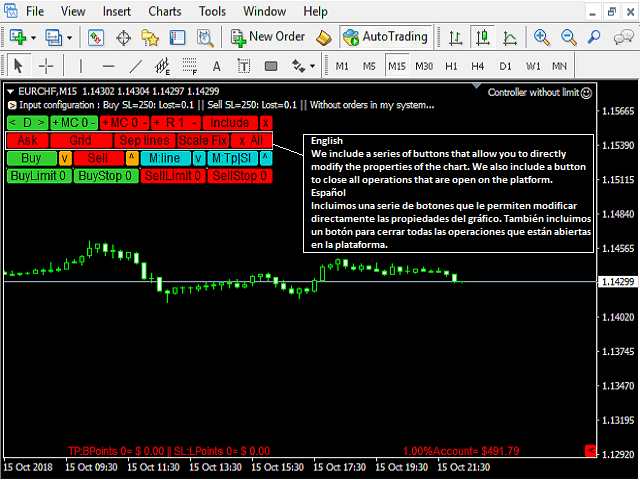
    • The Expert Advisor is a great tool that allows you to control your trade with ease and precision. The tool can be moved in the graphs and offers the following characteristics:
    • Instant order entry with a single click.
    • Entry of pending orders using price tags and trend lines.
    • Instant order closure with a single click.
    • Instant order closure using trend lines as output levels that the broker can not see.
    • We can modify the way to enter and exit the market, allowing us to choose the way to do it. For example: when the price crosses a trend line, or only if the candle 1 closes above or below the trend lines.
    • You can choose an option between the fixed trading volume or, the volume calculation based on the risk, depending on the capital of the available account, the entry price and the stop-loss level.
    • Calculates the benefits before modifying the stop-loss or take-profit and once calculated, modify the stop-loss or take-profit with a single click.
    • Control your orders, and you can add all the ones that exist in the platform, in the graphic where EA is executed.
    • If you want to evaluate a signal to enter the market, it will help you see if the risk-benefit ratio matches your strategy and shows you the level you need to get out and get the desired reward.

       Download images:  1, 2, 3.

         Instructions

    • The button (<D>) moves, hides and shows the control panel.
    • Buttons (+ -) modifies MC / R.
    • The button (MC) shows the configuration to close an order using the trend lines that appear once the Expert Advisor takes control of the order. To close an order with these lines, it will have to be: first 1, then 2.
    • If (MC = 1), the order closes at the close of candle 1 above or below the level of the line.
    • If (MC = 0), the order closes when the price (Bid) touches the line.
    • The button (R) is used to divide an order into several smaller orders. For example, if I want to risk 2% of my money and I have to open an order of 0.20 lots, I can divide it into 2 orders of 0.10 lots.
    • The button (X All) closes all orders. 
    • The (X) button closes an order.
    • Keep in mind that if you opened the order previously outside the Expert Advisor and you want to close it with the X button, you must include it in the Expert Advisor (Include button).
    • The orange buttons (^) (v) modify the stop-loss.
    • If you want to open a new order, press the Buy or Sell buttons.
    • If you want to place pending orders, use the buttons Buy Limit, Buy Stop, Sell Limit, Sell Stop.
    • The dark turquoise buttons (^) (v), draw the labels that are used to calculate the benefits before modifying a stop-loss or a take-profit.
    • The button (M: TP || SL) modifies the stop-loss and take-profit.
    • The button (M: line) modifies the line above and line below.
    • The yellow (>) and red (<) buttons show / hide comments.


    Note

    Before using the Expert Advisor in a real account, it is recommended to consult the tutorial and use it in an account (Demo) to familiarize yourself with all its functions.


            Parameters

      • In English: English / Spanish.
      • Risk: Percentage of risk, if your strategy is to risk a percentage of the account. If the risk is greater than 0, then the number of lots must be equal to 0.
      • Lots: Number of lots, if your strategy is with fixed lots. If these are greater than 0, then the risk must be equal to 0.
      • Stoploss: Distance in points.
      • TakeProfit: Distance in points.
      • Slippage: Last digit of the symbol.
      • Distance of the line of above: Distance in points.
      • Distance of the line of below: Distance in points.
      • Lines width: Width of the lines.
      • Percentage of my account: The percentage of the account to show in the comments.
      • Spread: Set false to disable.
      • Reward for the risk when we are going to buy: Set true to show line indicative of take-profit.
      • Reward for the risk when we are going to sell: Set true to show line indicative of take-profit.
      • Reward for the risk: Establish the risk-reward profile that will position the Take-Profit line. For example, if you set 1.0, the line will be drawn at the level where you must place the Take-Profit to match the benefit with the risk.
      • Horizontal comment: Set false to put it vertically.
      • Include all orders in general: Set true to include all orders that already exist on the platform.
      • Schedule orders using trend lines: Set true to schedule orders using trend lines.
      • The distance where you want to draw the trend lines: Distance in points.


      Produits recommandés
      Daily Candle Predictor est un indicateur qui prédit le cours de clôture d'une bougie. L'indicateur est principalement destiné à être utilisé sur les graphiques D1. Cet indicateur convient à la fois au trading forex traditionnel et au trading d'options binaires. L'indicateur peut être utilisé comme un système de trading autonome, ou il peut servir de complément à votre système de trading existant. Cet indicateur analyse la bougie actuelle, calcule certains facteurs de force à l'intérieur du corps
      Vizzion
      Joel Protusada
      Vizzion is a fully automated scalping Expert Advisor that can be run successfully using GBPJPY currency pair at H1 timeframe. Very Important This Expert Advisor can not run with any EAs in the same account. As part of the money management plan, it calculates and monitors the Margin Level % and assumes that all open trades are created by it. If you want an Expert Advisor that trades in a daily basis, this EA is not for you because using this requires a patience to wait for a few days or weeks on
      The Infinity Expert Advisor is a scalper. When the resistance and support levels are broken, trades are opened in the direction of the price movement. Open positions are managed by several algorithms based on the current market situation (fixed stop loss and take profit, trailing stop, holding positions in case of trend indication, etc.). Requirements for the broker The EA is sensitive to spread, slippages and execution quality. It is strongly recommended not to use the EA for currencies with s
      VR Cub
      Vladimir Pastushak
      VR Cub est un indicateur permettant d'obtenir des points d'entrée de haute qualité. L'indicateur a été développé pour faciliter les calculs mathématiques et simplifier la recherche de points d'entrée dans un poste. La stratégie de trading pour laquelle l'indicateur a été rédigé prouve son efficacité depuis de nombreuses années. La simplicité de la stratégie de trading est son grand avantage, qui permet même aux traders débutants de négocier avec succès avec elle. VR Cub calcule les points d'ouve
      Trade with Gann on your side!! MASTER CIRCLE 360 CIRCLE CHART, originally created by Gann admitted that this is “The Mother of all charts”. It is one of the last studies that this great trader left for us. The numeric tab le is apparently quite simple like all the tables and is based on square numbers, the SQUARE OF 12 and is by evolution, one of the most important square numbers. Here we can find CYCLE, PRICE AND TIME thanks to angles and grades, to show past and future support and resistance.
      "Auto FIBO Pro" Crypto_Forex indicator - est un excellent outil auxiliaire dans le trading ! - L'indicateur calcule et place automatiquement sur le graphique les niveaux de Fibo et les lignes de tendance locales (couleur rouge). - Les niveaux de Fibonacci indiquent les zones clés où le prix peut s'inverser. - Les niveaux les plus importants sont 23,6 %, 38,2 %, 50 % et 61,8 %. - Vous pouvez l'utiliser pour le scalping inversé ou pour le trading en grille de zones. - Il existe également de nombr
      Trendiness Index
      Libertas LLC
      5 (3)
      "The trend is your friend" is one of the best known sayings in investing, because capturing large trendy price movements can be extremely profitable. However, trading with the trend is often easier said than done, because many indicators are based on price reversals not trends. These aren't very effective at identifying trendy periods, or predicting whether trends will continue. We developed the Trendiness Index to help address this problem by indicating the strength and direction of price trend
      Noize Absorption Index MT4
      Ekaterina Saltykova
      5 (1)
      Noize Absorption Index - is the manual trading system that measures the difference of pressure between bears forces and bulls forces. Green line - is a noize free index that showing curent situation. Zero value of index shows totally choppy/flat market.Values above zero level shows how powerfull bullish wave is and values below zero measures bearish forces.Up arrow appears on bearish market when it's ready to reverse, dn arrow appears on weak bullish market, as a result of reverse expectation. S
      TradePilot
      Hossein Khalil Alishir
      TradePilot Expert Advisor (EA) for MetaTrader 4 TradePilot is a professional and user-friendly Expert Advisor (EA) for MetaTrader 4 (MT4) . It simplifies automated trading , risk management , and trade execution using a smart trading panel . Perfect for beginners and experienced traders looking for a reliable trade manager EA with automated lot size calculation . Key Advantages User-Friendly Trading Panel: Customizable panel with buttons and hotkeys. Smart Risk Management: Supports percen
      Wave Wolf MT4
      Andrei Salanevich
      L'indicateur Forex Wave Wold MT4 est conçu pour rechercher les vagues de Woolf et les afficher dans la fenêtre actuelle du terminal de trading. Un excellent indicateur pour les traders utilisant les vagues de Wolf dans le commerce. Son application dans les stratégies de trading augmentera considérablement leur efficacité et leur rentabilité. INFORMATIONS SUR L'INDICATEUR Contrairement à d'autres indicateurs de vague Wold, l'indicateur Forex Wave Wold MT4 a un certain nombre de caractéristiques
      Trend Oscillator - est un indicateur Crypto_Forex personnalisé avancé, un outil de trading efficace ! - Une nouvelle méthode de calcul avancée est utilisée - 20 options pour le paramètre « Prix pour le calcul ». - L'oscillateur le plus fluide jamais développé. - Couleur verte pour les tendances à la hausse, couleur rouge pour les tendances à la baisse. - Valeurs de survente : inférieures à 5, Valeurs de surachat : supérieures à 95. - Il existe de nombreuses possibilités de mettre à niveau même
      An indicator of pattern #31 ("Long Island") from Encyclopedia of Chart Patterns by Thomas N. Bulkowski. The second gap is in the opposite direction. Parameters: Alerts - show alert when an arrow appears   Push - send a push notification when an arrow appears (requires configuration in the terminal) GapSize - minimum gap size in points ArrowType - a symbol from 1 to 17 ArrowVShift - vertical shift of arrows in points   ShowLevels - show levels ColUp - color of an upward line ColDn - color of a
      Classic Market Surfer EA - A Timeless, Proven Strategy for Gold Trading For years, this powerful trading strategy has been hidden from the public-reserved for a select few. Now, for the first time, the Classic Market Surfer EA is available to traders like you.   Built on pure, time-tested trading principles, this EA doesn't rely on trendy gimmicks like AI or machine learning. Instead, it harnesses a classic, robust strategy that has consistently delivered results over the years. This is not a "g
      Meta Sniper
      Samir Tabarcia
      Requirements Optimized to work with   EURUSD-EURCHF-USDJPY, AUDUSD-CADJPY-AUDNZD, CHFJPY-NZDJPY-NZDUSD For timeframe 4H. *(Minimum recommended deposit is $300 for each Pair) for initial lot set to 0.10, My favorite Pair are (CHFJPY-NZDJPY-EURUSD-AUDNZD-USDJPY) Warning it will be SALE only 5 Copys at 60$ Then it will be update up to 200$  You can use it the way it is, For new Set Files will be add on (Comments) ECN broker with low spread is recommended to get better results. Setup is very e
      GoldenTrend
      Aliaksandr Sych
      GoldenTrend — a next-generation high-frequency scalping Expert Advisor designed to extract profit from the smallest market movements. Utilizing advanced algorithms for price action and volume analysis, it opens dozens of highly accurate trades daily with minimal risk. Why GoldenTrend? Монитор Ultra-Fast Trades : Captures profit from 5–15 pip movements. Ideal for ECN accounts with low spreads. Adaptive Strategy : Automatically adjusts to current market volatility and dynamically shifts tradi


      Calculate your account's consistency rule in one click! Works for all HFT Prop Firms: - Nova Funding - Infinity Forex Funds - KortanaFx - Next Step Funded - Quantec And many more! --------------------------------------------------- Settings: profitConsistencyPercentage = Max profit limit per order (%) according to your prop firm.  lowerRangePercentage - Lowest range for lot size (%) according to your prop firm. upperRangePercentage - Upper range for lot size (%) according to your prop firm. ---
      Royal Dutch Skunk
      Sayan Vandenhout
      ROYAL DUTCH SKUNK USES THE TREND WAVE INDICATOR AND IT CAN IDENTIFY THE BEGINNING AND THE END OF A NEW WAVE TREND MOVEMENT. AS AN OSCILLATOR, THE INDICATOR IDENTIFIES THE OVERBOUGHT AND OVERSOLD ZONES. IT WORKS GREAT TO CATCH THE SHORT TERM PRICE REVERSALS AND USES A MARTINGALE STRATEGY TO CLOSE ALL TRADES IN PROFIT. USE DEFAULT SETTINGS ON H1 OR HIGHER TIME FRAME ON ANY PAIR FOR MORE ACCURATE TRADES WHY THIS EA : Smart entries calculated by 6 great strategies The EA can be run on even a $20000
      | Fully-automated Smart Money Concept (ICT) inspired trading solution with multi-strategy capabilities | Built by a grid trader >> for grid traders.  This is MT4 version, click  here  for  Blue CARA MT5  (settings and logics are same in both versions)     Real monitoring signal  -->  Cara Gold Intro Blue CARA EA   ('CARA') - short for  C omprehensive  A lgorithmic R esponsive A dvisor is a next-gen  multi-currency    multi-timeframe  EA base on the widely known (and perhapse most popular) Inn
      Matrixs
      Andriy Sydoruk
      Matrix is a Forex arrow indicator. Displays signals simply and clearly! The arrows show the direction of the transaction, and are colored accordingly, which can be seen in the screenshots. As you can see, trading with such an indicator is easy. I waited for an arrow to appear in the desired direction - I opened a deal. An arrow formed in the opposite direction - closed the deal. The indicator also displays the lines with the help of which the arrow signals are formed, taking into account the int
      Infinity Trend Pro
      Yaroslav Varankin
      1 (1)
      This is a trend indicator without redrawing Developed instead of the binary options strategy (by the color of the Martingale candlestick) Also works well in forex trading When to open trades (binary options) A signal will appear in the place with a candle signaling the current candle It is recommended to open a deal for one candle of the current timeframe M1 and M5 When a blue dot appears, open a deal up When a red dot appears, open a trade down. How to open trades on Forex. When a signal is rec
      L'indicateur Crypto_Forex « DeMarker FLAT Detector » est un outil auxiliaire efficace pour le trading ! Pas de refonte. Je vous propose d'améliorer vos méthodes de trading avec cet excellent indicateur pour MT4. - L'indicateur affiche les zones de prix plates sur le graphique. Il dispose d'un paramètre « Sensibilité plate », qui permet de détecter les zones plates. - Le « DeMarker FLAT Detector » peut être utilisé pour confirmer les entrées d'action de prix ou en combinaison avec d'autres indi
      The Super scalper universal is a fully automated scalping Expert Advisor, which uses five indicators. Each open position is protected by a hidden stop order managed by an advanced modification algorithm. When searching for the suitable signals, the EA uses the integrated indicator in conjunction with the trend and time filters, as well as the volatility filter. It use dynamic position closure, which considers the location where the order had been opened and the subsequent price action. Profit is
      Macd Pro I
      Steve Zoeger
      MACD Pro I EA https://youtu.be/2wCzTFIGNp4 =============== This Robot is fully automated and has been created for everyone. The Robot works also on cent accounts. The Ea is based on the MACD Indicator and 3 more and has been kept simple. ========================================= Maybe better to go for small profit, set it on higher time frames then you can use it for more pairs at the same time. =========================================== => works on all Time Frames but i would recommend the
      Apex Fibo Tracer — Smart Auto-Fibonacci Tool Apex Fibo Tracer is a professional analytical indicator that automates one of the most powerful methods in technical analysis — Fibonacci retracement levels. By combining a high-precision ZigZag algorithm with dynamic Fibonacci plotting, the tool delivers instant and accurate visualization of market structure directly on your chart. Most traders lose valuable seconds manually adjusting Fibonacci grids during high volatility. Apex Fibo Tracer eliminate
      Trend Deviation
      VLADISLAV AKINDINOV
      Trend indicator with calculation of dynamic levels and signaling their intersection. Description of input parameters: StepTF = true; - Calculation of the indicator by closing the bar (true) or by each tick (false) BarsCount = 300; - Number of settlement bars Price = PRICE_CLOSE; - Type of price used TimeFrame = PERIOD_CURRENT; - Estimated timeframe TrendPeriod = 9; - Trend calculation period TrendDeviations = 4.9; - coefficient of deviation PeriodTrendSmooth = 1; - Trend smoothing perio
      This Expert Advisor trades based on trend lines, as well as on the basis of volume analysis. Volumes are calculated using minute bars, in order to determine if they were ascending or descending. The trend lines are drawn based on High and Lows in the trade history. There are also additional indicators. Buy or sell signals depend on all those factors. This allows the EA to enter the market with more accuracy and to perform more deals. Input parameters Lots - lot size (if 0, a lot is calculated b
      TWO PAIRS SQUARE HEDGE METER INDICATOR Try this brilliant 2 pairs square indicator It draws a square wave of the relation between your two inputs symbols when square wave indicates -1 then it is very great opportunity to SELL pair1 and BUY Pair2 when square wave indicates +1 then it is very great opportunity to BUY pair1 and SELL Pair2 the inputs are : 2 pairs of symbols         then index value : i use 20 for M30 charts ( you can try other values : 40/50 for M15 , : 30 for M30 , : 10 for H1 ,
      The Funicular
      Daniil Kurmyshev
      The Funicular is a functional indicator knowing all the rules of the market and performing constructions more accurate and faster than any professional analyst.  The Funicular helps you see the exact points of the "entrance", and it draws trends with great accuracy determinig their strength and fluctuation time. The main difference from the others is that it builds lines that are independent of timeframe allowing you to perceive the chart as a whole. Simply put, you need The Funicular, because i
      Super Reversal Pattern
      Parfait Mujinga Ndalika
      Super Reversal Pattern Indicator Unlock the power of advanced pattern recognition with our Super Reversal Pattern Indicator. Designed for traders seeking precision and reliability, this indicator identifies one of the most effective reversal patterns in technical analysis, offering a significant edge in your trading strategy. Key Features: Non-Repainting Accuracy: Enjoy the confidence of non-repainting technology. Once a Super Reversal Pattern is detected, it remains static, providing consiste
      This indicator presents an alternative approach to identify Market Structure. The logic used is derived from learning material created by   DaveTeaches (on X) Upgrade v1.10: add option to put protected high/low value to buffer (figure 11, 12) When quantifying Market Structure, it is common to use fractal highs and lows to identify "significant" swing pivots. When price closes through these pivots, we may identify a Market Structure Shift (MSS) for reversals or a Break of Structure (BOS) for co
      Les acheteurs de ce produit ont également acheté
      Bienvenue sur Trade Manager EA, l’outil ultime de gestion des risques conçu pour rendre le trading plus intuitif, précis et efficace. Ce n’est pas seulement un outil d’exécution d’ordres ; c’est une solution complète pour la planification des trades, la gestion des positions et le contrôle des risques. Que vous soyez débutant, trader expérimenté ou scalpeur ayant besoin d’une exécution rapide, Trade Manager EA s’adapte à vos besoins, offrant une flexibilité sur tous les marchés, des devises et i
      Exp COPYLOT CLIENT for MT4
      Vladislav Andruschenko
      4.69 (65)
      Copieur de trades professionnel pour MetaTrader 4 Un copieur de trades rapide, fiable et professionnel pour MetaTrader 4 . COPYLOT permet de copier des opérations Forex entre les terminaux MetaTrader 4 et MetaTrader 5 , avec une synchronisation flexible adaptée à différents types de comptes et styles de trading. La version COPYLOT MT4 prend en charge : MetaTrader 4 → MetaTrader 4 MetaTrader 5 Hedge → MetaTrader 4 MetaTrader 5 Netting → MetaTrader 4   Version MT5 Description complète + DEMO + PDF
      Trade Assistant MT4
      Evgeniy Kravchenko
      4.43 (197)
      It helps to calculate the risk per trade, the easy installation of a new order, order management with partial closing functions, trailing stop of 7 types and other useful functions. Additional materials and instructions Installation instructions   -   Application instructions   -   Trial version of the application for a demo account Line function -   shows on the chart the Opening line, Stop Loss, Take Profit. With this function it is easy to set a new order and see its additional characteris
      Local Trade Copier EA MT4
      Juvenille Emperor Limited
      4.96 (110)
      Découvrez une expérience exceptionnellement rapide de copie de trades avec le Local Trade Copier EA MT4 . Avec sa configuration facile en 1 minute, ce copieur de trades vous permet de copier des trades entre plusieurs terminaux MetaTrader sur le même ordinateur Windows ou Windows VPS avec des vitesses de copie ultra-rapides de moins de 0.5 seconde. Que vous soyez un trader débutant ou professionnel, le Local Trade Copier EA MT4 offre une large gamme d'options pour le personnaliser en fonction d
      Telegram to MT4 Multi-Channel Copier copie automatiquement les signaux de trading de vos canaux Telegram directement vers MetaTrader 4. Pas de bots, pas d'extensions de navigateur, pas de copie manuelle. Vous recevez un signal sur Telegram et l'EA ouvre l'opération sur votre terminal en quelques secondes. Le produit comprend deux composants : une application Windows qui écoute vos canaux Telegram, et cet Expert Advisor qui exécute les signaux sur votre terminal MT4. Une version MT5 est également
      Télécharger la version d'essai fonctionnelle Copy Cat More (Chat Copieur) — Copieur de Trades (Trade Copier) MT4 n'est pas un simple copieur de trades local ; c'est un cadre complet de gestion du risque et d'exécution (risk management and execution framework) conçu pour les défis du trading d'aujourd'hui. Des challenges de prop firm à la gestion de portefeuille personnel, il s'adapte à chaque situation grâce à sa combinaison d' exécution robuste, de protection du capital, de configuration fle
      Copieur ->Interaction d'interface pratique et rapide, les utilisateurs peuvent l'utiliser immédiatement       ->>>> Recommandé pour une utilisation sur des ordinateurs Windows ou VPS Windows Caractéristiques: Paramètres de copy trading diversifiés et personnalisés : 1. Différents modes de lot peuvent être définis pour différentes sources de signaux 2. Différentes sources de signaux peuvent être définies pour le copy trading avant et arrière 3. Les signaux peuvent être définis avec des commentai
      News Filter EA: Advanced Algo Trading Assistant News Filter EA is an advanced algo trading assistant designed to enhance your trading experience. By using the   News Filter EA , you can integrate a Forex economic news filter into your existing expert advisor, even if you do not have access to its source code. In addition to the news filter, you can also specify   trading days   and   hours   for your expert. The News Filter EA also includes   risk management   and   equity protection   features
      CloseIfProfitorLoss with Trailing
      Vladislav Andruschenko
      4.87 (31)
      Close If Profit or Loss with Trailing pour MetaTrader 4 — fermeture automatique par profit total ou perte totale Un utilitaire pratique pour MetaTrader 4 qui ferme automatiquement les positions lorsque le profit total ou la perte totale atteint le niveau que vous avez défini. L’Expert Advisor surveille les opérations ouvertes, calcule le résultat flottant, peut utiliser Trailing Profit et aide à gérer les positions plus rapidement qu’une réaction manuelle. MetaTrader 4 reste très utilisé par le
      Auto Trade Copier
      Vu Trung Kien
      4.76 (85)
      Auto Trade Copier is designed to copy trades to multiple MT4, MT5 and cTrader accounts/terminals with 100% accuracy. The provider and receiver accounts must be on the same PC/VPS. With this tool, you can copy trades to receiver accounts on the same PC/VPS. All trading actions will be copied from provider to receiver perfectly. This version can be used on MT4 accounts only. For MT5 accounts, you must use Auto Trade Copier for MT5 . Reference: - For MT4 receiver, please download Trade Receiver Fre
      TradePanel MT4
      Alfiya Fazylova
      4.84 (95)
      Trade Panel est un assistant commercial multifonction. L'application contient plus de 50 fonctions de trading pour le trading manuel et permet d'automatiser la plupart des tâches commerciales. Avant l'achat, vous pouvez tester la version de démonstration sur un compte de démonstration. Télécharger la version d'essai de l'application pour un compte de démonstration : https://www.mql5.com/fr/blogs/post/762644 . Instructions complètes ici . Commerce. Permet d'effectuer des opérations commerciales e
      Le MT4 to Telegram Signal Provider est un outil facile à utiliser et entièrement personnalisable qui permet d'envoyer des signaux à Telegram, transformant ainsi votre compte en fournisseur de signaux. Le format des messages est entièrement personnalisable ! Cependant, pour une utilisation simple, vous pouvez également opter pour un modèle prédéfini et activer ou désactiver des parties spécifiques du message. [ Démonstration ]   [ Manuel ] [ Version MT5 ] [ Version Discord ] [ Canal Telegram ]  N
      TPSpro Risk Manager
      Roman Podpora
      3.67 (3)
      Gestionnaire des risques TPSpro       est un système unique de contrôle professionnel des risques pour les traders de toute formation et de tout capital. Vous permet d'éviter les pertes dans les échanges et les erreurs graves dans les transactions. TPSpro Risk Manager est nécessaire à la gestion des risques, principalement pour les scalpers et les day traders, mais il est utilisé avec succès par les traders de tout style de trading. Le panneau comporte 3 colonnes, chacune contenant des informat
      The product will copy all telegram signal to MT4   ( which you are member  ) , also it can work as remote copier.  Easy to set up, copy order instant, can work with almost signal formats, image signal, s upport to translate other language to English Work with all type of channel or group, even channel have "Restrict Saving Content", work with  multi channel, multi MT5 Work as remote copier: with signal have ticket number, it will copy exactly via ticket number. Support to backtest signal. How to
      Telegram to MT4 Pro란 무엇인가요? Telegram to MT4 Pro 는 비공개, 공개 및 제한된 Telegram 채널과 그룹의 신호를 사용자의 MetaTrader 4 계정으로 자동 복사합니다. Telegram to MT4 Pro 는 모든 Telegram 채널 또는 그룹의 트레이딩 신호를 사용자의 MetaTrader 4 계정으로 실시간 자동 복사하는 전문 신호 복사기이며, 각 거래를 완전히 제어할 수 있습니다. 이 시스템은 함께 작동하는 두 부분으로 구성됩니다: 이 Expert Advisor — 거래 실행을 위해 MT4 차트에 설치됩니다 보조 데스크톱 앱 — TelegramMT4Pro.exe — Telegram에 연결하고 신호를 EA로 전달합니다 여러 Telegram 제공자를 여러 MT4 계정에 동시에 연결할 수 있습니다. 모든 설정은 계정별, 제공자별로 구성할 수 있습니다. 참고: 시스템은 자동으로 작동합니다. MetaTrader 내부에서 수동 연결 설정이 필요하지
      Telegram to MT4 Coppy
      Sergey Batudayev
      4.09 (11)
      Télégramme vers MT4 :   la solution ultime pour copier des signaux Simplifiez votre trading avec   Telegram vers MT4   , l'utilitaire de pointe conçu pour copier les signaux de trading directement depuis les canaux et chats Telegram vers votre plateforme MetaTrader 4, sans DLL. Cette solution robuste garantit une exécution fluide des signaux avec une précision et des options de personnalisation inégalées, vous faisant gagner du temps et optimisant votre efficacité. [ Instructions and DEMO ] Cara
      VirtualTradePad mt4 Extra
      Vladislav Andruschenko
      4.85 (61)
      Panneau de trading pour trader en 1 clic.   Travailler avec des positions et des commandes!   Trading à partir du graphique ou du clavier. En utilisant notre panel de trading, vous pouvez trader en un clic à partir du graphique et effectuer des opérations de trading 30 fois plus rapidement que le contrôle MetaTrader standard. Des calculs automatiques de paramètres et de fonctions qui facilitent la vie d'un trader et aident un trader à mener ses activités de trading beaucoup plus rapidement et pl
      TradeMirror est un outil de copie d'ordres localisé, spécialement conçu pour les plateformes MT4/MT5, qui synchronise les opérations de trading en temps réel. Tutoriel Veuillez cliquer sur le lien Tutoriel Trademirror pour voir plus de tutoriels. Avantages du produit En se basant sur les normes élevées des logiciels financiers en matière de sécurité, de stabilité et de protection de la vie privée, nous avons procédé à des optimisations en profondeur sur trois dimensions principales : Une interfa
      RS Trade Copier
      Boris Sedov
      5 (1)
      RS Trade Copier - le copieur de trades local ultra-rapide avec une véritable interface graphique. Arrêtez de saisir les numéros de compte manuellement. Fini les listes interminables de 200+ paramètres dans l'onglet Inputs. Un outil fiable et flexible pour copier les opérations de trading entre plusieurs terminaux MT4 et MT5. Il convient aux traders expérimentés, aux services de signaux ainsi qu'aux investisseurs privés. Il permet la synchronisation du trading d'un ou plusieurs Providers vers un
      Trade Copier Global
      Laszlo Tormasi
      5 (15)
      Trade Copier Global: The name speaks for itself. This copier allows you to copy orders between MT4 terminals even if they are not installed on the same computer. Features Copying trades between MT4 terminals around the world with a short delay. Automatically recognizes symbol prefixes. Can connect many Slaves to the same Master. Supports pending and market orders. Supports partial order close (with limitations, see below) Can send messages and notifications to the Slaves from the Master Several
      Grid Manual MT4
      Alfiya Fazylova
      4.71 (17)
      Grid Manual est un panneau de trading permettant de travailler avec une grille d'ordres. L'utilitaire est universel, possède des paramètres flexibles et une interface intuitive. Il fonctionne avec une grille d'ordres non seulement dans le sens des pertes, mais aussi dans le sens de l'augmentation des profits. Le commerçant n'a pas besoin de créer et de maintenir une grille d'ordres, l'utilitaire le fera. Il suffit d'ouvrir une ordre et "Grid Manual" créera automatiquement une grille de ordres po
      Candlestick Pattern Scanner is a multi-timeframe and multi-symbol dashboard and alert system that checks all timeframes and currency pairs for different candlestick patterns that are formed in them. Scanner is integrated with support and resistance zones so you can check the candlestick patterns in the most important areas of the chart to find breakout and reversal patterns in the price chart. Download demo version   (works on M30,D1,W1 timeframes and 20 symbols of Market Watch window) Read the
      Consultez instantanément l'historique de vos transactions clôturées par jour et par semaine, vos transactions ouvertes actuelles et votre exposition au forex sur un seul graphique ! Utilisez la carte thermique pour identifier les transactions rentables et où se situe votre baisse actuelle au sein de votre portefeuille de trading. Boutons de fermeture rapide Utilisez les boutons de fermeture rapide pour clôturer chaque transaction sur un seul symbole, clôturer des transactions individuelles en
      Trade panel Sniper
      Andrey Kaunov
      5 (4)
      Простая в управлении Торговая панель обеспечит безопасную торговлю. Вычислит объём сделки от заданного уровня Stop Loss и величины убытка. Поможет рассчитать сейф, и в ноль закрыть неверную сделку. Интуитивно понятный интерфейс делает панель удобной в управлении, освобождая внимание трейдера для принятия решения о входе в сделку. Программа сделает все расчёты за вас. Поэтому работа с помощью панели Снайпер - оптимальное решение для торговли с соблюдением Мани-менеджмента. А это главный ключ к по
      Trade copier MT4
      Alfiya Fazylova
      4.56 (32)
      Trade Copier est un utilitaire professionnel conçu pour copier et synchroniser les commandesentre les comptes de trading. Les commandes sont copiées du compte/terminal du fournisseur vers le compte/terminal du destinataire, qui sont installés sur le même ordinateur ou vps. PROMOTION - Si vous avez déjà acquis le "Trade copier MT5", vous pouvez obtenir le "Trade copier MT4" gratuitement (pour la copie MT4 > MT5 et MT4 < MT5). Pour obtenir des informations plus détaillées sur les conditions, veuil
      Trader Evolution MT4
      Siarhei Vashchylka
      5 (2)
      " Trader Evolution " - A utility designed for traders who use wave and technical analysis in their work. One tab of the utility is capable of money management and opening orders, and the other can help in making Elliott wave and technical analysis. Manual (Be sure to read before purchasing) | Version for MT5 Advantages 1. Trading in a few clicks. Immediate and pending orders are available in the panel 2. Money management. The program automatically selects the appropriate lot size 3. Simplifies
      Close by percentage MT4
      Konstantin Kulikov
      5 (1)
      Hello friends. I wrote this utility specifically for use in my profile with a large number of Expert Advisors and sets ("Joint_profiles_from_grid_sets" https://www.mql5.com/en/blogs/post/747929 ). Now, in order to limit losses on the account, there is no need to change the "Close_positions_at_percentage_of_loss" parameter on each chart. Just open one additional chart, attach this utility and set the desired percentage for closing all trades on the account. The utility has the following function
      Drawdown Protector MT4
      Konstantinos Kalaitzidis
      5 (2)
      Le protecteur de tirage est utilisé pour gérer votre tirage quotidien maximum souhaité. C'est un outil très précieux pour les traders, en particulier pour les traders des sociétés d'accessoires, vous devez faire attention aux limites de prélèvement.    Il s'agit d'un EA efficace et simple à utiliser à des fins de gestion des prélèvements de capitaux propres. Il fonctionne en bloquant les nouvelles transactions et en fermant les transactions existantes lorsque les capitaux propres flottants (et
      X2 Copy MT4
      Liubov' Shkandrii
      Rapide. Précis. Innovant. Technologique. Découvrez la copie instantanée de transactions avec le révolutionnaire X2 Copy MT4. Avec seulement 10 secondes d'installation simple, vous obtenez un outil puissant pour synchroniser les transactions entre les terminaux MetaTrader sur un seul ordinateur ou Windows VPS avec une vitesse sans précédent. Que vous gériez plusieurs comptes, suiviez des signaux ou déployiez votre stratégie, X2 Copy MT4 s'adapte à votre flux de travail avec une précision et un co
      Trendline PRO MT4 Trendline PRO MT4 est un Expert Advisor semi-automatisé pour MetaTrader 4 qui exécute des trades, gère des ordres ou envoie des alertes à partir de lignes de tendance et de niveaux de graphique créés par l'utilisateur. L'Expert Advisor ne génère pas de signaux de trading et n'inclut pas de stratégie intégrée. Toutes les entrées, sorties, règles de risque et règles de gestion sont définies par l'utilisateur sur le graphique. Le produit est conçu pour les traders qui utilisent dé
      Plus de l'auteur
      Pointer synchronization
      Roger Perez Lugo
      4 (1)
      Pointer synchronization is an indicator with which the pointer can be synchronized in all the visible charts of the terminal. It shows a crossed cursor in all the visible charts of the terminal, in position relative to the cursor of the active chart. To activate the indicator, simply press the button that appears in one of the corners of the chart once the indicator is added to the chart. To deactivate the indicator, simply press the button again. Once the indicator has been deactivated, the cr
      It can only be used in EURCHF . The Expert Advisor is a great tool that allows you to control your trade with ease and precision. The tool can be moved in the graphs and offers the following characteristics: Instant order entry with a single click. Entry of pending orders using price tags and trend lines. Instant order closure with a single click. Instant order closure using trend lines as output levels that the broker can not see. We can modify the way to enter and exit the market, allowing us
      FREE
      It can only be used in EURCHF / M15 . The Expert Advisor is a great tool that allows you to control your trade with ease and precision. The tool can be moved in the graphs and offers the following characteristics: Instant order entry with a single click. Entry of pending orders using price tags and trend lines. Instant order closure with a single click. Instant order closure using trend lines as output levels that the broker can not see. We can modify the way to enter and exit the market, allow
      FREE
      Candle clock
      Roger Perez Lugo
      This indicator shows the remaining time for the candle to close, even if the price does not change in value, the clock keeps counting backward. You can also program price alert levels using trend lines. It can be used together with Expert Advisors and other panels, such as Controller without limit . MT5 version       Instructions To set a price alert level, you must draw a trend line. Once the object has been drawn, it must be named so that the indicator recognizes the object. In the name, th
      This indicator helps you control several pairs in a small workspace, therefore, it is not necessary to open several charts on the platform to do so. The indicator shows sequentially up to 6 different pairs, besides that each of these pairs has a button with which you can stop the indicator to observe the selected pair. Place the indicator on a chart to monitor several pairs and the rest of your space use it on the chart of the pair you wish to observe in detail.    MT5 version          Parameter
      Object replicator is an indicator that allows you to replicate an object in one or as many charts as you like. This indicator is the solution to replicate part of your analysis in exactly the same position and price of a trend line, Fibonacci, vertical line, horizontal line, etc. Download the MT5 version   here Install the indicator on the source chart and follow the steps below: To activate the indicator, simply press the (Activate) button. Once the (Activate) button is pressed, a (Receive obj
      Capital protector is an Expert Advisor who works based on the profit and loss of your account. Its functions include: Closing of all orders when a certain profit or loss is reached. Remove any other Expert Advisor installed on a secondary chart when a certain profit or loss is reached. Send a notification to the mobile when a certain loss or profit is reached.  To configure the Expert Advisor you will only have to program the loss limit that you are willing to lose or the profit limit that you
      Pointer synchronization MT5 is an indicator with which the pointer can be synchronized in all the visible graphics of the terminal. It shows a cross cursor on all the visible graphics of the terminal, in position relative to the cursor of the active graph. To activate the indicator, simply press the button that appears in one of the corners of the chart once the indicator is added to the chart. To deactivate the indicator, simply press the button again. Once the indicator has been deactivated,
      The Expert Advisor is a great tool that allows you to control your trade with ease and precision. The tool can be moved in the graphs and offers the following characteristics: Instant order entry with a single click. Entry of pending orders using price tags and trend lines. Instant order closure with a single click. Instant order closure using trend lines as output levels that the broker can not see. We can modify the way to enter and exit the market, allowing us to choose the way to do it. For
      This indicator shows the remaining time for the candle to close, even if the price does not change in value, the clock keeps counting backward. You can also program price alert levels using trend lines. It can be used together with Expert Advisors and other panels, such as  Controller without limit MT5 MT4 version       Instructions To set a price alert level, you must draw a trend line. Once the object has been drawn, it must be named so that the indicator recognizes the object. In the name
      This indicator helps you control several pairs in a small workspace, therefore, it is not necessary to open several charts on the platform to do so. The indicator shows sequentially up to 6 different pairs, besides that each of these pairs has a button with which you can stop the indicator to observe the selected pair. Place the indicator on a chart to monitor several pairs and the rest of your space use it on the chart of the pair you wish to observe in detail.   MT4 version       Parameters Ob
      Object replicator   is an indicator that allows you to replicate an object in one or as many charts as you like. This indicator is the solution to replicate part of your analysis in exactly the same position and price of a trend line, Fibonacci, vertical line, horizontal line, etc. Download the MT4 version   here Install the indicator on the source chart and follow the steps below: To activate the indicator, simply press the (Activate) button. Once the (Activate) button is pressed, a (Receive o
      Capital protector MT5  is an Expert Advisor who works based on the profit and loss of your account. Its functions include: Closing of all orders when a certain profit or loss is reached. Remove any other Expert Advisor installed on a secondary chart when a certain profit or loss is reached. Send a notification to the mobile when a certain loss or profit is reached.  To configure the Expert Advisor you will only have to program the loss limit that you are willing to lose or the profit limit that
      Filtrer:
      Aucun avis
      Répondre à l'avis