RSI Monitors
- Indicateurs
-
Jeffrey Lloyd Lauzon
 Welcome to themt4developer!
I am a C++ systems programmer and specialized MQL4 developer focused on building professional-grade trading utilities, custom indicators, automated Expert Advisors, and advanced chart dashboards for MetaTrader. - Version: 1.7
MTF Relative Strength Index (RSI) Matrix (Free Advanced Momentum Dashboard)
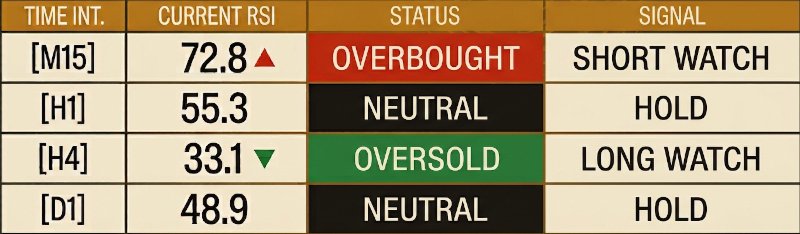
The Multi-Timeframe Relative Strength Index (RSI) Matrix is an institutional-grade technical scanner designed to evaluate momentum and overbought/oversold conditions across 4 distinct execution timeframes simultaneously[cite: 5, 6]. By monitoring the M15, H1, H4, and D1 intervals concurrently[cite: 5, 6], this utility completely eliminates multi-chart cluttering and gives traders an instant executive matrix of momentum exhaustion and structural trend extremes on a single window.
Unlike standard single-chart indicators that limit visibility, the RSI indicator calculates momentum based on the ratio of upward and downward price movements over a specified lookback period[cite: 6]. This matrix maps those raw metrics into a clean visual dashboard, converting index variations into real-time, actionable trading triggers[cite: 5, 6].
💎 Core Technical Features
* True Multi-Timeframe Convergence Matrix: Simultaneously scans 4 critical horizons (M15, H1, H4, D1) from your active asset window without necessitating manual interval swapping[cite: 5, 6].
* Standardized Momentum Calculation: Measures relative strength expansion across rolling historical windows without smoothing distortions[cite: 6].
* Intuitive Color-Coded State Machine: Instantly adapts to active trend contexts with high-visibility color blocks—deep green transitions for Oversold zones and deep red blocks for Overbought zones[cite: 5, 6].
* Actionable Signal Outputs: Translates momentum math into explicit trading actions, including SHORT WATCH, LONG WATCH, and HOLD triggers[cite: 5, 6].
* Institutional "Clean Workspace" Toggle: Includes a premium UI parameters layout that masks background market noise, grids, scales, and axes to give you a clean workspace dedicated strictly to data matrix scanning[cite: 6].
* Zero Terminal Lag / High Performance Architecture: Engineered with efficient, low-overhead arrays that execute loops smoothly, completely avoiding terminal lag on Linux/Wine, VPS, or native Windows architectures.
📈 Interactive Status & Interpretation Logic
The dashboard tracks relative strength index values and converts threshold breaches explicitly into multi-timeframe directional bias matrices:
* Overbought (>= 70.0): Cell transitions to deep red (OVERBOUGHT) and prints an upward directional momentum flag (▲), reflecting extreme upward price expansion[cite: 5, 6].
* Oversold (<= 30.0): Cell transitions to deep green (OVERSOLD) and prints a downward directional momentum flag (▼), reflecting sharp downside exhaustion[cite: 5, 6].
* Neutral (30.0 to 70.0): Displays baseline index metrics with a dark neutral slate background, maintaining a neutral HOLD directional signal[cite: 5, 6].
🛠️ Adjustable Input Parameters
Tailor the calculation matrix completely to your personalized risk strategy directly through the input dashboard:
* InpRSI_Period (Default: 14): Adjusts the historical bar lookback period for RSI calculations[cite: 6].
* InpOverbought (Default: 70.0): Sets your upper overbought index threshold limit[cite: 6].
* InpOversold (Default: 30.0): Sets your lower oversold index threshold limit[cite: 6].
* InpHideChart (Default: true): Removes background chart noise for a sleek, presentation-ready layout[cite: 6].
* InpCorner (Default: 0): Positions the table matrix seamlessly in your selected screen corner[cite: 6].
* InpXOffset / InpYOffset (Default: 20): Fine-tune pixel layout coordinate positions[cite: 6].
The Multi-Timeframe Relative Strength Index (RSI) Matrix is an institutional-grade technical scanner designed to evaluate momentum and overbought/oversold conditions across 4 distinct execution timeframes simultaneously[cite: 5, 6]. By monitoring the M15, H1, H4, and D1 intervals concurrently[cite: 5, 6], this utility completely eliminates multi-chart cluttering and gives traders an instant executive matrix of momentum exhaustion and structural trend extremes on a single window.
Unlike standard single-chart indicators that limit visibility, the RSI indicator calculates momentum based on the ratio of upward and downward price movements over a specified lookback period[cite: 6]. This matrix maps those raw metrics into a clean visual dashboard, converting index variations into real-time, actionable trading triggers[cite: 5, 6].
💎 Core Technical Features
* True Multi-Timeframe Convergence Matrix: Simultaneously scans 4 critical horizons (M15, H1, H4, D1) from your active asset window without necessitating manual interval swapping[cite: 5, 6].
* Standardized Momentum Calculation: Measures relative strength expansion across rolling historical windows without smoothing distortions[cite: 6].
* Intuitive Color-Coded State Machine: Instantly adapts to active trend contexts with high-visibility color blocks—deep green transitions for Oversold zones and deep red blocks for Overbought zones[cite: 5, 6].
* Actionable Signal Outputs: Translates momentum math into explicit trading actions, including SHORT WATCH, LONG WATCH, and HOLD triggers[cite: 5, 6].
* Institutional "Clean Workspace" Toggle: Includes a premium UI parameters layout that masks background market noise, grids, scales, and axes to give you a clean workspace dedicated strictly to data matrix scanning[cite: 6].
* Zero Terminal Lag / High Performance Architecture: Engineered with efficient, low-overhead arrays that execute loops smoothly, completely avoiding terminal lag on Linux/Wine, VPS, or native Windows architectures.
📈 Interactive Status & Interpretation Logic
The dashboard tracks relative strength index values and converts threshold breaches explicitly into multi-timeframe directional bias matrices:
* Overbought (>= 70.0): Cell transitions to deep red (OVERBOUGHT) and prints an upward directional momentum flag (▲), reflecting extreme upward price expansion[cite: 5, 6].
* Oversold (<= 30.0): Cell transitions to deep green (OVERSOLD) and prints a downward directional momentum flag (▼), reflecting sharp downside exhaustion[cite: 5, 6].
* Neutral (30.0 to 70.0): Displays baseline index metrics with a dark neutral slate background, maintaining a neutral HOLD directional signal[cite: 5, 6].
🛠️ Adjustable Input Parameters
Tailor the calculation matrix completely to your personalized risk strategy directly through the input dashboard:
* InpRSI_Period (Default: 14): Adjusts the historical bar lookback period for RSI calculations[cite: 6].
* InpOverbought (Default: 70.0): Sets your upper overbought index threshold limit[cite: 6].
* InpOversold (Default: 30.0): Sets your lower oversold index threshold limit[cite: 6].
* InpHideChart (Default: true): Removes background chart noise for a sleek, presentation-ready layout[cite: 6].
* InpCorner (Default: 0): Positions the table matrix seamlessly in your selected screen corner[cite: 6].
* InpXOffset / InpYOffset (Default: 20): Fine-tune pixel layout coordinate positions[cite: 6].