ATC Position Tool and Trade Manager MT5

ATC Position Tool and Trade Manager MT5

Planifiez, placez et gérez vos trades directement sur le graphique, avec un seul panneau propre.

📌 Aperçu

ATC Position Tool and Trade Manager apporte l'outil de position par glisser-déposer que les traders connaissent des plateformes de graphiques dans MetaTrader 5, et le connecte à l'exécution réelle des ordres.

Dessinez votre trade sur le graphique, définissez les niveaux d'entrée, de stop loss et de take-profit en glissant, et laissez l'EA calculer la taille du lot à partir de votre risque. Placez-le comme un ordre au marché ou en attente, ou enregistrez-le comme un plan à exécuter plus tard. Une fois le trade actif, la même boîte reste sur le graphique, afin que vous puissiez le gérer là où vous l'avez planifié.

Tous les trades en attente, actifs et clôturés sont listés dans un seul panneau. Chaque trade clôturé est automatiquement enregistré dans un journal CSV.

🎯 Outil de position : planifiez visuellement

New Long / New Short : cliquez sur le graphique pour placer l'entrée, et l'outil dessine la boîte de trade complète.
Glissez pour ajuster : déplacez l'entrée, le stop loss et chaque ligne de take-profit avec la souris. Le risque, la récompense et le ratio R:R se mettent à jour pendant que vous glissez.
Jusqu'à 10 niveaux de take-profit : ajoutez ou supprimez des niveaux de TP. La position est répartie entre eux automatiquement.
Calcul du lot basé sur le risque : choisissez Pourcentage (risque % du solde) ou Lot Fixe.
Marché ou en attente : l'EA envoie un ordre au marché, ou choisit le bon ordre limite ou stop selon où se trouve votre entrée.
Save Plan : gardez une idée de trade sur le graphique sans envoyer d'ordre, puis exécutez-la plus tard en un clic avec Execute Plan.
Verrouiller la distance SL / TP : gardez vos distances de stop et d'objectif fixes pendant que vous déplacez l'entrée.
Détails du profit TP et du lot : affichez éventuellement la taille du lot et le profit attendu pour chaque niveau de TP sur le graphique.
Vérifications des prix : les niveaux de stop loss et de take-profit sont validés selon les règles du courtier avant que quoi que ce soit ne soit envoyé.

⚙️ Gestion des trades : gérez sur le graphique

Chaque trade placé garde sa boîte sur le graphique avec ses propres contrôles :

Glissez SL et TP sur les trades actifs : l'ordre du courtier est modifié pour correspondre.
Breakeven : déplacez le stop loss à l'entrée en un clic.
Clôture partielle : fermez n'importe quel pourcentage de la position.
Modifier SL/TP : tapez des prix exacts lorsque vous avez besoin de précision.
Close / Close All : fermez une jambe ou tout le groupe de trades.
Affichage du trailing SL : une fois que votre stop est au-delà de l'entrée, la boîte l'affiche comme un trailing stop.
Show / Hide : masquez les étiquettes ou des trades entiers pour garder le graphique propre.
Couleur de groupe : donnez à chaque trade sa propre couleur.
Invites de confirmation : confirmation optionnelle avant les actions de suppression ou de clôture.

📋 Panneau de trades

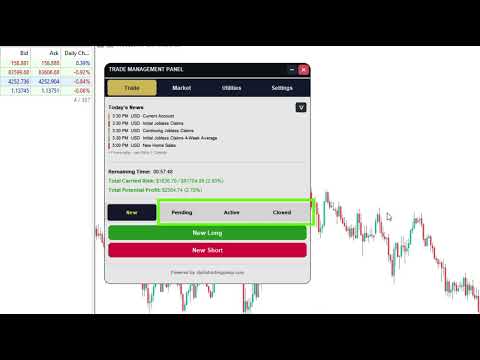
L'onglet Trade vous donne une vue complète de vos trades Position Tool :

New : configurez et placez un trade (type d'ordre, mode de risque, valeur de risque, niveaux de TP).
Pending : chaque ordre en attente avec les actions Manage (Edit SL/TP, Cancel Order).
Active : chaque trade ouvert avec les actions Manage (Close Trade, Partial Close %, Breakeven, Edit SL/TP).
Closed : votre historique de trades, groupé par trade.
Pagination : les longues listes sont divisées en pages, et vous choisissez combien de groupes chaque page affiche.

Boîte d'informations sur le risque :

Temps restant jusqu'à la clôture de la bougie actuelle.
Risque porté sur vos trades ouverts.
Profit potentiel de vos trades ouverts.
Limite d'exposition optionnelle : bloquez les nouveaux trades une fois que votre risque total atteint une limite que vous définissez.

💾 Sauvegarde et restauration

Journal de trades CSV : chaque trade clôturé est ajouté avec son ticket, sa direction, son entrée, SL, TP, lots, heures d'ouverture et de clôture, profit brut, commission, swap, profit net et raison de clôture. Il est prêt pour Excel ou tout outil de journal.
Restauration complète de l'état : les trades, les plans et les boîtes du graphique reviennent après un redémarrage du terminal, un changement d'unité de temps ou un changement de symbole.
Mémoire par symbole : chaque symbole garde ses propres trades et plans.
Réconciliation avec le courtier : les positions qui se sont fermées pendant que l'EA était éteint sont récupérées depuis l'historique du compte et journalisées correctement.
Dossier de données séparé : tout est stocké dans le dossier Files de votre terminal sous le nom défini dans les entrées.

🎨 Paramètres, style et préréglages

Settings > Position Tool : verrouiller la distance SL/TP, détails TP et sensibilité de glissement, modifiés en direct depuis le panneau.
Settings > Styling :
Thème Clair, Sombre ou Personnalisé.
Largeur du panneau, taille de police du corps et sélecteurs de couleur.
Préréglages : enregistrez votre configuration complète sous un nom et chargez-la à nouveau en un clic.
Paramètres mémorisés : vos paramètres de panneau et la position du panneau sont conservés entre les sessions.

🛠 Entrées

Les entrées sont groupées et numérotées pour une configuration rapide :

A: Order Management Tool
B: Trade Management (numéro magique, risque % par défaut, lots par défaut, niveaux TP max, limite d'exposition au risque)
C: Position Tool Settings
D: Risk Info Box
E: Position Tool Colors
F: Trade Management Panel layout and colors
G: Panel body text and info box

✅ Pour qui ?

Les traders discrétionnaires qui planifient avec des niveaux d'entrée, SL et TP et veulent un risque exact sur chaque trade.
Les traders qui sortent progressivement sur plusieurs niveaux de take-profit.
Toute personne qui veut un enregistrement de chaque trade sans journalisation manuelle.

ℹ️ Notes

Fonctionne sur tout symbole et unité de temps proposés par le courtier : forex, métaux, indices, crypto et plus.
Gère uniquement les trades placés via l'outil (identifiés par son numéro magique).
L'EA n'ouvre pas de trades par lui-même. Chaque ordre est placé par vous.

Produits recommandés
Veron Link Slave – Synchronized Grid, Martingale & Breakout Management Short Description Advanced synchronization tool designed to manage Grid, Martingale, and Breakout EAs. Automatically sends close-basket signals to the Master account upon profit target completion, minimizing slippage across different brokers. Full Description Veron Link Slave is a specialized utility developed to enhance the execution efficiency and risk management of multi-account or multi-broker trading setups. It is desig
HedgeSafe Trade Assistant Un panneau de trading manuel pour MetaTrader 5 centré sur la maîtrise du risque. HedgeSafe aide à préparer, valider et gérer une opération directement sur le graphique avant de cliquer sur BUY ou SELL. HedgeSafe n'est ni un service de signaux, ni un outil de prévision, ni un robot IA, ni une stratégie automatique. Il ne choisit pas la direction et ne promet aucun profit. Chaque décision reste sous le contrôle du trader. Fonctions principales Calcul du lot selon un pourc
DDKiller Pro
Njaratahiry Michael Randrianiaina
Arrête de faire sauter ton compte. Une bonne fois pour toutes. DDKiller Pro est le gardien du risque MT5 qui tourne silencieusement sur ton graphique et coupe le trading dès qu'une limite est atteinte — que tu passes un challenge prop firm ou que tu gères ton propre compte CFD. Le problème que tout trader connaît : Tu fixes tes règles. Tu les enfreins quand même. Un trade de vengeance. Une position surleviéragée. Une session qui efface un mois de gains. DDKiller Pro retire cette décision de tes
INTRODUCTORY LAUNCH OFFER: $139 • Exclusive introductory price for the first 10 copies only. • Price will be permanently adjusted to $279 after the first 10 activations. • Next price step: $199 -> Final price: $279. Fortress Risk Manager is an institutional-grade, all-in-one Capital Protection and Risk Management Cockpit built natively for MetaTrader 5. Engineered specifically for prop firm challenge accounts, funded trader programs, and discipl
Manual Trade Panel EA MT5
Juvenille Emperor Limited
5 (2)
Le   Panneau de Commerce Manuel EA MT5   est le panneau de commerce le plus simple et le plus facile à utiliser que vous puissiez trouver pour MT5. Il a toutes ses options et fonctions dans une surface, sans avoir besoin d'ouvrir des fenêtres ou des panneaux supplémentaires. Il s'agit d'un utilitaire de gestion des commandes, de calcul des risques, de fermeture partielle et de protection de compte, le tout dans une interface extrêmement pratique à utiliser! En utilisant   Manual Trade Panel EA
Symbol Manager for MT5
Taras Slobodyanik
5 (3)
Symbol Manager or Grid Manager, designed to group orders into one position (by Symbol or by Magic Number). This utility will be useful to multi-currency traders (many EAs), who can have multiple orders on several pairs. You will be able to see the total number of lots, the total profit, and set virtual stop loss and virtual take profit. To set a real TP (or SL), you must first set the virtual value, and then enter the command in this cell: "set". If you want to set real TP/SL for all orders at
Breakevan Utility
Jose Luis Thenier Villa
BreakEvan Utility  Is a simple tool in a panel with this utilities: This utility will draw a Golden Line in the chart applied showing the breakeven price, considering all the positions opened for that specific symbol. Also the information panel shows: Balance Breakeven Price for that chart Force Breakeven (for that symbol) as ON/OFF Force Breakeven Global (takes into account all trades opened) as ON/OFF Total Lots opened for Symbol Total Lots opened Global And two buttons: Force Breakeven: Whe
Inverted_Chart_EA Utility Expert Advisor Inverted_Chart_EA creates and maintains a mirror-inverted chart of any symbol and timeframe. It automatically generates a custom instrument (e.g. US30_INV ) and keeps its price history updated in real time, with bars mirrored around a chosen pivot. This utility gives traders a new way to analyze the market from a different perspective by flipping the chart upside down. Why use an inverted chart? Highlight hidden patterns – price formations that look ordin
Auto SLTP Maker MT5  is an assistant for all those who forget to set StopLoss and/or TakeProfit in deal parameters, or trade on a very fast market and fail to place them in time. This tool automatically tracks trades without StopLoss and/or TakeProfit and checks what level should be set in accordance with the settings. The tool works both with market and pending orders. The type of orders to work with can be set in the parameters. It can track either trades for the instrument it runs on, or all
Rhino Backtest Manager - panneau de gestion des trades pour le trading réel et le testeur de stratégies Rhino Backtest Manager est un panneau de gestion des trades qui fonctionne aussi bien en trading réel que dans le testeur de stratégies de MetaTrader 5. Il permet de placer et de suivre des ordres manuellement à l'intérieur du testeur avec la même interface que sur un compte réel, de sorte qu'une stratégie peut être vérifiée sur des données historiques puis tradée sans changer d'outil. Le pan
Manual Trading Assistant Pro 【L'outil de "Survie" Ultime pour les Traders Manuels】 Avez-vous déjà paniqué avec les calculs de lots ou les réglages TP/SL lors de mouvements rapides du marché ? Cet utilitaire est conçu pour les traders qui veulent se concentrer à 100% sur "L'Entrée (Attaque)" et laisser la "Sortie (Défense)" à la machine. 【Nouveau dans V3.82 : Fonction de Diagnostic】 Diagnostic de Paramètres Intégré (Pips Check) Ne vous inquiétez plus des mauvais réglages. Le bouton [Pips Check]
This Utility EA is a simple solution for editing many trades with ease , good for traders that ladder into positions. Syncs TP and SL Across All Trades Detects the TP and SL any trade. Updates all trades to match the highest trade's TP and SL if they change. Calculates Expected Profit and Loss Computes the total expected profit and loss in USD by considering TP, SL, lot size, and tick value.
Executor Trader Panel (Sta) - Standard Version   is a multi-functional trading tool designed for traders. The trading panel integrates over 30 individual functions and more than 10 combined functions, providing traders with a highly flexible operational approach. Adapted for DPI: 96, 192. Main Features of the Executor: Instant Connection Status:   Immediately know if the connection with the broker is lost. Time Synchronization:   Instantly know the current local time and the time of the trad
TradePilotmt5
Hossein Khalil Alishir
TradePilot Expert Advisor (EA) for MetaTrader 5 TradePilot is a professional and user-friendly Expert Advisor (EA) for MetaTrader 5 (MT5) . It simplifies automated trading , risk management , and trade execution with a smart trading panel . Perfect for beginners and experienced traders looking for a reliable trade manager EA with automated lot size calculation and smart position management. Key Advantages User-Friendly Trading Panel: Customizable panel with buttons and hotkeys for fast ex
DR Trade and Risk Manager: The Foundational Algorithmic Risk Console for MT5 For the discretionary trader, the greatest adversary is not the market; it is the undisciplined self. You have a solid strategy, but in moments of high pressure, do you follow your rules with perfect consistency? Do you cut losses without hesitation? Do you let winners run without cutting them short out of fear? For most, the answer is no. This gap between strategy and execution is where profits are lost. DR Trade and R
Price reach indicator. It also serves as the perfect term for supports and resistance. I use it in two experts. The basic tool for professional trading. The indicator analyzes the last 500 bar and uses this to determine the levels ( but it doesn't predict the future ) . Personally, I use it on TF H1.  It is very simple. Four lines on chart and that's all. Only two input parameters.  Thousands of indicators. Why this? Is good ? No! Is very good. Please test the indicator prior to purchasing. You
Capital Management EA – Smart Risk Management & Profit Optimization for MT5 Take control of your trading capital with smart, automated strategies — fully optimized for MetaTrader 5 (MT5). Looking to protect your capital and maximize profits through automated money management strategies ? Capital Management EA is the all-in-one Expert Advisor for MetaTrader 5 (MT5) that helps you trade smarter, not harder. Core Features: 5-in-1 Capital Management Strategies – Built-in versatility Gr
Bastion is a monitor-and-close-only risk manager for prop-firm traders. It watches your account against your firm's daily-loss and maximum-drawdown limits in real time and force-closes your open positions BEFORE you cross a line. It never opens a trade of its own, so it stays fully within the tools allowed by FTMO, FundedNext, The5ers, FTUK and FXIFY. Why traders fail challenges A large share of failed evaluations end on a single daily-loss breach: a moment of inattention, a news spike, one tra
TradingManagement
Christian Ishmael Calienta Magallon
TradingManager is a comprehensive trading panel designed to streamline your trading workflow in MetaTrader 5. It combines order management, risk controls, and market analysis into one intuitive interface. Key Features 1. Trading Panel Market Order Entry   - One-click BUY/SELL with automatic SL and TP line placement on chart Fib Limit Orders   - Draw Fibonacci-based limit orders with visual SL and TP levels Risk Management   - Choose between Lots, % Risk, or $ Risk modes Take Profit Split   - Dis
Trade Copilot - Panneau semi-automatique de gestion du risque pour l'Or (XAUUSD) et tout instrument Trade Copilot est un panneau de trading semi-automatique conçu pour les traders manuels qui souhaitent la discipline d'un EA sans renoncer au contrôle de leurs propres entrées. Vous décidez de la direction et du niveau ; le panneau calcule automatiquement la taille du risque, place le stop-loss, gère le take-profit et protège la position. FONCTIONNALITÉS PRINCIPALES - Calcul du lot basé sur le
Fast execution utility for manual traders. Drag-and-drop visual trading, split take-profits, and single-ticket management system. Speed, Precision, and Risk Control. KAB Trade Manager is built for traders who need to execute fast but keep risk tight. It integrates all essential tools into floating, collapsible windows. Core Functions: Instant Order Execution:   Market and Pending orders with automatic Lot sizing based on SL distance. Focus Ticket Manager:   A dedicated window to monitor and mana
# Equity Monitor Pro  ## Short Description Equity Monitor Pro is a professional equity p**Equity Monitor Pro** is a powerful risk management tool that automatically protects your trading account by monitoring equity levels and enforcing prop firm style rules. Whether you're taking an FTMO challenge, trading a funded account, or just want to protect your capital, this EA runs silently alongside your trading strategy and takes action when it matters most. Protection tool designed for prop firm
JMM Trade Panel MT5 JMM Trade Panel MT5 est un outil d’exécution et de gestion des trades pour MetaTrader 5. Il permet d’ouvrir des positions Buy et Sell directement depuis le graphique, d’ajuster rapidement le volume, de suivre les paniers de positions et de gérer les trades selon le Magic Number et les symboles sélectionnés. Manuel utilisateur complet :  Télécharger Fonctionnalités principales Boutons Buy, Sell et Close All sur le graphique. Fermeture en un clic de toutes les positions gérée
Lot calculator tool MT5
Ernestas Kvedaras
3.67 (3)
More stable MetaTrader 4 version is available here:  Lot Calculator Tool . This tool helps you to automatically calculate and manage risk, conveniently place orders visually, schedule orders, trail stops, move them to break-even and more. Features Place market or pending orders using draggable lines Schedule orders Calculate and limit risk using various methods See current spread See time till next candle Set custom order comments Trail stops Move stops to break-even See order profit/loss in p
Risk-o-meter is a Risk calculator Panel designed to help people who are new to trading, better understand how much they are risking for potential profit or loss. Inputs: 1. Enter your Risk in % or currency 2. Enter your Return Ratio 3. Enter your Lot Size Results: 1. SL line 2. TP Line Features: 1. By moving the SL line, lot size will adjust to keep Risk fixed. 2. By moving the TP line, Risk Ration will adjust to keep Risk fixed.  
Bbmamy Trade and Risk Manager
Muhammad Amirul Al Hakim Bin Mahyuddin
Bbmamy Trade and Risk Manager est un utilitaire d’exécution manuelle et semi-automatique et de contrôle du risque pour MetaTrader 5. Il réunit dans un même espace de travail sur le graphique le calcul de la taille de position adapté aux conditions du courtier, l’exécution d’ordres au marché et en attente, l’échelonnement des entrées dans une zone, la gestion des positions, les protections du compte, les notifications mobiles et la journalisation locale. L’utilitaire ne génère aucun signal et ne
ManualEdge ∴ Manual Trading & Basket Risk Panel Trade by hand. Let the system watch your back. ManualEdge is a one-click chart panel built for discretionary traders who want the speed of manual execution combined with the discipline of automated risk management. Instead of choosing between a dumb button panel and a black-box EA, ManualEdge gives you both: you decide when to enter, the panel handles the boring ∴ and dangerous ∴ parts of managing the trade afterward. Protect yourself from bad habb
Divergent Stochastic Filter II Catch Reversals Early, Filter Noise, Trade with Confidence The Edge: Why This Stochastic is Different  Every trader knows the Stochastic oscillator. But knowing when to trust its signals, that's the real challenge. The Divergent Stochastic Filter II transforms this classic indicator into a precision reversal detection system by adding critical elements: divergence intelligence, signal filtering and exhaustion detection.  While standard Stochastic oscillators fire s
## Operating Principle **Manual Order Manager PRO BTC** is an Expert Advisor for MetaTrader 5 designed to **automatically manage trades opened manually by the trader**. The EA does not decide when to buy or sell. The user analyzes the market, chooses the direction, sets the lot size, and opens the position manually. From that point on, the system monitors the trade and applies the configured protection and management rules. The goal is to help the trader maintain a more disciplined approach
Un seul EA au lieu d'une dizaine d'outils : assistant de trading, gestion du risque et 17 indicateurs dans un seul panneau. Posez-le sur le graphique — tout l'essentiel est à portée de main.   Prix de lancement : les 20 premières copies à 49$, ensuite 99$. -50%, maintenant seulement.   TRADEZ EN UN CLIC Le lot se calcule tout seul à partir du risque en % du solde — fini les calculatrices. Stop fractal sur n'importe quelle UT ou manuel, take profit selon le R:R, clôtures partielles TP1/TP2/TP3, b
Les acheteurs de ce produit ont également acheté
Farmed Hedge Yield Farming | All Markets (Manual - Hybrid - Semi/Automated EA) VERIFIED TRADING RESULTS - Farmed Hedge Yield Axi Copy:  https://www.mql5.com/en/signals/2356376 - Farmed Hedge Yield Exn Copy:   https://www.mql5.com/en/signals/2356404 - Farmed Hedge Yield V Copy:  https://www.mql5.com/en/signals/2357156 IMPORTANT NOTICE: FarmedHedge is a MANUAL-FOCUSED TRADING UTILITY ,not a fully automated EA. Results shown on this Signal include manual trades and overall strategic management.
MT5 Trading Deck
Manuel Michiels
5 (2)
One button. One trade. MT5 Trading Deck is a hotkey trading panel for MetaTrader 5 that turns the platform into a keyboard-driven execution cockpit. Stop loss, take profit and lot size are pre-calculated for every key; the moment you press, a market order is live on the broker. A complete technical user manual is attached in the product Comments section. It documents every input parameter, the full hotkey map, the recommended Stream Deck XL layout, and the advanced workflows for Pre-Limit orders
YuClusters
Yury Kulikov
4.93 (43)
Attention: You can view the program operation in the free version  YuClusters DEMO .  YuClusters is a professional market analysis system. The trader has unique opportunities to analyze the flow of orders, trade volumes, price movements using various charts, profiles, indicators, and graphical objects. YuClusters operates on data based on Time&Sales or ticks information, depending on what is available in the quotes of a financial instrument. YuClusters allows you to build graphs by combining da
Mentfx Mmanage mt5
Anton Jere Calmes
4.25 (8)
The added video will showcase all functionality, effectiveness, and uses of the trade manager. Drag and Drop Trade Manager. Draw your entry and have the tool calculate the rest. Advanced targeting and close portions of a trade directly available in tool (manage trades while you sleep). Market order or limit order on either side with factored spread. Just draw the entry, the tool does the rest. Hotkey setup to make it simple. Draw where you want to enter, and the stop loss, the tool calculates al
Copy your MT5 trades to Interactive Brokers You keep using MT5. Every order you open or close is sent to your IB account. In real time. No coding. No changes to your strategy or EA. Try it first Rent 1 month: $30. Test on a live or paper account. What it does Real-time copying: same direction, reverse, or one side only. Map any MT5 symbol to any IB symbol. Set a lot ratio for each. Forex, Futures, Stocks, CFDs, Metals and Crypto. Position sync: both accounts checked, any difference fixed. Optio
Quant AI Agents
Ho Tuan Thang
5 (1)
Quant AI Agents are independent trading Expert Advisors. Instead of trading using a fixed strategy like other conventional EAs, Quant AI Agents   is a   multi-agent AI trading framework   that turns natural-language strategy prompts into live.  WANT THE SAME RESULTS AS MY LIVE SIGNAL?   Use the exact same brokers I do:   IC MARKETS , IC TRADING   .  Unlike the centralized stock market, Forex has no single, unified price feed.  Every broker sources liquidity from different providers, creating un
HINN Lazy Trader
ALGOFLOW OÜ
5 (1)
The core idea: using the user interface, you configure the parameters the chart must meet before entering a position (or positions), choose which entry models to use, and set the rules for when trading and planning should end. Lazy Trader  handles the rest: it  takes over all the routine chart watching and execution! full description  :: 3 key videos [1] ->  [2]   ->  [3] What can it do? - Understands Larry Williams market structure - Understands swing market structure by Michael Huddleston
AI Agent Supervisor is NOT an Expert Advisor. AI Agent Supervisor   is a   multi-agent AI risk & portfolio supervisor   that watches every EA on your account and intervenes in real time.  WANT AN AI PORTFOLIO MANAGER WATCHING YOUR FLEET 24/7?   Run your fleet on the same brokers I do:   IC MARKETS , IC TRADING   .  Unlike the centralized stock market, Forex has no single, unified price feed.  Every broker sources liquidity from different providers, creating unique data streams. The Supervisor r
TradePad
Ruslan Khasanov
5 (1)
TradePad est un outil pour le trading manuel et algorithmique. Nous vous présentons une solution simple pour des opérations de trading rapides et le contrôle des positions sur plusieurs instruments de trading. Attention, l'application ne fonctionne pas dans le testeur de stratégie! Version d'essai de l'application pour un compte démo et une description de tous les outils L'interface de l'application est adaptée aux moniteurs haute résolution, simple et intuitive. Pour un travail confortable, le
Features   With MT5 to Interactive Brokers(IB) Trader, you can: 1. Load chart data from IB to MT5, and Analyze with all standard or customer Indicators. 2. Place Orders to IB Account Directly in MT5. 3. Make your Own EAs upon IB Securities by only making minus changes of the trading function. Usage 1) Installation Copy the "Mt5ToIBTraderEn.ex4" and sample files to [MT5 Data Folder]->MQL5->Experts.  2)  MT5 Settings Add the IP Address to the MT5 Allowed URLs in 'Tools->Options->Expert Adviso
Unlimited Trade Copier Pro MT5 is a tool to copy trade remotely to multiple MT4, MT5 and cTrader accounts at different computers/locations over internet. This is an ideal solution for you if you are a signal provider and want to copy your trades to other receivers globally on your own rules. One provider can copy trades to multiple receivers and one receiver can get trade from multiple providers as well. The provider can even set the subscription expiry for each receiver, so that receiver will n
# If you have any other requirements or are interested in collaboration, please contact  dev.quantech.london@gmail.com . Flash Trade (FT) Most friendly manual trading tool. Easy operation to secure your funds. Features of FT Click the chart to trade fast FT supports market orders and pending orders Click twice to complete the order and set SL and TP Click trice to complete the pending order and set SL and TP Automatically set the stop-loss amount of each order to a fixed percentage of the bala
Adam FTMO MT5
Vyacheslav Izvarin
5 (2)
ADAM EA Special Version for FTMO Please use ShowInfo= false for backtesting ! Our 1st EA created using ChatGPT technology Trade only GOOD and checked PROP FIRMS  Default parameters for Challenge $100,000 Tested on EURUSD and GBPUSD only  Use 15MIN Time Frame Close all deals and Auto-trading  before Weekend at 12:00 GMT+3  Friday For Prop Firms MUST use special Protector  https://www.mql5.com/en/market/product/94362 --------------------------------------------------------------------------------
Trading Chaos Expert
Hennadii Stanilevych
5 (11)
This software has no equals in the world and represents a universal trade "console" covering trading signals, automated market entry, setting of Stop Loss and Take Profit, as well as Trailing Profit for multiple trades at the same time in a single open window. Intuitive control of the Expert Advisor in "three clicks" ensures a comprehensive use of all its functions on different computers, including tablets PCs. Interacting with additional signal indicators that mark the chart to give a real mark
QCML Assistant
Maxime Turcotte-lafreniere
QCML Assistant MT5 Votre Trading. Notre Assistant. Votre Avantage. Vous cherchez un outil qui transforme complètement votre expérience sur MetaTrader 5 ? QCML Assistant est la solution tout-en-un développée par des traders, pour des traders. Un seul outil installé sur votre graphique, et vous avez accès à une plateforme de trading ultra-complète, ultra-rapide et ultra-simple. Fini les heures perdues à configurer votre setup. Fini les prises de position compliquées. Avec QCML Assistant, tout devi
Check EA performance  https://www.mql5.com/en/signals/2376164?source=Site +Profile+Seller Spot vs Future Arbitrage EA for MT5 Spot vs Future Arbitrage EA is an automated Expert Advisor designed for MetaTrader 5 that operates using price differences between Gold spot and Gold futures instruments. The strategy opens positions on both instruments simultaneously to take advantage of temporary differences between spot and futures prices. Requirements The trading account must provide both Gold spot
Latency Arbitrage
Heri Yusufu Kaniugu
Latency Arbitrage – Ultra Fast Execution & Price Inefficiency Capture Latency Arbitrage  utility tool is designed to exploit short-term price inefficiencies between fast and slow price feeds. Instead of predicting market direction, the EA focuses on execution speed and price deviation opportunities, allowing traders to capture micro-movements before the market fully adjusts. With built-in risk controls and smart filtering, it ensures precise and disciplined trading performance. Price increases b
FRATO Smart GEX Gamma Exposure 0DTE Dashboard
Francisco Felipe Alves Da Silva Rocha
Passez au niveau institutionnel avec FRATO Smart GEX. Bien plus qu'un simple indicateur technique basé sur des moyennes mobiles ou des oscillateurs retardés, cet outil d'intelligence quantitative analyse en temps réel le positionnement des principaux teneurs de marché grâce à l'analyse du GEX (exposition gamma) et de l'intérêt ouvert (OI). Identifiez les zones où les gros acteurs influencent les prix et repérez les supports et résistances invisibles sur un graphique en chandeliers classique !
Hedge Trimmer EA
Michael Sipho Bhiya
Hedge Trimmer & Roll-Over EA Managing a hedged position means carrying two opposing trades simultaneously. Over time, the losing side grows while the profitable side offsets it. The standard problem is that closing the loser costs money you may not have sitting in cash — it has to come from somewhere. Hedge Trimmer EA solves this by using the floating profit on your winning trades as the funding source to progressively close down the losing side. It identifies which trades are in profit, uses a
Gamma Edge Pro MT5
Xuan Nam Diep
1 (1)
Gamma Edge Pro MT5 — GexBot Classic API Integration Gamma Edge Pro brings institutional-grade Gamma Exposure (GEX) data directly onto your MetaTrader 5 chart — the same data used by professional options traders to anticipate price magnets, hedging flows, and dealer positioning. Powered by the GexBot Classic API, this indicator automatically maps options market data from US-listed instruments onto any MT5 CFD instrument — Forex pairs, Gold, indices, and more — with intelligent price conversion bu
News Trader Pro is a unique robot that allows you to trade the news by your predefined strategy. It loads every piece of news from several popular Forex websites. You can choose any news and preset the strategy to trade it, and then News Trader Pro will trade that news by selected strategy automatically when the news comes. News release gives opportunity to have pips since the price usually has big move at that time. Now, with this tool, trading news becomes easier, more flexible and more exciti
Elliott Wave Counter est un panneau pour le balisage manuel rapide et convivial des vagues d'Elliott. On peut sélectionner une couleur et un niveau de marques. Il existe également des fonctions pour supprimer le dernier balisage et tout le balisage effectué par l'outil. Le balisage se fait en un clic. Cliquez cinq fois - ayez cinq vagues ! Elliott Wave Counter sera un excellent instrument à la fois pour les débutants et les analystes professionnels des vagues d'Elliott. Guide d'installation et d
If you wish to draw Support and Resistance lines, view: daily market opening, classical pivot levels, Fibonacci pivot levels, trend lines, Fibonacci levels, the remaining time to candle closing, and current spread. If you seek to place your orders with the exact lot that meets your desired stop loss risk. If you wish to do all this and more with just one click, then this is the perfect tool to use. This tool will allow you to feel more relaxed when deciding to open orders, as well as predicting
如果产品有任何问题或者您需要在此产品上添加功能,请联系我 Contact/message me if you encounter any issue using the product or need extra feature to add on the base version. There is Demo version of this panel Dashboard Babon Scalping System MT5 Demo in my product list, please try it out to get familiar with all functionalities for free. Free version: LINK MT4 version: LINK This system basically utilizes TDI, Heiken Ashi Trend, Price Trend on H1 time-frame and TMA on H1&H4 time-frame to generate the trend (big picture). Then
The new version of  MirrorSoftware 2021  has been completely rewriten and optimized.  This version requires to be loaded only on a single chart because  it can detect all actions on every symbol and not only the actions of symbol where it is loaded. Even the  graphics and the configuration mode  have been completely redesigned. The MirrorSoftware is composed of two components (all components are required to work):  MirrorController  (free indicator): This component must be loaded into the MASTER
ClusterSecond
Rafil Nurmukhametov
4.78 (32)
The utility allows you to build different types of graphs: Seconds chart from 1 second to 86400 seconds Tick chart from 1 tick and above The volume chart Delta chart Renko chart Range chart Demo version of the utility https://www.mql5.com/ru/channels/clustersecond Built-in indicators for volumetric analysis: daily market profile and market profile of the selected timeframe, Cluster Search Imbalance VWAP Dynamic POC, VAH, VAL the profile depth of the market vertical volume with various display op
Corporate Report MT5
Pavel Verveyko
5 (1)
The script displays info about the share's corporate reports and dividends. The data is downloaded from   investing.com : Report date Profit per share (EPS) Revenue Market capitalization Amount of dividends Date of payment of dividends Dividend income The product cannot be tested in the tester (since it is not possible to receive data from the Internet). Before launching:  Add 2   URL   https://ru.investing.com/earnings-calendar/Service/getCalendarFilteredData  and   https://ru.investing.com/di
Telegram Publisher Agent   est un module complémentaire qui permet aux commerçants d'envoyer des signaux à leurs canaux et groupes Telegram en temps réel. Avec des messages personnalisables, des captures d'écran de graphiques et d'autres fonctionnalités, l'outil aide les traders à partager leurs idées et stratégies de trading avec leurs abonnés. L'outil présente également un beau design avec un commutateur de thème clair et sombre, offrant aux utilisateurs une expérience de trading esthétique et
Telegram Notify MT5 Telegram Notify MT5 is an utility tool to bridge your MetaTrader 5 activities to your Telegram chat/channel. It is useful for monitoring your MetaTrader 5 account by sending a notification to your particular Telegram chat/channel when someone/EA is placing trades, modifying order's TP/SL, closing trades and etc. This EA does not place any trade for your account. This EA also could be a convenient tool for monitoring other's EA trading activities or a tool for publishing your
Telegram ChartSnap MT5 is an utility tool to bridge your MetaTrader 5 activities to your Telegram chat/group/channel. It will screen shot your MetaTrader 5 chart and send it to your dedicated Telegram chat/group/channel through a Telegram bot. The whole process will keep repeating based on a time cycle that predetermined by the user. It is a convenient tool for those who like to get access to their favorite system/dashboard that only available at MetaTrader Desktop. Beside that, trader can easi
Plus de l'auteur
ATC Economic Calendar and News Panel affiche le calendrier économique intégré de MetaTrader 5 directement sur le graphique, afin que vous puissiez voir les publications à venir sans ouvrir une autre fenêtre. Principales fonctionnalités : • Une carte « Prochain à fort impact » avec le prochain événement à fort impact pour vos devises sélectionnées et un compte à rebours en direct jusqu'à celui-ci. • Liste d'événements jour par jour. Naviguez en avant et en arrière dans les jours avec les bouto
FREE
ATC Currency Strength Meter mesure USD, EUR, GBP, JPY, AUD, NZD, CAD et CHF sur un seul panneau et les classe du plus fort au plus faible. Comment c'est calculé : • La force est le changement en pourcentage depuis l'ouverture de la bougie choisie, tiré des 7 paires majeures avec l'USD. • La force de l'USD est la moyenne des mouvements des autres devises contre lui. • Les suffixes de symboles du courtier (par exemple EURUSD.m) sont détectés automatiquement. Principales fonctionnalités : • B
FREE
ATC Alert Manager Définissez des alarmes de prix directement sur votre graphique et gérez-les toutes depuis un seul panneau. Aperçu ATC Alert Manager vous permet de placer des alarmes de prix en un clic, de les voir comme des lignes sur le graphique et de les déplacer par glisser-déposer. Une alarme se déclenche une fois, au moment où le prix croise réellement votre niveau. Vous recevez une alerte popup, un son et, si vous le souhaitez, une notification push sur votre téléphone. Chaque alarme
FREE
ATC Candle Timer place le temps restant de la bougie actuelle et les informations clés du symbole dans un petit panneau. Minuteur de bougie : • Compte à rebours jusqu'à la clôture de la bougie pour l'unité de temps du graphique ou toute unité de temps de votre choix, y compris hebdomadaire et mensuelle. • Une barre de progression indiquant combien de la bougie s'est écoulée. • Étiquette de compte à rebours optionnelle à côté de la bougie actuelle, activée ou désactivée avec un bouton sur le
FREE
ATC Trading Sessions Voyez les sessions de Sydney, Tokyo, Londres et New York sur votre graphique, dessinées au bon moment toute l'année. Aperçu ATC Trading Sessions dessine une boîte autour de chaque session forex majeure, montrant le haut et le bas de cette session, et ajoute un petit panneau avec le statut en direct de chaque marché. Chaque session est définie dans l'heure locale de ce marché, et l'heure d'été est appliquée automatiquement pour l'Europe, les États-Unis et l'Australie. Les
FREE
One-click execution. Automatic risk calculation. No more manual math. Drag your Entry, Stop Loss, and Take Profit levels directly on the chart. Lot size, risk percentage, and R:R update live as you move the lines — no more typing numbers into a ticket and hoping they're right. Built for manual traders who want the speed of automation without giving up control of every decision. Includes: one-click order execution, auto risk calculator, batch stop-loss management, trade journaling, CSV export, an
Everything in Essential, plus real-time market structure and trend analysis on your chart. See major and minor structure breaks, shifts, and trend direction the moment they happen — no separate indicator, no manual marking. Combined with one-click execution and auto risk calculation, you get context and control in the same panel. Includes: market structure analysis, real-time structure updates, major/minor trend display, plus the full Essential feature set — one-click execution, risk calculator,
Multi-timeframe market structure, FVG and order block mapping, and liquidity detection — combined with one-click execution and risk management. See the trade before you're in it. Drag your Entry, Stop Loss, and Take Profit levels directly on the chart while Premium maps FVGs, order blocks, key levels, and institutional liquidity zones across multiple timeframes in real time. Includes: multi-timeframe FVG and order block mapping, liquidity detection, key and equal levels mapping, session range vi
Le panneau complet de gestion des trades sur le graphique, pour tous les styles de trading — exécution, risque, journal et contexte de marché, réunis en un seul outil. Calculer la taille du lot à la main sous pression, déplacer les lignes de SL/TP à vue, et un graphique encombré de configurations à moitié oubliées et impossibles à reconstituer après un redémarrage — c'est la réalité de la plupart des comptes tradés manuellement, quelle que soit la stratégie derrière l'entrée. Trade Manager rempl
SMC Multi-Timeframe Market Structure MT5 La structure de marché sur cinq unités de temps à la fois, résumée dans un panneau et dessinée sur votre graphique. SMC Multi-Timeframe Market Structure lit le prix comme les traders smart money lisent un graphique : points de swing, sommets plus hauts et creux plus hauts, sommets plus bas et creux plus bas, et les cassures qui confirment ou changent la tendance. Il le fait sur cinq unités de temps en même temps, afin que vous puissiez voir d'un coup d'œi
Filtrer:
Aucun avis
Répondre à l'avis