My Trends MT5
- Indicateurs
-
Lasse Mathias Baagoe S Christensen
 I code what I trade.
I also teach how I trade.
______________________________________
Trading Experience: 5 years.
CEO: Powered Traders & Deep Traders.
Tools & chart inspiration. 👇🏽 - Version: 1.21
How to Read My Trends
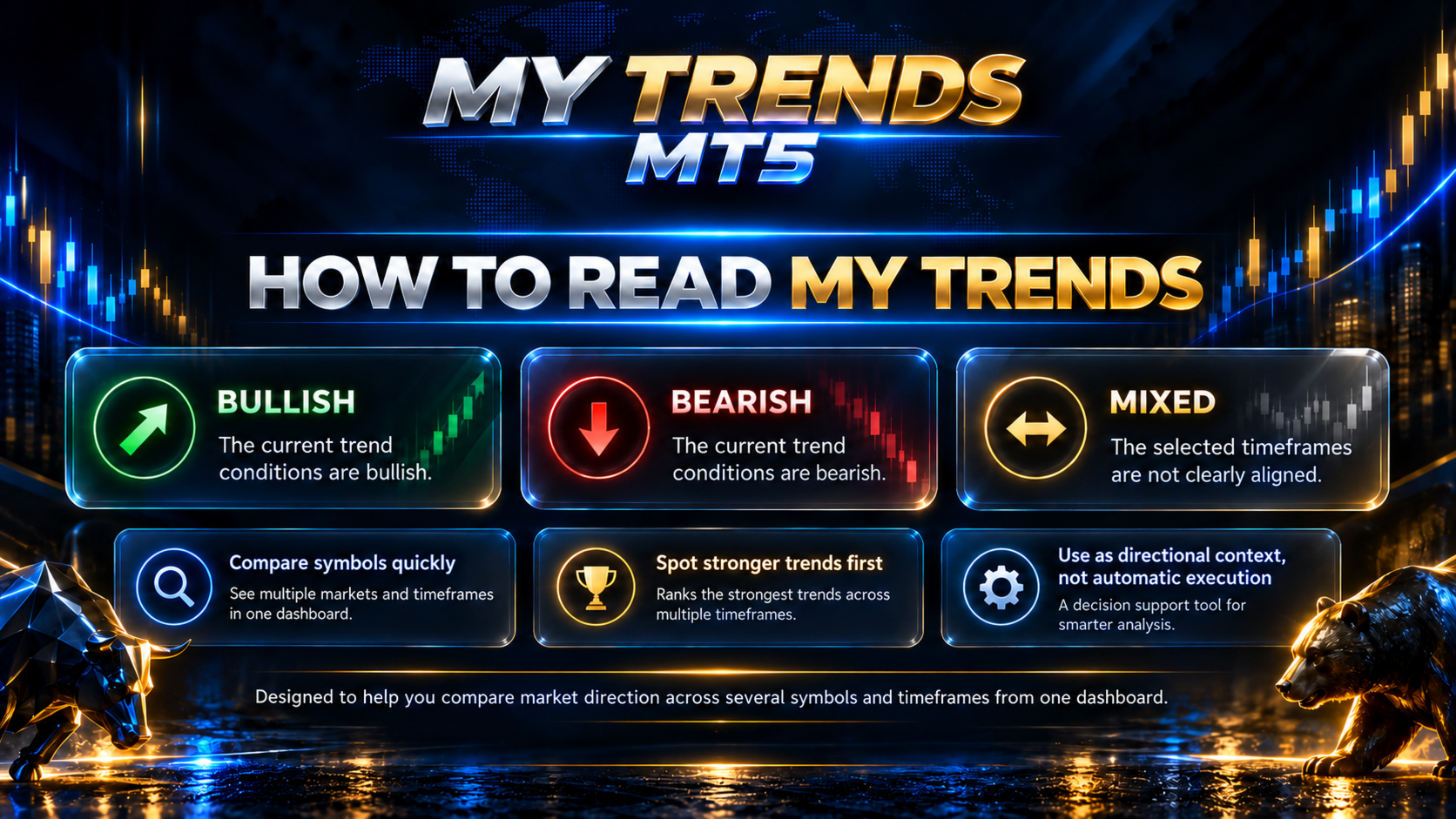
My Trends is designed to help you quickly compare market direction across several symbols and timeframes from one dashboard.
Each symbol can display one of three directional states on the selected timeframes:
-
↑ Bullish – The current trend conditions are bullish
-
↓ Bearish – The current trend conditions are bearish
-
→ Mixed – The selected timeframes are not clearly aligned
The Trend Strength score then provides an additional summary of how strong the current multi-timeframe alignment is.
This allows you to quickly separate cleaner directional markets from markets where the timeframes are giving conflicting information.
Finding the Strongest Trends
When several markets are being monitored at the same time, manually comparing every symbol can take time.
My Trends can automatically rank the symbols inside each market category from strongest to weakest based on the current Trend Strength calculation.
The TOP TREND display highlights the strongest directional market currently detected by the scanner.
This gives you a simple starting point for further analysis.
A higher Trend Strength does not automatically mean you should enter a trade.
It simply shows that the scanner currently detects stronger trend alignment compared with the other monitored markets.
Trend Alignment vs Mixed Conditions
One of the main purposes of My Trends is to show whether several timeframes are supporting the same market direction.
For example, a market may be:
-
Bullish on M5 and M15
-
Mixed on M30
-
Bearish on H1 and H4
In this situation, the dashboard makes the disagreement visible immediately.
Another market may show bullish direction across M15, M30, H1 and H4, producing a stronger overall trend reading.
My Trends helps you identify these differences without repeatedly switching between charts.
Higher-Timeframe Context
Not every timeframe carries the same importance in the Trend Strength calculation.
Higher timeframes contribute more weight to the overall reading, helping the scanner distinguish between a short-term price move and broader directional alignment.
This means a strong reading is based on more than simply counting how many timeframe cells are bullish or bearish.
The purpose is to provide a more useful summary of the current multi-timeframe trend environment.
From Scanner to Chart
My Trends is not only designed to scan markets.
It also helps you move quickly from the overview into your own chart analysis.
You can click a symbol to switch the current MetaTrader 5 chart to that market.
You can also click a timeframe reading to open the selected symbol on that specific timeframe.
A typical workflow could be:
-
Scan the available markets
-
Check the strongest Trend Strength readings
-
Look for multi-timeframe agreement
-
Click the market you want to inspect
-
Open the relevant timeframe
-
Apply your own entry strategy and risk management
One Dashboard, Multiple Markets
My Trends brings several parts of the market-scanning process into one workspace:
-
Forex markets
-
Gold
-
Nasdaq
-
Crypto
-
Multiple timeframes
-
Trend Strength
-
Automatic ranking
-
Top Trend identification
The goal is to reduce unnecessary chart switching and make it easier to see where stronger directional conditions are currently developing.
My Trends finds the markets. You decide what deserves a closer look.
Custom Market Lists
Different brokers can use different symbol names.
My Trends therefore allows the monitored symbol lists to be adjusted from the indicator settings.
For example, your broker may use:
-
XAUUSD
-
XAUUSD.a
-
NAS100
-
NAS100.cash
-
BTCUSD
-
BTCUSDm
Enter the symbol exactly as it appears in your MetaTrader 5 Market Watch.
Up to 40 symbols can be configured by default.
Flexible Timeframe Selection
You do not need to monitor every supported timeframe.
My Trends allows individual timeframes to be enabled or disabled depending on your own trading style.
Supported timeframes include:
-
M5
-
M15
-
M30
-
H1
-
H4
-
D1
The dashboard automatically adapts to the timeframes you choose to monitor.
Dark & Light Themes
My Trends includes both Dark and Light dashboard themes.
The dashboard position and sizing can also be adjusted so the scanner can better fit your MetaTrader 5 workspace.
This allows the indicator to remain readable without unnecessarily covering the chart.
What My Trends Does Not Do
-
Does not open trades automatically
-
Does not close trades automatically
-
Does not manage live positions
-
Does not calculate your Stop Loss or Take Profit
-
Does not determine your position size
-
Does not guarantee that the strongest trend will continue
-
Does not guarantee profitable trades
My Trends is a market-analysis and scanning tool designed for manual traders.
My Trends MT5 in Short
-
Multi-Symbol Market Scanner
-
Multi-Timeframe Trend Analysis
-
M5 to D1 Monitoring
-
0–100% Trend Strength
-
Higher-Timeframe Weighted Analysis
-
Automatic Trend Ranking
-
Global Top Trend
-
Custom Symbol Lists
-
Forex, Gold, Nasdaq & Crypto
-
Click-to-Open Charts
-
Selectable Timeframes
-
Dark & Light Themes
-
Manual Trading Only
ONE CHART. MULTIPLE MARKETS. YOUR TRENDS.
Testing My Trends
Before making the scanner part of your regular trading workflow, test it with the symbols and timeframes you normally analyse.
Pay attention to:
-
How Trend Strength changes as timeframe alignment changes
-
Differences between bullish, bearish and mixed markets
-
How the strongest ranked symbols behave after appearing near the top
-
How higher-timeframe direction compares with shorter-term movement
-
Which timeframe combination best fits your own trading style
Different symbols and market conditions can produce different Trend Strength readings and ranking behaviour.
Important Information
My Trends MT5 is a technical market-analysis indicator.
Trend direction, Trend Strength, ranking and Top Trend information are analytical references and do not represent guaranteed trade opportunities.
A market with a high Trend Strength score can reverse, become mixed or lose momentum as market conditions change.
The strongest currently ranked market is not guaranteed to produce the best future trading result.
Always combine the scanner with your own market analysis, entry rules, position sizing and risk management.
Trading leveraged financial products involves substantial risk and can result in loss of capital.
Historical market behaviour does not predict future performance.
For product questions or support, use the MQL5 product comments or MQL5 messaging system.