Just One Click Trade
- Utilitaires
- Version: 4.3
- Mise à jour: 5 octobre 2026
- Activations: 10

Just One Click Trade
A manual trading panel for MetaTrader 5. You set the risk and the levels directly on the chart, while lot calculation and position handling are done automatically. This is not a trading robot — it is a tool for those who trade manually and want to do it faster and more precisely.
Risk management
The trade volume is calculated automatically — as a percentage of the balance or in the account currency. You can also open a trade with a fixed lot and switch between modes in one click. An exact risk-matching option is available, rounding the lot up or down. Swap on positions is taken into account (can be disabled in the settings). The trade commission is shown on the stop-loss line (if the instrument has no commission data in its history yet, the value may not appear for a while).
Interactive order placement
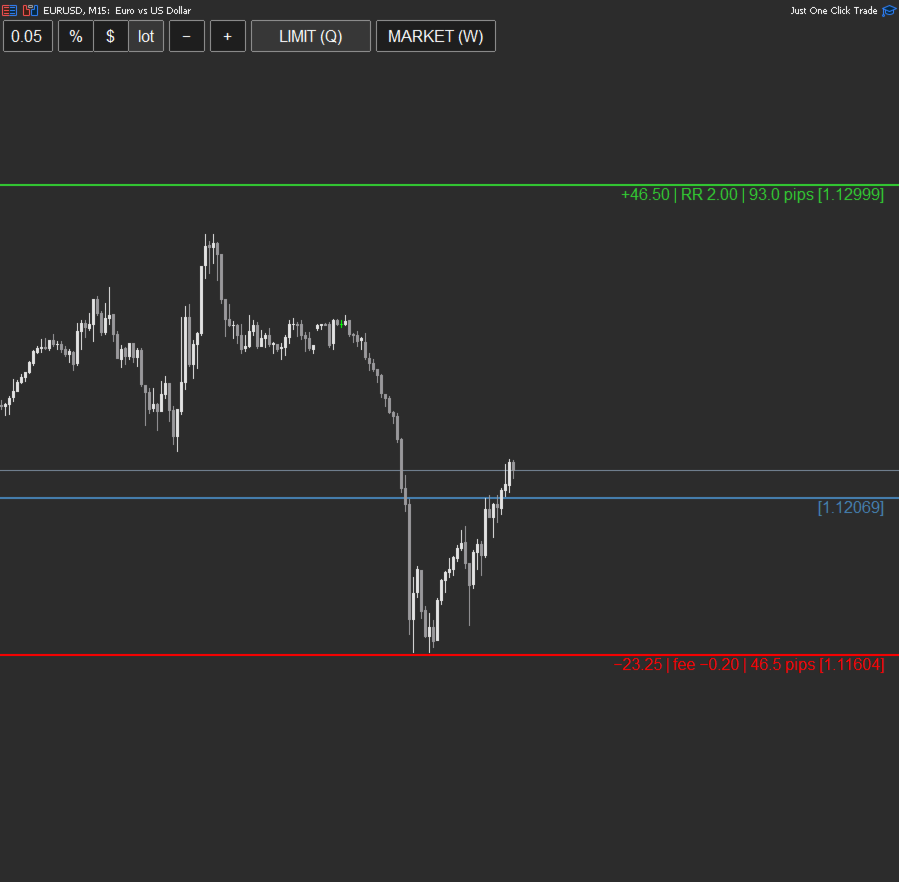
Drag the stop-loss (SL), entry (Entry) and take-profit (TP) lines directly on the chart. The TP line shows the potential profit and the profit-to-risk ratio; the SL line shows the potential loss amount, distance and commission. Market and pending orders (Limit and Stop) are supported.
Position management
The list of all open positions for the symbol updates in real time along with the P/L. Available actions include one-click partial close, several partial take-profit levels executed automatically once the price is reached (mind the spread), moving to break-even with a single button, changing the take-profit of an open trade, quick close by direction or result, and closing all positions for the symbol at once.
(Partial TP and break-even levels work only while the terminal and the EA are running — keep this in mind while trading)
Hotkeys
- W — market order.
- Q — pending order.
- T — change the take-profit of the selected or the last trade (order).
- F — close all positions for the symbol (with protection against accidental presses, which can be disabled).
- P — Cancel Pending Orders
- D — remove all partial levels.
- Z — show or hide the main panel.
- X — show or hide the positions panel.
- Esc — cancel the action.
All keys can be reassigned or removed in the settings.
How to use
Select the method for calculating risk: as a percentage, in the account currency, or as a fixed lot. Select the order type: Market or Limit. Then set the stop-loss and the entry line. If the stop-loss is below the entry line, the order is a buy order; if it is above, the order is a sell order. The expert advisor will automatically select the correct order type (Limit or Stop) depending on the position of the entry line relative to the current market price.
A market order will be executed at the current price immediately after the stop-loss is set.
Support
For any questions about the EA, please use the product comments section or private messages on mql5.com.
Trading Panel, Risk Management, Risk Manager, Manual Trading, Trade Manager, MT5, Expert Advisor, MetaTrader 5, Trading Tool, Trader Utility, Lot Calculation, Risk Calculator, Position Size, Partial Close, Stop Loss, One Click, Trade Placement, Risk Reward, Risk Reward Ratio, Risk Per Trade, Risk Management, Fast Execution, Manual Trading, Scalping