My Chart Generator

What if your chart adapted to the market instead of the clock?


THE PROBLEM IT SOLVES

 Instead of trying to find the best indicator that fits your timeframe chart, build a chart and find the most appropriate indicator.


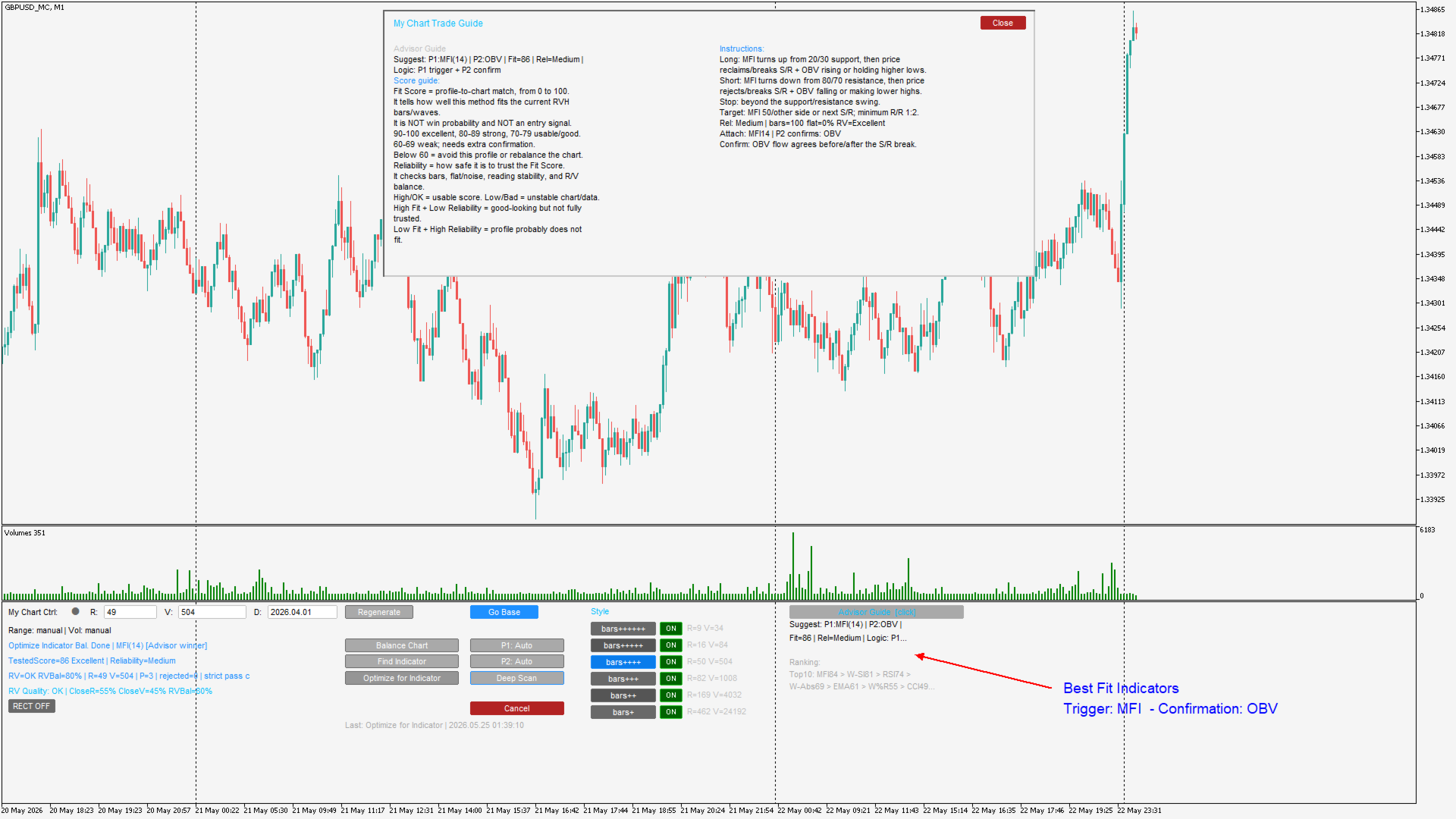
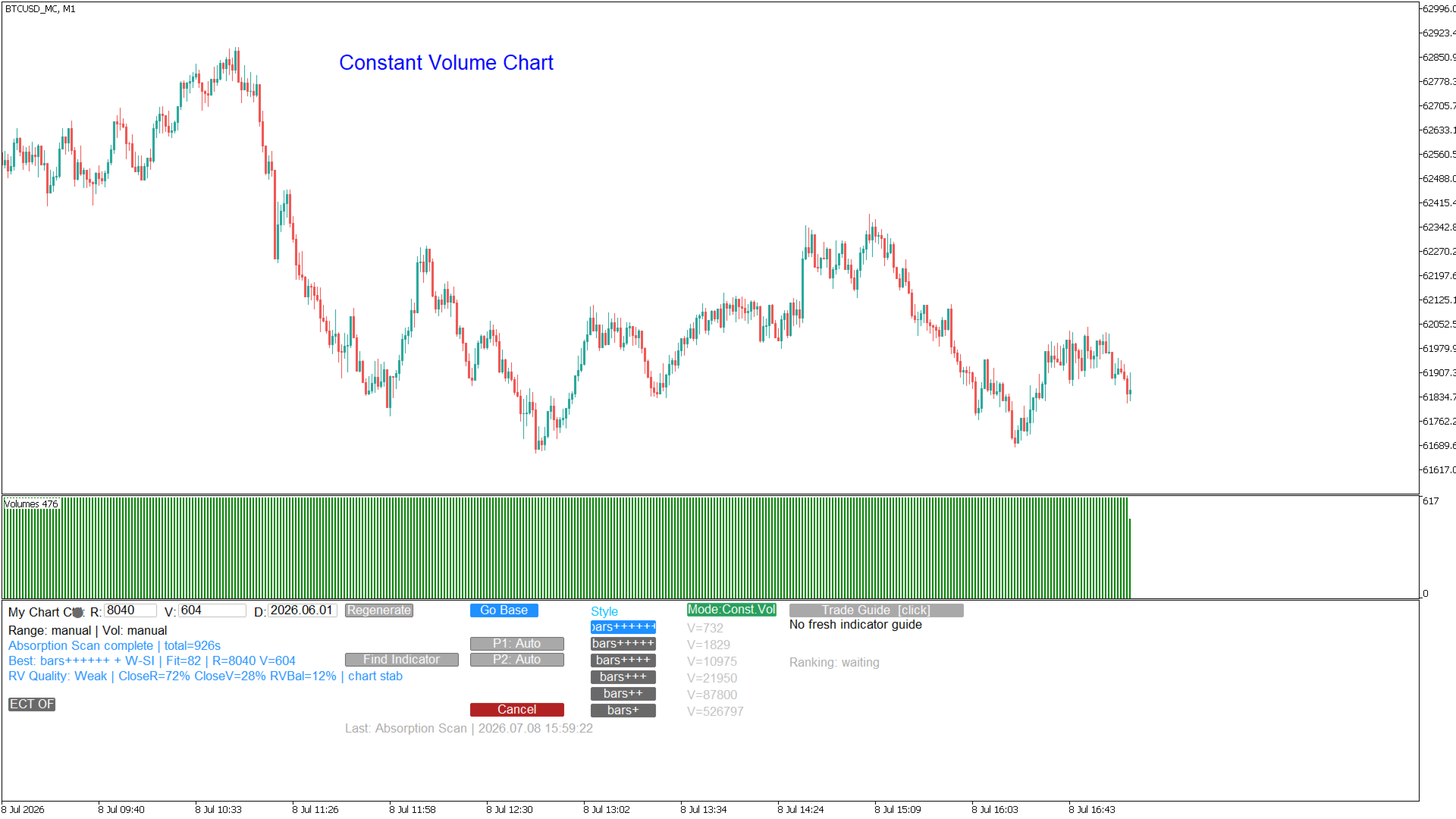
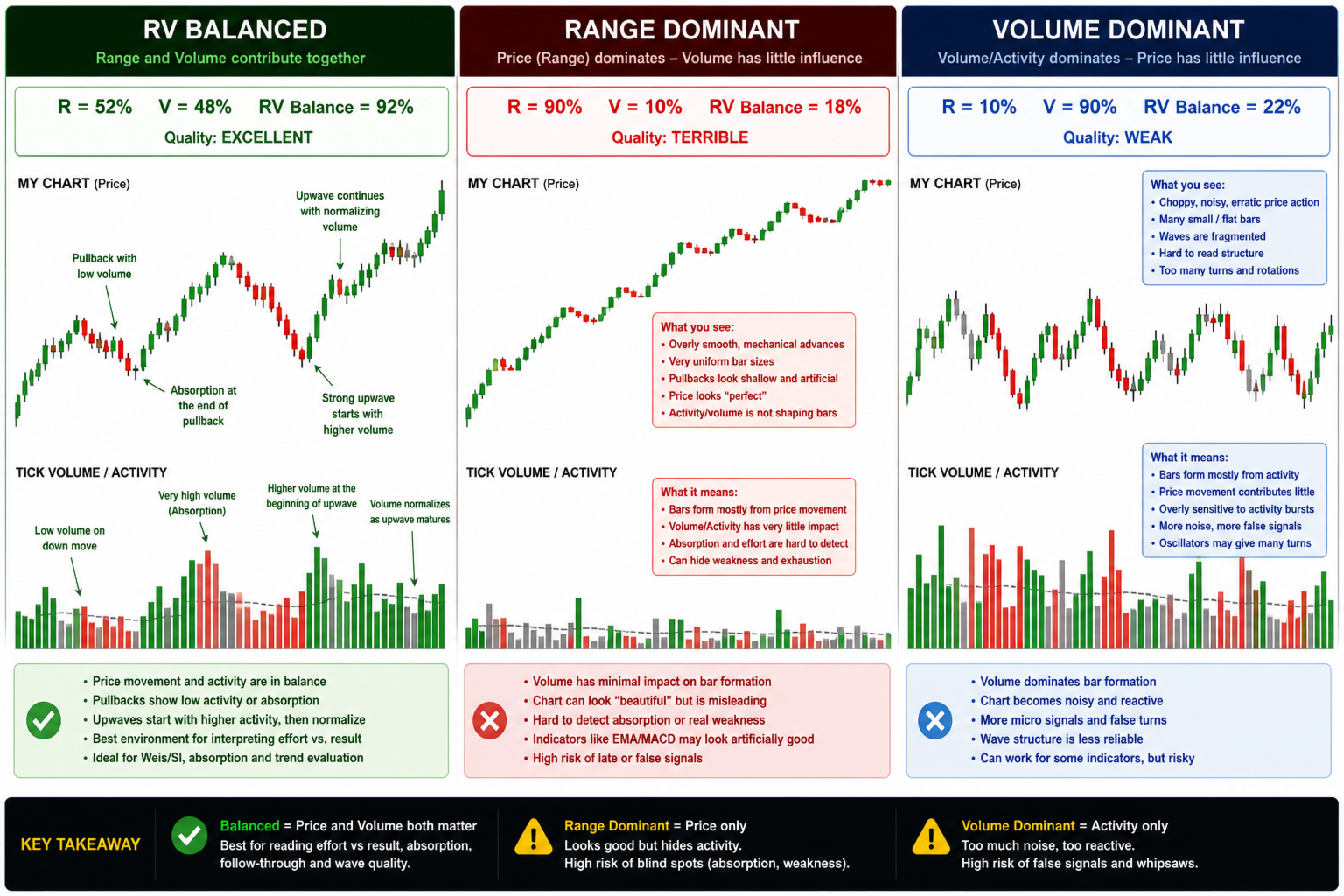
My Chart Generator is a MetaTrader 5 background service that builds a live, fully historical custom Range/Volume chart from any symbol — Forex pairs, crypto, indices, commodities, or anything available in your MT5 terminal. Unlike time-based charts where every bar has an identical duration regardless of what the market is doing, a Range/Volume bar closes only when price has moved a minimum distance AND a minimum volume has been accumulated. The result is a chart whose rhythm is driven entirely by market activity: during quiet, low-participation periods bars compress and fewer signals fire; during active, high-conviction moves bars flow cleanly and structure becomes readable at a glance.

 To control it download the free indicator My Chart Control


HOW IT WORKS

The Generator runs as a dedicated MT5 Service — a background process that stays alive independently of any chart. It reads the raw tick stream from your chosen source symbol, accumulates each tick into the current open bar, and closes that bar the moment both the Range threshold (minimum point movement) and the Volume threshold (minimum tick accumulation) are satisfied. The completed bar is written to an MT5 Custom Symbol, which then appears as a normal chart in your terminal — fully compatible with all indicators, expert advisors, and drawing tools.

When the Generator starts for the first time it seeds the custom chart with the full available tick history from a user-defined start date, so the historical portion of the chart is as meaningful and back-testable as the live portion. There is no artificial gap between history and live data.


SIX STYLE PRESETS — ONE CLICK TO CHANGE

 My Chart Generator has six built-in style presets that automatically calibrate Range and Volume from the symbol's own recent tick activity:

  — bars+  (like a Daily ): targets approximately one bar per one to two days. Maximum noise filtering for multi-session position trading.

— bars++  (like 4HR): targets approximately one bar per four hours. A well-rounded timeframe for position and swing traders.

— bars+++  (like 1HR): targets approximately one bar per hour. The recommended starting point for intraday directional trading.

— bars++++  (like 30min): targets approximately one bar per thirty minutes. Suited to breakout and momentum strategies.

— bars+++++  (like 5min): targets approximately one bar per five minutes. Fast, clean bars for active intraday scalping.

— bars++++++  (like 2min): targets approximately one bar per two minutes. Ultra-high frequency for tick-dense symbols such as major crypto pairs.

  A Custom style is also available for traders who prefer to set Range and Volume manually.


PROFILE SCORING AND ADVISOR INTELLIGENCE

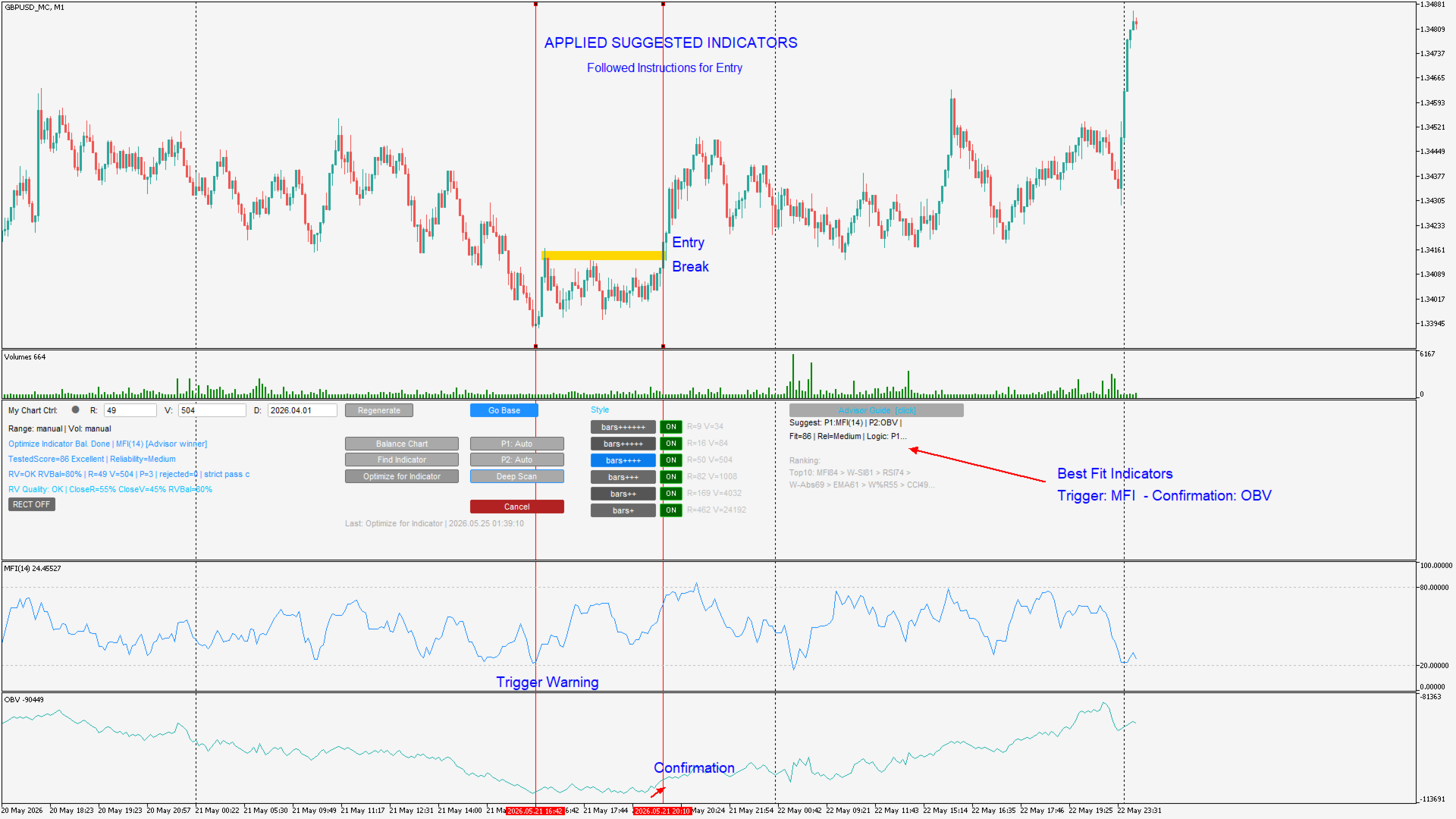
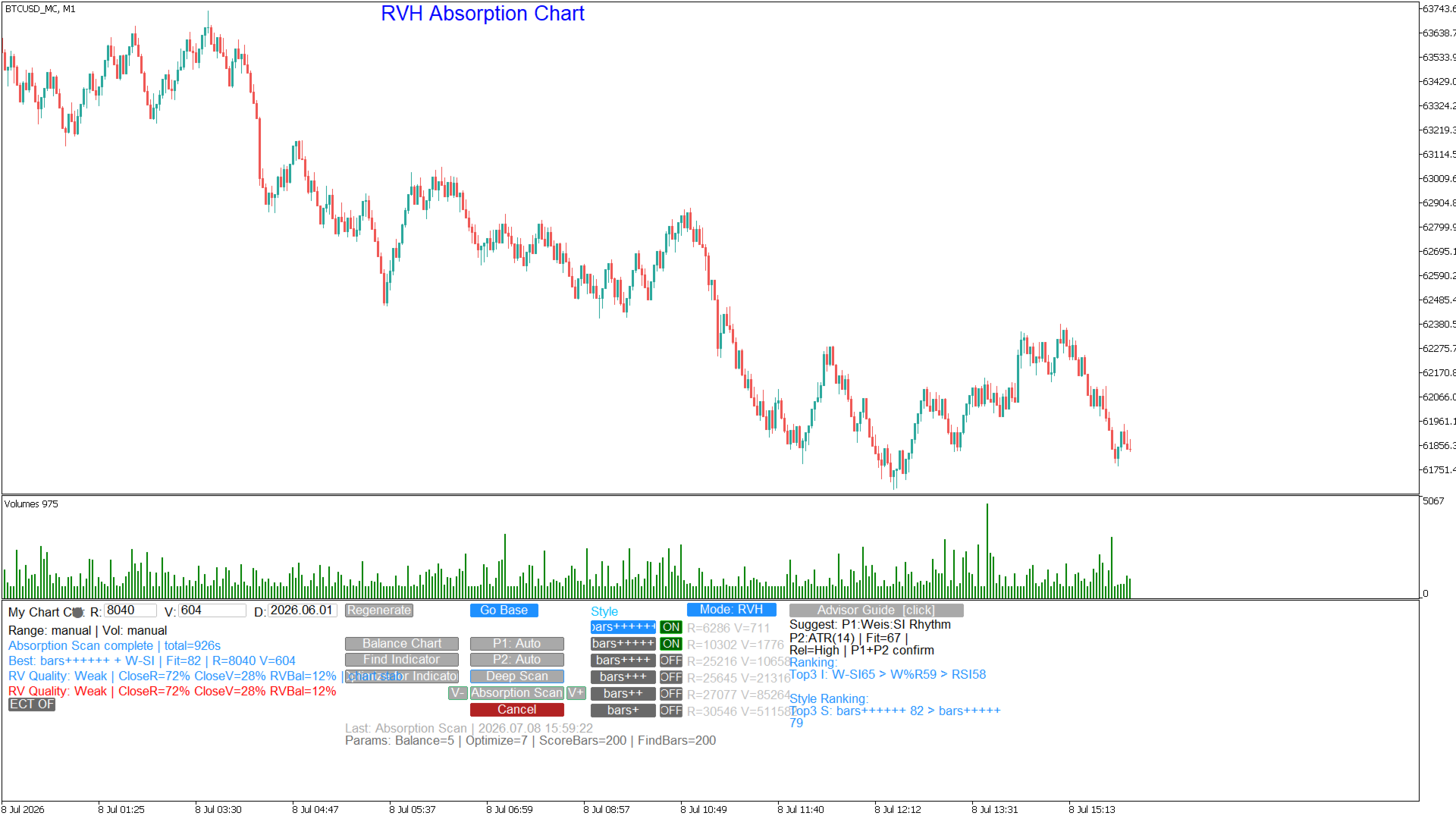
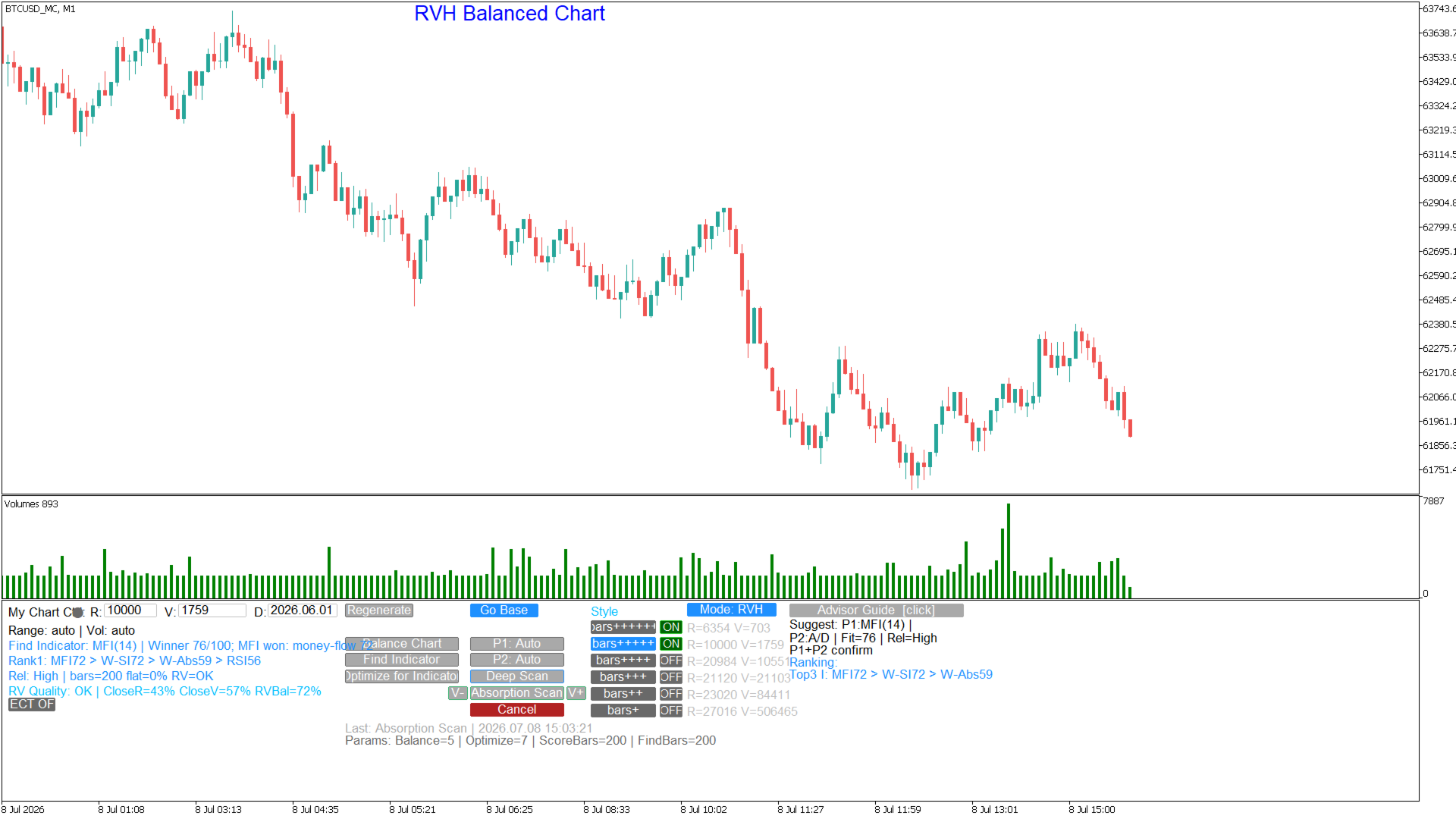
  The Generator is not just a bar builder — it is the intelligence layer of the My Chart ecosystem. It owns the Advisor brain, which analyses recent chart structure to detect the current market regime (trend impulse, pullback, range rotation, breakout expansion, absorption, compression, or chop) and recommends the optimal indicator profile. It also runs the full multi-pass profile scoring engine used by the Optimize for Indicator function, evaluating how cleanly a chosen indicator's signals align with the custom chart's bar structure.


Supported scoring profiles include: EMA/MA, EMA Cross, RSI, MACD, Stochastic, MFI, Bollinger Bands, Williams %R, CCI, ADX, ATR, OBV, Accumulation/Distribution, Weis Wave/Speed Index, Wave Absorption, Flat Absorption, and External Indicator (any custom MQL5 indicator with configurable signal buffers).


EXTERNAL INDICATOR SUPPORT

Connect any custom MQL5 indicator that publishes buy and sell signals to buffers to the Generator's scoring engine. Configure the signal buffer indices and buffer mode (single signed buffer or separate long/short buffers), and the Generator will score that indicator's behaviour across multiple R/V candidates during the Optimize for Indicator workflow — finding the exact bar construction settings that make your indicator perform at its best on that symbol.


CONTROLLED BY FREE MY CHART CONTROL INDICATOR https://www.mql5.com/en/market/product/178749

  The Generator has no on-chart UI. All interaction — changing style, adjusting R/V, triggering Balance Chart, Optimize, Deep Scan, and Find Indicator — is handled by the companion My Chart Control indicator, which must be attached to the custom chart. The two components communicate through MT5 Global Variables and are designed to run together as a single integrated system.


REQUIREMENTS

— MetaTrader 5 terminal, build 3000 or later.

— My Chart Control indicator (free indicator).

— Source symbol must be available with tick history in MT5 Market Watch.


To download the manual sign up for free on my site: www.tradethevolumewaves.com and download it from your profile menu under files
Plus de l'auteur
Weis Wave with Alert
Trade The Volume Waves Single Member P.C.
4.82 (22)
Rental/Lifetime Package Options and Privileges' Rent Monthly Six Months   Yearly/Lifetime Weis Wave with Speed with Alert+Speed Index x x x Manual  x x x Quick Set up Video x x x Blog x x x Lifetime Updates x x x Setup and Training Material x x Rectangle Break Alert Tool      x Discord Access Channel "The SI traders" x   How to trade info visit:    http://www.tradethevolumewaves.com   ** If you purchase please contact me to setup your  : training Room and  complete manual access.  This is
Weis Wave with Alert MT5
Trade The Volume Waves Single Member P.C.
4.94 (17)
Rental/Lifetime Package Options and Privileges  Rent Monthly Six Months   Yearly/Lifetime Weis Wave with Speed with Alert+Speed Index x x x Manual  x x x Quick Set up Video x x x Blog x x x Lifetime Updates x x x Setup and Training Material x x Discord Access Channel "The SI traders"          x Rectangle Break Alert Tool      x How to trade with it:    http://www.tradethevolumewaves.com   ** If you purchase please contact me to setup your  : Training Room and  complete manual access.  Wei
Wave Anatomy
Trade The Volume Waves Single Member P.C.
5 (1)
Wave Anatomy Visit:   http://www.tradethevolumewaves.com   for more information Construct your own 5 Waves and analyze the price movements stages: Easy Movement Hard time to move Fast move This indicator is based on Wyckoff’s, David’s Weis and my Speed Index Theory. This indicator will you help analyze what is happening in 5 Price Waves that you can construct yourself. This tool is designed for scalpers and swing traders and will help them to analyze any wave on any timeframe at the same time.
Trend Lines MT5 with Alert
Trade The Volume Waves Single Member P.C.
Trend Lines Cross  This indicator will alert you on any cross of a Trendline. You can draw up to two trend lines and form a channel, a pennant , a triangle or a simple trend and when the price crosses either trend line the indicator  will provide you with alerts that you define plus an up or down arrow when the cross happened. How to:   Draw the 1st trendline and name it tl1.  Draw the 2nd trendline and name it tl2. Select which type of alerts you would like in the indicator properties and you a
FREE
Range Volume Hybrid Generator
Trade The Volume Waves Single Member P.C.
1. Introduction Range Volume Hybrid (RVH) is a MetaTrader 5 Expert Advisor that creates custom chart symbols using a unique dual-condition bar formation method. Unlike traditional charts where bars close based on a single criterion (time, range, or volume), RVH bars close only when BOTH a minimum price range AND a minimum volume threshold are met simultaneously.  Download also and install RVH Monito r Indicator - to control the EA from the custom charts (it's Free)  https://www.mql5.com/en/marke
TrendLines Cross with Alert
Trade The Volume Waves Single Member P.C.
4 (4)
Trend Lines Cross  This indicator will alert you on any cross of a Trendline. You can draw up to two trend lines and form a channel, a pennant , a triangle or a simple trend and when the price crosses either trend line the indicator  will provide you with alerts that you define plus an up or down arrow when the cross happened. How to:   Draw the 1st trendline and name it tl1.  Draw the 2nd trendline and name it tl2. Select which type of alerts you would like in the indicator properties and you a
FREE
Constant Volume Calculator MT5
Trade The Volume Waves Single Member P.C.
This is a free helper indicator for MT5 that will help traders setup their constant volume charts depending on their trading style. It will calculate the number of ticks that your constant volume chart should have depending on the following trading styles: Scalper Active Day trader Day trader Swing trader Position trader   Instruction video attached. Enjoy!
FREE
RVH Monitor MT5
Trade The Volume Waves Single Member P.C.
This is an indicator to control the Parameters of Range Volume Hybrid Generator expert advisor -It does not work as stand alone, it works as a remote control of Range Volume Hybrid Generator and must be applied on the custom chart generated by the EA. To get Range Volume Hybrid Generator expert advisor:  https://www.mql5.com/en/market/product/165557 Parameters that can be adjusted: Trading Style as well as manual setting of Range, Volume and start Date of data collection. What's the video for 
FREE
Constant Volume Calculator MT4
Trade The Volume Waves Single Member P.C.
This is a free helper indicator for MT4 that will help traders setup their constant volume charts depending on their trading style. It will calculate the number of ticks that your constant volume chart should have depending on the following trading styles: Scalper Active Day trader Day trader Swing trader Position trader   Instruction video attached. Enjoy!
FREE
Tick Chart Monitor
Trade The Volume Waves Single Member P.C.
DO NOT DOWNLOAD  UNLESS YOU OWN "Tick Chart - Constant Volume Generator EA" - This indicator acts as remote control of the specifc EA. The link for "Tick Chart - Constant Volume Generator EA" : https://www.mql5.com/en/market/product/171018 1. Tick Chart Monitor   1.1 What It Does The Monitor is an indicator that runs directly on the generated tick chart. It provides a graphical control panel that lets you change the EA’s style, volume, start date, or trigger a full rebuild — without touching the
FREE
No Demand No Supply
Trade The Volume Waves Single Member P.C.
4.5 (4)
This indicator identifies No Demand –No Supply candles  to your chart and plots volume bars colored according to the signal. It can be applied to all timeframes or to a specific one only. It can also be used as regular volume indicator but with exceptional future of WEIGHTED VOLUME. Furthermore is has an alert notification, sound and email when a signals occurs. The indicator does not repaint but the alert will come on two candles back due to the definition of No Demand No Supply. The VSA (Volum
Anchored VWAP with Alert
Trade The Volume Waves Single Member P.C.
5 (4)
What is the Volume Weighted Average Price (VWAP)? The volume weighted average price (VWAP) is a trading benchmark used by traders that gives the average price an instrument has traded at throughout the day, based on both volume and price.  It is important because it provides traders with insight into both the trend and value of the instrument. What is the Difference between VWAP and AVWAP? While VWAP is having as starting point the beggining of the day,week,month etc. in the AVWAP you can plac
No Demand No Supply MT5
Trade The Volume Waves Single Member P.C.
No Demand No Supply   This indicator identifies   No Demand –No Supply candles to your chart and plots volume bars colored according to the signal. It can be applied to all timeframes or to a specific one only. It can also be used as regular volume indicator  with exceptional future of WEIGHTED VOLUME. Furthermore is has an alert notification, sound and email when a signals occurs. The indicator does not repaint but the alert will come on two candles back due to the definition of No Demand No Su
Anchored VWAP with Alert MT5
Trade The Volume Waves Single Member P.C.
5 (1)
What is the Volume Weighted Average Price (VWAP)? The volume weighted average price (VWAP) is a trading benchmark used by traders that gives the average price an instrument has traded at throughout the day, based on both volume and price.  It is important because it provides traders with insight into both the trend and value of the instrument. What is the Difference between VWAP and AVWAP? While VWAP is having as starting point the beggining of the day,week,month etc. in the AVWAP you can pla
Wave Anatomy MT5
Trade The Volume Waves Single Member P.C.
Wave Anatomy Visit:  http://www.trafethevolumewaves.com  for more information Construct your own 5 Waves and analyze the price movements stages: Easy Movement Hard time to move Fast move This indicator is based on Wyckoff’s, David’s Weis and my Speed Index Theory. This indicator will you help analyze what is happening in 5 Price Waves that you can construct yourself. This tool is designed for scalpers and swing traders and will help them to analyze any wave on any timeframe at the same time. Fur
Tick Chart Constant Volume Generator
Trade The Volume Waves Single Member P.C.
1. Overview   The Tick Chart Toolset is a pair of tightly coupled MQL5 files that generate and control professional Constant Volume charts inside MetaTrader 5 as custom symbols. Unlike time-based charts, each bar closes only when a target volume threshold is reached, giving you a noise-filtered, activity-proportional view of the market. Free "Tick Chart Monitor Indicator" to control the generator EA:  https://www.mql5.com/en/market/product/17104   Component Type Role Tick_Chart_Generator_AI_MT5
My Chart Control
Trade The Volume Waves Single Member P.C.
Important: Do not download or install My Chart Control unless you already own My Chart Generator service. My Chart Control is not a standalone chart generator. It is designed to work together with the custom charts produced by My Chart Generator. Your Range/Volume chart, optimized for your indicator — automatically.   My Chart Control is the on-chart dashboard and intelligence interface for My Chart Generator. Attach it to your My Chart custom symbol chart and it gives you complete control over
FREE
Filtrer:
Aucun avis
Répondre à l'avis