Aurum Cipher
- Experts
- Version: 2.0
- Mise à jour: 1 août 2026
- Activations: 7

### Short Description
Aurum Cipher is a MetaTrader 5 trend-continuation Expert Advisor designed primarily for XAUUSD on M5. It evaluates trend, volatility, and price structure after a bar has closed and trades only when its conditions are aligned.
### Trading Approach
Aurum Cipher uses selective entries rather than high-frequency trading. Its internal filters evaluate moving-average structure, trend slope, volatility, candle quality, and swing location. The core signal settings are built into the program, while user inputs focus on direction, execution, position sizing, stops, trade management, and sessions.
Main trading characteristics:
- Signals are confirmed only on closed bars - Entries are placed with market orders - Long and short trading can be enabled separately - One position is managed at a time for the same symbol and Magic Number - No grid, martingale, or loss-recovery position expansion
Symbols containing XAUUSD or GOLD are recognized as gold instruments, including broker suffixes such as XAUUSD.m. The default setup is designed mainly for XAUUSD M5. Other instruments can be tested, but they should be validated separately with the broker's own pricing, contract specifications, and trading costs.
The signal timeframe can be set to M5, M15, M30, or H1. In the gold M5 setup, if no M5 entry is opened, the EA also evaluates a secondary M15 continuation signal when a new M15 bar begins.
### Stop Loss and Take Profit
Three initial stop-loss modes are available:
- Swing-based stop: uses a recent swing reference - Signal-candle stop: uses the signal candle extreme - Balanced stop: provides a middle choice between the first two modes
An optional stop buffer can be added in points. Take profit is calculated from the initial stop distance and the Reward:risk input.
### Position Sizing
Two position-sizing modes are available:
- Risk % of equity: calculates volume from account equity, selected risk percentage, and initial stop distance; valid range is above 0% and up to 15% - Fixed lots: uses a fixed volume; valid range is above 0 and up to 100 lots
The final volume is adjusted to the symbol's minimum, maximum, volume step, aggregate volume limit, and available margin. Actual trade risk can still differ from the calculation because of gaps, slippage, spread changes, or minimum-volume constraints.
### Position Management
Three position-management modes are available:
- Off: uses only the initial stop loss and take profit - Break-even + half close: moves the stop to break-even when its condition is reached and can close half at a selected trigger - Partial close + peak trail: closes part of the position at a selected trigger and manages the remainder from the achieved price peak
In this description, 1R means the price distance between entry and the initial stop loss.
The default first partial fraction is 0.50, which means 50% of the current position. Partial closing follows the broker's minimum volume and volume-step rules. A very small position may not be divisible into two valid volumes.
By default, Partial/trail trigger is 0, so partial closing and peak trailing are disabled. Set this input above 0 to activate the path at the selected R multiple. Break-even trigger, stop floor, first partial fraction, and the R/ATR trail distances are configurable.
### Trading Sessions
The EA can restrict entries to Asia, London, and New York sessions using broker server time. Start and end times can be configured to the minute. Default sessions are:
- Asia: 03:00 to 07:00 - London: 09:00 to 12:00 - New York: 15:00 to 20:00
Broker server time zones differ, so review these settings before use.
### Scope
This version does not include an economic-calendar news filter, holiday CSV handling, automatic weekend closing, an account daily-loss limit, or rules for any specific trading company. The EA manages only positions opened with its own Magic Number. It does not manage manual trades or positions opened by other EAs.
The EA does not require DLLs, WebRequest, or external files.
### Suggested Setup
1. For the first test, start with XAUUSD M5 and the default inputs. 2. Attach the EA to the intended symbol and enable algorithmic trading. 3. Use a different Magic Number for each independent strategy instance. 4. Check all session inputs against broker server time. 5. Before live use, test the symbol name, spread, commission, swap, execution limits, and volume calculation in the Strategy Tester and on a demo account.
### Backtest and Risk Notice
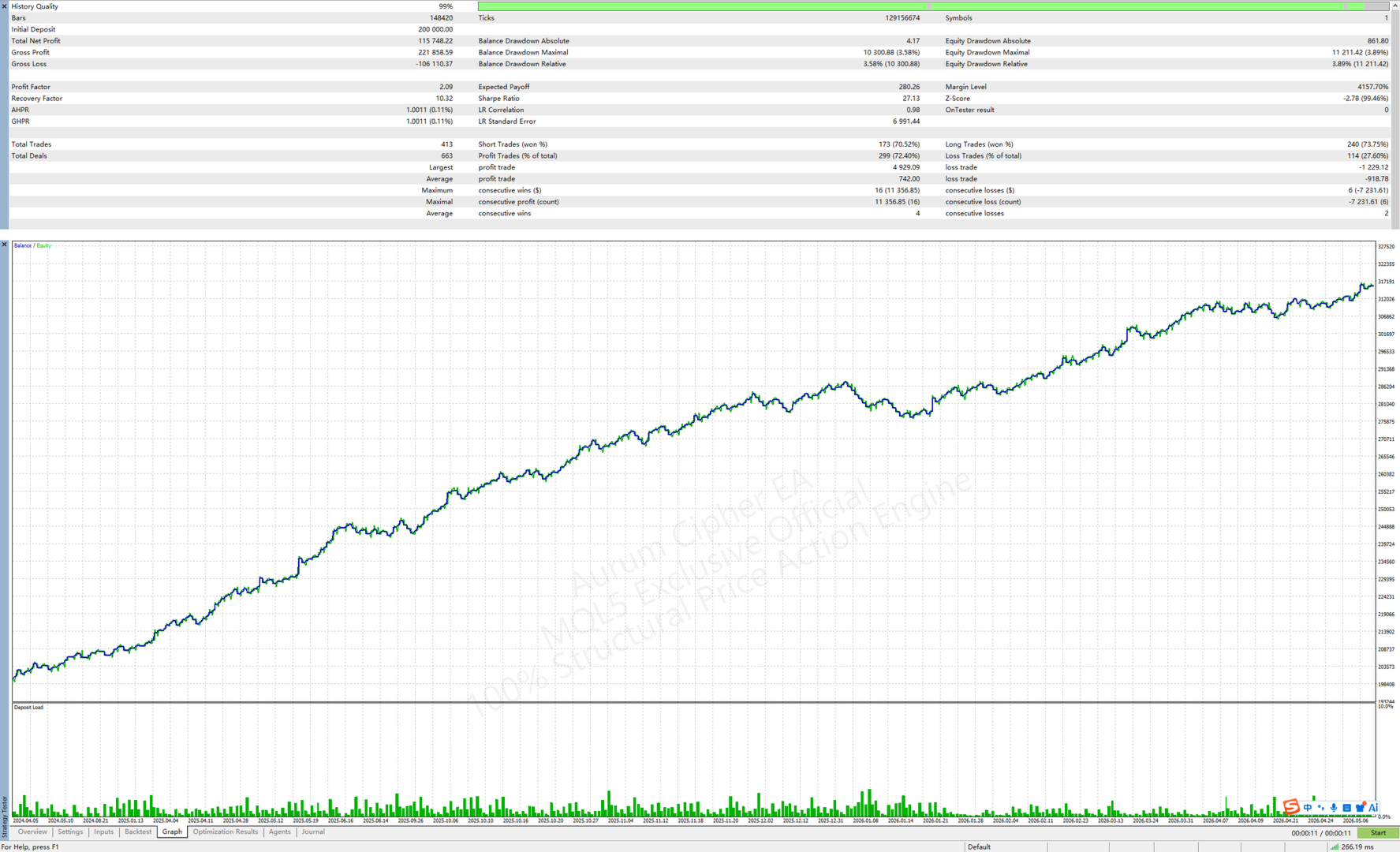
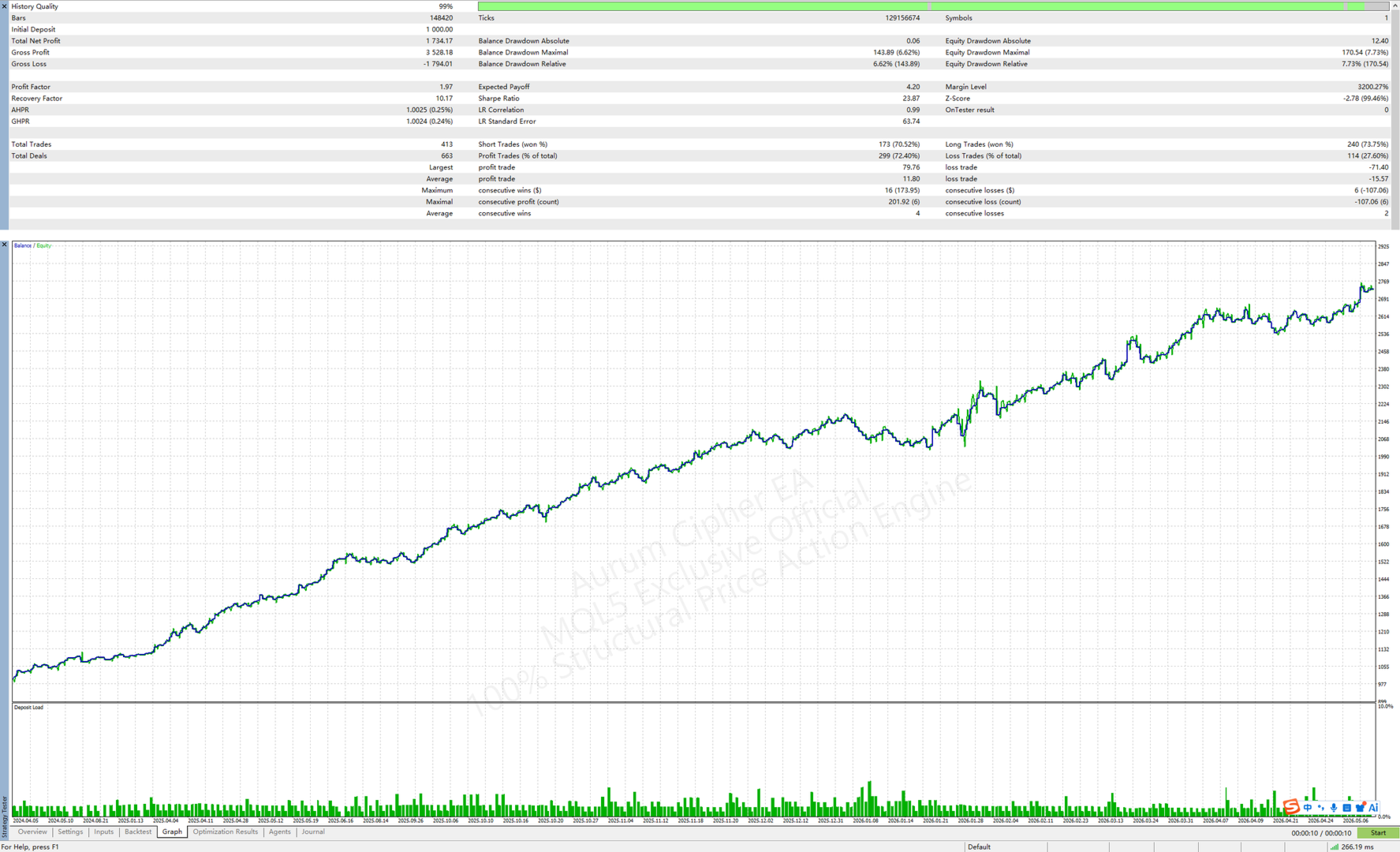
Any Strategy Tester screenshot on the product page represents a historical backtest under the stated data and settings. It is not a live trading result and does not indicate future performance. Results can vary with data source, spread, commission, slippage, swap, leverage, margin rules, and execution quality.
Trading involves the risk of loss. Aurum Cipher is trading software, not investment advice. It does not guarantee profit, a win rate, or qualification for any evaluation program.
### Support
Product support is provided through the MQL5 product comments or the MQL5 messaging system. When reporting an issue, include the symbol, timeframe, broker, account type, input settings, and relevant screenshots.
Price changes apply only to future orders. Existing buyers are not affected by later price adjustments. The applicable price is the price displayed on the product page at checkout.
### Short Description
Aurum Cipher is a MetaTrader 5 trend-continuation Expert Advisor designed primarily for XAUUSD on M5. It evaluates trend, volatility, and price structure after a bar has closed and trades only when its conditions are aligned.
### Trading Approach
Aurum Cipher uses selective entries rather than high-frequency trading. Its internal filters evaluate moving-average structure, trend slope, volatility, candle quality, and swing location. The core signal settings are built into the program, while user inputs focus on direction, execution, position sizing, stops, trade management, and sessions.
Main trading characteristics:
- Signals are confirmed only on closed bars
- Entries are placed with market orders
- Long and short trading can be enabled separately
- One position is managed at a time for the same symbol and Magic Number
- No grid, martingale, or loss-recovery position expansion
Symbols containing XAUUSD or GOLD are recognized as gold instruments, including broker suffixes such as XAUUSD.m. The default setup is designed mainly for XAUUSD M5. Other instruments can be tested, but they should be validated separately with the broker's own pricing, contract specifications, and trading costs.
The signal timeframe can be set to M5, M15, M30, or H1. In the gold M5 setup, if no M5 entry is opened, the EA also evaluates a secondary M15 continuation signal when a new M15 bar begins.
### Stop Loss and Take Profit
Three initial stop-loss modes are available:
- Swing-based stop: uses a recent swing reference
- Signal-candle stop: uses the signal candle extreme
- Balanced stop: provides a middle choice between the first two modes
An optional stop buffer can be added in points. Take profit is calculated from the initial stop distance and the Reward:risk input.
### Position Sizing
Two position-sizing modes are available:
- Risk % of equity: calculates volume from account equity, selected risk percentage, and initial stop distance; valid range is above 0% and up to 15%
- Fixed lots: uses a fixed volume; valid range is above 0 and up to 100 lots
The final volume is adjusted to the symbol's minimum, maximum, volume step, aggregate volume limit, and available margin. Actual trade risk can still differ from the calculation because of gaps, slippage, spread changes, or minimum-volume constraints.
### Position Management
Three position-management modes are available:
- Off: uses only the initial stop loss and take profit
- Break-even + half close: moves the stop to break-even when its condition is reached and can close half at a selected trigger
- Partial close + peak trail: closes part of the position at a selected trigger and manages the remainder from the achieved price peak
In this description, 1R means the price distance between entry and the initial stop loss.
The default first partial fraction is 0.50, which means 50% of the current position. Partial closing follows the broker's minimum volume and volume-step rules. A very small position may not be divisible into two valid volumes.
By default, Partial/trail trigger is 0, so partial closing and peak trailing are disabled. Set this input above 0 to activate the path at the selected R multiple. Break-even trigger, stop floor, first partial fraction, and the R/ATR trail distances are configurable.
### Trading Sessions
The EA can restrict entries to Asia, London, and New York sessions using broker server time. Start and end times can be configured to the minute. Default sessions are:
- Asia: 03:00 to 07:00
- London: 09:00 to 12:00
- New York: 15:00 to 20:00
Broker server time zones differ, so review these settings before use.
### Scope
This version does not include an economic-calendar news filter, holiday CSV handling, automatic weekend closing, an account daily-loss limit, or rules for any specific trading company. The EA manages only positions opened with its own Magic Number. It does not manage manual trades or positions opened by other EAs.
The EA does not require DLLs, WebRequest, or external files.
### Suggested Setup
1. For the first test, start with XAUUSD M5 and the default inputs.
2. Attach the EA to the intended symbol and enable algorithmic trading.
3. Use a different Magic Number for each independent strategy instance.
4. Check all session inputs against broker server time.
5. Before live use, test the symbol name, spread, commission, swap, execution limits, and volume calculation in the Strategy Tester and on a demo account.
### Backtest and Risk Notice
Any Strategy Tester screenshot on the product page represents a historical backtest under the stated data and settings. It is not a live trading result and does not indicate future performance. Results can vary with data source, spread, commission, slippage, swap, leverage, margin rules, and execution quality.
Trading involves the risk of loss. Aurum Cipher is trading software, not investment advice. It does not guarantee profit, a win rate, or qualification for any evaluation program.
### Support
Product support is provided through the MQL5 product comments or the MQL5 messaging system. When reporting an issue, include the symbol, timeframe, broker, account type, input settings, and relevant screenshots.
Price changes apply only to future orders. Existing buyers are not affected by later price adjustments. The applicable price is the price displayed on the product page at checkout.