Master Gold Spike Hunter
- Experts
-
Deynis Alejandro Puro Rodriguez
 We are a group of independent developers of algorithmic trading systems specialized in advanced Expert Advisors for MetaTrader 5, with a rigorous focus on risk management, operational robustness, and adaptability to multiple markets and brokers.
 - Version: 1.7
- Mise à jour: 17 octobre 2026
- Activations: 10
Overview
Master Gold Spike Hunter is an Expert Advisor developed specifically for XAUUSD on MetaTrader 5. It runs seven internal strategies as a single coordinated system, each with its own entry conditions, stop loss, take profit and waiting period between entries.
It is built as the higher-participation counterpart of the Gold Spike Hunter framework. Where the PRO version prioritises selectivity, this version engages the market more often, around 30 percent more entries, while keeping the same structured risk control.
That additional engagement comes from wider detection of volatility expansions, momentum continuation zones, intraday liquidity shifts and early-stage impulse movements.
This product is actively maintained and receives updates to improve stability and adapt to changing market behaviour.
Strategy Profile
Intraday day trading, based on volatility and momentum, capturing directional expansion.
No Martingale. No Grid. No Recovery systems. No High-Frequency Trading. No Scalping.
The system trades more often than the PRO version, but every entry still passes the same filtering logic. More participation, not looser rules.
Supported Market and Broker Compatibility
The system trades XAUUSD only, and is calibrated around its liquidity, institutional participation and volatility behaviour.
Broker symbol names are detected automatically, including variations such as XAUUSD, XAUUSD.a, XAUUSDm, GOLD and GOLDmicro. The resolved name is written in the Experts log at start-up so you can confirm what the EA found. If your server uses a non-standard convention, a manual symbol name input is available.
The EA is designed to operate across ECN brokers, STP brokers, prop firms, retail accounts and VPS environments, through an adaptive execution calibration engine that absorbs differences in spread, liquidity provider and execution speed.
A hedging account is recommended. On netting accounts all seven strategies merge into a single position with a blended average price, so the break-even logic does not apply there. The EA still trades, but position management is designed for hedging.
For prop firms, the structure is aligned with typical rules: controlled exposure, no risk amplification techniques, daily loss protection and no grid stacking. Always verify your firm's rules before trading.
Single-Chart Rule
The EA must run on one chart only. Recommended setup: XAUUSD, H1 timeframe, one instance. Never change the timeframe while the EA is running.
From version 1.5 the EA detects this by itself. If a copy is already running on another chart of the same terminal, the second copy does not trade and the panel states the reason. Detection covers charts within the same terminal, so if you run two separate terminals on one account, keep the EA in only one of them.
Installation
- Open MetaTrader 5.
- Enable XAUUSD in Market Watch.
- Open the XAUUSD chart and set the H1 timeframe.
- Attach the EA to that chart only.
- Enable AutoTrading.
- Confirm successful initialization in the Experts tab.
- Choose the Lot Size Mode. Automatic needs no further setup. Manual needs the volumes from the reference table.
Once active, the EA monitors, analyses and executes only when its internal conditions are met.
Lot Size Mode
Version 1.5 introduces automatic position sizing. This is the default mode and no volume configuration is needed.
In Automatic mode the EA calculates the volume of every trade from the account balance and the real stop loss distance of that specific strategy, asking the broker server for the exact monetary value. Each strategy has its own risk level, because each one uses a different stop loss, and a single shared percentage would not respect that difference.
Three rules govern the calculation:
The volume is always rounded down to the broker's volume grid, so the result never exceeds the requested risk. When the calculated volume falls below the broker's minimum, the minimum is used. And when even the minimum volume would exceed the maximum risk allowed, the signal is discarded rather than opened with more risk than requested, with the reason written in the log and shown on the panel.
The result is that as the account grows, risk converges towards the configured target from below, never above it.
The maximum risk input is a limit per trade, not an aggregate limit. Several strategies can hold positions at the same time, so combined exposure can exceed that figure. The daily loss protection is what caps total exposure over a 24 hour window.
In Manual mode each strategy uses the fixed volume you set, and the reference table below applies.
Minimum Balance and Manual Lot Reference
Minimum recommended balance: 300 USD.
Gold has a coarse volume grid. On a 300 USD account every strategy sizes at the broker minimum of 0.01 lots in both modes, so Automatic and Manual behave the same. Risk differentiation between strategies only becomes visible from roughly 500 USD upward, as the calculated volume starts to exceed the minimum.
The table below applies to Manual mode. In Automatic mode the EA sizes every position by itself and this table is for reference only.
| Account type | Balance | Contract size | Lot per strategy |
|---|---|---|---|
| Spot account | 300 USD | 100 | 0.01 |
| Funded account | 5,000 USD | 100 | 0.02 |
These values assume a XAUUSD contract size of 100, which is the most common specification. If your broker uses different contract specifications, verify the symbol properties before applying them. To keep a consistent risk profile in Manual mode, increase the volumes proportionally with the account balance.
Trading Logic
The system operates through a multi-layer decision engine built on volatility spike detection, momentum continuation analysis, market structure validation, liquidity flow tracking, exhaustion and expansion cycles, and multi-factor confirmation.
The seven strategies work across different timeframes and directions. They do not share a common entry rule, and each one carries its own stop loss, take profit and waiting period, which is why they are sized independently in Automatic mode.
Master Version Compared to PRO
| Feature | PRO Version | Master Version |
|---|---|---|
| Trade frequency | Lower | Higher, around 30 percent more |
| Risk profile | Conservative | Moderately aggressive |
| Entry timing | Highly selective | Expanded opportunities |
| Market exposure | Limited | Increased |
Both are built on the same core engine. Gold Spike Hunter PRO is oriented towards precision and stability; Master Gold Spike Hunter towards performance and participation. The difference is the level of participation you choose.
Risk Management System
Risk is controlled through several independent layers:
Position sizing from account balance and real stop loss distance, or fixed volumes per strategy. Dynamic stop loss and adaptive take profit per strategy. Break-even logic after a defined progression towards target. Daily loss limitation that closes the EA's own positions and pauses trading for 24 hours. Loss streak protection that temporarily suspends trading after an adverse sequence and reactivates by itself.
From version 1.5 the daily loss protection and the loss streak protection count only the positions opened and managed by this EA. Positions from other programs or opened manually are never touched and never counted. Trade results include commission and swap with the correct sign.
Every order is validated before it is sent: volume limits, volume step, aggregate symbol volume limit, broker minimum stop distance, free margin and open market session. A signal that fails any of these checks is discarded and reported, instead of being sent and rejected by the server.
Input Parameters
Parameters are organised in named groups inside the EA properties window. Boolean inputs: false means OFF, true means ON.
| Group | Parameter | Default | What it does |
|---|---|---|---|
| 1. General Settings | InpMagicNumber | 84972183 | Identifies the trades opened by this EA, so it manages only its own positions |
| 2. Trading Time Window | StartTradingHour | 1 | Server hour on Monday when the EA starts looking for trades |
| StopTradingHour | 17 | Server hour on Friday when the EA stops opening new trades | |
| CloseAllHour | 22 | Hour of the Friday forced close | |
| CloseAllMinute | 30 | Minute of the Friday forced close, for example 22:30 server time | |
| 3. Daily Risk Management | MaxDailyLossPercent | 20.0 | Percentage of the balance at the start of the day. When reached, the EA closes its own positions and pauses for 24 hours |
| 4. Break-Even Management | Enable_Move_SL_BE | true | Moves the stop loss to the entry price after a defined progression towards target |
| BreakEvenLevels | 90 % | How far towards the target before the stop loss is moved | |
| 5. TP Position Booster | Enable_TP_Booster | false | Expands take profit targets when conditions indicate a higher probability of further favourable movement |
| 6. Market Sensitivity | SensitivityLevels | -35 % | Adaptive calibration to align behaviour across brokers with different volume and liquidity reporting |
| 7. Symbol SL Protection | CheckAndDisableSymbolBYSL | true | Temporarily suspends trading after an adverse stop loss sequence, and reactivates by itself |
| 8. Manual Symbol Name | NameToSymbolGold | GOLD | Used only if automatic symbol detection fails |
| 9. Lot Size Mode | LotSizingMode | Automatic | Automatic, risk based, or Manual, fixed volumes |
| Risk_M1 | 2.0 % | Risk target for its strategy group | |
| Risk_M5 | 4.0 % | Risk target for its strategy group | |
| Risk_M15 | 5.0 % | Risk target for its strategy group | |
| Risk_H1_Sell | 5.0 % | Risk target for its strategy group | |
| Risk_H1_Buy | 8.0 % | Risk target for its strategy group | |
| Risk_ChartSymbol | 2.0 % | Risk target for the chart symbol strategy | |
| AutoRisk_MaxPercent | 10.0 % | Maximum risk allowed per trade. Above this, the signal is discarded | |
| 10. Manual Lot Size | Gold_XAUUSD_lotajeP0 to P4 | 0.01 | Used only when Lot Size Mode is set to Manual |
Trading window. Broker server time, calibrated for a GMT+3 schedule. If your broker server time is not GMT+3, adjust these inputs so the effective window matches the same GMT+3 hours.
Note on break-even. It can reduce drawdown, and it can also reduce long-run performance by closing trades earlier during normal retracements. On brokers that enforce a wide minimum stop distance, a break-even set at 90 percent may not execute, because at that point the price is already too close to the target for the server to accept the modification. Lowering the level gives it more room.
Note on daily risk. This value must be consistent with your volumes and account balance. On funded accounts, set it slightly below the prop firm daily limit to keep a buffer. It is a limit per 24 hour window, not a limit on total drawdown over a longer period.
Note on the TP Booster. OFF is recommended for a more conservative style. ON may increase aggressiveness in profit capture and can lead to different outcomes depending on market conditions and execution.
Market sensitivity is the most relevant input to set up. Test it using recent data, ideally the last 24 months.
| Broker | Reference value |
|---|---|
| IC Markets | -35 % |
| Deriv | -20 % |
| Prop firms and generic brokers | -35 % |
On-Chart Panel
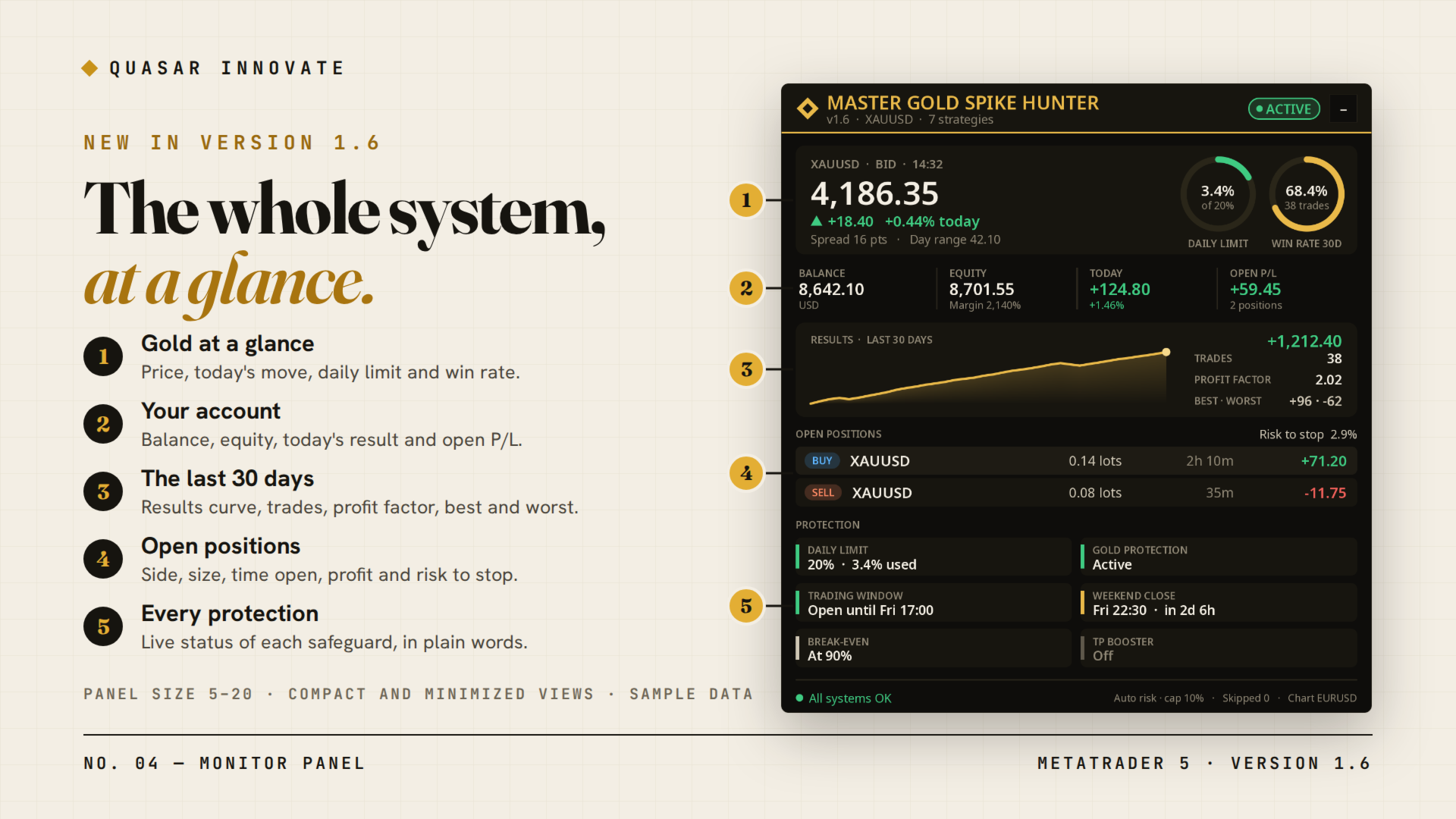
The panel reports the EA name and version, the trading status, the symbol being monitored, the active lot size mode, the account balance, the profit and loss of the day with the daily risk bar, and the number of discarded signals with the reason for the last one.
That last line makes support easier: you can report what the panel says without opening the log. The panel also states directly when algo trading is disabled, when the account does not allow Expert Advisors, when the daily limit has paused the EA, and when a duplicate copy is detected.
Backtesting, Normal Behaviour and Operational Notes
For realistic backtests, use the last 12 to 24 months of historical data, with real spreads, real commissions and accurate tick data. Consider that multi-year tests may not reflect current execution conditions, and calibrate SensitivityLevels for your broker before drawing conclusions.
The following are normal and do not indicate a problem: periods with no trades, variable trade frequency, selective entries, automatic pauses due to risk protections, and discarded signals in Automatic mode when the account is small relative to a specific strategy.
For stable operation, use a VPS, avoid frequent restarts or re-attaching the EA, and do not mix it with other EAs on the same account. Each strategy uses internal waiting times between entries, and restarting resets them. A dedicated account also keeps the daily loss calculation and the suspension logic aligned with what this EA is actually doing.
Troubleshooting
| Symptom | What to check |
|---|---|
| EA is not trading | Look at the panel first: it names the reason when algo trading is off, the account does not allow EAs, the daily limit has paused the EA, or the copy is a duplicate. Then confirm successful initialization in the Experts tab and that XAUUSD is visible in Market Watch |
| Signals are being discarded | Check the discarded signals counter on the panel. In Automatic mode, an account that is small relative to a strategy will discard its signals, because the smallest volume allowed would exceed the maximum risk |
| Trades are duplicated | Almost always the EA attached to more than one chart. From 1.5 the second copy detects it and does not trade. Remove all instances and keep one |
| Gold is not being traded | It may be temporarily suspended by the SL protection, or the symbol name may not have been detected. The name written in the log at start-up confirms what the EA resolved on your server |
Updates and Support
Support for this product is provided through the MQL5.com product comments and the MQL5.com messaging system. Please use these official channels for questions, troubleshooting and update-related assistance.
Disclaimer
Trading financial markets involves risk. Past performance does not guarantee future results. Results may vary due to broker conditions, execution quality, spreads, commissions, liquidity, market volatility and user configuration. Test the product in the Strategy Tester and on a demo account before running it on a live account.