TrendLine Auto Executor

ATTENTION: the utility cannot work in the Strategy Tester, if you want to try the demo version for free for a week, or have any questions, write me an email! You can find my address on my user profile.

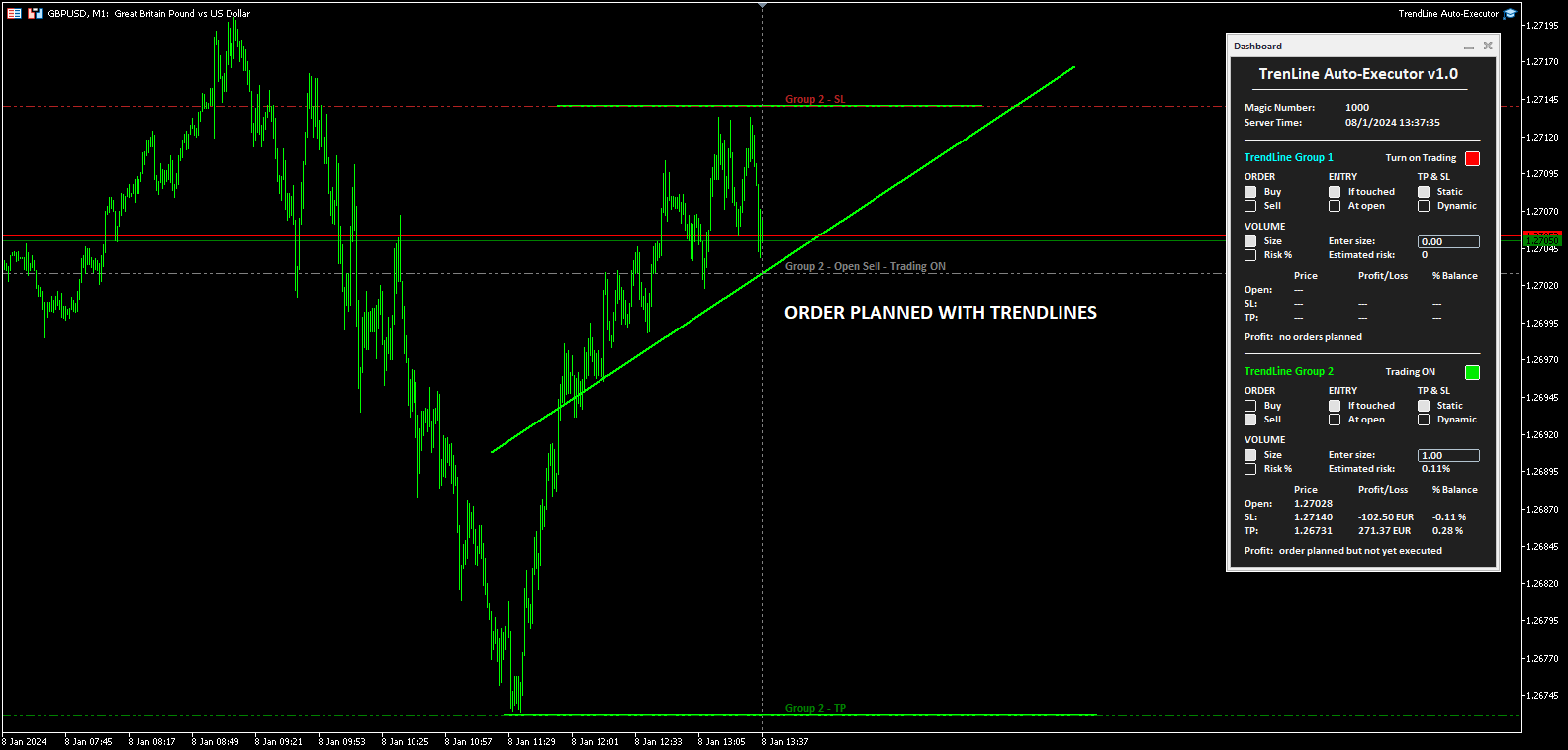
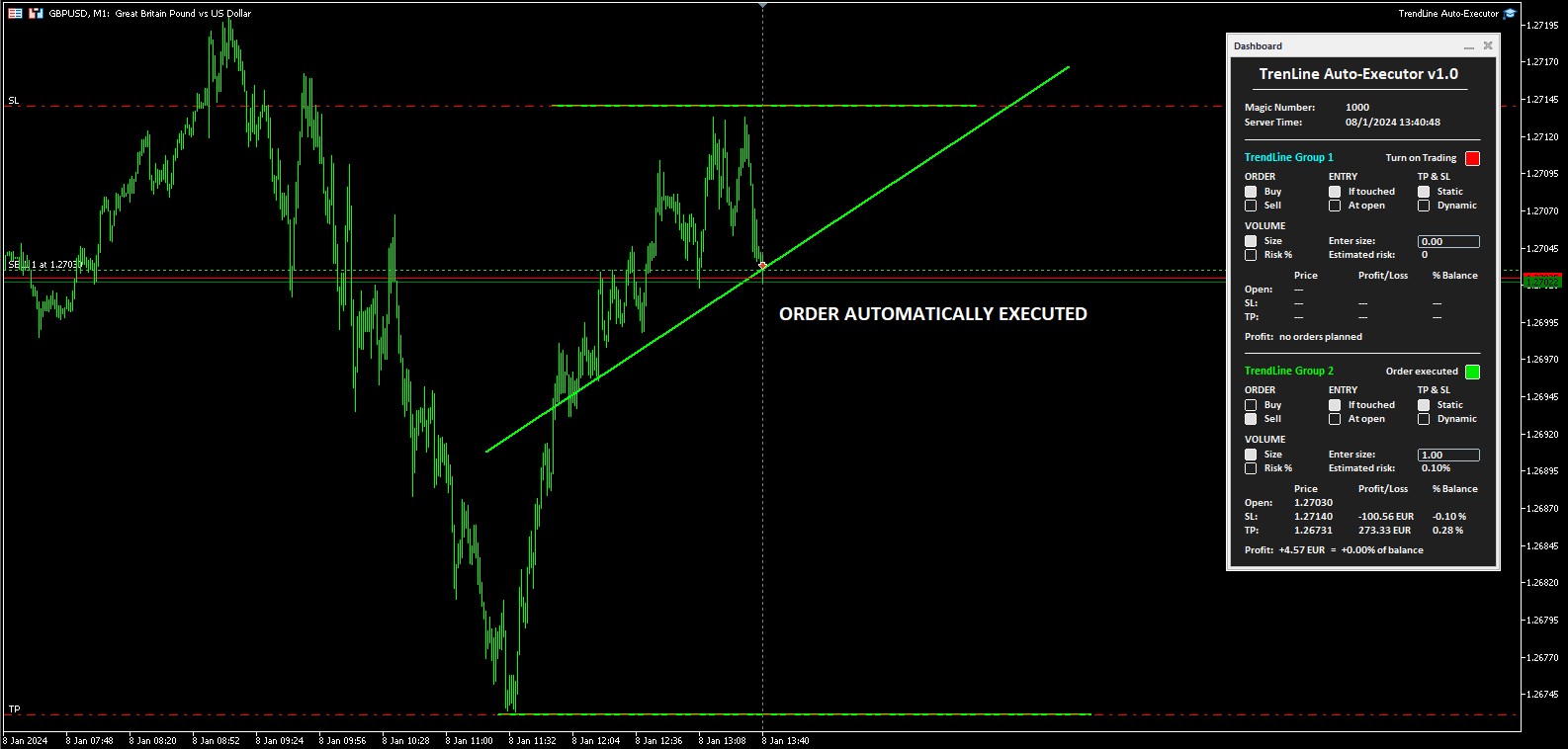
TrendLine Auto Executor is a software capable of identifying the trendlines you have drawn on the chart and opening orders as soon as they are touched or exceeded.

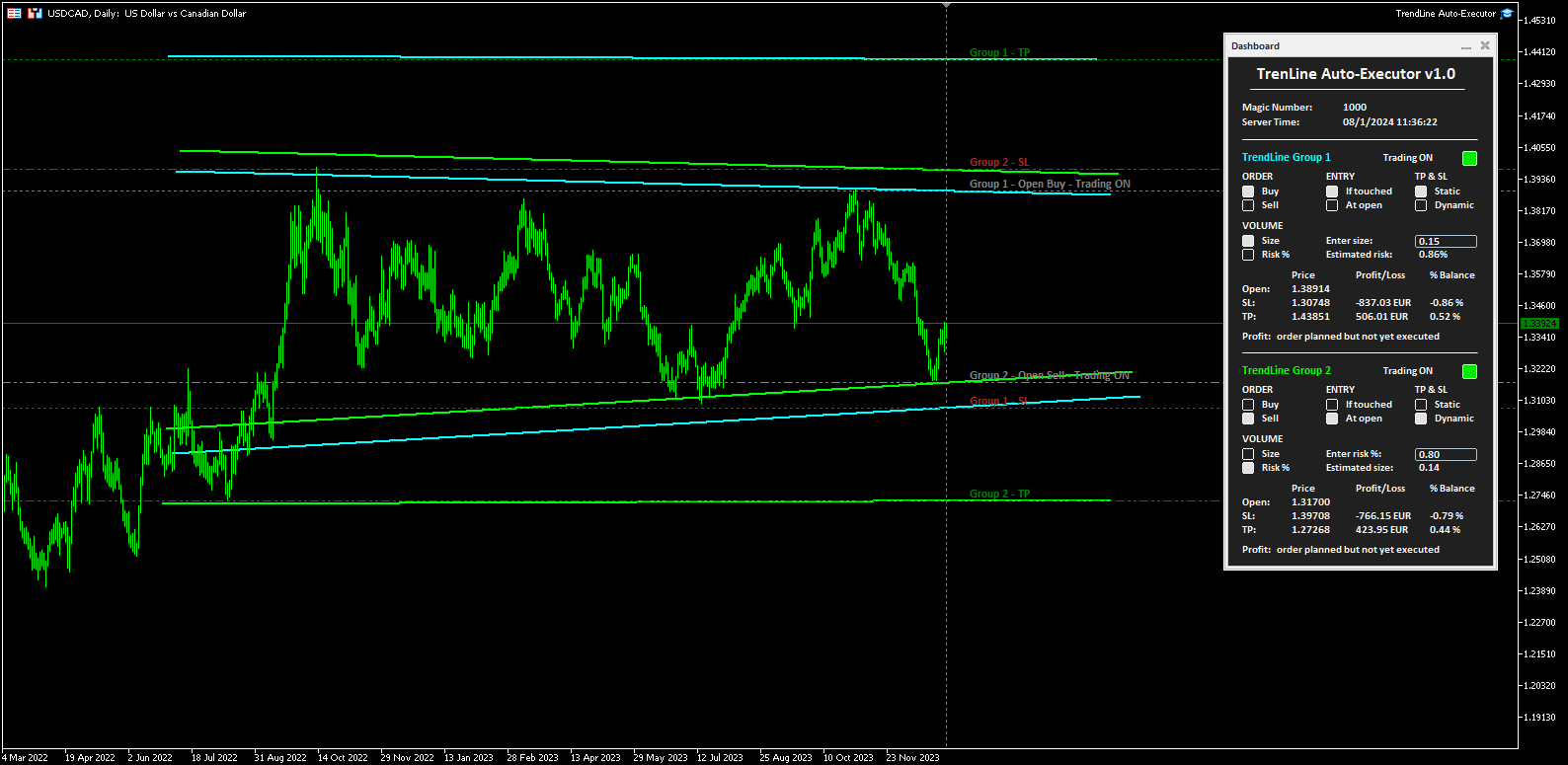
The software allows you to manage two orders at a time for each chart by tracking two groups of trendlines, one for each order, and each order is defined by tracking 3 lines:

  • the first trendline drawn identifies the opening price of the order
  • the second trendline (optional) identifies the price at which to place the stop loss
  • the third trendline (optional) identifies the price at which to place the take profit

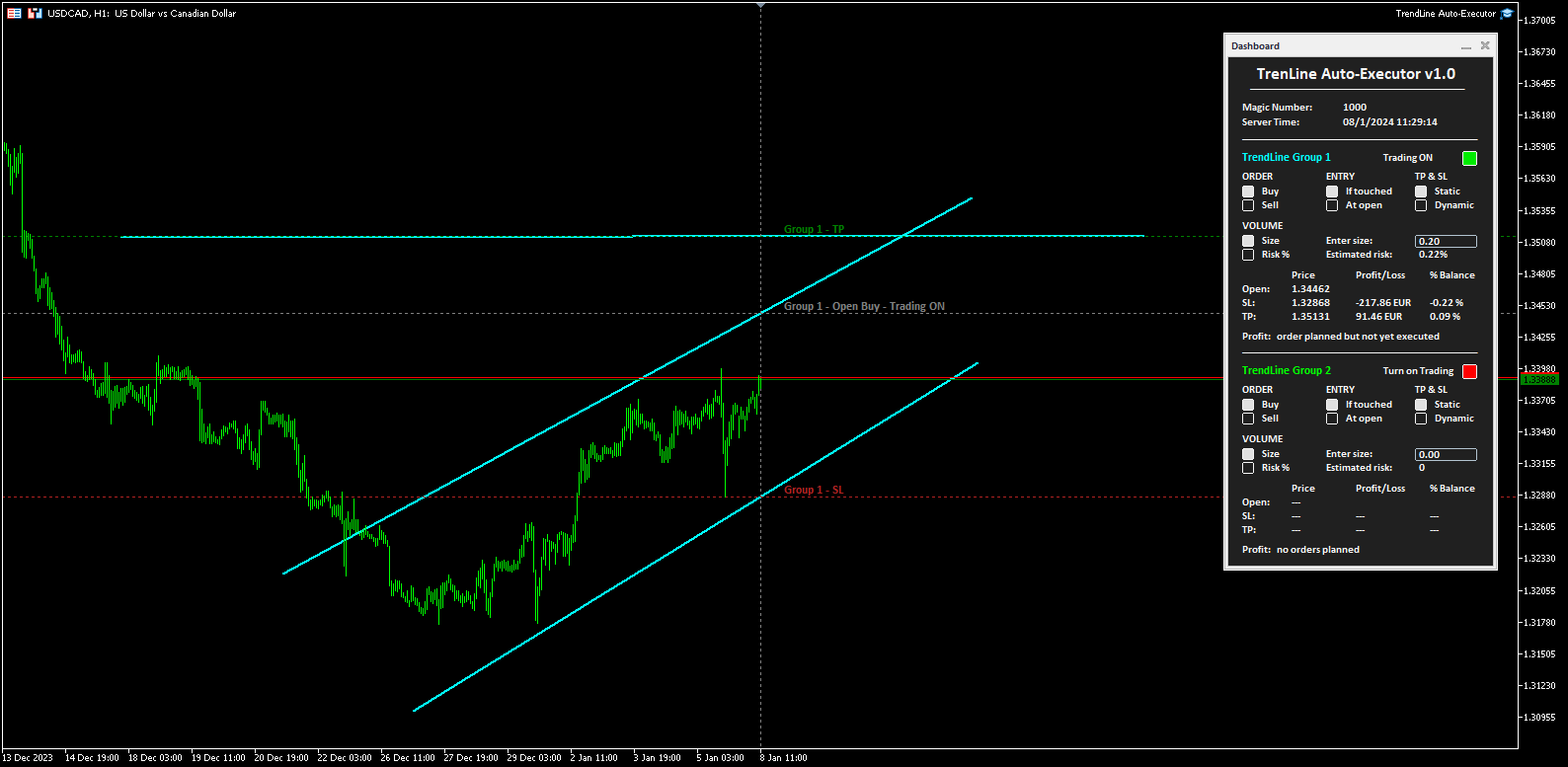
Once the trendlines have been drawn, TrendLine Auto Executor automatically updates, candle after candle, the opening, take profit and stop loss prices following the inclination of the lines, until the order is opened.

Everything is managed via a simple and practical control panel (dashboard) present on the price graph which allows you to set the type and size of the order.


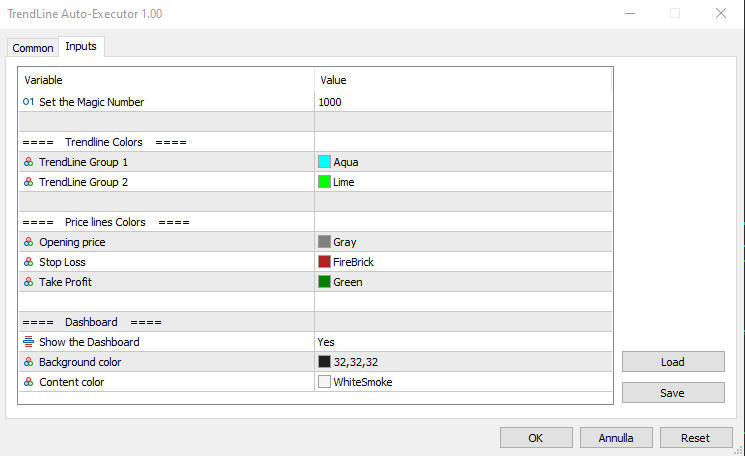
Input parameters:

Set the Magic Number:  allows you to set the bot's magic number


Trendline Colors

  • TrendLine Group 1 allows you to set the color of the trendlines of group 1
  • TrendLine Group 2 allows you to set the color of the trendlines of group 2

Price lines Colors

  • Opening price allows you to set the color of the horizontal line automatically drawn on the graph that identifies the opening price of the order
  • Stop Loss:  allows you to set the color of the horizontal line automatically drawn on the graph that identifies the stop loss
  • Take Profit allows you to set the color of the horizontal line automatically drawn on the graph that identifies the take profit

Dashboard

  • Show the Dashboard Select Yes to display the dashboard, No to hide it
  • Background color allows you to set the background color of the dashboard
  • Content color allows you to set the color of all elements within the dashboard


Dashboard

The dashboard allows you to define the type of order you wish to open in a very simple way, using the various buttons. Each part of it is described below.

  • Magic number indicates the magic number assigned when setting the parameters.
  • Server Time: i ndicates the current server time.
  • TrendLine Group 1 (and Trendline Group 2):  indicates the area within the dashboard dedicated to group 1, or group 2, of trendlines. The color of the writing recalls the one set for the trendline group when setting the parameters.
  • Turn on Trading by clicking on the red button you can activate trading and open orders (the button turns green and the writing shows “Trading ON”).
  • ORDER  (the two buttons allow you to set the type of order)
    • Buy:  to set the automatic opening of a buy order.
    • Sell:  to set the automatic opening of a sell order.
  • ENTRY  (the two buttons allow you to set the type of entry)
    • If touched:  the order will be executed as soon as the price touches the trendline.
    • At open:  the order will be executed when a new candle opens. If Buy has been set, the new candle must open above the trendline, while the opening of the previous one must be below. In the case of a Sell order, the new candle must open below the trendline, while the opening of the previous candle must be above.
  • TP & SL  (the two buttons allow you to set how to manage the take profit and stop loss once the order has been opened)
    • Static:  once the market order is opened, the TP and SL (if present) will remain unchanged.
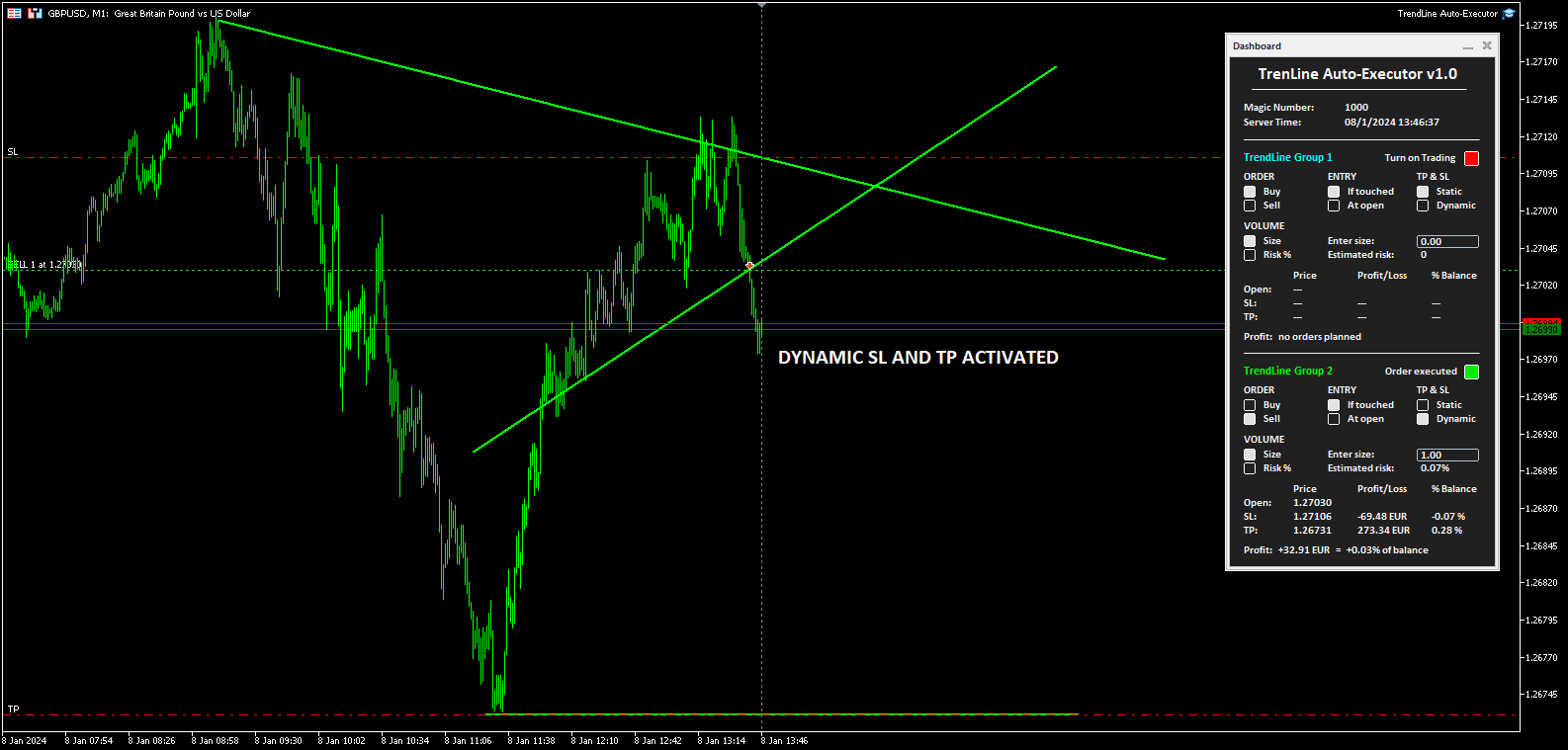
    • Dynamic:  once the market order has been opened, the TP and SL (if present) will follow the trendlines drawn, assuming the same values, furthermore by manually moving the trendlines it is possible to also move the TP and SL.
  • VOLUME  (the two buttons allow you to set the volume of the operation)
    • Size:  the volume is set by defining the number of lots or contracts. The value must be entered in the field alongside indicated by the words “Enter size:”. The estimated percentage risk in relation to the Balance is indicated just below (the Stop Loss line must have been drawn).
    • Risk%:  the volume is set by defining the percentage risk compared to the Balance. The value must be entered in the field alongside indicated by the writing “Enter risk %:”. The estimated size for opening the order is indicated just below (the Stop Loss line must have been drawn to calculate the size and therefore open the order).
  • The table at the bottom indicates the prices, the monetary profit and in percentage of the Balance, both of the order not yet placed based on where the trendlines have been positioned, and of the market order once opened by the software.
  • Finally, the word Profit positioned at the bottom shows the indication:
    • “no orders planned”,  if no trendlines are drawn on the graph and therefore no order has been planned
    • “order planned but not yet executed” , if trendlines are drawn but the order has not yet been executed
    • The monetary profit and the profit compared to the balance, if the order has been executed and is at market


Notes for correct use:

  • The software is developed to only recognize trendlines of the color specified when setting the parameters, other types of lines and other colors are not taken into consideration.
  • To be identified and recognized, trendlines must be traced up to the current candlestick, otherwise it is as if they were not present.
  • To define an order it is necessary to draw at least one trendline to identify the opening price.
  • If you set the At open option as ENTRY, the order will open according to the set chart timeframe.
  • Once the order is closed (manually, for take profit or stop loss) the bot disables trading by returning the "Turn on Trading" button to the red color and the size to zero. The trendlines still remain positioned on the chart so you can reuse them to plan new orders.
  • Once the trendlines have been drawn, the software automatically draws horizontal lines that indicate the opening price of the order and, if indicated, the prices at which to place the stop loss and take profit.
  • The buttons and writings on the dashboard update their status with each new tick of the market, in phases of low liquidity there may be some delay in the response of the buttons.
Produits recommandés
This tool will help you calculate position size based on the lines that you draw on the chart. It will automatically create the trading setup in the background and provide adaptive buttons for market and pending order confirmation. The design is very simple and straightforward, with just a single click you will be able to place the trading setup. Features Set your risk based on your predefined amount or percent of your account balance. Drag the lines to define the entry, take profit target and s
Guardian Magic GT
Carlos Eduardo Rivas Istacuy
Guardian Magic GT - Risk Management Expert Advisor for MetaTrader 5 PROTECT YOUR TRADING CAPITAL WITH INTELLIGENT RISK MANAGEMENT Guardian Magic GT is a professional-grade Expert Advisor designed to safeguard your trading operations by implementing sophisticated risk control mechanisms. Whether you run a single bot or manage multiple automated trading systems simultaneously, Guardian Magic GT provides real-time monitoring and automatic position management to ensure your account stays within your
Check Execution
Ivan Zaidenberg
1 (1)
This script will show you information about the execution speed of market orders. Instruction 1. Press " File/Open Data Folder " 2. Copy the log-files from  ../Logs   to   ../MQL5/Files 3. Run the CheckExec script on EURUSD chart, for example 4. Select parameters: AllOrders - check execution time of all market orders for EURUSD, OpenOrders - check execution time of market orders which where used to open positions on EURUSD, CloseOrders - check execution time of market orders which where used to
Cet EA est principalement utilisé pour le scalping du XAUUSD. Objectif   Élimine l’émotion dans la gestion des trades — protège automatiquement les positions et prend des profits afin que vous n’ayez pas à prendre de décisions difficiles sous pression. Ce qu’il fait   ️ Stop Loss automatique   Définit le SL sur la base des récents hauts/bas + buffer   Fini le stress de la pose manuelle   Prises de profits partielles automatiques   Deux modes :   Mouvement fixe : ferme 50 % après un mouve
Check out my TRADE PLANNER MT5 – strongly recommended to anticipate account scenarios before risking any money. This is a multi-symbol, multi-timeframe, table-based indicator for MetaTrader 5 that identifies 46 types of candlestick formations. Each formation has its own image for easier recognition. The indicator includes popular patterns such as Engulfing, Hammer, Three Line Strike, Piercing, and Doji-like candles. You can check the full list of patterns in the screenshots below. Also you can
Current price: $39 - increases to $49 after the next 20 purchases. VERIFIED BUYER KIT: 37 Professional Resources ($147 Value) - Included FREE  PDF Guides, Checklists, Mindmaps, Reference Cards, Excel Workbooks, and EA Presets - built from 8 years of developing structured XAUUSD trading workflows. Risk control before it compounds, profit capture before it reverses. After purchase, please message me via MQL5 inbox. Your complete Buyer Kit will be delivered within 24 hours. Most bad gold trades do
The indicator detects and displays М. Gartley's Butterfly pattern. The pattern is plotted by the extreme values of the ZigZag indicator (included in the resources, no need to install). After detecting the pattern, the indicator notifies of that by the pop-up window, a mobile notification and an email. The pattern and wave parameters are displayed on the screenshots. The default parameters are used for demonstration purposes only in order to increase the amount of detected patterns. Parameters z

Current price: $59 - increases to $69 after the next 20 purchases. VERIFIED BUYER KIT: 40 Professional Resources ($197 Value) - Included FREE  PDF Guides, Checklists, Mindmaps, Reference Cards, Excel Workbooks, and EA Presets - built from 8 years of developing structured XAUUSD trading workflows. Risk control before it compounds, profit capture before it reverses. After purchase, please message me via MQL5 inbox. Your complete Buyer Kit will be delivered within 24 hours. You have 5 positions op

Telegram Notification Worker (v5.31) Telegram Notification Worker is a high-performance, professional utility designed to bridge the gap between your MetaTrader 5 terminal and Telegram. It acts as a dedicated background worker that forwards custom alerts, trade events, and system status messages from any of your Expert Advisors (EAs) directly to your Telegram chat or channel. Key Technical Features: Asynchronous Messaging Engine: Unlike standard notification scripts, this worker uses an asynchr
FREE
Basic Theme Builder MT5
Mehran Sepah Mansoor
5 (2)
Basic Theme Builder : Simplifiez la personnalisation de vos graphiques Transformez votre expérience de trading avec l'indicateur Basic Theme Builder , un outil polyvalent conçu pour simplifier la personnalisation de l'apparence de vos graphiques sur MetaTrader 5. Cet indicateur intuitif offre un panneau facile à utiliser qui vous permet de passer d'un thème à l'autre et de changer les schémas de couleurs en toute simplicité, améliorant ainsi l'apparence visuelle et la fonctionnalité de votre en
FREE
Current price: $39 - increases to $49 after the next 20 purchases. VERIFIED BUYER KIT: 37 Professional Resources ($147 Value) - Included FREE  PDF Guides, Checklists, Mindmaps, Reference Cards, Excel Workbooks, and EA Presets - built from 8 years of developing structured XAUUSD trading workflows. Risk control before it compounds, profit capture before it reverses. After purchase, please message me via MQL5 inbox. Your complete Buyer Kit will be delivered within 24 hours. After years of watching
Visual Dolphin Indicator
AL MOOSAWI ABDULLAH JAFFER BAQER
Visual Dolphin Indicator Unlock the rhythm of the market with the Visual Dolphin Indicator, your ultimate tool for identifying and capitalizing on market trends with clarity and confidence. Designed for both novice and experienced traders, this indicator eliminates the noise and guesswork, providing crystal-clear buy and sell signals directly on your chart. The Logic Behind the Waves The core of the Visual Dolphin Indicator is a sophisticated yet intuitive dual-wave system based on moving avera
Tax Buddy MT5
Eric Emmrich
5 (5)
Tax Buddy creates a simple, sortable trading report which you can send to your local tax authorities alongside your annual declaration. I've been using this kind of report for the German Finanzamt in order to declare my capital gains ("Kapitalerträge") in a readily comprehensible manner. For testing purposes, the Demo version places random trades in the Strategy Tester on the symbol of your choice and creates a demo report for them. Conveniently, all reports are stored in the common path for al
Trade Assistant For MT5
Abdelkhabir Yassine Alaoui
Assistant de trading pour MT5 Panneau de gestion des transactions de niveau institutionnel pour une précision et un contrôle optimaux Prenez le contrôle total de votre trading avec l'Assistant de trading pour MT5 : un panneau d'exécution et de gestion de niveau professionnel conçu pour les traders exigeants en matière de rapidité, de précision et de gestion rigoureuse des risques. Conçu pour offrir performance et facilité d'utilisation, cet outil transforme votre graphique MetaTrader 5 en
The “Summary Risk Target” indicator is designed to show the total number of transactions made on a single pair. The transactions counted include active positions as well as pending orders . By setting a stop loss for each trade, this indicator displays the total potential risk (loss) that may be incurred. This helps traders easily understand their overall risk exposure without the need for manual calculations. Likewise, for take profit , if the TP level is defined—either in terms of pips or at a
FREE
Auto SL and TP is a program that adds StopLoss and TakeProfit automatically, so you don't need to worry about it anymore. The program checks at any time if StopLoss and TakeProfit are set correctly!!! You can enter your values via the input parameter. Input-Settings StopLoss: Boolean value, if set to true, will be executed. StopLoss in Points TakeProfit: Boolean value, if set to true, will be executed. TakeProfit in Points
L'Indice Directionnel Moyen (ADX) Scanner Multidevises MT5 est un indicateur de trading avancé conçu pour analyser simultanément plusieurs paires de devises. Il bénéficie aux traders cherchant à améliorer leur processus de prise de décision en fournissant des signaux en temps réel basés sur l'Indice Directionnel Moyen, permettant une analyse efficace des tendances du marché. Cet outil simplifie l'expérience de trading en facilitant l'identification de la force des tendances et du mouvement direc
Market Sessions Time PRO
Juan Facundo Valdes
4 (2)
Affichez sur le graphique jusqu'à  7 sessions de marché  et  3 plages hebdomadaires,  totalement personnalisables Chaque session et plage peuvent être affichées ou masquées et adaptées pour correspondre à des périodes intraday ou intrasemaine spéciales en fonction des besoins de chaque trader Définissez les heures de début/fin des sessions en utilisant l'une de ces options : Heure GMT/UTC (ajustable à n'importe quel fuseau horaire) Heure du serveur/du courtier (heure du graphique)  Heure locale
Object Synchronizer MT5 : Better focus/analysis of the price chart in many timeframes. Are you bored to save and load template many times for the same symbol for many chart timeframes? Here is the alternative. With this indicator, you enjoy creating objects across many charts, you can modify the same object in any chart, you can delete the same object in any chart. All objects you created/modified are always synchronized across all chart windows (with the same symbol). Save your time, you can fo
Category: Utilities → Trade Panels Version: 1.2 (auto-sizing buttons + adjustable font size) ClickCloserExpress is a super-lightweight panel for MetaTrader 5 that lets you close positions instantly by profit/loss, symbol, side (Buy/Sell), and magic number— without opening new trades or cluttering your chart. Perfect for manual/semi-auto management, scalping, and fast portfolio clean-ups. What it does One-click closing of: All positions. Profitable only or losing only . Symbol on chart o
Présentation Candle Timer Countdown Pro affiche un compte à rebours fluide et précis jusqu’à la clôture de la bougie en cours, avec un arc circulaire de progression en temps réel. Fonctionnalités Compte à rebours précis Arc circulaire (anneau ou secteur rempli) 6 positions d’affichage 3 modes de couleur Mise en évidence finale Détection de connexion Alertes nouvelle bougie Faible utilisation CPU Installation Télécharger depuis MQL5 Market Ajouter au graphique Configurer les paramètres Compatibil
RSI Currency Strength Meter is a powerful and elegant multi-currency indicator that measures the real-time relative strength of the 8 major currencies using RSI logic. By calculating the smoothed performance of each currency across its major pairs and applying the RSI formula, it delivers clean and responsive strength lines that make it easy to spot which currencies are truly strong or weak at any moment. This indicator is particularly useful for visualizing currency correlations and divergence
It has never been so easy to manage the risk of your account until now, this tool will allow you to have full control of your capital and manage your entries in the synthetic index derivative markets, in an easy, practical and safe way. The available input and configuration parameters are as follows :  RISK MANAGEMENT 1. Value of your account: Here as its name says you will place the value corresponding to the size of your account, for example if your account is 150 dollars the corresponding val
Trade Notifications
Konstantinos Kalaitzidis
5 (5)
"Trade Notifications" est un outil utilitaire, destiné à vous informer soit par   des notifications mobiles, soit par des alertes de terminal   sur chaque transaction ouverte ou fermée, ainsi que le résultat en dollars de profit/perte de chaque transaction. C'est un outil que j'utilise moi-même depuis longtemps, et j'ai décidé de le partager gratuitement ! Paramètres d'entrée: (chaque entrée est de  type   vrai/faux   ,     double-cliquez dessus pour changer sa valeur) Notifier les positions f
FREE
Current price: $39 - increases to $49 after the next 20 purchases. VERIFIED BUYER KIT: 34 Professional Resources ($147 Value) - Included FREE  PDF Guides, Checklists, Mindmaps, Reference Cards, Excel Workbooks, and EA Presets - built from 8 years of developing structured XAUUSD trading workflows. Risk control before it compounds, profit capture before it reverses. After purchase, please message me via MQL5 inbox. Your complete Buyer Kit will be delivered within 24 hours. If you've ever stared a
Ping-Monitor — Never Miss a Tick Again! Do you run EAs and worry about silent chart freezes or data feed stalls ?  This utility is your ultimate watchdog, alerting you the moment your charts stop receiving updates. Ping-Monitor is designed to detect when a chart freezes or the data feed stalls, even if MT5 still shows that the connection is active. It works by tracking the time of the last incoming tick. Every time the chart receives a new price update, the EA records the timestamp. Then, on a
This is a MetaTrader 5 script. It helps to summarize all trades into every symbol. Input Select Period: This is 7-option input. It includes Last Month, This Month, Last Week, This Week, Today, All History, and Date Specified. Specify Starting Date: Enter a date if you selected Date Specified in "Select Period" input. Specify Ending Date: Enter a date if you selected Date Specified in "Select Period" input. The summary is saved into a file in MQL5\Files folder. MT4 Version:   https://www.mql5.co
FREE
The DD_Profit_Monitor MT5  indicator is a trading tool developed by the Dagangduit Core Team . This indicator is designed to monitor profits in real-time with the following key features: All Time Profit : Displays the total profit earned since the beginning of the trading account's usage. This feature helps traders see the overall performance of their trading activities. Daily Profit : Displays daily profits, allowing traders to monitor their daily performance more specifically. Key Features: Al
Trend Wave Analyzer Overview The Trend Wave Analyzer is a specialized MQL5 tool designed for MetaTrader 5 that identifies,analyzes,and visualizes price trend cycles in financial markets.It detects complete up/down/sideways price movements by identifying key turning points(peaks and troughs)in price action,providing traders with valuable insights into market behavior patterns. #Key Features -Multi-symbol Analysis:Analyze multiple trading instruments simultaneously -Trend Identification:Auto
Buy Sell Mouse Keyboard
Cesar Tavares Santiago
BUY SELL  MOUSE KEYBOARD – The Speed of a Click at the Heart of the Financial Market In today's fast-paced financial market, where every fraction of a second can define profit or loss, relying on outdated tools is simply not an option. Technology is advancing at an exponential rate, and your operations need to keep up with that same momentum. We present BUY SELL  MOUSE KEYBOARD , the smart tool that transforms the complexity of the trading desk into pure agility. Say goodbye to slow order entrie
Les acheteurs de ce produit ont également acheté
Trade Assistant MT5
Evgeniy Kravchenko
4.43 (214)
It helps to calculate the risk per trade, the easy installation of a new order, order management with partial closing functions, trailing stop of 7 types and other useful functions. Additional materials and instructions Installation instructions - Application instructions - Trial version of the application for a demo account Line function -   shows on the chart the Opening line, Stop Loss, Take Profit. With this function it is easy to set a new order and see its additional characteristics bef
Bienvenue sur Trade Manager EA, l’outil ultime de gestion des risques conçu pour rendre le trading plus intuitif, précis et efficace. Ce n’est pas seulement un outil d’exécution d’ordres ; c’est une solution complète pour la planification des trades, la gestion des positions et le contrôle des risques. Que vous soyez débutant, trader expérimenté ou scalpeur ayant besoin d’une exécution rapide, Trade Manager EA s’adapte à vos besoins, offrant une flexibilité sur tous les marchés, des devises et i
Local Trade Copier EA MT5
Juvenille Emperor Limited
4.96 (142)
Découvrez une expérience exceptionnellement rapide de copie de trades avec le   Local Trade Copier EA MT5 . Avec sa configuration facile en 1 minute, ce copieur de trades vous permet de copier des trades entre plusieurs terminaux MetaTrader sur le même ordinateur Windows ou Windows VPS avec des vitesses de copie ultra-rapides de moins de 0.5 seconde. Que vous soyez un trader débutant ou professionnel, le   Local Trade Copier EA MT5   offre une large gamme d'options pour le personnaliser en fonc
TradePanel MT5
Alfiya Fazylova
4.88 (162)
Trade Panel est un assistant commercial multifonction. L'application contient plus de 50 fonctions de trading pour le trading manuel et permet d'automatiser la plupart des tâches commerciales. Avant l'achat, vous pouvez tester la version de démonstration sur un compte de démonstration. Télécharger la version d'essai de l'application pour un compte de démonstration : https://www.mql5.com/fr/blogs/post/762644 . Instructions complètes ici . Commerce. Permet d'effectuer des opérations commerciales e
Version Bêta Le Telegram to MT5 Signal Trader est presque prêt pour la sortie officielle en version alpha. Certaines fonctionnalités sont encore en développement et vous pourriez rencontrer de petits bugs. Si vous rencontrez des problèmes, merci de les signaler, vos retours aident à améliorer le logiciel pour tout le monde. Telegram to MT5 Signal Trader est un outil puissant qui copie automatiquement les signaux de trading depuis des chaînes ou groupes Telegram vers votre compte MetaTrader 5 .
Telegram to MT5 Multi-Channel Copier copie automatiquement les signaux de trading de vos canaux Telegram directement vers MetaTrader 5. Pas de bots, pas d'extensions de navigateur, pas de copie manuelle. Vous recevez un signal sur Telegram et l'EA ouvre l'opération sur votre terminal en quelques secondes. Le produit comprend deux composants : une application Windows qui écoute vos canaux Telegram, et cet Expert Advisor qui exécute les signaux sur votre terminal MT5. Une version MT4 est également
Power Candles Strategy Scanner - Outil de recherche de configurations multi-symboles à optimisation automatique Le Power Candles Strategy Scanner utilise le même moteur d'auto-optimisation que celui qui alimente l'indicateur Power Candles, pour chaque symbole de votre Market Watch, en parallèle. Un panneau vous indique quels symboles sont statistiquement négociables à l'instant, quelle stratégie est la plus performante pour chacun, la paire Stop Loss / Take Profit optimale, et vous alerte dès qu
Exp COPYLOT CLIENT for MT5
Vladislav Andruschenko
3.94 (34)
Copieur professionnel de trades pour MetaTrader 5 Un copieur de trades rapide, professionnel et fiable pour MetaTrader . COPYLOT permet de copier des trades Forex entre les terminaux MT4 et MT5 avec prise en charge des comptes Hedge et Netting . La version MT5 de COPYLOT prend en charge : - MT5 Hedge → MT5 Hedge - MT5 Hedge → MT5 Netting - MT5 Netting → MT5 Hedge - MT5 Netting → MT5 Netting - MT4 → MT5 Hedge - MT4 → MT5 Netting Version MT4 Description complète + DEMO + PDF Comment acheter Comme
Anchor Trade Manager
Kalinskie Gilliam
5 (5)
Anchor: The EA Manager Run your full EA portfolio without conflicts, without stacked risk, and without watching every chart yourself. Anchor coordinates up to 64 Expert Advisors on a single account, including daily loss protection built for prop firm rules. Attach Anchor to any chart. Type your EA names and magic numbers in one line. Click OK. Anchor begins coordinating immediately. Built for portfolios. Built for prop firms. Built for discipline. The Problem Running multiple EAs on the same acc
Trade copier MT5
Alfiya Fazylova
4.59 (49)
Trade Copier est un utilitaire professionnel conçu pour copier et synchroniser les commandesentre les comptes de trading. Les commandes sont copiées du compte/terminal du fournisseur vers le compte/terminal du destinataire, qui sont installés sur le même ordinateur ou vps. PROMOTION - Si vous avez déjà acquis le "Trade copier MT5", vous pouvez obtenir le "Trade copier MT4" gratuitement (pour la copie MT4 > MT5 et MT4 < MT5). Pour obtenir des informations plus détaillées sur les conditions, veuil
Farmed Hedge Yield Farming | All Markets (Manual - Hybrid - Semi/Automated EA) MULTI-ASSET SUPPORT Trade any asset available on your broker - Forex: Major, Minor, Exotic pairs - Crypto: BTC, ETH, XRP, SOL, BNB - Stocks: Apple, Tesla, Amazon, Google, etc. - Commodities: Gold, Silver, Oil, Gas - Indices: US30, NAS100, SPX500, DAX40 - Any CFD your broker offers VERIFIED TRADING RESULTS - Farmed Hedge Yield Axi Copy:  https://www.mql5.com/en/signals/2356376 - Farmed Hedge Yield Exn Copy:   https:/
EasyInsight AIO MT5
Alain Verleyen
4.92 (12)
EASY Insight AIO – La solution tout-en-un pour un trading intelligent et sans effort Présentation Imaginez pouvoir analyser l’ensemble du marché — Forex, Or, Crypto, Indices et même Actions — en quelques secondes, sans aucune analyse manuelle de graphiques, sans installation complexe ni configuration d’indicateurs. EASY Insight AIO est votre outil d’exportation ultime, prêt à l’emploi, pour un trading alimenté par l’IA. Il fournit une vue d’ensemble du marché dans un fichier CSV propre — prêt
Quant AI Agents
Ho Tuan Thang
5 (1)
Quant AI Agents are independent trading Expert Advisors. Instead of trading using a fixed strategy like other conventional EAs, Quant AI Agents   is a   multi-agent AI trading framework   that turns natural-language strategy prompts into live.  WANT THE SAME RESULTS AS MY LIVE SIGNAL?   Use the exact same brokers I do:   IC MARKETS , IC TRADING   .  Unlike the centralized stock market, Forex has no single, unified price feed.  Every broker sources liquidity from different providers, creating un
Premium Trade Manager - Le panneau de trading avec un coach intégré Premium Trade Manager intègre un coach de trading directement dans votre graphique, avec un moteur d'exécution complet en dessous. Configurez le trade comme vous le faites toujours, puis laissez Max, votre coach de trading IA, analyser ce setup exact par rapport à votre compte en direct et vous donner un verdict clair avant de vous engager : le stop est-il discipliné, le risque est-il raisonnable, une publication à fort impact e
Seconds Chart MT5
Boris Sedov
4.61 (18)
Seconds Chart - un outil unique pour créer des graphiques en secondes dans MetaTrader 5 . Grâce à Seconds Chart , vous pouvez créer un graphique avec une période définie en secondes, offrant une flexibilité et une précision idéales pour l'analyse, indisponibles sur les graphiques standards en minutes ou en heures. Par exemple, la période S15 indique un graphique avec des bougies d'une durée de 15 secondes. Vous pouvez utiliser n'importe quels indicateurs et experts advisors compatibles avec les
The product will copy all telegram signal to MT5 ( which you are member) , also it can work as remote copier.  Easy to set up, copy order instant, can work with almost signal formats, image signal,  s upport to translate other language to English Work with all type of channel or group, even channel have "Restrict Saving Content", work with  multi channel, multi MT5 Work as remote copier: with signal have ticket number, it will copy exactly via ticket number. Support to backtest signal. How to s
Trade Dashboard MT5
Fatemeh Ameri
4.95 (131)
Trade Dashboard simplifies how you open, manage, and control your trades, with built-in lot size calculation. It allows you to execute trades, manage risk, and control positions directly on the chart, with tools such as partial close, breakeven, and trailing stop. Designed to reduce manual work and help you stay focused on your trading decisions. A demo version is available for testing. Detailed explanations of features are provided within the MQL5 platform. Installation instructions are include
Télécharger la démo fonctionnelle Copy Cat More (Chat Copieur) — Copieur de Trades (Trade Copier) MT5 est un copieur de trades local et un cadre complet de gestion du risque et d'exécution, conçu pour les défis du trading d'aujourd'hui. Des challenges de prop firm à la gestion de portefeuille personnel, il s'adapte à chaque situation grâce à une combinaison d'exécution robuste, de protection du capital, de configuration flexible et de gestion avancée des trades. Le copieur fonctionne dans les
Trade Manager DaneTrades
Levi Dane Benjamin
4.28 (29)
Trade Manager pour vous aider à entrer et sortir rapidement des transactions tout en calculant automatiquement votre risque. Y compris des fonctionnalités pour vous aider à éviter le sur-trading, le trading de vengeance et le trading émotionnel. Les transactions peuvent être gérées automatiquement et les mesures de performances du compte peuvent être visualisées dans un graphique. Ces fonctionnalités rendent ce panneau idéal pour tous les traders manuels et contribuent à améliorer la plateforme
EA Performance Tracker
Russell Leeon Tan
5 (2)
EA Performance Tracker (AESTracker) A clean, modern dashboard that shows exactly how your trades and EAs are performing — right on your chart. It reads your full account history automatically and breaks down the numbers by magic number / strategy. Display only — it does not place any trades. What it shows - Account header: live Balance, Equity, and Open (floating) P/L - Profit summary: gross profit, net profit, and the exact commission & swap deducted - Key stats: win rate, profit factor, exp
HINN Lazy Trader
ALGOFLOW OÜ
5 (1)
LIMITED SUMMER SALE -40% ! ONLY $470 insead of $790!  Maximum real discount! The core idea: using the user interface, you configure the parameters the chart must meet before entering a position (or positions), choose which entry models to use, and set the rules for when trading and planning should end. Lazy Trader  handles the rest: it  takes over all the routine chart watching and execution! full description  :: 3 key videos [1] ->  [2]   ->  [3] What can it do? - Understands Larry Williams
================================================================================ POC BREAKOUT - V20.72. Full Professional Grade Toolkit ================================================================================ POC Breakout is a full MetaTrader 5 trading dashboard for discretionary traders who want breakout signals, Point of Control (POC) context, volume profiles, order flow, market structure, news, alerts, and advanced trade planning in one professional workspace. Attached directly to you
Panneau de trading pour MetaTrader 5 — contrôle professionnel du trading en un clic depuis le graphique et le clavier Un panneau de trading avancé conçu pour les traders actifs, afin d’ouvrir, gérer et clôturer des positions bien plus rapidement qu’avec l’interface standard de MetaTrader. Cette solution s’adresse à ceux qui veulent contrôler positions, ordres en attente, profit global et exécution depuis un seul espace de travail professionnel. Il ne s’agit pas d’un simple utilitaire. C’est un
DrawDown Limiter
Haidar Lionel Haj Ali
5 (20)
Expert Advisor "Drawdown Limiter"  Vous êtes au bon endroit si vous recherchez un contrôle de drawdown, un limiteur de drawdown, une protection du solde, une protection de l'équité ou une limite quotidienne de drawdown en rapport avec les entreprises de gestion de capitaux (Prop Firm), FTMO, My Forex Fund, ou si vous souhaitez protéger votre compte de trading. Avez-vous déjà eu du mal à contrôler votre drawdown en tradant sur des comptes financés ? Cet EA est fait pour vous. Les entreprises de
Welcome to ENTRY IN THE ZONE WITH SMC MULTI TIMEFRAME Entry In The Zone with  SMC Multi Timeframe  is a professional trading indicator built on Smart Money Concepts (SMC), combining market structure analysis with a No Repaint BUY / SELL signal system in a single indicator. It helps traders understand market structure more clearly, identify key price zones, and focus on higher-quality trading opportunities. By combining Multi-Timeframe Analysis, Points of Interest (POIs), and real-time signals, t
Timeless Charts
Samuel Manoel De Souza
5 (7)
Timeless Charts est un utilitaire de trading tout-en-un destiné aux traders professionnels. Il combine des types de graphiques personnalisés tels que les graphiques en secondes et Renko avec une analyse avancée du flux d’ordre s utilisant Footprints , Clusters , Profils de Volume , études VWAP et outils d’analyse ancrés pour une compréhension plus approfondie du marché. Le trading et la gestion des positions sont effectués directement depuis le graphique via un panneau intégré de gestion des ord
The News Filter MT5
Leolouiski Gan
4.78 (23)
Ce produit filtre tous les conseillers experts et les graphiques manuels pendant les heures de publication des actualités, de sorte que vous n'avez pas à vous soucier des pics de prix soudains qui pourraient détruire vos configurations de trading manuelles ou les transactions entrées par d'autres conseillers experts. Ce produit est également livré avec un système de gestion des ordres complet qui peut gérer vos positions ouvertes et vos ordres en attente avant la publication de toute actualité.
YuClusters
Yury Kulikov
4.93 (43)
Attention: You can view the program operation in the free version  YuClusters DEMO .  YuClusters is a professional market analysis system. The trader has unique opportunities to analyze the flow of orders, trade volumes, price movements using various charts, profiles, indicators, and graphical objects. YuClusters operates on data based on Time&Sales or ticks information, depending on what is available in the quotes of a financial instrument. YuClusters allows you to build graphs by combining da
Chart Copilot
George Angelo Boutselis
Chart Copilot est un assistant de trading conçu pour aider les traders à passer des ordres plus rapidement, gérer leurs positions ouvertes et configurer des alertes de tout type directement depuis le graphique. Toutes ces fonctionnalités sont accessibles via le panneau graphique ainsi que via un chatbot conversationnel. Ressources supplémentaires et instructions : Version d'essai  - Instructions d'installation Chatbot Chart Copilot est fourni avec un serveur dédié exécutant un grand modèle de la
Uber Trade Manager
Meelis Hynninen
4.88 (16)
Le gestionnaire UTM est un outil intuitif et facile à utiliser qui offre une exécution rapide et efficace des transactions. L'une des fonctionnalités les plus remarquables est le mode "Ignore Spread", qui vous permet de négocier au prix des bougies, en ignorant complètement les spreads (par exemple, permet de négocier des paires de spreads plus élevés sur LTF, évitez d'être retiré des transactions par spread). Un autre aspect clé du gestionnaire UTM est son copieur de commerce local unique, perm
Plus de l'auteur
MA MTF Overlay Chart   is software that allows you to overlay the candlestick chart of a financial instrument with a second candlestick chart of the same one, or of another, financial instrument, by setting a different timeframe from that of the basic chart. The software is very simple to use and the input parameters are listed below. Input parameters: Overlay chart set-up Financial instrument :   financial instrument that you want to overlay on the base chart Time period :   secondary instrume
FREE
ATTENTION: the utility cannot work in the Strategy Tester, if you want to try the demo version for free for a week, or have any questions, write me an email! You can find my address on my user profile. TrendLine Auto Executor   is a software capable of identifying the trendlines you have drawn on the chart and opening orders as soon as they are touched or exceeded. The software allows you to manage two orders at a time for each chart by tracking two groups of trendlines, one for each order, and
Tyrell Strategy 1
Alessandro Bertoli
Tyrell Strategy 1   is a professional trading strategy based on the key concepts of Technical Analysis and developed by a team of traders and programmers with many years of experience. The Expert Advisor operates by placing pending Stop orders and exploits the increases in volatility that occur when specific price levels that act as resistances and supports are broken. Tyrell Strategy 1   is equipped with several risk management systems, including 2 trailing stop systems and a protection syste
Tyrell Strategy 2
Alessandro Bertoli
Tyrell Strategy 2 is a professional trading strategy based on the key concepts of Technical Analysis and developed by a team of traders and programmers with many years of experience. The Expert Advisor operates by placing pending Buy Stop orders and exploits the price movements that occur following the creation of specific volatility patterns. Tyrell Strategy 2 is equipped with several risk management systems, including a trailing stop that intervenes once the market order exceeds a specific p
Tyrell Strategy 3
Alessandro Bertoli
Tyrell Strategy 3  is a professional trading strategy based on the key concepts of Technical Analysis and developed by a team of traders and programmers with many years of experience. The Expert Advisor operates by placing pending Buy Stop orders and has the aim of identifying the reversal phases and riding the new trend until it runs out. Tyrell Strategy 3  is equipped with several risk management systems, including a trailing stop that intervenes once the market order exceeds a specific profi
Filtrer:
Aucun avis
Répondre à l'avis