 MetaTrader 5
 Experts
 Indicateurs
 Scripts
 Bibliothèque
 Stockage
Voir comment télécharger gratuitement des robots de trading
Retrouvez-nous sur Facebook !
Rejoignez notre page de fans
Rejoignez notre page de fans
Vous avez aimé le script ? Essayez-le dans le terminal MetaTrader 5

Prop Firm News Window Countdown and Spread Monitor - indicateur pour MetaTrader 5

- Vues:
- 66
- Note:
- Publié:
-
 Vous manquez des opportunités de trading :
- Applications de trading gratuites
- Plus de 8 000 signaux à copier
- Actualités économiques pour explorer les marchés financiers
Inscription Se connecterVous acceptez la politique du site Web et les conditions d'utilisation
Si vous n'avez pas de compte, veuillez vous inscrire -
 Besoin d'un robot ou d'un indicateur basé sur ce code ? Commandez-le sur Freelance
Aller sur Freelance

News releases move spreads before price even breaks a level. If you're running an Expert Advisor through CPI, NFP, or a central bank rate decision, a wider Ask-Bid gap can stop out tight trades or violate a funded account's restricted news window. Checking the calendar manually on every chart doesn't scale.
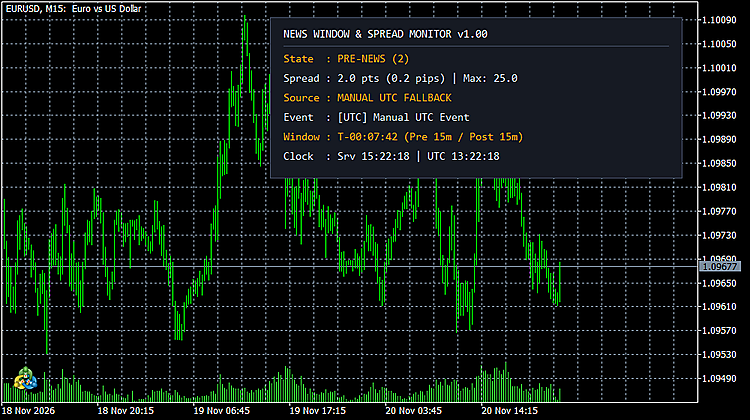
I built PropFirm News Spread Monitor to track the live MQL5 economic calendar and real-time spread in one lightweight chart panel. Every 250 milliseconds on the timer (plus incoming ticks), the indicator evaluates whether the symbol sits inside your pre-news warning window, inside the post-news lockout window, or above your maximum allowed spread in points. It writes those readings directly to three iCustom buffers so any EA can read a single numeric state code before sending an order.
iCustom Buffers and State Machine
Your EA only reads bar index 0 via CopyBuffer . The indicator exposes three DRAW_NONE data buffers and renders an optional top-right HUD (10 chart objects total, DPI-scaled for high-resolution displays). Buffer 0 ( ExtStateBuf ) outputs 0 ( STATE_INIT ), 1 ( STATE_NORMAL ), 2 ( STATE_PRE_NEWS ), 3 ( STATE_LOCKED_WINDOW ), or 4 ( STATE_SPREAD_ALERT ). Buffer 1 ( ExtSpreadBuf ) reports the live Bid-Ask spread in points via _Point with a SYMBOL_SPREAD fallback. Buffer 2 ( ExtSecondsToNewsBuf ) holds signed seconds to the active event (negative during post-news lockout, or EMPTY_VALUE when clear for 24 hours).
When the built-in MQL5 Economic Calendar returns zero events (such as inside Strategy Tester or on an offline weekend chart), the monitor switches to a daily UTC fallback window if InpEnableManualUtcFallback is enabled. Once a live calendar event enters the post-news lockout range, g_lockedNewsWinEnd seals the lockout end timestamp so the window stays locked until the timer expires.
EA Integration Snippet (MQL5)
int g_newsMonitorHandle = INVALID_HANDLE;

int OnInit()
  {
   g_newsMonitorHandle = iCustom(_Symbol, _Period, "PropFirm_News_Spread_Monitor");
   if(g_newsMonitorHandle == INVALID_HANDLE)
      return(INIT_FAILED);
   return(INIT_SUCCEEDED);
  }

bool IsNewsAndSpreadClear()
  {
   double stateBuf[1];
   if(CopyBuffer(g_newsMonitorHandle, 0, 0, 1, stateBuf) <= 0)
      return(false);
   return((int)MathRound(stateBuf[0]) == 1); // 1 == STATE_NORMAL
  }
Input Parameters
| Parameter | Default | Description |
|---|---|---|
| InpPreNewsMinutes | 15 | Pre-news warning window in minutes before the event timestamp ( >= 1 ). |
| InpPostNewsMinutes | 15 | Post-news lockout window in minutes after the event timestamp ( >= 1 ). |
| InpMaxSpreadPoints | 25.0 | Maximum allowed Bid-Ask spread in points before raising STATE_SPREAD_ALERT ( >= 1.0 ). |
| InpHighImpactOnly | true | When true , tracks high-impact calendar events only; when false , includes moderate-impact events. |
| InpFilterChartCurrencies | true | Filters calendar events to match the active chart's base or profit currency. |
| InpEnableManualUtcFallback | true | Uses a daily UTC schedule window when the MQL5 calendar returns no events. |
| InpManualNewsUtcHour | 13 | Manual fallback event hour in UTC ( 0-23 ). |
| InpManualNewsUtcMinute | 30 | Manual fallback event minute in UTC ( 0-59 ). |
| InpManualNewsLabel | Manual UTC Event | Event title displayed on the HUD when manual UTC fallback is active. |
| InpPanelX | 20 | Top-right HUD panel horizontal offset in pixels. |
| InpPanelY | 20 | Top-right HUD panel vertical offset in pixels. |
Technical Scope
This indicator handles single-chart live calendar countdowns, spread gating, and iCustom state output. It doesn't flatten open positions, delete pending orders, replay historical M1 tick curves, or inspect backtest HTML reports. For full account-level risk utilities and related documentation, see my MQL5 profile.
False Breakout Envelope
False breaks at an ATR envelope, drawn as trades: price pushes through a band, closes back inside, and a box runs from the entry to the moving midline, with the stop as a thick line. Each label prints the win rate of earlier signals in the same RSI zone, and a corner card charts it for every zone.
Auto Fibonacci Retracement on the Latest Swing
Detects swing highs and lows automatically and draws Fibonacci retracement levels on the latest completed swing leg. The levels move to the new leg as soon as a new swing is confirmed; the levels, their colors and the swing sensitivity are configurable.
Session Boxes with DST-correct clocks
Tokyo, London and New York session boxes with high-low range, kept on the right hours through every clock change, plus a live clock panel.
MACD Signals
Indicator edition for new platform.