 MetaTrader 5
 Experts
 Indicateurs
 Scripts
 Bibliothèque
 Stockage
Rejoignez notre page de fans


- Vues:
- 340
- Note:
- Publié:
- Mise à jour:
-
 Vous manquez des opportunités de trading :
- Applications de trading gratuites
- Plus de 8 000 signaux à copier
- Actualités économiques pour explorer les marchés financiers
Inscription Se connecterVous acceptez la politique du site Web et les conditions d'utilisation
Si vous n'avez pas de compte, veuillez vous inscrire -
 Besoin d'un robot ou d'un indicateur basé sur ce code ? Commandez-le sur Freelance
Aller sur Freelance
Besoin d'un robot ou d'un indicateur basé sur ce code ? Commandez-le sur Freelance
Aller sur Freelance

Expert Advisor that sends closed MT5 deals to your GO日誌 account at gonisshi.com. It does not open, close, or manage orders.
Attach it to any chart. Broker login and password never leave your PC. Only closed-trade data is posted over HTTPS.
Setup
- In MT5: Tools → Options → Expert Advisors
- Enable Allow algorithmic trading
- Enable Allow WebRequest for listed URL
- Add https://gonisshi.com (must match ApiBaseUrl )
- Enable Algo Trading on the toolbar.
- In gonisshi.com: Import → Broker sync → copy your sync key.
- Attach this EA to a chart and paste the key into ApiKey .
- Watch View → Toolbox → Experts (not Journal) for logs.
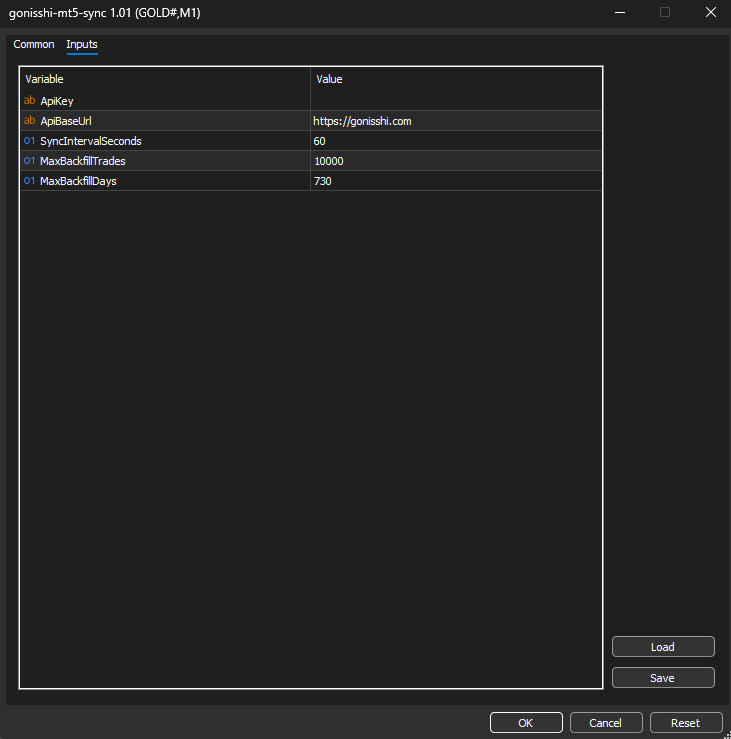
Inputs
| Input | Default | Meaning |
|---|---|---|
ApiKey | (empty) | Sync key from Import → Broker sync. Required (at least 8 characters). |
ApiBaseUrl | https://gonisshi.com | API origin. Must be listed in WebRequest URLs exactly. |
SyncIntervalSeconds | 60 | How often to poll for new closes. Minimum 30 seconds. |
MaxBackfillTrades | 10000 | Max closed trades to upload on first connect. |
MaxBackfillDays | 730 | How far back to read history (about 2 years). |
What it does
- Checks /api/ea-sync/health, then registers the account (login, server, company, currency).
- Backfills closing deals ( OUT / INOUT / OUT_BY ) newer than the saved cursor.
- On each timer: posts a batch of new closes, or a heartbeat if there is nothing new.
- Remembers connection_id and last synced position ticket in a common-folder file so a restart continues where it left off.
- On HTTP 401 (revoked key): alerts and stops the timer.
- On 403/404 (stale connection): clears saved state and re-registers.
Limitations
- Open positions are not synced until they close.
- The cursor is the last synced position ID. A trade that opened before the cursor moved and closed later can be skipped. First-connect backfill covers already-closed history within the day/trade caps.
- Does not place trades. Safe to run on a live account for journaling only.
Troubleshooting
- No logs → Experts tab, not Journal.
- WebRequest error 4060 → add ApiBaseUrl to allowed URLs and restart MT5.
- HTTP 401 → generate a new key in the app.
- Stale connection (403) → remove the EA, re-attach with a fresh key.
Screenshots
 Volume-Weighted Price Displacemet Oscillator
Plots a volume-weighted, volatility-normalized oscillator that flags impulse and exhaustion conditions as price stretches away from its rolling VWAP
BMP Chart Wallpaper
BMP Chart Wallpaper Background for MT5
Volume-Weighted Delta Divergence Oscillator
A normalized order-flow oscillator that estimates buy/sell volume pressure per bar, accumulates it into a rolling delta, and automatically flags regular bullish and bearish divergence against price swings.
Adaptive Volume Profile Node Tracker
Builds a rolling, volatility-adaptive volume profile over a configurable lookback window and plots the Point of Control (POC), Value Area High/Low, and statistically significant High/Low Volume Nodes (HVN/LVN) directly on the chart.