🤖 Assistant IA intégré à MT5 : Guide complet pour débutants — commencez en 5 minutes

Quand vous entendez que « l'IA peut vous apprendre à trader », pensez-vous : « Ça a l'air compliqué » ou « C'est peut-être trop tôt pour moi » ?
En fait, l'assistant IA ajouté à MetaTrader 5 (MT5) dans la mise à jour de juillet 2026 est une fonctionnalité pratique que vous pouvez commencer à utiliser gratuitement, sans installer d'EA ou d'indicateur spécial.
En consultant un graphique, vous pouvez simplement poser des questions en langage naturel, telles que « Le marché est-il actuellement dans une tendance haussière ? » ou « Cette position est-elle risquée ? ». On a presque l'impression de consulter un trader expérimenté.
Bien sûr, l'IA ne peut pas garantir des transactions rentables. Cependant, elle peut s'avérer un outil précieux pour comprendre le marché.
Dans cet article, nous examinerons d'abord les fonctionnalités de l'Assistant IA, puis nous expliquerons comment démarrer étape par étape, même si vous l'utilisez pour la première fois.
🤖 Qu'est-ce que l'assistant IA de MT5 ?
L'assistant IA de MT5 est une fonctionnalité d'IA fournie officiellement par MetaQuotes.
Son principal avantage est qu'il n'est pas nécessaire d'apprendre des commandes compliquées.
Par exemple, vous pouvez demander :
- « Parlez-moi de la situation actuelle de l'EUR/USD. »
- « Ce graphique est-il dans une tendance haussière ? »
- « Laquelle de mes positions actuelles est la plus risquée ? »
- «Analysez mes transactions du mois dernier et dites-moi comment je peux m’améliorer.»
Vous pouvez simplement poser des questions dans un langage courant, et l'IA peut répondre tout en analysant vos graphiques, vos positions et votre historique de transactions.
Pour les débutants, cette méthode est bien plus simple à comprendre que la lecture d'ouvrages complexes sur le trading. Les traders expérimentés peuvent également l'utiliser comme outil d'analyse objective du marché.
En revanche, l'assistant IA ne peut pas encore effectuer de transactions automatiques ni tracer de lignes de tendance sur les graphiques. Il est préférable de le considérer comme un assistant qui soutient votre analyse.
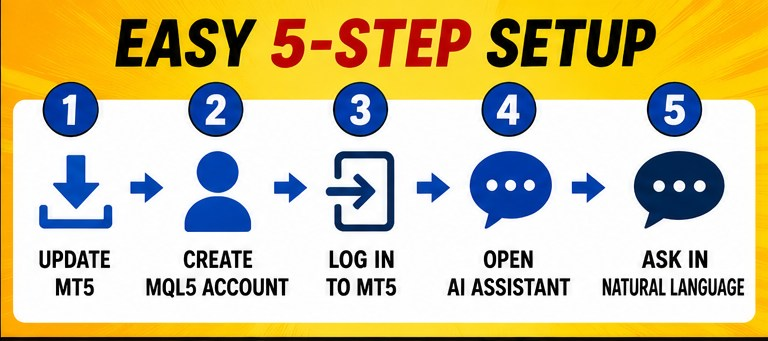
🚀 Démarrez en 5 minutes : Guide d’installation de l’assistant IA MT5
Voici comment commencer à l'utiliser.
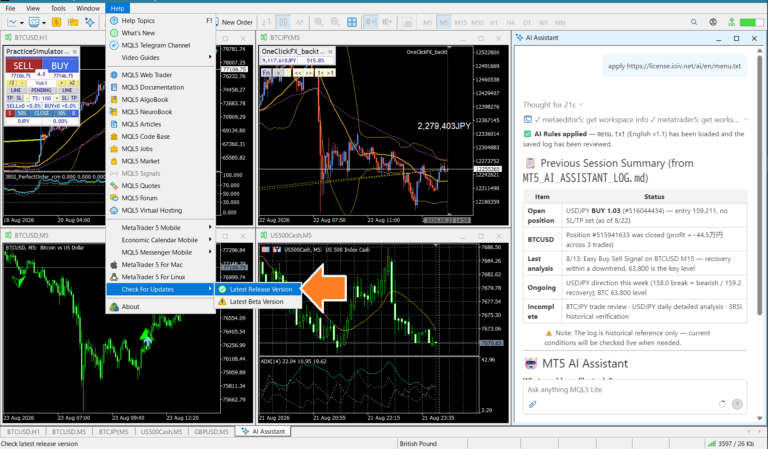
① Mettez à jour MT5 vers la dernière version
L'assistant IA est une fonctionnalité relativement récente.
Tout d'abord, lancez MT5 et sélectionnez « Aide » → « Rechercher les mises à jour » pour passer à la dernière version.
Redémarrez MT5 après la mise à jour.
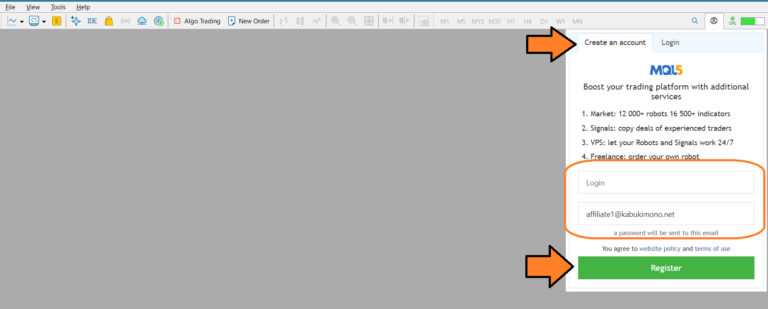
② Créez un compte MQL5.community
Vous avez besoin d'un compte gratuit sur MQL5.community pour utiliser l'assistant IA.
Vous avez simplement besoin de :
- Adresse email
- Nom d'utilisateur
- Mot de passe
Après votre inscription, cliquez sur le lien figurant dans l'e-mail de confirmation pour activer votre compte.
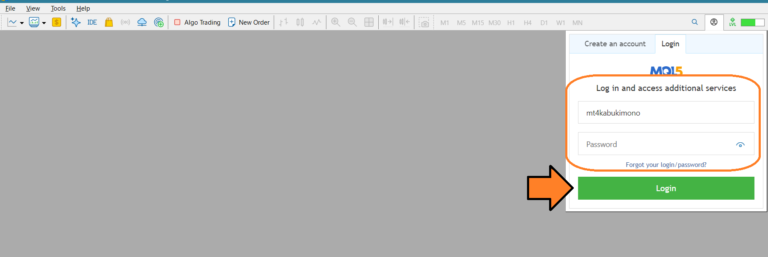
③ Se connecter depuis MT5
Retournez dans MT5 et cliquez sur l'icône de bulle de dialogue, ou sur l'icône utilisateur, dans le coin supérieur droit de l'écran.
Entrez le :
- Nom d'utilisateur
- Mot de passe
Vous vous êtes inscrit(e) précédemment.
Vous pouvez alors utiliser le forfait gratuit MQL5 Lite , qui donne accès à l'assistant IA.
④ Lancez l'assistant IA
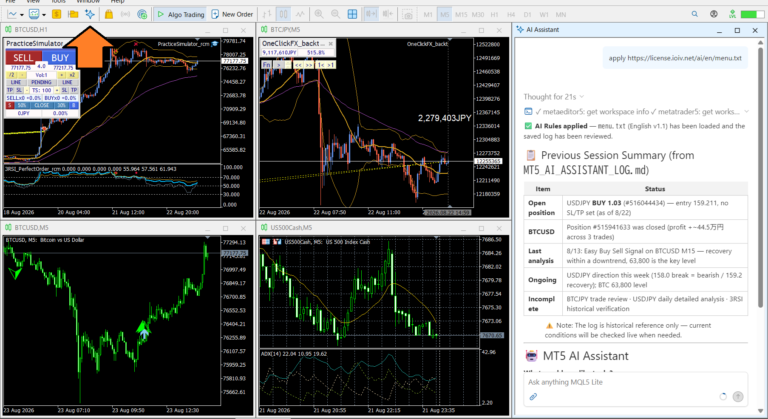
Après vous être connecté, cliquez sur « Ouvrir un nouvel assistant IA » pour ouvrir l'écran de chat IA.
Vous pouvez également l'ouvrir depuis le menu Fichier → Assistant IA .
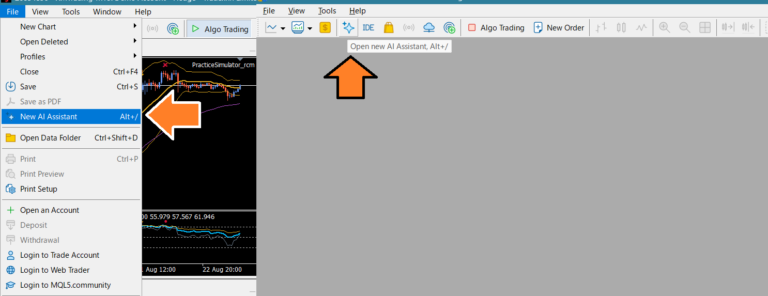
⑤ Posez simplement vos questions dans votre propre langue
C'est tout ce que vous avez à faire. Il vous suffit de saisir votre question dans le champ de saisie.
Par exemple:
Analyse graphique
- « Analysez la situation actuelle de l'USD/JPY sur l'horizon temporel H1. »
- «Dites-moi quelle est la tendance de XAUUSD.»
Analyse de position
- « Analysez mes postes vacants actuels. »
- « Quel poste présente le risque le plus élevé ? »
analyse de l'historique des transactions
- «Analysez mes transactions du mois dernier et dites-moi comment je peux m’améliorer.»
Vous n'avez pas besoin d'utiliser de format particulier.
J'ai également créé un menu standard qui vous permet d'utiliser l'assistant IA avec des options numérotées simples :
⑥ Si cela ne fonctionne pas
Si l'assistant IA n'apparaît pas, vérifiez les points suivants :
- Assurez-vous que MT5 est à jour.
- Assurez-vous d'être connecté à MQL5.community.
- Redémarrez MT5.
Pour que l'assistant IA fonctionne, vous devez notamment être connecté à MQL5.community. Cette connexion est différente de celle à votre compte de trading ou à votre serveur de trading.

🤪 Envie de discuter avec une IA ? Elle peut aussi tenir des conversations informelles.
L'assistant IA de MT5 n'est pas seulement utile pour l'analyse de marché.
Par exemple, vous pouvez demander :
- «Expliquez-le en dialecte du Kansai.»
- « Enseignez-moi comme un professeur enthousiaste. »
- «Guide-moi comme une servante.»
Il adaptera son style à votre demande.
Vous pouvez également poser des questions d'ordre général qui n'ont rien à voir avec le trading, telles que :
- « Que me conseillez-vous pour le dîner ce soir ? »
- « Il a fait très chaud ces derniers temps. Comment puis-je éviter le coup de chaleur ? »
- «Quels sont les objets utiles à emporter en voyage ?»
En revanche, elle n'excelle pas particulièrement dans la recherche d'actualités récentes ou d'informations politiques et économiques détaillées. Comparée à une IA générative généraliste, ses capacités de collecte d'informations sont plus limitées, et elle peut s'avérer insuffisante pour consulter les derniers rapports ou mener des recherches approfondies.
En d'autres termes, l'assistant IA de MT5 est moins un « service de recherche d'informations » qu'un « partenaire de trading avec lequel vous pouvez dialoguer tout en consultant vos graphiques et vos transactions dans MT5 ».
Essayez de dialoguer avec elle de manière informelle et voyez ce qu'elle peut faire. Vous découvrirez peut-être des façons utiles d'intégrer l'IA à votre trading.

🎯 Résumé
L'assistant IA de MT5 est un « partenaire de trading » facile à utiliser pour apprendre à connaître le marché. Nul besoin de réglages complexes ni de connaissances spécialisées : il vous suffit de créer un compte gratuit sur MQL5.community pour commencer à l'utiliser.
Commencez par quelque chose d'aussi simple que : « Analysez le graphique actuel. »
Utiliser l'IA comme conseiller tout en améliorant progressivement vos propres compétences décisionnelles peut être un moyen utile de développer vos compétences de trading sur le long terme.
📢Simulateur d'entraînement avec assistant IA
Conçu pour la nouvelle ère du trading assisté par l'IA. Essayez-le gratuitement dès aujourd'hui 👍