Discussion of article "Continuous Walk-Forward Optimization (Part 5): Auto Optimizer project overview and creation of a GUI" - page 2

You are missing trading opportunities:
- Free trading apps
- Over 8,000 signals for copying
- Economic news for exploring financial markets
Registration
Log in
You agree to website policy and terms of use
If you do not have an account, please register
frames are a whole mechanism with a set of methods for working with them.
On the contrary: it will be a bit of a hassle. Just a couple of lines of code. You can write a class in a plug-in file. Only OnNester() and OnTesterDeinit() will have to be written into the Expert Advisor. FrameInputs() will output all the expert's inputs into a string array. It is possible to change their values for the next pass. If you want, I can sketch an example. But I am not good at OOP yet.
Tried to run the auto optimiser and this is what came out:
1. Idea: Why not make ASSET name as a list, so that optimisation can be done on the list of tools.
2. Please add heights for the string with the optimisation period. Years, months are cut off
3 Optimisation does not start. When running from the terminal too. Errors are thrown:
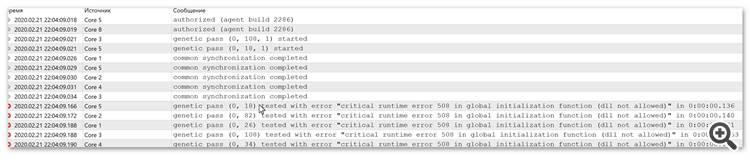
dll is compiled and located in the Libraries folder. The meta-editor did not generate any compilation errors.Tried to run the auto optimiser and this is what came out:
1. Idea: Why not make ASSET name as a list, so that optimisation can be done on the list of tools.
2. Please add heights for the string with the optimisation period. Years, months are cut off
3 Optimisation does not start. When running from the terminal, too. Errors are thrown:
dll is compiled and located in the Libraries folder. The meta-editor did not generate any compilation errors.I will correct the list of assets - I couldn't find a way to get it from the terminal in an adequate way, so for now the text version
Regarding dll - you just haven't enabled dll loading (it is done in the terminal settings ).
Just the opposite: it will be a bit of a hassle. Just a couple or three lines of code. You can write a class in a plug-in file. Only OnNester() and OnTesterDeinit() will have to be written in the Expert Advisor. FrameInputs() will output all the expert's inputs into a string array. It is possible to change their values for the next pass. If you want, I can sketch an example. But I am not good at OOP yet.
The programme is already designed for xml files, so I don't want to rewrite its key aspects. As for inputs - I will study the option that fxsuber suggested and possibly automate it.
Asset list - text option for now
Is it possible to just type in commas?
Is it possible to just type in a comma?
No, you need to enter the specific asset on which the optimisation process is to be started
I managed to run the optimisation, so far without filtering. Just for the test, one pass with sorting by payoff. Then I clicked on the result line on the history. Look at the different results between the tester and the auto-optimiser:
The settings of the EA in the pass were completely the same. What is wrong here? And note: you have two bull days in a week (indicated by an arrow).
I managed to run the optimisation, so far without filtering. Just for the test, one pass with sorting by payoff. Then I clicked on the result line on the history. See how different the results are between the tester and the auto-optimiser:
The settings of the EA in the pass were completely the same. What is wrong here? And pay attention: you have two bull days in a week (indicated by the arrow).
The test was conducted on minutes or on real ticks (depending on the mode you have chosen in the optimiser settings GUI button). And you ran the test by double click in the tick simulation mode (dropdown in the first third of the screen). this alone can affect the difference in results. Also, the recovery factor will not coincide with what is in the terminal, because the auto optimiser counts it by the fixed PL, while the terminal counts it by the variation (green chart - terminal, blue chart - auto optimiser). Regarding profit/loss days - I don't see what you have reflected on the screenshot in the terminal.
Also, keep in mind that profit/loss by day is calculated as an average value for the day, not as an absolute amount.
When I was running it, the chart and profit/loss indicators coincided. In the second article I described how the indicators are calculated.
I was just about to recalculate on real ticks, terminal was updated. Optimisation does not start, an error occurs. DLL permission in the settings was not broken. Looks like a surprise from MQ.
PL==profit? Anyway the difference is too big for tick modelling. If the auto optimiser works again, I'll recalculate. Here is a reason for Russian localisation - not all analogues of values are clear.
I mentioned profitable/loss days because you have an error in the interface. The arrow is pointing. And where are these "blue and green graphs?"
I was just about to recalculate on real ticks, terminal was updated. Optimisation does not start, an error occurs. DLL permission in the settings was not broken. It seems to be a surprise from MQ.
Payoff==profit? Or is it PL? Either way the difference is too big for tick modelling. If the auto optimiser works again, I'll recalculate. Here is a reason for Russian localisation - not all analogues of values are clear.
I mentioned profitable/loss days because you have an error in the interface. The arrow is pointing. And where are these "blue and green graphs?"
PL - profit, and Payoff - coefficient, in the second article (or in the third) I wrote the formula I use to calculate it. I don't plan to make localisation - I don't plan to, there is not so much English there, besides MetaQuotes translate articles and foreign colleagues for example will be surprised much more if the program opens in our language)
I compared it and everything worked. Some things could go wrong if you have a hedge account, but I don't think there should be such errors. Just because I trade on stock markets - I tested everything on the terminal with netting system of calculation (which is on stock markets), and although I did accounting of hedge account, but there was no opportunity to check everything in detail, but tests on demo hedge account I ran when I wrote a class leading all calculations.
Regarding dll loading - close the terminal, run it as usual and not through auto optimiser and see if library loading is allowed and if the test is running. If everything is fine and the test runs, then the auto optimiser will be able to work. And yes, you will not be able to use my program in cloud optimisation, because you cannot upload dll libraries to the cloud.
Regarding dll loading - close the terminal, run it as usual and not through the auto optimiser and see if the loading of libraries is allowed and if the test is running. If everything is fine and the test runs, then the auto optimiser will be able to work. And yes, you will not be able to use my program in cloud optimisation, because you cannot upload dll libraries to the cloud.
I have already found the payoff formula, I didn't have time to fix it - you answer quickly. Error screenshots are taken from the terminal. It does not run the test. I don't need the cloud, I just didn't have such an error before. The account is really a hedging account. But before the terminal update, an hour ago, everything was working.