 MetaTrader 5
 Experts
 Indicators
 Scripts
 Libraries
 Storage
Watch how to download trading robots for free
Find us on Telegram!
Join our fan page
You liked the script? Try it in the MetaTrader 5 terminal

Trade History Exporter - closed trades to CSV with R multiple, MAE and MFE - script for MetaTrader 5
Daniel Reynolds

MQL4 and MQL5 developer building Expert Advisors, indicators, trade panels and utilities for MetaTrader 4 and 5.
What I build:
- Views:
- 47
- Published:
-
 You are missing trading opportunities:
- Free trading apps
- Over 8,000 signals for copying
- Economic news for exploring financial markets
Registration Log inYou agree to website policy and terms of use
If you do not have an account, please register -
 Need a robot or indicator based on this code? Order it on Freelance
Go to Freelance


The terminal's history shows deals, not trades. Trade History Exporter rebuilds each closed trade from its deals and writes one row per trade to a CSV file you can open in a spreadsheet.
Columns: position, symbol, type, volume, open time, open price, close time, close price, points, profit, commission, swap, fee, net, duration, initial stop loss, R multiple (gross), MAE points, MFE points, magic number and comment.
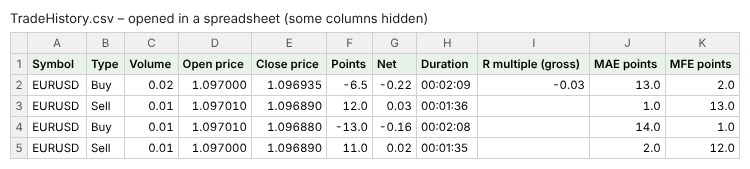
Four demo trades. The first was closed in two parts and is shown as one row.
How the figures are worked out
- A position closed in several parts (partial closes) is one row. Open and close prices are volume-weighted averages.
- Commission, swap and fees from every deal of the trade are added up, so "Net" is the real result.
- R multiple (gross) = points won or lost / points between the open price and the stop loss on the opening deal, before costs. Left blank when the trade had no stop loss when it was opened.
- MAE (maximum adverse excursion) and MFE (maximum favourable excursion) are the largest move against and in favour of the trade, in points, taken from M1 bars between the open and the close. This is an approximation: the first and last minute can include prices just before the entry or just after the exit, and the bars are built from Bid prices, so for sell trades the spread is not included. Left blank when the terminal does not have M1 history for the whole trade.
- Dates are written as yyyy-mm-dd hh:mm:ss (server time), which spreadsheets read as dates. Money uses the account currency's decimals.
- The file is saved as UTF-8 with a byte order mark. A comment that starts with =, +, - or @ gets a ' in front, so a spreadsheet does not run it as a formula.
- Rows are in the order the trades were opened.
Inputs
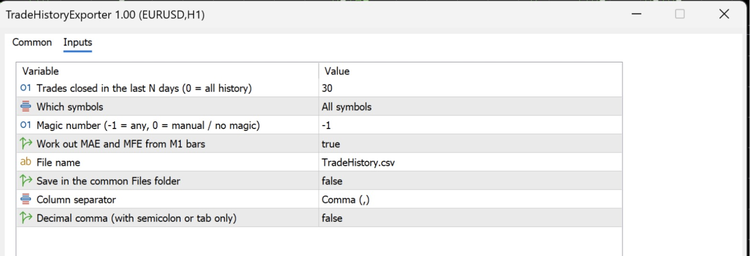
The script's inputs
- Trades closed in the last N days: 0 = all history.
- Which symbols: all symbols or this chart's symbol only.
- Magic number: -1 = any, 0 = no magic number (usually manual trades), any other number = only that magic number.
- Work out MAE and MFE from M1 bars: true by default. Turn it off for a faster export of a long history.
- File name.
- Save in the common Files folder (shared by all terminals) instead of this terminal's MQL5\Files folder.
- Column separator: comma, semicolon or tab.
- Decimal comma: writes 1,0950 instead of 1.0950, for spreadsheets set to a decimal comma. Used only with the semicolon or tab separator.
When it finishes, a message shows the file's full path, the number of trades, the number of winners and the net result.
 Inside-Bar Outcome Tracker: Breakout Direction, Failure Rate and Time to Resolve
Finds every inside-bar pattern in the history of your chart and follows it to the end: which side of the mother bar broke first, whether the breakout held or failed within a few bars, and how many inside bars came before it. The histogram marks each breakout, boxes show the patterns on the chart, and a panel gives the statistics for your own symbol and timeframe, split by the number of inside bars and by the size of the mother bar, plus one line that can be pasted into a comment to compare symbols.
 Daily Loss Limit Guard - close all and stay flat after the daily limit
A simple account guard: once the day's loss (equity against the balance at the start of the day) reaches your limit, it closes all positions, deletes pending orders and keeps the account flat until the next day. Works on manual trades and on any EA. Never opens trades.
Close By Filter - close positions by side, symbol, magic number and profit
Closes only the open positions that match your filters and, if you choose, deletes matching pending orders. Shows a summary and asks before it acts.
Gold MACD Divergence Map
MACD regular and hidden divergences on closed bars with an honest first-touch statistics panel. Not a trading signal.