 MetaTrader 5
 Experts
 Indicators
 Scripts
 Libraries
 Storage
Watch how to download trading robots for free
Find us on Telegram!
Join our fan page
You liked the script? Try it in the MetaTrader 5 terminal


- Views:
- 75
- Published:
-
 You are missing trading opportunities:
- Free trading apps
- Over 8,000 signals for copying
- Economic news for exploring financial markets
Registration Log inYou agree to website policy and terms of use
If you do not have an account, please register -
 Need a robot or indicator based on this code? Order it on Freelance
Go to Freelance
A common way to size a position is risk divided by stop distance times tick value. On forex majors that usually works. On some brokers' metal and index CFDs, or on symbols quoted in a currency other than your account currency, the reported tick value can be stale or set for a different contract, and the lot comes out wrong without any warning.
This utility asks the trade server instead. It calls OrderCalcProfit for one lot from your entry to your stop, so contract size, quote currency and account currency are all handled by the same function the terminal uses for real orders. Then it divides your risk by that loss and rounds down to the symbol's volume step.
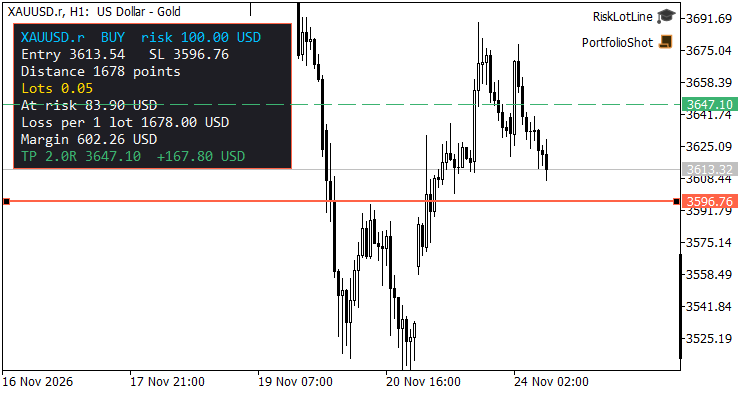
XAUUSD H1: 100 USD risk, stop 1678 points away, 0.05 lots, take profit at 2R
How to use it
Attach it to a chart. A red line appears below the price: that is your stop. Drag it. Below the price means a buy (entry at Ask), above means a sell (entry at Bid). The panel updates while you drag and on every tick.
What the panel shows
- Direction, entry and stop price, and the distance in points
- Lots: the largest size that stays within your risk, rounded down to the volume step
- At risk: the money you really lose at the stop with that rounded size, which is usually a little less than what you asked for
- Loss per 1 lot from entry to stop, so you can check the number yourself
- Margin for that size from OrderCalcMargin
- Take profit at your R multiple, drawn as a dashed green line, with the money it would make
If even the minimum lot risks more than you asked, the size and the risk turn orange and the panel says so.
Input parameters
- Risk is measured as: % of balance, % of equity, or a fixed amount in the account currency.
- Risk: the percent or the amount.
- Take-profit at R multiple: 2 means the target is twice the stop distance. 0 hides it.
- First SL distance: where the line starts, in % of the price.
- Colours, panel corner, font size: for dark and light charts.
Notes
It is an Expert Advisor only because MetaTrader 5 does not allow OrderCalcProfit inside indicators (error 4014). It never opens, changes or closes a trade. It runs on demo and live accounts; on a chart that already has an EA, open a second chart of the same symbol. Spread and commission are not part of the loss at the stop. Removing it deletes its objects; changing the timeframe or the inputs keeps your stop line where you left it.
 Import Ticks CSV - a tick file into a custom symbol for real-tick tests
A script that reads a tick CSV into a custom symbol and builds its M1 bars, so the Strategy Tester can run "Every tick based on real ticks" over a period the broker's server does not keep. It finds the columns by name and moves UTC times to server time.
Tick Depth Probe - how far back your broker keeps real ticks
A script that shows how far back your broker's server keeps real ticks for a symbol. It samples a few short windows over the last four years, asks for each one until its ticks arrive or the time is up, and prints the oldest one that has ticks.
 Safe Pyramiding - add to winning trades only when they are risk free
Decides if you can add to a running winner: only when all open trades in that direction are on break-even and the newest one is in profit. The open risk is never more than one add. Hedging accounts only.
 EzoO Candle Timer - time left on the candle, live spread and today's range
Shows the time left on the current candle, the live spread and today's range next to the price or in a chart corner. Works on every timeframe.