 MetaTrader 5
 Experts
 Indicators
 Scripts
 Libraries
 Storage
Watch how to download trading robots for free
Find us on Twitter!
Join our fan page
Join our fan page
You liked the script? Try it in the MetaTrader 5 terminal

Six-Timeframe EMA Trend Direction Panel - indicator for MetaTrader 5
Kenichiro Sakamoto

I'm Kenichiro Sakamoto, the developer behind FXEA365 — a studio building transparent, rule-based Expert Advisors for MetaTrader 5.
- Views:
- 44
- Published:
-
 You are missing trading opportunities:
- Free trading apps
- Over 8,000 signals for copying
- Economic news for exploring financial markets
Registration Log inYou agree to website policy and terms of use
If you do not have an account, please register -
 Need a robot or indicator based on this code? Order it on Freelance
Go to Freelance

The indicator shows the trend direction of six timeframes of the chart symbol in one panel. For each of M5, M15, M30, H1, H4 and D1 it compares a fast EMA with a slow EMA, both calculated on close prices. The panel works the same way on any chart timeframe.
A timeframe is shown as UP in the uptrend colour when the fast EMA is above the slow EMA, as DOWN in the downtrend colour when it is below, and as FLAT when both are equal. The comparison uses the last closed bar of each timeframe, so the state does not change back and forth while a bar is still forming. Three dots are shown while the history of a timeframe is still loading.
The twelve EMA handles are created once at start and released when the indicator is removed. The panel is refreshed on every tick and every five seconds by a timer. The panel size and the offsets are scaled by the screen DPI, and the panel can be placed in any of the four chart corners.
Input parameters
- InpEmaFast - period of the fast EMA (default 20).
- InpEmaSlow - period of the slow EMA (default 50).
- InpCorner - chart corner the panel is anchored to (default upper left).
- InpX - horizontal offset from the corner in pixels at 96 dpi (default 20).
- InpY - vertical offset from the corner in pixels at 96 dpi (default 30).
- InpFontSize - font size of all labels (default 10).
- InpUpColor - colour of UP (default LimeGreen).
- InpDownColor - colour of DOWN (default Tomato).
- InpFlatColor - colour of FLAT and of the loading state (default Silver).
- InpTextColor - colour of the title and the timeframe names (default WhiteSmoke).
- InpBgColor - panel background colour (default Black).
The indicator only draws objects and has no buffers. It does not place or manage trades.
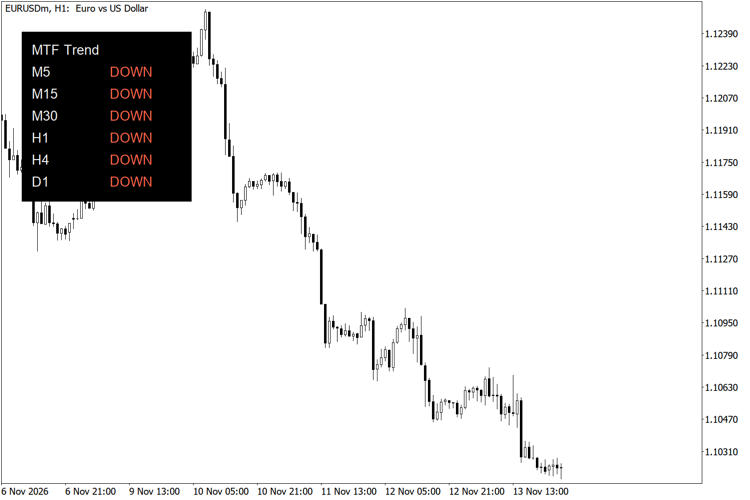
Six-timeframe EMA trend panel on EURUSD H1
ATR Stop Distance and Risk-Based Lot Size Panel
Panel that shows the ATR of the last closed bar, a stop-loss distance derived from it, the money at risk for a chosen percentage of the balance and the lot size that matches that risk.
Account Information Panel with Daily P/L and Equity Drawdown
Shows balance, equity, margin, margin level, floating P/L, today's closed P/L and the drawdown from the equity peak in a small panel on the chart.
Economic Calendar Event Lines by Impact
Draws a dotted vertical line at the release time of each economic calendar event of the selected currencies, coloured by impact, from the built-in MetaTrader 5 calendar.
 Risk Order Script: Drop at Stop Loss for Auto Lot Size and R:R Take Profit
Drop the script on the chart at your stop loss price and it opens a market order with the lot size calculated from your risk percentage and take profit placed at your reward:risk ratio.