 MetaTrader 5
 Experts
 Indicators
 Scripts
 Libraries
 Storage
Watch how to download trading robots for free
Find us on Facebook!
Join our fan page
Join our fan page
You liked the script? Try it in the MetaTrader 5 terminal

Common Folder Copier - copy positions between MT5 terminals on the same PC - expert for MetaTrader 5
Augusto Martin D'anna

MQL5 & Pine Script developer | Trader since 2019 | Strategy validation
As a trader, I know a bot is only as good as the logic behind it. I bridge
trading concepts and clean code: I don't just follow instructions, I make
sure your EA behaves exactly the way your strategy intends.
As a trader, I know a bot is only as good as the logic behind it. I bridge
trading concepts and clean code: I don't just follow instructions, I make
sure your EA behaves exactly the way your strategy intends.
- Views:
- 81
- Published:
- Updated:
-
 You are missing trading opportunities:
- Free trading apps
- Over 8,000 signals for copying
- Economic news for exploring financial markets
Registration Log inYou agree to website policy and terms of use
If you do not have an account, please register -
 Need a robot or indicator based on this code? Order it on Freelance
Go to Freelance
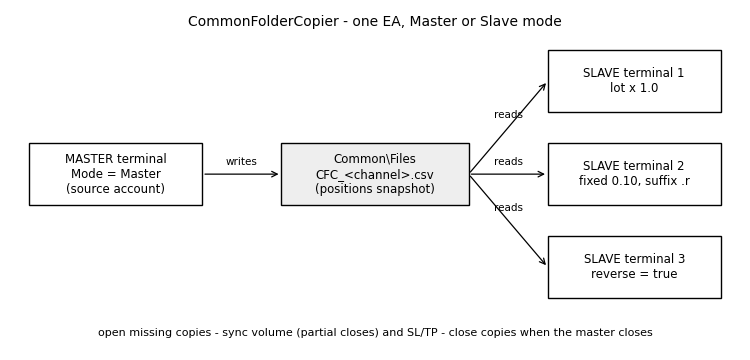
Common Folder Copier copies positions from one MT5 account to one or more MT5 accounts running on the same computer or VPS. It is a single EA with two modes. The Master writes a snapshot of its open positions to a small file in the terminals' shared Common\Files folder several times per second; each Slave reads it and makes its own account mirror the master. No DLL, no internet service, no external software.
How it works
- Master (attach to one chart of the source account): writes all open positions, or only one magic number, with symbol, direction, volume, SL and TP. The file is written to a temporary name and then replaced, so a slave never reads a half-written file.
- Slave (attach to one chart of each receiving account): opens the positions that have no copy yet, reduces the volume when the master closes part of a position, keeps SL and TP in sync and closes the copy when the master position is closed.
- Each copy is linked to its master ticket through a terminal global variable, so the link survives partial closes and terminal restarts.
- If the master file is older than the configured limit (master terminal closed or frozen), the slave stops acting instead of closing everything.
Inputs
- Mode - Master or Slave. Channel name - the same in master and slaves; use different channels to run several copiers at once.
- Update interval, ms.
- Master: copy only this magic - -1 copies all positions.
- Slave: lot mode and value - master lot x multiplier, or a fixed lot (rounded to the symbol volume step and limits).
- Slave: symbol prefix / suffix - for brokers with names like EURUSD.r or mXAUUSD.
- Slave: reverse - copy in the opposite direction (SL/TP are not copied in this mode).
- Slave: copy SL and TP, magic number of the copies and maximum age of the master file.
Notes
- Designed for hedging accounts. On netting accounts opposite positions on one symbol net out, and the EA prints a warning.
- Both terminals must be on the same machine (the Common folder is shared by all terminals of one Windows user).
- Check your prop firm's rules before copying between accounts: some firms restrict copy trading between different people's accounts.
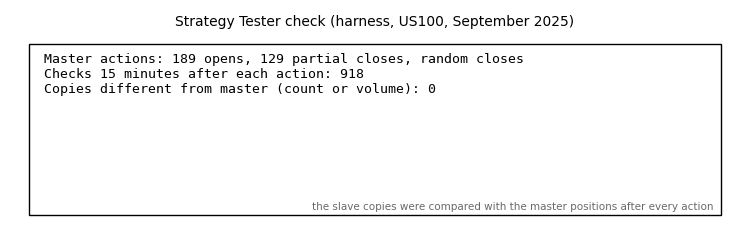
- Tested in the Strategy Tester with a harness that opened, partially closed and closed master positions at random: after 918 checks the copies always matched the master in count and volume.
 Execution Quality Logger - slippage, fill delay and spread of every deal
Logs the slippage, fill delay and spread of every deal on the account (manual, EAs, SL/TP hits) to a CSV file and shows a live summary. It never trades.
Equity Target Closer - close all trades at a profit or loss level
Closes all positions and pending orders when the account profit or loss reaches your target, in money or % of balance. Floating or full-day P/L, symbol and magic filters.
 Correlation Matrix Dashboard
Live rolling-correlation heatmap across your watchlist — spot hidden overlapping exposure before you stack three “different” trades that are secretly one trade.
Equity Drawdown Monitor
An animated chart panel that shows the equity drawdown of the account in real time, the closed result of the day, week and month, and one line for every Expert Advisor running on the account.