 MetaTrader 5
 Experts
 Indicators
 Scripts
 Libraries
 Storage
Join our fan page

Trade Manager Utility - expert for MetaTrader 5

- Views:
- 129
- Rating:
- Published:
-
 You are missing trading opportunities:
- Free trading apps
- Over 8,000 signals for copying
- Economic news for exploring financial markets
Registration Log inYou agree to website policy and terms of use
If you do not have an account, please register -
 Need a robot or indicator based on this code? Order it on Freelance
Go to Freelance
Need a robot or indicator based on this code? Order it on Freelance
Go to Freelance
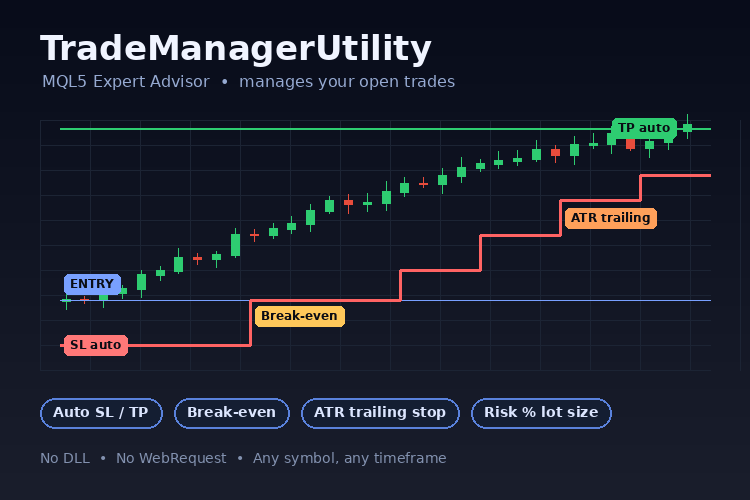
Trade Manager Utility manages existing MetaTrader 5 positions on a timer and on incoming ticks. It can add missing initial stop loss or take profit levels, move stops to break even, trail stops, report the number of managed positions, optionally close positions above a configured count, and pause management after a daily account threshold is reached. It does not open positions.
Inputs
| Group | Input | Default | Description |
|---|---|---|---|
| Position selection | InpMagic | -1 | Manage all magic numbers when -1 ; 0 selects manual positions; a positive value selects that magic number. |
| Position selection | InpAllSymbols | false | When enabled, manage matching positions on all symbols; otherwise use the chart symbol. |
| Position selection | InpTimerSeconds | 2 | Minimum interval between management cycles in broker-time seconds; accepted range is 1–3600. |
| Initial protection | InpInitialSL | true | Add a stop loss only when the selected position has no stop loss. |
| Initial protection | InpInitialTP | false | Add a take profit only when the selected position has no take profit. |
| Initial protection | InpInitialMode | DISTANCE_POINTS | Distance unit used for both initial levels: points or ATR. |
| Initial protection | InpInitialSLPoints | 500 | Initial stop loss distance in points, anchored to entry price. |
| Initial protection | InpInitialTPPoints | 1000 | Initial take profit distance in points, anchored to entry price. |
| Initial protection | InpInitialSLATR | 2.0 | Initial stop loss distance as an ATR multiple. |
| Initial protection | InpInitialTPATR | 4.0 | Initial take profit distance as an ATR multiple. |
| Break even | InpBreakEven | false | Enable stop movement after the position reaches the trigger profit. |
| Break even | InpBETriggerPoints | 500 | Favorable price movement in points required to trigger break even. |
| Break even | InpBELockPoints | 10 | Points to lock beyond the opening price; zero moves the stop to the opening price. |
| Trailing stop | InpTrailing | false | Enable trailing stop management. |
| Trailing stop | InpTrailingMode | DISTANCE_POINTS | Units for trailing start, distance, and step: points or ATR. |
| Trailing stop | InpTrailStartPoints | 600 | Favorable movement in points required before trailing begins. |
| Trailing stop | InpTrailDistancePoints | 400 | Stop distance from the current market price in points. |
| Trailing stop | InpTrailStepPoints | 50 | Minimum improvement in points before the stop is updated again. |
| Trailing stop | InpTrailStartATR | 3.0 | Favorable movement required before trailing begins, as an ATR multiple. |
| Trailing stop | InpTrailDistanceATR | 2.0 | Stop distance from the market price, as an ATR multiple. |
| Trailing stop | InpTrailStepATR | 0.25 | Minimum stop improvement before another update, as an ATR multiple. |
| ATR and execution | InpATRPeriod | 14 | ATR indicator period; accepted range is 1–10000. |
| ATR and execution | InpATRTimeframe | PERIOD_CURRENT | Timeframe used to calculate ATR. The most recently completed bar is used. |
| ATR and execution | InpMaxSpreadPoints | 0 | Skip position modifications when spread exceeds this number of points; 0 disables the filter. |
| ATR and execution | InpMaxQuoteAgeSeconds | 300 | Maximum quote age in server-time seconds for trade actions. |
| ATR and execution | InpDeviationPoints | 20 | Maximum price deviation passed to position-close requests, in points. |
| Position count | InpMaxTrades | 0 | Maximum number of managed positions; 0 disables the limit. |
| Position count | InpAlertMaxTrades | false | Alert when the managed-position count exceeds the configured limit. |
| Position count | InpCloseExcess | false | Close positions above the limit when enabled. |
| Daily account protection | InpDayBase | DAY_EQUITY | Use account equity or account balance as the daily baseline and comparison value. |
| Daily account protection | InpDailyLossPercent | 0 | Pause daily management and attempt to close managed positions at or below this percentage loss; 0 disables the threshold. Maximum is 100. |
| Daily account protection | InpDailyProfitPercent | 0 | Pause daily management and attempt to close managed positions at or above this percentage gain; 0 disables the threshold. |
| Informational risk calculation | InpShowRiskLot | false | Show an estimated lot size for the configured side in the chart comment. This is informational and does not place an order. |
| Informational risk calculation | InpRiskSide | ORDER_TYPE_BUY | Side used for the informational risk estimate: buy or sell. |
| Informational risk calculation | InpRiskPercent | 1.0 | Account equity percentage used for the informational risk estimate; maximum is 100. |
| Informational risk calculation | InpRiskStopPoints | 500 | Assumed stop distance in points for the informational side estimate. |
Usage
Compile TradeManagerUtility.mq5 in MetaEditor, enable Algo Trading and EA trading permissions, then attach it to a chart. Try it on a demo account first. Choose the position filters and management rules in the Inputs tab. Distances named in points are points, not pips; ATR modes use ATR multiples. Initial levels are anchored to the entry price and are skipped if no longer valid against current market and broker limits. Stop loss updates only move the stop in a more protective direction. Timer and tick events share the configured minimum interval, using broker time; no management actions run while broker time is unavailable. When either daily threshold is enabled, live daily state is stored in terminal global variables keyed by account login, InpMagic , InpAllSymbols , InpDayBase , and the chart symbol (also in all-symbols mode). The symbol is truncated as needed so every complete key is shorter than 63 characters. Symbols sharing the retained prefix can therefore collide; broker server is not included. This key format differs from earlier versions, so earlier saved daily state is not reused. In the Strategy Tester, daily state remains in memory for the EA instance and is not persisted to terminal global variables.
The risk-lot display estimates the configured buy or sell side for the chart symbol using the configured risk percentage and stop distance. It floors volume to the symbol's volume step, caps it at the symbol maximum, checks the calculated loss against the risk budget, and checks an estimated margin amount. Below-minimum risk shows no lot. The estimate excludes commission, other costs and slippage; break even is based on entry price and is not adjusted for costs.
Limitations
- Compilation and MetaTrader CodeBase AutoValidator results have not been verified.
- Daily change is measured against account-wide equity or balance. Position selection filters only which positions this EA manages and closes. It cannot prevent manual trades or other EAs from opening positions, and those trades can affect the account-wide daily metric.
- In netting and exchange accounts, the maximum-trades monitor counts positions, with at most one aggregate position per symbol; it does not count individual deals. A symbol position can aggregate multiple deals. The position has one magic number, so the EA cannot manage constituent deals separately by their original magic numbers.
- Run only one utility instance per overlapping position scope to avoid duplicate management actions.
- Inputs for disabled features are not validated; when break even is enabled, its lock must be less than its trigger. In a flat standalone Strategy Tester run, position management is not exercised because the EA does not open positions.
- Excess positions are closed newest first by open time, with ticket order breaking ties. The spread limit filters stop modifications; it does not filter risk-triggered or excess-position closes.
- The daily baseline is account equity or balance at the EA's first cycle of the server day, not a reconstructed midnight snapshot. After restart, a valid saved baseline for that day is reused. A zero day marker indicates an interrupted write: the EA warns and starts a fresh baseline with the pause cleared. DAY_BALANCE ignores floating loss.
- Daily protection latches until the next broker day. It retries closes of selected managed positions each cycle, including newly opened matching positions. Deposits and withdrawals affect the raw equity or balance metric; they are not adjusted out. Unavailable or non-finite daily data defers ordinary actions, while an existing pause continues its close attempts.
- Closing and modifying existing positions are not blocked by a free-margin estimate. Broker restrictions and trade failures can still prevent execution. For a close, an existing SL or TP at or within the reported freeze distance defers the request; a frozen response also defers it. These cases retry after 60 seconds and are logged once per ticket while its retry record exists. Retry records are removed when the ticket is no longer an open position.
- A pre-existing stop or take-profit inside the combined stop/freeze distance plus the one-tick safety buffer can prevent the entire modification for that position.
- Trading-session availability checks inspect session windows for the current and previous broker weekdays, including windows that end after midnight. The result still depends on the session data reported by the broker.
- No historical positions or deals are used to reconstruct daily baselines. No positions are opened by this EA.
 Session Range Breakout
Draws the high and low of a chosen time window and alerts on the first break on each side. The levels are also available through iCustom.
Close All Positions Panel
Close all positions panel for MT5: seven buttons to close all, buys, sells, winners, losers, the chart symbol or delete pending orders, on Gold (XAUUSD), forex or any symbol, for manual trades and any EA. Open source code.
Xander Grid RSI Gold
XAUUSD grid EA that opens a basket when RSI leaves oversold or overbought on a closed candle, adds levels with a lot multiplier and closes the basket at a money or points target. Open source code.
Trade Journal Exporter - closed trades to CSV, one row per position, with MFE/MAE, R multiple and session
Exports your closed trade history to a CSV file with one row per position (not per deal), ready for Excel, Python or any journal. Each row has ticket, symbol, magic number, comment, side, volume, entry and exit time and price, duration, initial SL and TP when known, gross profit, commission, swap, net result and R multiple. It also calculates MFE and MAE (best and worst price reached while the trade was open, in points and in money) from the M1 bars between entry and exit, plus the entry session (Asia, London, New York) and weekday. Filter by magic number (lists and ranges) and symbol (wildcards), pick the period, the column separator (; or ,) and the decimal mark, and save to MQL5\Files or the common folder. Tested on hedging accounts and in the Strategy Tester (netting logic included; feedback welcome), where the file is written when the test ends. Read-only: it never opens, modifies or closes a trade. No DLLs, no web requests.