 MetaTrader 5
 Experts
 Indicators
 Scripts
 Libraries
 Storage
Join our fan page

Daily P/L by Magic Number - per-EA profit table for today, week and month - indicator for MetaTrader 5

I build clean, well-tested Expert Advisors and indicators for MetaTrader 4 and 5, with a focus on rule-based strategies and solid risk management.
What I can do for you:
- Views:
- 112
- Rating:
- Published:
-
 You are missing trading opportunities:
- Free trading apps
- Over 8,000 signals for copying
- Economic news for exploring financial markets
Registration Log inYou agree to website policy and terms of use
If you do not have an account, please register -
 Need a robot or indicator based on this code? Order it on Freelance
Go to Freelance
Need a robot or indicator based on this code? Order it on Freelance
Go to Freelance

What it does
Daily P/L by Magic Number turns the account history and the open positions into a compact table on the chart:
| Column | Meaning |
| Strategy | Magic number, or the name you gave it. manual = magic 0. |
| Today / Week / Month | Closed result (profit + swap + commission + fees) plus floating P/L of that strategy's open positions (can be switched off). |
| Float | Floating P/L of the open positions right now. |
| Trd | Trades closed today. |
| DayDD | Largest intraday drop from the day's peak (closed results plus floating, tracked while the indicator runs). |
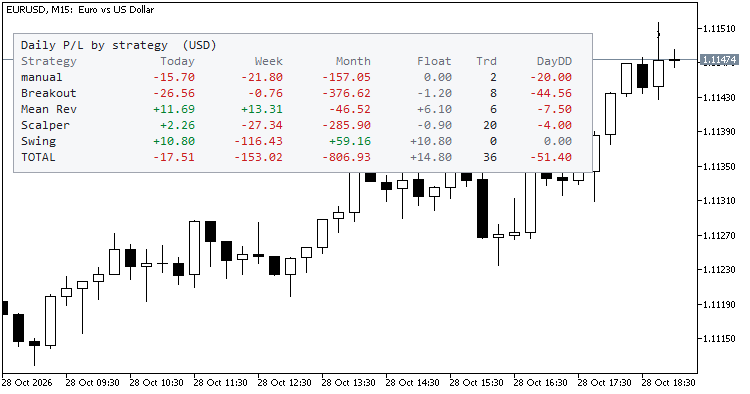
The last row, TOTAL, adds up everything shown. Colours: green for profit, red for loss, grey for zero.
Why it is useful
- Running several EAs on one account? The terminal shows a single balance curve. This table shows who contributed what, today and over the week and month.
- Spot a misbehaving EA early: a strategy with a large DayDD or an unusual loss today is visible at a glance.
- Manual trades are separated from EA trades instead of being mixed in.
- Works with hedging and netting accounts, any symbol and any timeframe. Put it on one chart; it covers the whole account.
How the periods are defined
- Day, week and month follow the broker server time. The week starts on Monday and the month on the 1st.
- The indicator reads history from the first day of the current week or month, whichever is earlier, so it stays light on large accounts.
- The intraday drawdown combines the closed-trade curve of the day with floating values sampled while the indicator is running. If the terminal was closed for part of the day, the floating part of that period cannot be reconstructed.
Inputs
- Names : optional list "magic=name;magic=name", e.g. 1001=Breakout;1002=Grid .
- Show manual trades (magic 0) : show or hide the manual row.
- Add floating P/L to Today / Week / Month : on by default.
- Max strategy rows , Refresh every N seconds .
- Panel corner , X/Y offset , Font size , Dark theme .
Notes
- Read-only: no orders are sent, modified or closed; there are no buffers and no alerts.
- The account number, name, broker and balance are never drawn.
- Totals are in the account currency (shown in the title).
- Open and closed deals made by other EAs on the same account are included, as they are in the account history.
- Not financial advice; it reports what already happened.
Try it in the Strategy Tester
Because it reads the deal history of whatever account it runs on, you can also load it in the Strategy Tester to check the table before using it on a demo or live account.
Currency Exposure and Leverage Monitor
Splits all open positions into currencies and shows the net exposure per currency in account money, the effective leverage of the account and how much a 1% currency move would change your equity.
Session Range and Spread
Draws Asia, London and New York session high/low boxes with each session's range in pips or price, plus a live spread and open-sessions panel.
 SpreadClock - your broker's spread by hour and weekday from real ticks
Reads real tick history and reports average, median and 95th-percentile spread for every server hour and weekday, plus the cost in % of price.
 BotWatchdog - phone alerts when your EAs silently stop working
Push notifications when the connection drops, algo trading is switched off, an EA leaves its chart, the account changes, a position has no stop, equity or margin hit a limit - plus a daily heartbeat.