 MetaTrader 5
 Experts
 Indicators
 Scripts
 Libraries
 Storage
Join our fan page

Prop-firm Guard - daily loss and max drawdown protection for challenge accounts - expert for MetaTrader 5

- Views:
- 103
- Rating:
- Published:
-
 You are missing trading opportunities:
- Free trading apps
- Over 8,000 signals for copying
- Economic news for exploring financial markets
Registration Log inYou agree to website policy and terms of use
If you do not have an account, please register -
 Need a robot or indicator based on this code? Order it on Freelance
Go to Freelance

Prop-firm challenges fail on one rule more than any other: a single bad day that crosses the daily loss limit or the max drawdown. Prop-firm Guard is a small utility EA that enforces those limits for you, a little before the firm does.
How it works
Attach it to any one chart. It watches the whole account - every symbol, every magic number and manual trades - on every tick and once per second.
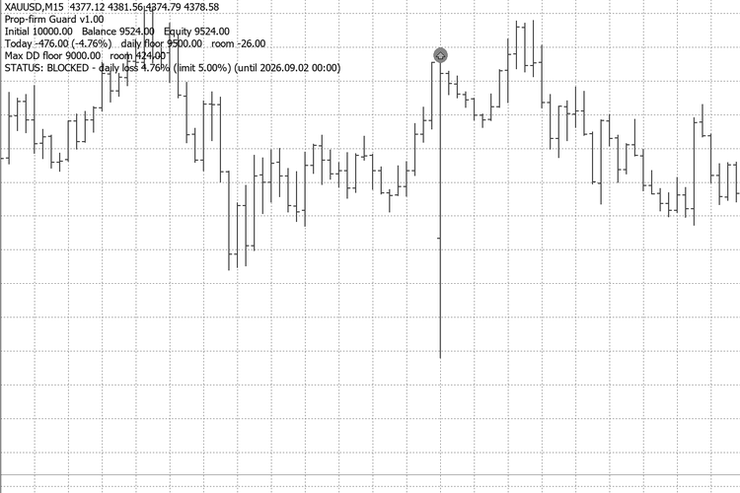
- When equity falls to a set share of a limit (default 90%, so a 5% daily limit acts at -4.5%), it deletes all pending orders, closes all positions and blocks the account.
- While blocked, any new trade from another EA or by hand is closed at once.
- A daily-loss block lifts at the start of the next trading day. A max-drawdown or profit-target block stays until you set InpUnblock = true (for a new challenge).
- State (initial balance, day start, peak, block) is stored in terminal global variables, so restarting the terminal or the VPS does not reset it.
Rules supported
- Daily loss as % of the initial balance (FTMO style) or % of the day-start value; day start measured from balance or the higher of balance and equity; trading day starts at any server hour.
- Max drawdown: static (from the initial balance), trailing equity high or trailing balance high; the trailing floor can stop at the initial balance.
- Optional profit target: flatten and stop when it is reached.
- Optional flatten on Friday at a set time, and/or every day before the daily break.
Display
A status panel on the chart shows initial balance, balance, equity, today's P/L, both floors and the room left before the guard acts. A push notification is sent to the MT5 mobile app on every breach.
Inputs
| Input | Default | Meaning |
|---|---|---|
| InpInitBalance | 0 | Initial balance (0 = balance when first attached) |
| InpDailyPct | 5.0 | Max daily loss % (0 = off) |
| InpDayBase | Higher of balance/equity | What the daily loss is measured from |
| InpDailyOfInit | true | Daily amount = % of initial balance (false = % of day base) |
| InpMaxDDPct | 10.0 | Max drawdown % of initial balance (0 = off) |
| InpDDMode | Static | Static / trailing equity / trailing balance |
| InpTrailLock | true | Trailing floor stops at the initial balance |
| InpTargetPct | 0 | Profit target % (0 = off) |
| InpTriggerPct | 90 | Act at this % of a limit (buffer for slippage) |
| InpResetHour | 0 | Trading day starts at this server hour |
| InpFridayHM | 0 | Flatten on Friday at HHMM server time (0 = off) |
| InpDailyHM | 0 | Flatten every day at HHMM, before the daily break (0 = off) |
| InpDeviation | 50 | Max slippage when closing (points) |
| InpUnblock | false | Clear a max-DD / target block |
| InpPanel / InpPush | true | Chart panel / mobile push |
| InpDemoTrades | false | Strategy Tester only: random trades to watch the guard work |
Try it in the Strategy Tester
Set InpDemoTrades = true and run it in visual mode. The EA opens random trades so you can watch the guard flatten and block the account. In normal use it never opens a trade.
Test results (XAUUSD, real ticks, Aug-Oct 2026, $10,000, 0.3 lot demo trades)
- Static max DD at 10%: flattened at equity 9,097 (trigger 9,100).
- Trailing max DD followed the equity peak and flattened at floor + 60.
- With InpDailyHM and InpFridayHM on: the daily limit was hit 40 times; 39 stopped near 4.5%, and 1 slipped to 5.84% on a news spike.
Limits - please read
No EA can close a position while the market is closed. A weekend gap, the daily break or a news spike can jump past the buffer. In the same test without InpDailyHM / InpFridayHM, positions held over the break or the weekend gapped through the limit, with losses reaching as much as 16%. If your strategy does not need to hold overnight, turn those two inputs on, and keep risk per trade well below the buffer. Do not turn them on for strategies that are meant to hold overnight - the guard will close those trades.
Use it as a safety net, not as a risk model. Check your prop firm's exact rules (day start time, equity vs balance) and set the inputs to match.
Restart-Safe EA Template - no duplicate entries after a restart
Expert Advisor template that shows safe execution practices: closed-bar signals once per bar, no duplicate entries after an MT5 or VPS restart, spread and stop-level checks, normalised volume and a log line for every decision.
 Spread ATR Monitor - current, average and max spread vs ATR
Shows the current spread next to its recent average and maximum and compares it with ATR, so you can see at a glance when trading costs are too high relative to the symbol's normal movement.
Leverage Monitor – Real Leverage, Margin Tiers, Swap, Commission and Spread
See the real leverage of every Market Watch symbol, including floating margin tiers, with swap, commission and live spread in one panel.
Prop Firm Live Daily Breach Line (OrderCalcProfit and iCustom Ready)
Real-time daily drawdown buffer monitor and exact breach price line indicator for prop firm accounts. Features 00:00 server-time deal history reconstruction (including entry commissions), 00:00 HWM snapshot locking, two-stage OrderCalcProfit cross-rate calibration, and iCustom() data buffers for Expert Advisors.