 MetaTrader 5
 Experts
 Indicators
 Scripts
 Libraries
 Storage
Join our fan page

Manual Trade Pad for Strategy Tester - expert for MetaTrader 4

- Views:
- 90
- Rating:
- Published:
- Updated:
-
 You are missing trading opportunities:
- Free trading apps
- Over 8,000 signals for copying
- Economic news for exploring financial markets
Registration Log inYou agree to website policy and terms of use
If you do not have an account, please register -
 Need a robot or indicator based on this code? Order it on Freelance
Go to Freelance
Need a robot or indicator based on this code? Order it on Freelance
Go to Freelance
The Expert Advisor provides essential trading controls in one compact interface, allowing traders to open BUY and SELL orders, configure position sizing, calculate Stop Loss and Take Profit levels, and manage open trades without repeatedly using the standard terminal trading dialogs.
One of its key purposes is to support both live manual trading and visual historical strategy testing using a consistent interface.
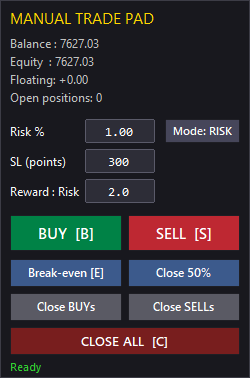
Main Features
1. Manual Market Order Execution
Open market orders directly from the chart panel using:
-
BUY — Open a Buy position.
-
SELL — Open a Sell position.
The EA uses the current market price and calculates the Stop Loss and Take Profit levels according to the selected settings.
2. Flexible Position Sizing
Choose between two position-sizing methods.
Fixed Lot
Specify the trading volume manually.
Example: 0.10 lots
Risk Percentage
Set the percentage of account balance you want to risk on a trade.
Example: 1.0%
When risk-based sizing is selected, the EA estimates the required lot size using the Stop Loss distance and the symbol's tick size and tick value.
The calculated volume is adjusted to respect the broker's minimum lot, maximum lot, and lot-step requirements.
Note: The actual monetary risk may vary because of execution prices, spread, commissions, slippage, and other trading conditions.
3. Stop Loss Configuration
Set the Stop Loss distance in points before opening a trade.
The EA checks the broker's minimum permitted stop distance to help prevent invalid Stop Loss placement.
This feature makes it easier to maintain consistent trade parameters across different symbols and trading conditions.
4. Automatic Take Profit Calculation
Calculate the Take Profit level automatically using a configurable Risk/Reward ratio.
For example:
-
Stop Loss: 300 points
-
Risk/Reward: 2.0
-
Take Profit: 600 points
Set the Risk/Reward value to 0 to disable automatic Take Profit calculation.
5. Break-Even Management
Move managed positions to their entry price, optionally applying a point offset.
-
BUY positions: Move Stop Loss to the entry price or above it.
-
SELL positions: Move Stop Loss to the entry price or below it.
The EA checks the broker's stop-distance requirements before attempting to modify a position and preserves the existing Take Profit when possible.
6. Partial Position Closing
Reduce an open position without closing it completely.
The partial-close function attempts to close approximately half of the selected position volume while respecting the broker's minimum volume and lot-step restrictions.
This can be useful when securing part of a trade while keeping the remaining volume open.
7. Directional and Bulk Closing
Manage multiple positions through dedicated closing operations:
-
Close BUY positions.
-
Close SELL positions.
-
Close all positions managed by the EA.
These controls are useful when several trades are open and you need to exit a specific direction or close the managed positions quickly.
Manual Trading in MetaTrader 4
When attached to a normal MT4 chart, the panel provides a convenient interface for discretionary trading.
A typical workflow is:
-
Select Fixed Lot or Risk Percentage.
-
Enter the desired lot size or risk percentage.
-
Configure the Stop Loss distance.
-
Set the Risk/Reward ratio.
-
Press BUY or SELL.
-
Manage the resulting position using Break-Even, Partial Close, or the closing controls.
Manual Trade Pad is a trading utility, not an automated strategy. It does not analyze the market or generate trading signals. The trader remains responsible for all trading decisions.
Strategy Tester Support
The EA is also designed for manual historical testing in the MetaTrader 4 Strategy Tester.
Use the visual testing environment to navigate historical price movements and practice executing trades through the panel.
Possible applications include:
-
Manual strategy testing.
-
Entry and exit evaluation.
-
Discretionary trading practice.
-
Risk-management experiments.
-
Break-Even and partial-close testing.
-
Learning and practicing trading setups.
This approach is particularly useful for discretionary strategies that are difficult to express as fully automated trading rules.
Important: Strategy Tester operation depends on MT4's visual testing environment. Test the panel in Visual Mode and verify the supported operations in your terminal build.
Position Identification and Trade Safety
The EA uses the chart symbol and configured Magic Number to identify the trades it manages.
This helps separate its operations from trades belonging to other Expert Advisors or manual trading activity.
Positions outside the EA's management scope are intended to remain unaffected by its management functions.
Always verify the behavior on your broker's account type, particularly when using hedging, multiple Expert Advisors, or different Magic Numbers.
Keyboard Shortcuts
Frequently used operations can also be triggered through keyboard shortcuts:
| Key | Action |
|---|---|
| B | Open BUY |
| S | Open SELL |
| E | Move managed positions to Break-Even |
| C | Close all managed positions |
Keyboard shortcuts can speed up manual testing and trade management. Ensure the chart has the appropriate focus when using them.
Panel Interface
The interface is built using native MetaTrader 4 chart objects.
No third-party GUI framework, external DLL, or additional indicator is required.
The panel brings together the essential controls for:
-
BUY and SELL execution.
-
Position sizing.
-
Stop Loss and Risk/Reward settings.
-
Account information.
-
Position information.
-
Trade-management operations.
-
Status messages.
The goal is to provide a lightweight and practical trading interface without unnecessary complexity.
Input Parameters
Magic Number
Identifies the trades managed by the EA.
Initial Sizing Mode
Selects the default position-sizing method: Fixed Lot or Risk Percentage.
Default Fixed Lot
Sets the initial trading volume when Fixed Lot mode is selected.
Default Risk Percentage
Sets the default percentage of account balance used for risk-based position sizing.
Default Stop Loss
Defines the default Stop Loss distance in points.
Default Risk/Reward
Sets the default Risk/Reward ratio used to calculate Take Profit. Use 0 to disable automatic Take Profit calculation.
Break-Even Offset
Specifies the optional point offset applied when moving Stop Loss to Break-Even.
Maximum Deviation
Sets the permitted price deviation for supported order execution and closing operations.
Panel X / Y
Controls the horizontal and vertical position of the panel on the chart, measured in pixels.
Requirements
-
MetaTrader 4.
-
A trading account supported by MetaTrader 4.
-
An MT4 terminal build compatible with the EA.
-
No external DLLs.
-
No third-party GUI libraries.
-
No additional indicators required.
Important Notes
Manual Trade Pad is a manual trading and position-management utility. It does not provide investment advice, trading signals, or guarantees of profitability.
Risk-based lot sizing is an estimate based on the available symbol specifications and the selected Stop Loss distance. Actual trading risk can differ because of spread, commissions, slippage, gaps, and execution conditions.
Broker restrictions may affect order placement, Stop Loss modification, partial closing, and other trading operations.
Always test the EA in the Strategy Tester and on a demo account before using it with real funds.
Source Code
The source code is provided for educational, development, and customization purposes through the MQL5 Code Base.
The implementation demonstrates how a lightweight manual trading interface can be built using native MQL4 functionality and chart objects.
Developers can study the code and adapt the implementation to their own trading tools and workflows.
Summary
Manual Trade Pad for MT4 brings essential manual trading and position-management functions together in a single chart-based interface.
Key capabilities:
-
Manual BUY and SELL execution.
-
Fixed-lot and risk-percentage position sizing.
-
Stop Loss configuration.
-
Risk/Reward-based Take Profit calculation.
-
Break-Even management.
-
Partial position closing.
-
Directional and bulk position closing.
-
Keyboard shortcuts.
-
Live manual trading.
-
Visual Strategy Tester practice.
The objective is simple: make manual trade execution and management more convenient while providing a consistent workflow for live trading and historical testing in MetaTrader 4.
Scalper EA for End-of-Weeks on BTC
Awesome Expert Advisor for Metatrader 4
 QCL Smoothed Heikin Ashi
QCL Smoothed Heikin Ashi for MT4 applies two-stage smoothing to Heikin Ashi candles, helping traders reduce visual price noise and identify trend direction. It features independent smoothing periods, four moving average methods (SMA, EMA, SMMA, and LWMA), and customizable bullish, bearish, and neutral candle colors. Smoothed candles appear directly on the main chart. Candle values are calculated and do not represent actual market prices. The current candle may change until the bar closes.
Pin-Point TrendFollowing System
MACD, OsMA, AC, AO & RVI same time slope growing/falling is the signal.
ATR Sylvain Vervoort Trading System
Excellent Trend-Following system based on ATR.