
Major Update: Turn MetaTrader 5 Into a Modern TradingView-Style Terminal (100% Free Workspace)

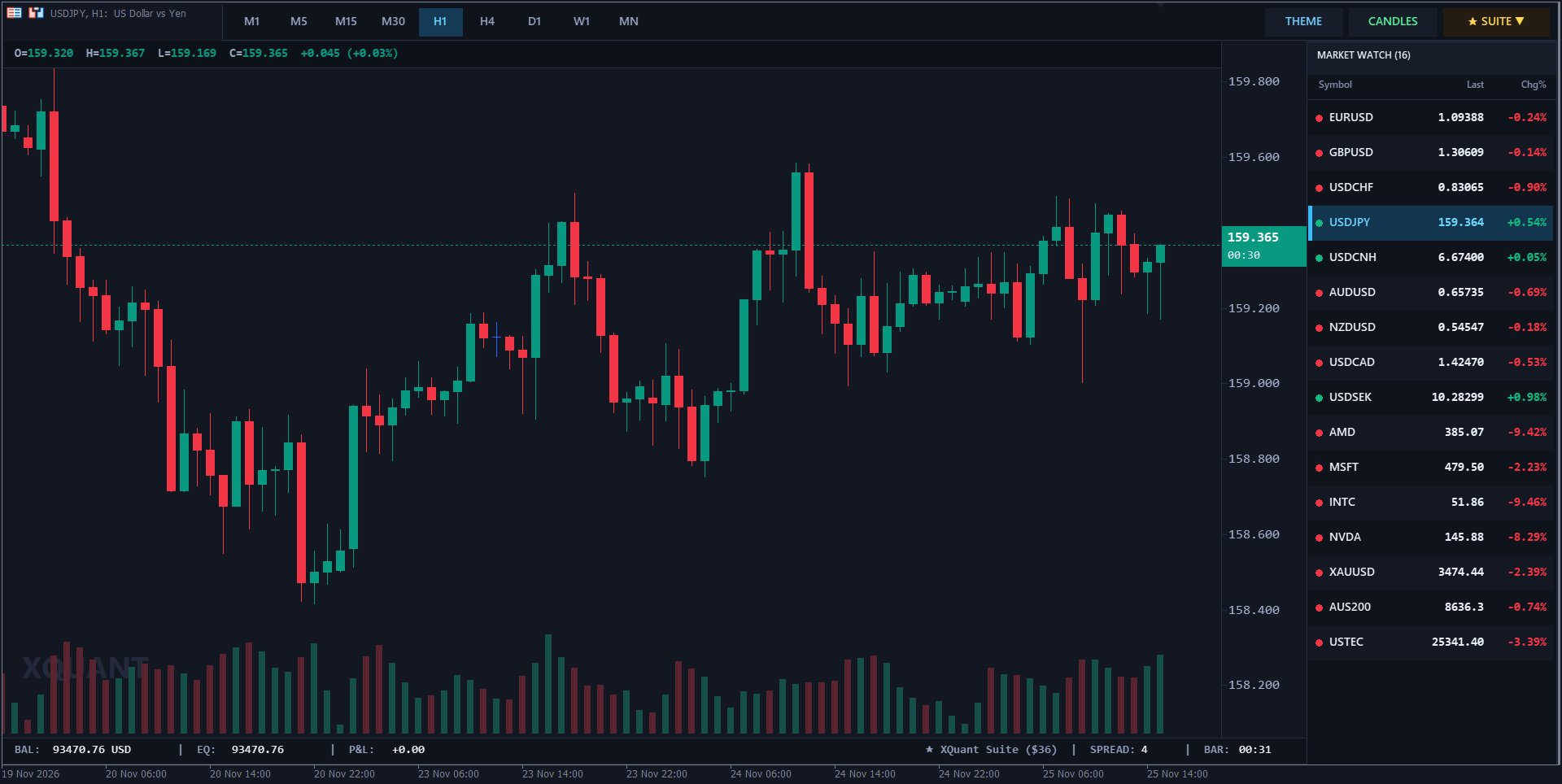
XQuant Studio Theme and Watchlist Switcher has just received a major UI overhaul—bringing a lag-free, TradingView-inspired dark workspace, clickable multi-asset watchlist, and live telemetry HUD natively into MetaTrader 5 for free .

Many traders love MetaTrader 5 for its order execution speed and prop-firm compatibility, but hate staring at the outdated 1998 black-and-green default grid or constantly switching between TradingView and MT5 just to manage charts.
To fix that, I rebuilt XQuant Studio Theme and Watchlist Switcher as a 100% native .ex5 indicator—meaning zero external DLLs, zero lag, it never occupies your Expert Advisor (EA) slot, and it automatically restores all your original MT5 chart colors and settings the moment you remove it.
What’s New in Today’s Major Redesign:
-
Instant Theme & Candle Switcher ( THEME / CANDLES ): Toggle seamlessly between 4 matte, eye-friendly themes (TradingView Dark, Midnight Fintech, Obsidian Slate, and Institutional Research Light) and clean custom candlestick styling right from the top bar .
-
Clickable Multi-Asset Live Watchlist: Monitor Forex majors ( EURUSD , GBPUSD , USDJPY ), Gold ( XAUUSD ), Indices ( USTEC , AUS200 ), and US Equities ( NVDA , AMD , MSFT ) with real-time prices and daily % change right on your chart—so you can finally close MT5’s clunky Market Watch window .
-
Top Timeframe Bar & Bottom Telemetry HUD: Switch timeframes ( M1 – MN ) with one click at the top, and track your live Balance, Equity, Floating P&L, real-time Spread, and Candle Close Countdown timer along the bottom bar .
-
Modular Ecosystem Ready ( ★ SUITE ▼ ): Built as the visual foundation for your charts—works smoothly alongside any of your existing indicators, or snaps directly into our companion XQuant SMC, Liquidity, and Supertrend modules .
Download & Try It Free
You can grab the updated XQuant Studio Theme and Watchlist Switcher completely free on the MQL5 Market today. If you try it out, drop a comment below letting me know which symbols or UI tweaks you’d like to see in the next build!
XQuant Studio Theme and Watchlist Switcher has just received a major UI overhaul—bringing a lag-free, TradingView-inspired dark workspace, clickable multi-asset watchlist, and live telemetry HUD natively into MetaTrader 5 for free.
Many traders love MetaTrader 5 for its order execution speed and prop-firm compatibility, but hate staring at the outdated 1998 black-and-green default grid or constantly switching between TradingView and MT5 just to manage charts.
To fix that, I rebuilt XQuant Studio Theme and Watchlist Switcher as a 100% native .ex5 indicator—meaning zero external DLLs, zero lag, it never occupies your Expert Advisor (EA) slot, and it automatically restores all your original MT5 chart colors and settings the moment you remove it.
What’s New in Today’s Major Redesign:
- Instant Theme & Candle Switcher ( THEME / CANDLES ): Toggle seamlessly between 4 matte, eye-friendly themes (TradingView Dark, Midnight Fintech, Obsidian Slate, and Institutional Research Light) and clean custom candlestick styling right from the top bar.
- Clickable Multi-Asset Live Watchlist: Monitor Forex majors ( EURUSD , GBPUSD , USDJPY ), Gold ( XAUUSD ), Indices ( USTEC , AUS200 ), and US Equities ( NVDA , AMD , MSFT ) with real-time prices and daily % change right on your chart—so you can finally close MT5’s clunky Market Watch window.
- Top Timeframe Bar & Bottom Telemetry HUD: Switch timeframes ( M1 – MN ) with one click at the top, and track your live Balance, Equity, Floating P&L, real-time Spread, and Candle Close Countdown timer along the bottom bar.
- Modular Ecosystem Ready ( ★ SUITE ▼ ): Built as the visual foundation for your charts—works smoothly alongside any of your existing indicators, or snaps directly into our companion XQuant SMC, Liquidity, and Supertrend modules.
Download & Try It Free
You can grab the updated XQuant Studio Theme and Watchlist Switcher (v1.5) completely free on the MQL5 Market today. If you try it out, drop a comment below letting me know which symbols or UI tweaks you’d like to see in the next build!


