
This is the reference to Recurring Buy DCA: user guide for MT5 and MT4: every message the expert can show, what each one means and what to do, then every input with its default. "Guide section" points to a section of the user guide.
Contents
- Troubleshooting
- Input reference
1. Troubleshooting
Inputs refused. The expert leaves the chart, and a message box shows the log line with the reason: [ERROR] recurring buy dca inputs refused reason="Pick at least one buying day.". Fix that input and attach again. Every reason it can give:
- "The magic number must not be 0: manual trades carry 0, and the expert would take them over."
- "The magic number must be 1 to 2147483647." on MetaTrader 4 for a number out of range, and "The magic number must be 1 to 9223372036854775807." on MetaTrader 5 for a negative number.
- "The buy hour must be 0 to 23, or -1 for any time, and the minute 0 to 59."
- "Monthly day must be from 1 to 31."
- "Pick at least one buying day."
- "Weekly buy day must be one of the buying days."
- "Every N weeks must be from 1 to 8."
- "Lots per buy must be a finite positive number." or "Position value per buy must be a finite positive number."
- "Maximum positions must be nonnegative.", "Maximum total lots must be a finite nonnegative number.", "Minimum margin level must be a finite nonnegative number.", "Minimum equity must be a finite nonnegative number."
- "Maximum spread and slippage must be 0 or more points."
- "The margin close level must be 0 (the broker's margin call level) or a positive percent."
- "The margin close level must be under the margin level where buying stops." (with the margin close on and both levels above 0)
- "The condition timeframe must be shorter than the VWAP's period: H1 or H4 for the daily VWAP."
- "The condition percent must be above 0, and under 100 for a fall."
- "The condition lookback must be from 1 to 1000 candles."
- "Enter the other symbol for the buy condition."
- "The MetaTrader 4 Strategy Tester has only the tested symbol's prices. Pick a buy condition on it."
Other message boxes, which leave the expert on the chart: a margin floor at or under the broker's margin call level, at start ("The margin floor 100% is at or under the broker's margin call level 100%. Raise it so buying stops before a margin call."), and an alert that could not go out, such as Push or Email turned on while the terminal is not set up for them. That one comes with the first alert sent on that channel, not at start. While any message box is open the expert does nothing, the margin close included, until you click OK.
What the panel shows when nothing is bought, and what to do:
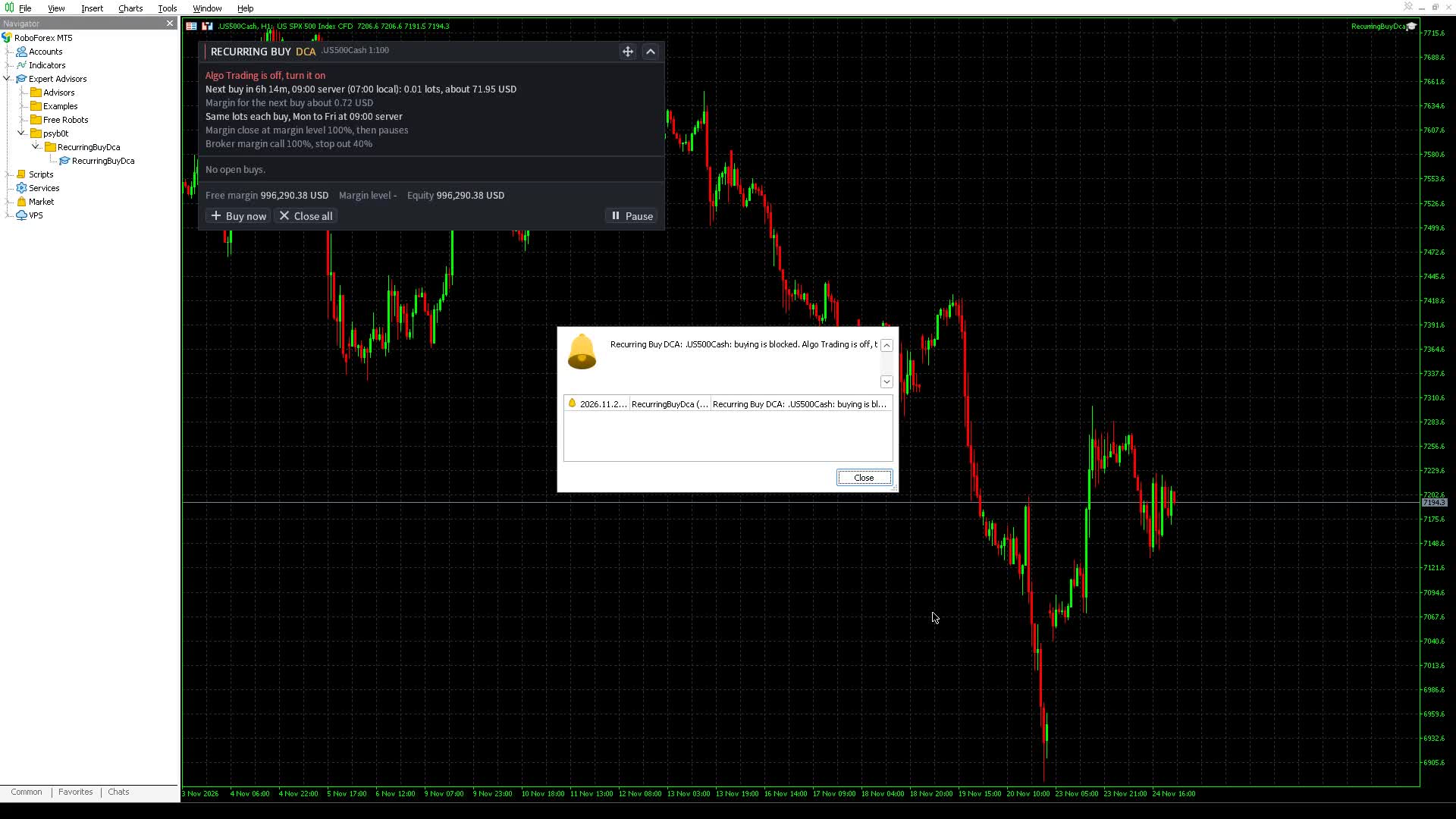
Blocks. In red on the state line at any time. Nothing is bought until you fix the cause, and one "buying is blocked" alert names it.
- "Algo Trading is off, turn it on" ("AutoTrading is off, turn it on" on MetaTrader 4): turn on the toolbar button.
- "Trading is off in this expert's settings, Common tab" ("Allow live trading is off in the expert's Common tab" on MetaTrader 4): allow trading on the expert's Common tab.
- "Disconnected, check the connection": check the login too.
- "Read-only login, use the trading password": you logged in with the investor password, or the broker turned off trading on this account.
- "Broker allows no automatic trading here": the broker turned off expert trading for this account. Ask the broker.
- "Broker allows only closing this symbol": the symbol is close only. Pick another symbol.
Refused buys. In red on the state line while a buy is due; between buy times the line reads Running. Each one sends a "scheduled buy did not go through" alert at the buy time.
- "Maximum positions reached, raise it to buy" or "Maximum total lots reached, raise it to buy": the plan holds what you allowed. Raise the limit or close buys (guide section 4).
- "Margin level after the buy 160%, under 200%": the buy would take the margin level under the margin floor. Wait, add funds or lower the amount per buy.
- "Equity 900.00 is under 1,000.00": the equity is under the equity floor. Buying goes on once it is back over.
- "Not enough free margin for 0.05 lots": lower the amount per buy or free some margin.
- "Another position on this symbol blocks buying": on a netting account, another program, a manual trade or a short holds the symbol. Close it or use another account.
- "Not enough history for the buy condition": open a chart of the symbol on the condition timeframe once to load the candles. This one sends no alert.
- "Account money conversion is unavailable" or "Price moved above the position value per buy": same money only (guide section 3).
- "Broker refused, retrying: ...": the broker refused the order. The expert sends it again after 10 seconds, then 60, then every 300 seconds while the buy is due. The alert names the broker's reason and the retry time.
- "Order sent, result unknown; check the broker": the order went out and no answer came back. The expert sends no other order until the position shows up, or until it gives up: at the next buy time for a scheduled buy, one hour later for Buy now. It alerts either way. Check the Trade tab.
On the next buy line, in red. "Minimum lot is 0.01", "Minimum lot is worth 1,080.00" or "Maximum lot is 100": the amount per buy does not fit the symbol (guide section 3).
In amber. "Paused, not buying": you pressed Pause; press Resume. "Margin close paused buying: press Resume or change an input": the margin close acted. Read guide section 4 before you press Resume.
Quiet waits. These never show on the panel; the state line stays green "Running" and no alert comes. The buy goes through by itself once the wait ends, and if the buy time passes without a buy, the missed buy alert names the last one ("Last reason: ...").
- "Market closed": the next buy line shows the open instead.
- "Waiting for prices": the last quote is older than five minutes while the market should be open.
- "Waiting for the spread: 25 points, maximum 20": the spread is over "Wait while the spread is above".
- "Waiting for the buy condition": the condition did not hold on the last completed candle.
Between buy times the next buy line just counts down to the next buy, and Debug logs say why nothing is due ("Bought this period", "Not a buying day", "Not a buying week" and so on). If you expected a buy, check the buying days, whether this day, week or month was bought, the condition, the spread limit and Every N weeks.
Inactive. The plan could not start. The state line starts with "Inactive: " and the reason, cut at 63 characters when it is long; the alert "EURUSD: Recurring Buy DCA is not buying. ... It tries again every minute." and the log have it whole. It retries every minute.
- "Inactive: Waiting for the trading account to connect": clears once the terminal logs in.
- "Inactive: Could not read the account's history to rebuild the plan.": the terminal did not hand over the account history. It clears by itself once the history loads.
- "Inactive: Could not read the saved pause", or the file's own read error: the pause in the plan's directory could not be read, so the expert does not start rather than guess whether you paused it. If a retry does not clear it, remove the expert, delete the plan's directory as for "Invalid saved DCA state" below, and attach it again.
- "Inactive: The buy condition's symbol ... is not available on this broker.": type the name as Market Watch shows it, suffix included.
- "Inactive: The margin close level X% is under the broker's stop-out level (Y%); raise it or use 0 for the margin call level."
- "Inactive: Invalid saved DCA state. Buying is blocked.": remove the expert, delete the plan's directory MQL5\Files\RecurringBuyDca_<account key>_<magic>_<symbol> (MQL4\Files on MetaTrader 4; the account key stands for the login, one directory per account) and attach again. The plan rebuilds from the account without buying the same day, week or month twice. The pause lives in the same directory, so the expert starts unpaused.
Log files are in a different directory, without the account key: MQL5\Files\RecurringBuyDca_<magic>_<symbol>\logs (MQL4\Files\... on MetaTrader 4). Set Log level to Debug for a while to see every decision.
For questions, write in the product's Comments tab or send me a private message on MQL5.
2. Input reference
The dialog shows every input, in sections under header rows such as ------- SCHEDULE -------. Changing any input restarts the expert. It keeps its positions and a pause you set with Pause, and remembers whether this day, week or month was bought. A margin close pause ends (guide section 4).
Each input is written as the dialog shows it, followed by its default in brackets. A bracket inside the label, such as "(Same money each buy)" or "(with a buy hour)", names the only setting the input counts for; with any other setting the expert does not use it. Lots per buy, Position value per buy, Day of the month and Every N weeks must still hold a valid value, or the inputs are refused.
General
- Order magic number (4256). The number on every order the plan sends. The plan is kept per trading account, magic number and symbol. Changing the number starts a new, empty plan, and the expert stops counting, closing and margin closing the positions with the old number. Any positive number on MetaTrader 5, 1 to 2147483647 on MetaTrader 4; 0 is refused because manual trades carry 0. Two copies on the same symbol need different numbers, and no other program on the account should use it.
Amount per buy
- Method (Same lots each buy). Same lots each buy or Same money each buy (guide section 3).
- Lots per buy (Same lots each buy) (0.01). The lots of every buy, rounded down to the symbol's lot step. Under the minimum lot, nothing is bought (guide section 3).
- Position value per buy, not margin (Same money each buy) (100). What each buy is worth at the current price, in account currency. Under one minimum lot's value, nothing is bought (guide section 3).
Schedule
- Repeat (Daily). Daily, Weekly or Monthly (guide section 5).
- Buy hour, server time, -1 for any time (9). 0 to 23 on the broker's clock, the time Market Watch shows. -1 buys at any time of the day, and then Buy minute, Buy day, Day of the month and Missed buy are not used (guide section 5).
- Buy minute (with a buy hour) (0). 0 to 59.
- Buy day (Weekly, with a buy hour) (Monday). Sunday to Saturday. It must be one of the buying days, or the inputs are refused.
- Every N weeks (Weekly), 1 every week (1). 1 to 8. At 2, a weekly plan buys every other week.
- Day of the month (Monthly, with a buy hour) (1). 1 to 31. A month without that day buys on its last day. A day that falls on a day off is handled by Missed buy (guide section 5).
- Buy on Sunday (off), Buy on Monday to Buy on Friday (on), Buy on Saturday (off). The days a buy may happen. A daily plan buys on each of them, and a weekly Buy day must be one of them. At least one must be on. For a crypto CFD quoted at weekends, turn Saturday and Sunday on.
- Missed buy (with a buy hour) (Next market open). Next market open makes one catch-up buy as soon as a buying day and an open market allow it. Skip the missed buy lets a buy go through only within its minute and otherwise waits for the next buy time (guide section 5).
- First buy after attaching (At the next buy time). At the next buy time waits for the next one. Right away buys this day, week or month once its buy time has passed (guide section 5). It counts only for a plan with no saved state (guide section 1).
Limits
- Maximum positions, 0 unlimited (0). The most open buys the plan may hold. A buy that would pass it is refused whole. On a netting account use Maximum total lots instead.
- Maximum total lots, 0 unlimited (0). The most lots the plan may hold. A buy that would pass it is refused whole, never cut (guide section 3).
- Stop buying under margin level %, 0 off (200). The margin floor: no buy that would leave the account's margin level under it (guide section 4).
- Stop buying under equity, account currency, 0 off (0). The equity floor: no buys while the equity is under this amount.
- Close buys at a low margin level, then pause (on). The margin close: at or under the level below, it closes the plan's buys one at a time, least profitable first, then pauses buying (guide section 4). It keeps working while the expert is paused.
- Close at margin level %, 0 the broker's margin call level (0). Where the margin close acts. It must be under the margin floor when the margin close is on and both are above 0. Above 0, it must not be under the broker's stop out level, even with the margin close off.
Execution
- Wait while the spread is above, points, 0 off (0). A due buy waits while the spread is wider than this. Points as the symbol quotes them: 0.00001 on a five-digit EURUSD, 0.1 on an index quoted to one decimal.
- Slippage, points, 0 allows the current spread (0). 0 uses the current spread, at least 3 points. Market execution brokers ignore it.
Alerts
- Alert window (on), Sound (off), Push (off), Email (off). The channels every alert goes to (guide section 7). Push and Email need the terminal set up first.
- Summary alert (Off). Off, Daily or Weekly. A report of the open buys, their value and P/L and the next buy, at 08:00 server time or later; Weekly sends it on Mondays.
Panel
- Panel X (20), Panel Y (30). Pixels from the chart's top left corner where the panel first opens. After you move it, the panel keeps its new place on that chart, and changing Panel X or Panel Y no longer moves it there.
- Theme (Dark). Dark or Light.
- Average cost line on the chart (on) and Average cost line color (DodgerBlue). A dotted line at the plan's average cost, while buys are open.
- Arrow at each open buy on the chart (off) and Buy arrow color (DodgerBlue). An arrow at each open buy's time and price.
- Hide the terminal's trade history and levels here (on). Hides the terminal's position, stop loss and take profit lines on this chart, and on MetaTrader 5 its trade history arrows, which it draws over the panel. Turn it off if you trade this chart by hand.
Strategy Tester (they do nothing on a live chart)
- Optimization result (Gain % on money bought). Gain % on money bought, Value over money bought, or Gain over worst equity drawdown: what an optimization ranks runs by (guide section 10).
- Deposit each buy's money (MetaTrader 5) (off). Adds each buy's position value to the test account (guide section 10).
- Buy once at the start of a test (on). The run buys once on its first tick, like Buy now, whatever the buy time, then follows the schedule (guide section 10). An amount under the symbol's minimum lot buys one minimum lot.
Logs
- Log level (Warning). Debug, Information, Warning, Error or Fatal: how much goes to the Experts tab and the log files. It never changes which alerts you get.
- Log retention (days, 0 keeps all) (7). How many days of log files to keep.
Buy condition (optional)
- Buy condition (None, buy every time). The check every scheduled buy waits for; the table in guide section 6 lists every choice. Buy now skips it.
- Condition timeframe (D1). H1, H4, D1 or W1: the candles the condition reads, whatever the chart shows. The daily VWAP needs H1 or H4, the weekly VWAP anything but W1.
- Percent (fell/rose by) (5). The size of the fall or rise, above 0, and under 100 for a fall.
- Lookback candles (fell/rose by) (5). 1 to 1000. "Fell by at least 10% over 30 D1 candles" compares the last close with the one 30 daily candles before.
- Other symbol, exact broker name (Another symbol) (empty). The symbol the "Another symbol" choices read, as Market Watch shows it, suffix included, such as a VIX or gold symbol. The expert adds it to Market Watch.
- Level (Another symbol over/under) (0). The other symbol's price for "over a level" and "under a level".


