
Recurring Buy DCA is a free expert advisor for MT5 and MT4 that buys the chart's symbol on a schedule: daily, weekly or monthly, at a time on your broker's clock. Each buy is the same number of lots or the same amount of money, and a buy can wait for a simple condition, such as RSI under 30.
Video tutorial: https://youtu.be/ydFNbKU0zl0
It only buys. It places no take profit and no stop loss, and it never sells to lock in a gain. It closes positions only when you click Close or Close all on its panel, and when the account runs low on margin (the margin close, section 4).
New to MetaTrader? Four terms the guide uses:
- Lot: one lot of EURUSD is 100,000 euros, so 0.01 lot is 1,000 euros. Gold, coins and indices differ per broker (section 3).
- CFD: on MetaTrader a coin, an index or a share is almost always a CFD. You do not own the asset, you cannot withdraw it, and you pay swap every night you hold it (section 9).
- Margin: what the broker holds for a position. 0.01 lot of EURUSD at 1.0800 is a 1,080 USD position; at 1:100 the broker holds 10.80 USD, and the profit or loss runs on the full 1,080 USD. The guide calls the 1,080 USD the position value.
- Margin level: your equity (balance plus the open profit or loss) divided by the margin in use, in percent. At the broker's margin call level (often 100%) it warns and may refuse new trades; at stop out (often 50%) it starts closing positions.
I built it to run one plain plan on one symbol and to say on the chart what it will do next. It is free on the MQL5 Market:
- MetaTrader 5: https://www.mql5.com/en/market/product/211385
- MetaTrader 4: https://www.mql5.com/en/market/product/211386
Contents
- Install and the first start
- The panel and its buttons
- Sizing a buy for your account
- Limits and the margin close
- How the schedule runs
- How the buy condition decides
- Alerts
- Running on a VPS
- Swap
- The Strategy Tester
- MetaTrader 4 differences
Every message the expert can show and every input with its default are in the second post, Recurring Buy DCA: troubleshooting and input reference.
1. Install and the first start
From the MQL5 Market, the expert installs under Expert Advisors, Market, in the Navigator (Ctrl+N).
- Open a chart of the symbol you want to buy. The expert buys only that chart's symbol, and the chart's timeframe does not change the schedule.
- Drag Recurring Buy DCA onto the chart.
- On the Common tab, let the expert trade: tick "Allow Algo Trading" on MetaTrader 5, "Allow live trading" on MetaTrader 4.
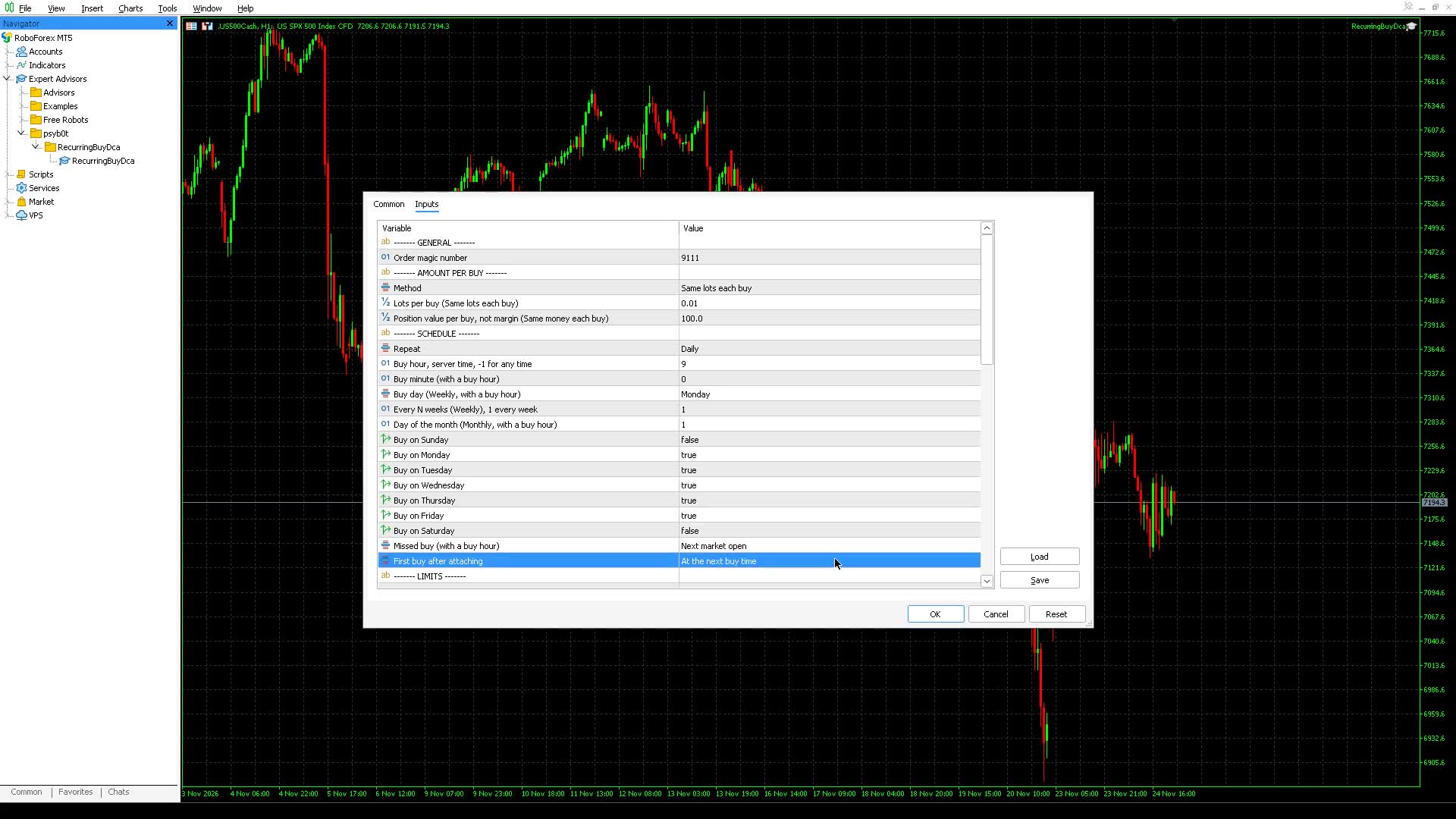
- On the Inputs tab, set the plan (the checklist below), then click OK.
- Turn on the toolbar button: Algo Trading on MetaTrader 5, AutoTrading on MetaTrader 4.
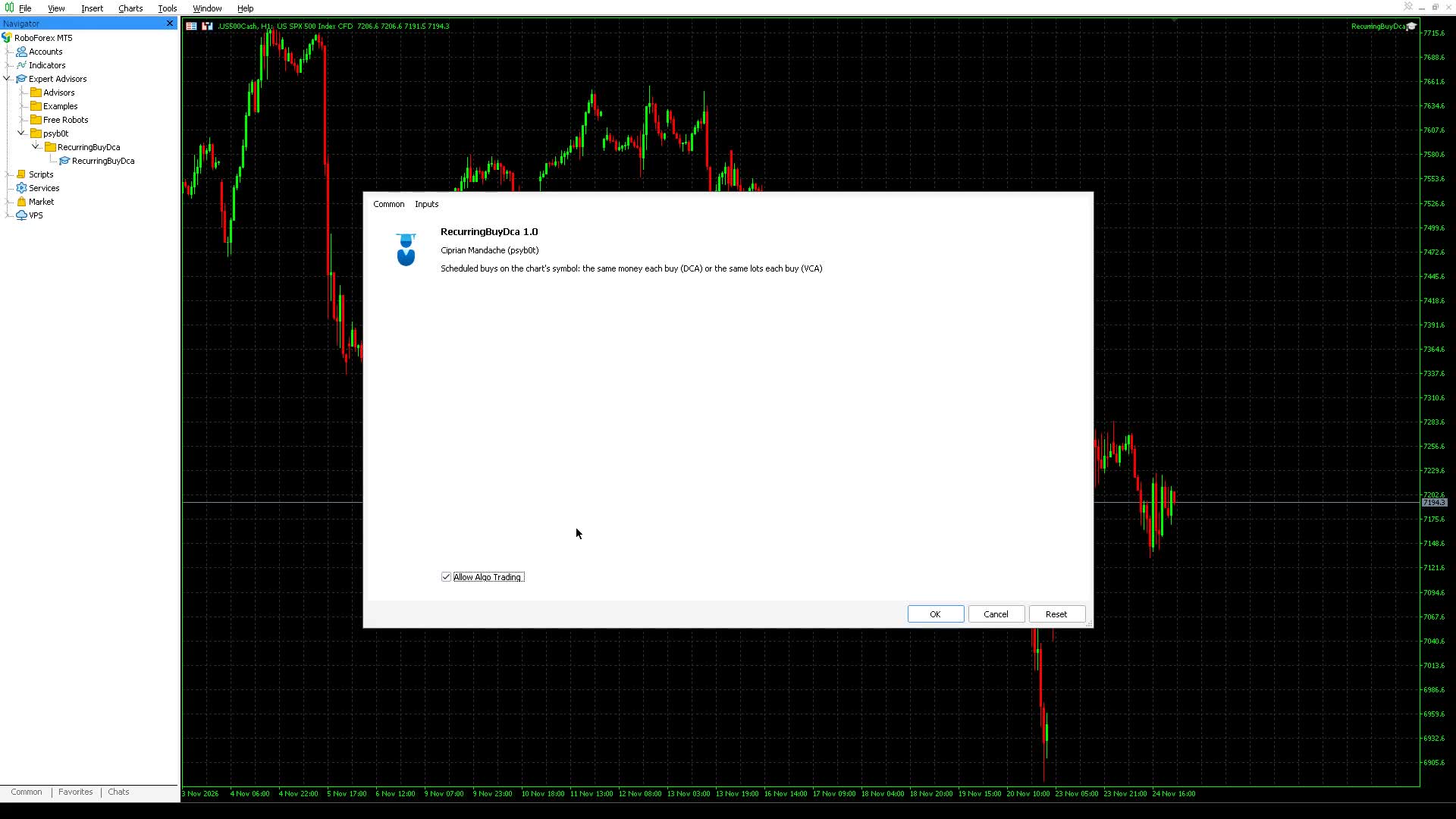
If step 3 or 5 is missing, the panel's first line says so in red (troubleshooting post).
With the default inputs it buys 0.01 lots daily at 09:00 server time, Monday to Friday, starting at the next 09:00 after you attach it. Attaching never buys at once unless you set "First buy after attaching" to "Right away" (section 5).
First run checklist.
- Use a demo account and one symbol.
- Keep Method on "Same lots each buy" at 0.01 lots.
- Leave "First buy after attaching" on "At the next buy time", the default, so nothing is bought before the next scheduled time.
- Set "Maximum total lots" to the most you would hold on this symbol by hand (section 3).
- Click OK and read the next buy line. It shows the lots and their position value, and the line under it shows the margin. If either is more than you meant, change the inputs (F7 on the chart) before the buy time.
How to stop it. Press Pause on the panel (section 2). Removing the expert stops everything, the margin close included, and leaves its positions open.
One plan per chart.
- One copy runs one plan on one chart. For several symbols, attach one copy to each symbol's chart. Two copies on the same symbol need different magic numbers (Order magic number, the tag the expert puts on its orders).
- Buys happen only while the terminal runs and is connected (section 8 for a VPS).
- The plan is kept per trading account. Another login in the same terminal gets its own plan, built from that account's positions and history.
- Attached again with the same magic number, the expert takes its open positions back and remembers when it last bought, so it does not buy the same day, week or month twice. "First buy after attaching" counts only for a plan with no saved state.
2. The panel and its buttons
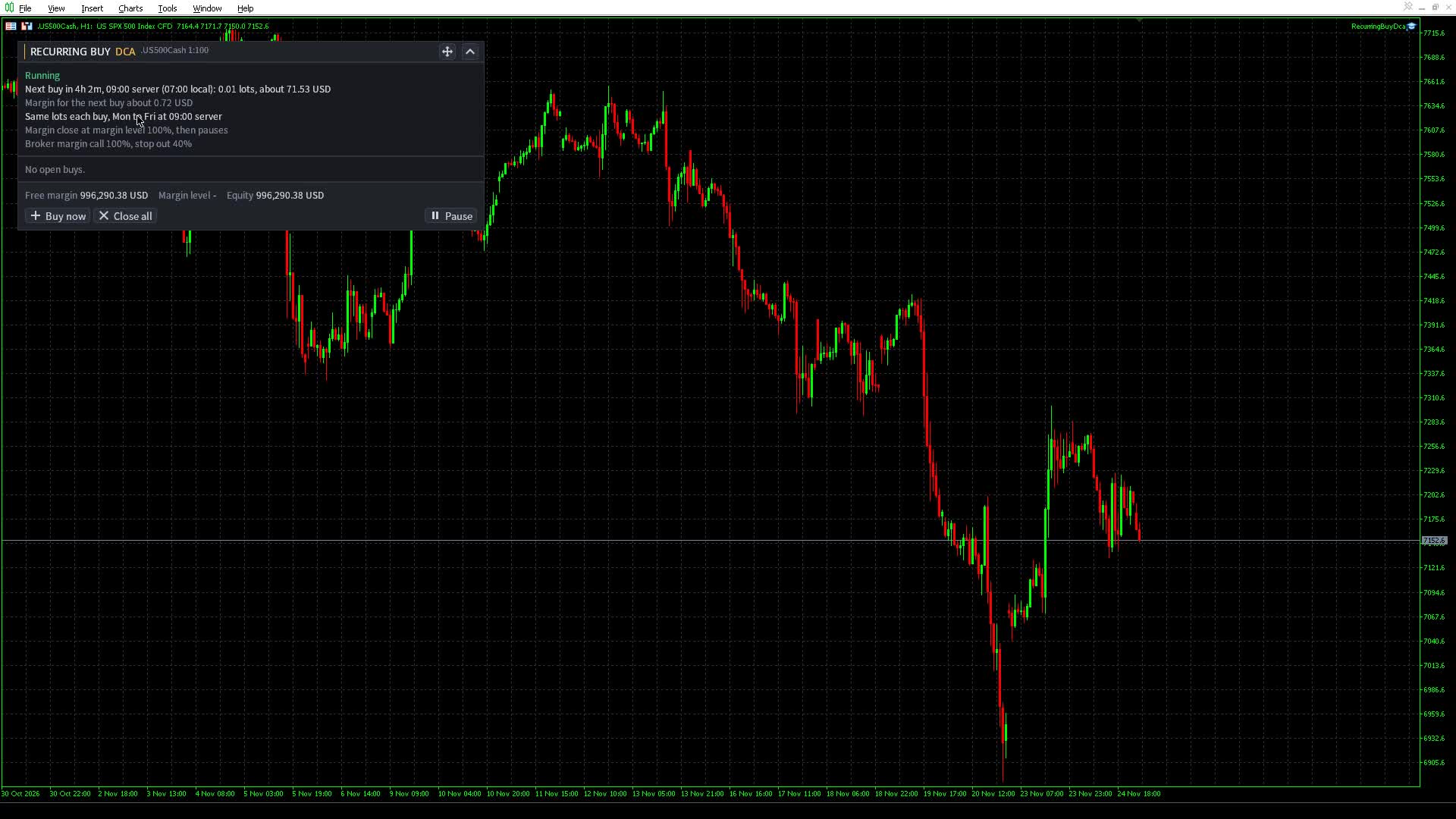
The title bar shows the chart's symbol and the broker's margin ratio for it, such as "EURUSD 1:100". The ratio can differ per symbol.
The lines below show only when they have something to say. Examples are for the default plan on EURUSD, on a USD account at 1:100:
- The state. Green "Running", amber "Paused, not buying" or "Margin close paused buying: press Resume or change an input", or, in red, the reason it is not buying (troubleshooting post).
- The next buy: "Next buy in 15h 57m, Wed 09:00 server (Wed 11:00 local): 0.01 lots, about 1,080.00 USD", the lots and their position value. When the amount per buy cannot buy the symbol (minimum or maximum lot, or no currency conversion), the reason replaces the size in red. While paused: "No scheduled buy while paused".
- The margin for the next buy: "Margin for the next buy about 10.80 USD".
- The last buy: "Last buy 0.01 lots worth 1,079.40 USD, 8h 3m ago".
- The plan: "Same lots each buy, Mon to Fri at 09:00 server", or "Same money each buy, 5,000.00 USD position value".
- The buying days or the schedule, when the plan line has no room: "Buying days: Mon to Fri".
- The minimum lot: "Minimum lot 0.01 is worth 1,080.00 USD, step 0.01". Shown with "Same money each buy", and in red with either method when the amount per buy cannot buy the symbol.
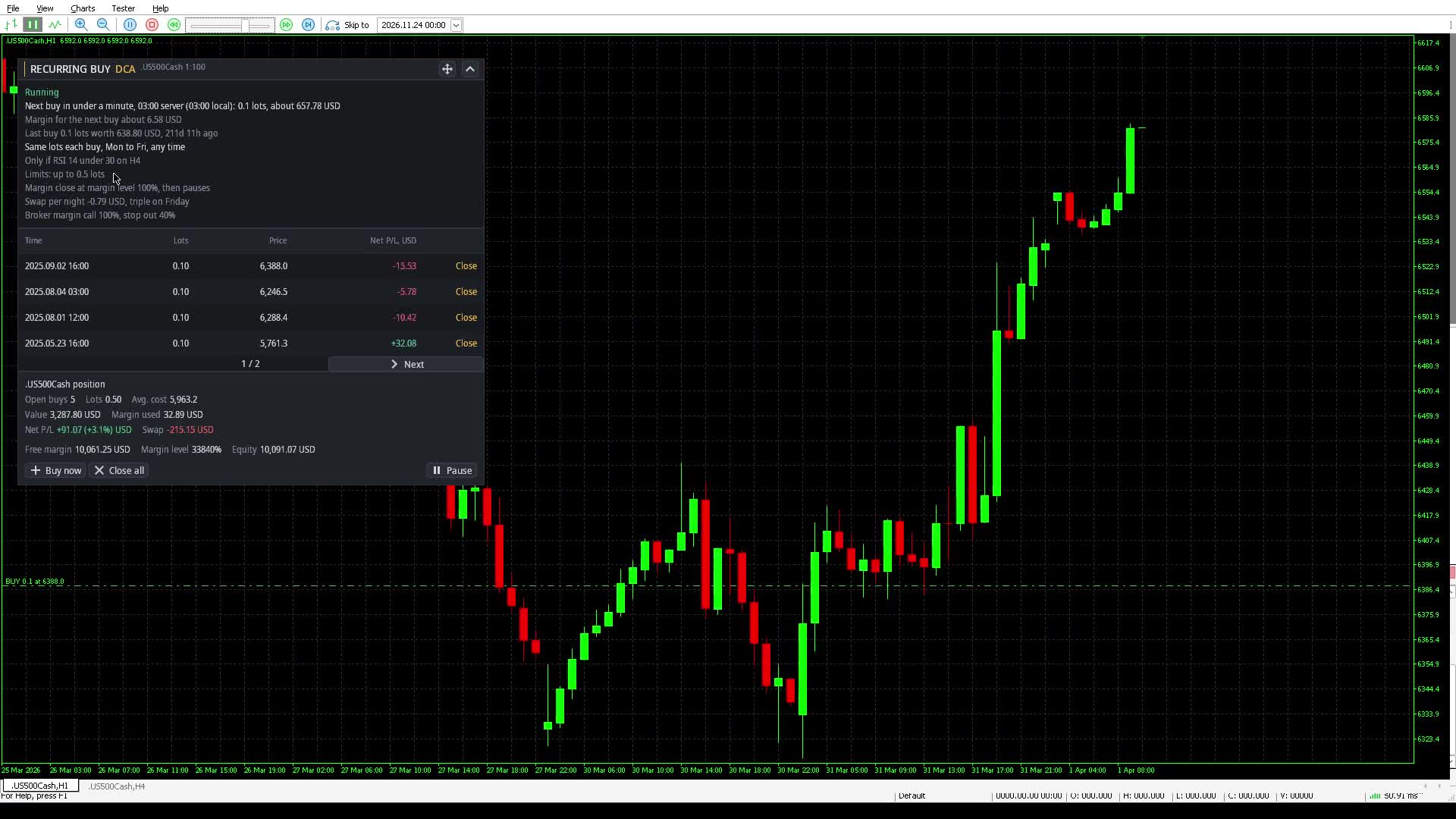
- The buy condition, when set: "Only if RSI 14 under 30 on D1".
- The limits that are set: "Limits: up to 10 positions, 0.1 lots".
- The margin close: "Margin close at margin level 100%, then pauses", or "Margin close off".
- The swap: "Swap per night -0.70 USD, triple on Wednesday" (section 9).
- The broker's levels: "Broker margin call 100%, stop out 50%".
On a chart too short for the whole panel, the settings lines (the plan down to the broker's levels) are hidden; the state, the next buy and the buttons stay.
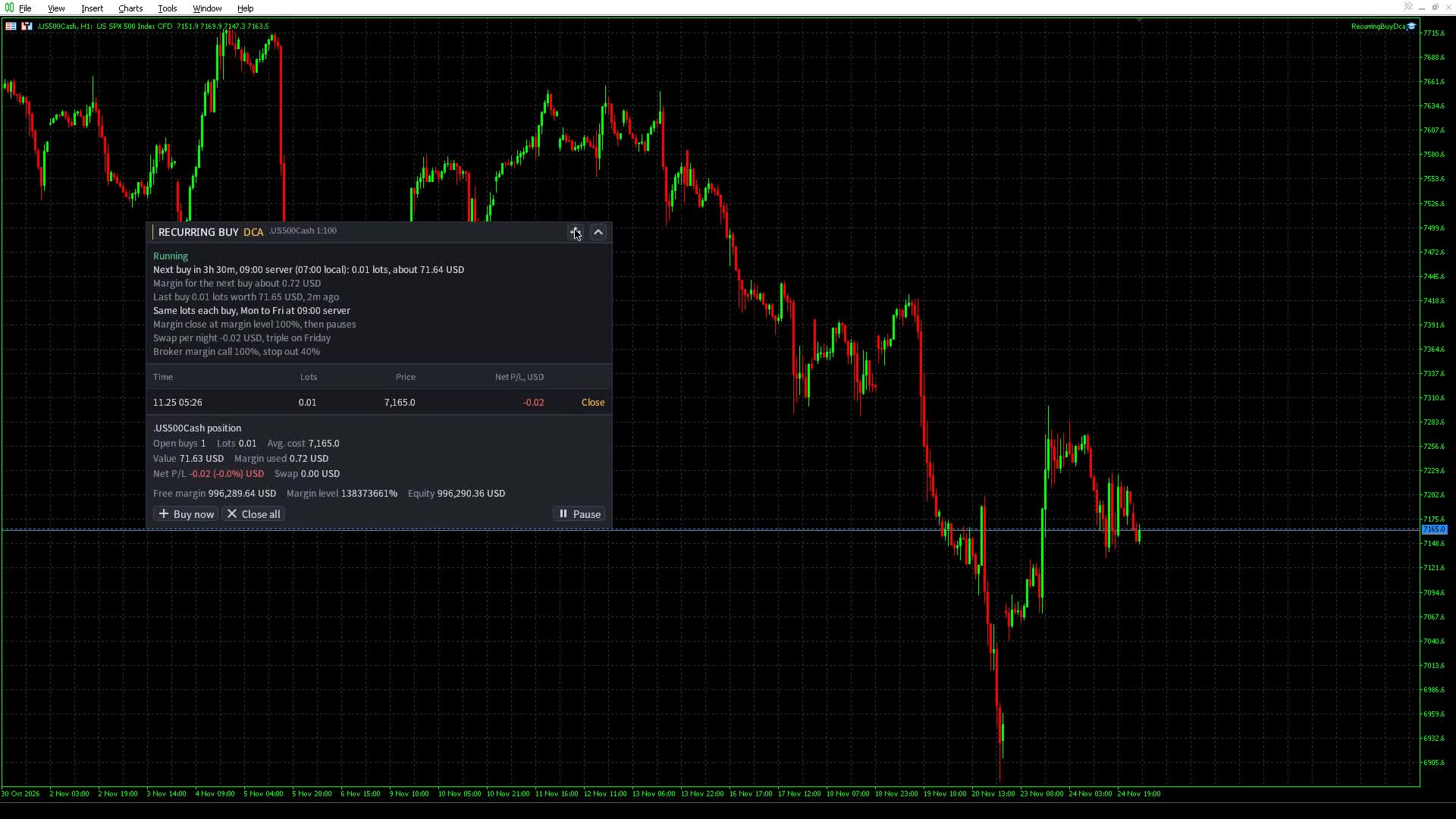
The open buys come next, newest first: time, lots, price, net P/L and a Close link, about five to a page with Prev and Next. A buy closed outside the panel leaves the list within a second and sends an alert (section 7).

The position block shows only while buys are open:
EURUSD position
Open buys 5   Lots 0.05   Avg. cost 1.07820
Value 5,400.00 USD   Margin used 54.00 USD
Net P/L +6.90 (+0.1%) USD   Swap -2.10 USD
Value is what the open lots are worth at the current price, and Margin used is an estimate from one lot's margin. Net P/L includes swap and commission. Its percent is of what the open buys cost at their average price. Commission and Dividends (MetaTrader 5) lines show only when there is any. Dividends counts everything booked on the symbol, not only these buys.
The account line follows, on a 2,000 USD account "Free margin 1,952.90 USD Margin level 3716% Equity 2,006.90 USD". The margin level turns red under the margin floor, the equity under the equity floor (both section 4).
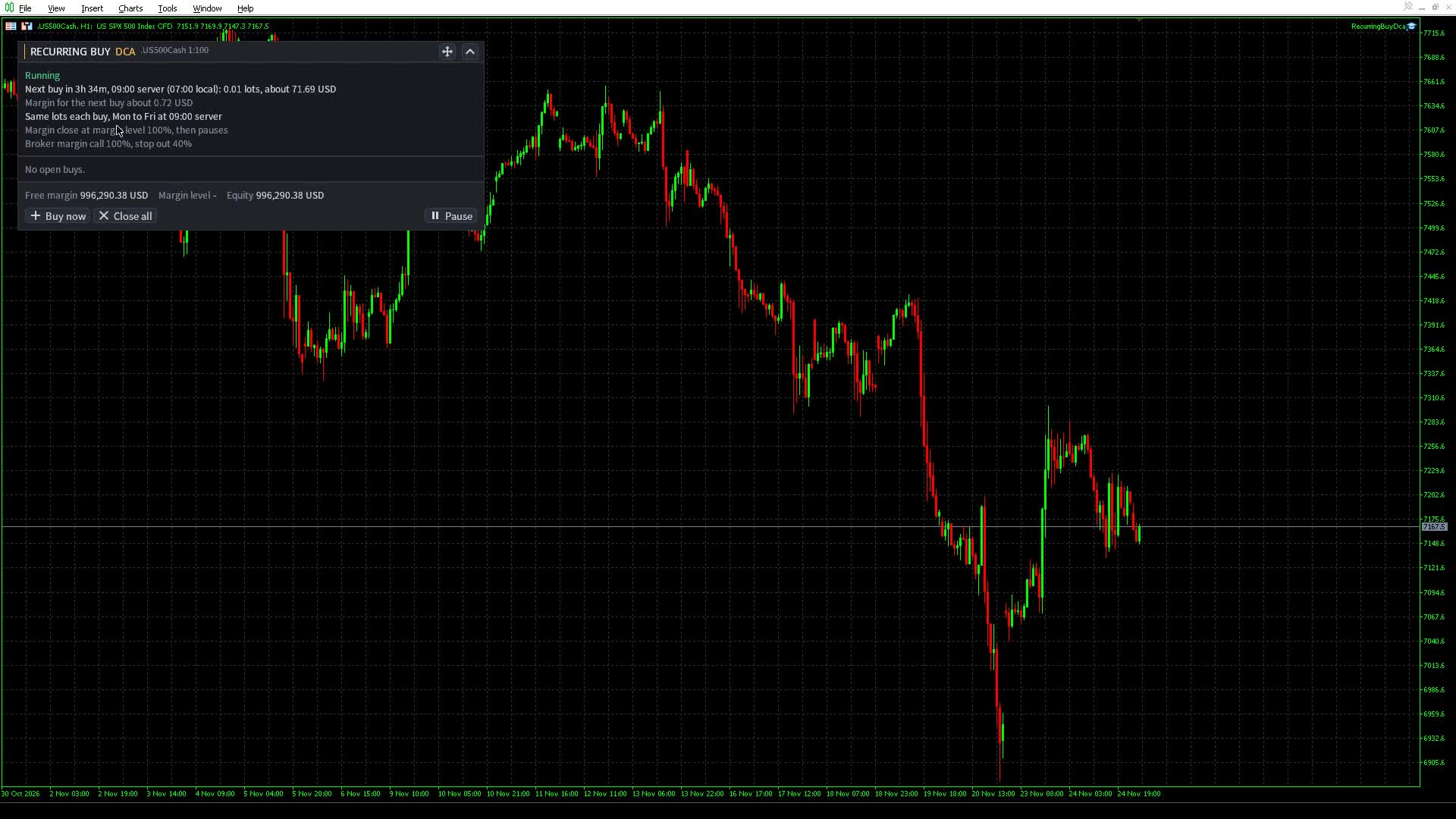
The buttons:
- Buy now buys the amount per buy once, after asking. It ignores the schedule, the buying days and the condition. It still needs an open market, a fresh price, a spread under the limit and enough free margin, and it obeys the trading blocks and every limit and floor. It is refused while an earlier order's result is unknown or a refused buy waits to be sent again. It works while paused and does not use up the scheduled buy.
- Close all closes every open buy of the plan at the market, after asking. Close on a row closes that one buy.
- Pause stops every scheduled buy and stays paused after a restart; Buy now still works. The button then reads Resume.

The line under the buttons says what the click did, for 30 seconds, and a click sends no alert:
- "Bought 0.01 lots worth 1,080.10 USD" or "Not bought: ..." with the reason.
- "Closed the buy of 0.01 lots", "Closed 3 buy(s)", "Closed 2 of 3 buys: ...", "Not closed: ...", "That buy is no longer open" or "No open buys to close".
- "Paused, no buys until Resume", "Buying on the schedule again" or "Not saved, the pause did not change".
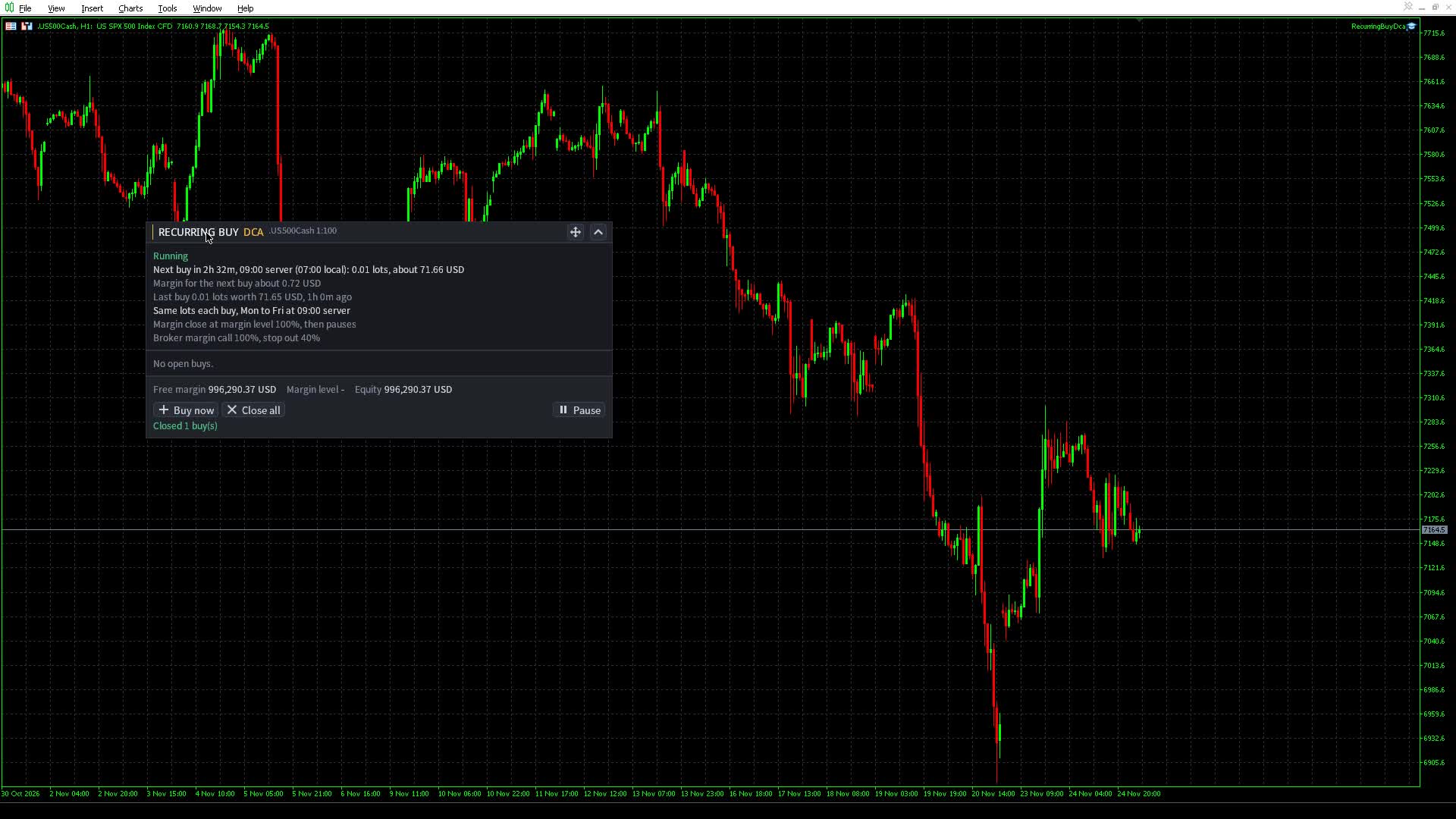
Moving and folding. The two buttons at the right of the title bar move and fold the panel. Click the move button (the left one), move the pointer, and click again to drop the panel. The fold button hides everything but the title bar, which then adds "Running", "Paused" or "Blocked". The Theme input switches to a light panel.
3. Sizing a buy for your account
Position value and margin. Amounts in this expert are position value, not margin: 0.01 lot of EURUSD at 1.0800 is 1,080 USD of position value. The panel shows both:
Next buy in 15h 57m, Wed 09:00 server (Wed 11:00 local): 0.01 lots, about 1,080.00 USD
Margin for the next buy about 10.80 USD
What one lot is on your symbol. Market Watch, right-click the symbol, Specification: Contract size and Minimal volume.
The two methods. The Method input picks one. Below, the amount per buy means Lots per buy or Position value per buy, whichever the Method uses.
- Same lots each buy (the default; the expert's description calls it VCA, volume cost averaging): the same lots every time, so a buy's value follows the price. 0.01 lots of EURUSD is 1,080 USD at 1.0800 and 980 USD at 0.9800.
- Same money each buy (DCA, dollar-cost averaging): the same position value every time. Each method keeps its own amount, so switching Method does not carry Lots per buy over to Position value per buy.
Which to pick. Same lots is the one to start with: Maximum total lots maps straight to a number of buys. Same money makes sense when one lot step is worth much less than the position value per buy, such as a stock CFD at 0.01 lot steps with a few hundred dollars per buy. On an index or gold, one minimum lot is already hundreds or thousands of dollars. The lot step is then so large that same money buys the same lots most of the time.
What can stop a same lots buy.
- Lots per buy under the symbol's minimum lot. The next buy line turns red with "Minimum lot is 0.01" and nothing is bought. One alert comes at once, "EURUSD: the next buy cannot go through. Lots per buy 0.001 are under the minimum lot 0.01. Change the amount per buy.", and a "scheduled buy did not go through" alert at the buy time. The minimum differs per symbol and per broker, 0.01 on most forex and 0.1 or 1 on some indices and stocks.
- Lots per buy over the symbol's maximum lot. The line reads "Maximum lot is 100", the alert says "Lots per buy exceed the symbol's maximum lot.", and the buy is refused, never cut to the maximum.
- Lots per buy that is not a whole number of lot steps. The expert rounds it down to the step, counted from the minimum lot, and the next buy line shows both: "0.01 lots, about 1,080.00 USD (plan 0.015)".
- Lots per buy whose margin is more than the free margin. The alert reads "Lots per buy require more than the available free margin.", and at the buy time the state line says "Not enough free margin for 0.05 lots" in red.

What can stop or shrink a same money buy. The lots are the position value per buy divided by one lot's value at the current price, rounded down to the broker's lot step, never up:
- 5,000 USD at 1.0800 buys 0.04 lots, worth 4,320 USD. At 0.9800 it buys 0.05 lots, worth 4,900 USD.
- 1,500 USD buys 0.01 lots, worth 1,080 USD, 72% of the position value per buy. When a buy comes out under 80% of it, the size turns amber, "0.01 lots, about 1,080.00 USD (plan 1,500.00)", and one alert says "EURUSD: the next buy is about 1,080.00 USD, well under the plan's 1,500.00 USD, because lots round down to the step 0.01."
- A position value per buy under one minimum lot's value buys nothing, and the default of 100 cannot buy EURUSD at all. Both lines turn red: "Minimum lot 0.01 is worth 1,080.00 USD, step 0.01" and "Minimum lot is worth 1,080.00". One alert says "EURUSD: the next buy cannot go through. The minimum lot 0.01 is worth 1,080.00 USD, more than the position value per buy. Change the amount per buy." It comes once per cause, not every minute as the lot's value moves. A rising price can push a buy that worked last week under the minimum this week.
- A position value per buy over the maximum lot's value is refused with "Maximum lot is 100", never cut.
- When the terminal cannot convert the symbol's currency to the account's, the line reads "Account money conversion is unavailable" and the buy waits. Add the conversion pair to Market Watch if the broker has it.
- When the price moves up between the size check and the order, so the lots would cost more than the position value per buy, the buy waits with "Price moved above the position value per buy" and tries again.
Both methods check again every minute, and the "next buy cannot go through" alert clears once you fix the input or the price makes the buy possible.
Set a total cap. With the defaults, nothing caps how much the plan holds. 0.01 lots of EURUSD every weekday is about 2.6 lots after a year, a position worth about 280,000 USD. On a 10,000 USD account that is 28 times the account: a 1% fall loses 2,800 USD, and the default margin floor does not stop it. So set Maximum total lots on every account:
- Maximum total lots = equity x how many times your equity you are willing to hold / value of one lot.
- 10,000 USD, at most 3 times the equity, one lot of EURUSD worth 108,000 USD: 30,000 / 108,000 = 0.277. Set 0.27.
- The plan stops buying after 27 buys of 0.01 lots (section 4).
What the margin ratio changes. Only how much margin each buy ties up, not how much you gain or lose. With the 0.27 lot cap on 10,000 USD, a fall of about 34% takes the account to a 100% margin level at 1:100, 1:500 and 1:1000 alike, before swap and spread. Without a cap, the ratio decides how far the plan can grow before the margin floor stops it:
| At 1:N | Margin for 0.01 lot | Largest plan the 200% floor lets through |
|---|---|---|
| 1:100 | 10.80 USD | positions worth 50 times the equity |
| 1:500 | 2.16 USD | positions worth 250 times the equity |
| 1:1000 | 1.08 USD | positions worth 500 times the equity |
At 250 or 500 times the equity, a move of a fraction of a percent reaches the margin close (section 4).
Read the ratio per symbol in the title bar; a crypto or stock CFD often gets a lower one. Some brokers raise the margin on gold and crypto at weekends or above a size, which alone can take the margin level to the margin close.
4. Limits and the margin close
Maximum positions and Maximum total lots refuse a whole buy that would pass them; the expert never cuts a buy to fit. While a due buy waits, the state line says "Maximum positions reached, raise it to buy" or "Maximum total lots reached, raise it to buy". Between buy times it reads Running. On a netting account (one position per symbol, where each buy adds to it), use Maximum total lots.
The margin floor ("Stop buying under margin level %", 200 by default) refuses a buy that would leave the margin level under it: "Margin level after the buy 160%, under 200%". It adds the new buy's margin before it checks, so it can refuse even the first buy on an empty account. A buy the free margin cannot cover is refused with "Not enough free margin for 0.05 lots".
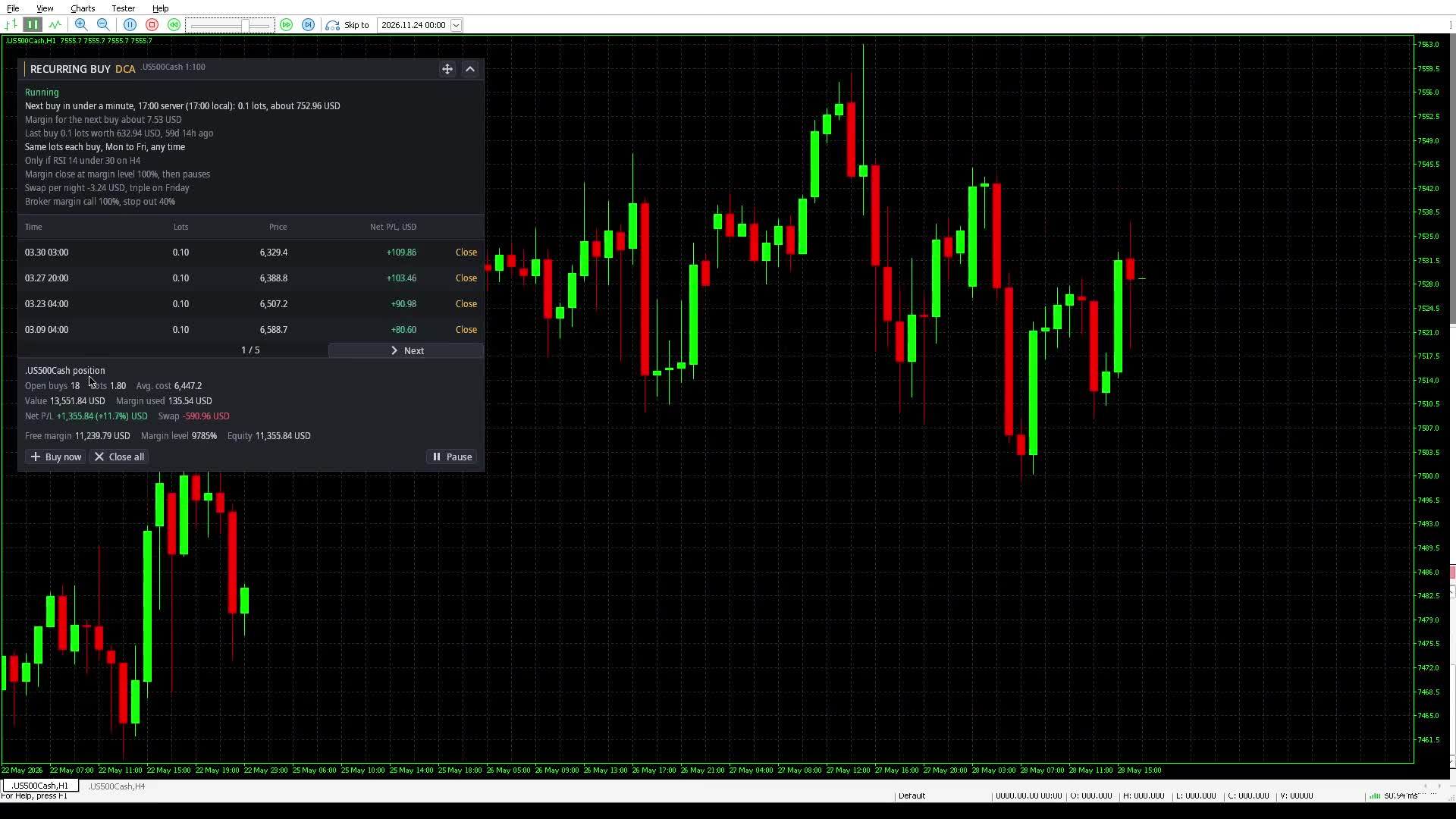
The margin floor only stops new buys; it closes nothing. If the plan has grown until the floor stops it, a small further fall reaches the margin close:
- fall in percent = (margin floor - margin close level) / N, at 1:N.
- 200% floor, 100% close: 1% at 1:100, 0.2% at 1:500, 0.1% at 1:1000.
The floor counts every position on the account. When open positions take the account under it between buys, the margin level on the account line turns red and one alert says "EURUSD: buying is stopped. Margin level 180% is under 200%.", and another when it is back over.
The equity floor ("Stop buying under equity", off by default) stops buying while the equity is under the amount you set: "Equity 900.00 is under 1,000.00".
The margin close is on by default. At or under "Close at margin level %", the expert closes the plan's buys one at a time, least profitable first. It stops once the margin level is back over.
- It reads the whole account's margin level. A losing manual trade or another program can make it close this plan's buys, though it never closes other positions.
- Two copies on one account read the same level, and both can close and pause in the same second.
- It acts while paused too. The Pause button stops buying, not the margin close.
- A close level of 0, the default, uses the broker's margin call level. Its level is never under the broker's stop out: if the margin call level is lower, it uses the stop out.
- It waits while the market is closed. A weekend gap can open under the stop out, and then the broker closes first.
After a margin close, the expert pauses buying and alerts with the margin level and the buys closed and left. The state line reads "Margin close paused buying: press Resume or change an input". The pause ends when you:
- Press Resume on the panel.
- Change any input: F7 on the chart, change a value, OK. Any input counts, even Panel X, so read why it closed first. On a VPS, change an input and migrate again (section 8).
A pause you set with the Pause button stays through restarts and input changes until you press Resume.
With the margin close on and both levels above 0, the close level must be under the margin floor, or the inputs are refused. A close level above 0 but under the broker's stop out keeps the plan from starting, even with the margin close switched off. The state line then starts with "Inactive: The margin close level", and the alert gives the whole reason: "...is under the broker's stop-out level (Y%); raise it or use 0 for the margin call level."
5. How the schedule runs
Every time is server time, the clock Market Watch shows; the panel adds your local time. The expert checks once a second whether a buy is due. The plan buys at most once per day, week or month, depending on Repeat.
Buying days. A daily buy time on a day that is off is skipped, not bought the next morning.
Missed buy. When a buy time passes without a buy (terminal off, market closed, condition not met, a limit):
- With Next market open, the expert makes one catch-up buy, however many were missed, as soon as a buying day and an open market allow it. The catch-up window ends when the next buy's day starts: midnight for a daily plan, the next buy day for a weekly or monthly one.
- With Skip the missed buy, a buy goes through only within its minute, 09:00:00 to 09:00:59 for 09:00.
Closed market. When the buy time falls outside the trading hours, the next buy line counts down to the buy time, then shows the open while the buy waits: "Next buy at the open, Mon 16:30 server (Mon 17:30 local)". With Next market open the buy goes through then. A buy time outside the hours on every buying day gets an alert at start.
First buy.
- At the next buy time (the default): nothing now; the first buy is at the next buy time.
- Right away: if this day's, week's or month's buy time has passed, it buys once as soon as the market is open and the condition holds. A Monday weekly plan attached on Wednesday buys that Wednesday. An earlier day, week or month is never bought late.
- With "Skip the missed buy", Right away buys only if you attach within the buy's minute; otherwise it waits for the next buy time.
Any time. With the buy hour at -1, the expert buys once per day, week or month, the first moment the market is open on a buying day and the condition holds. The buy minute, buy day, day of the month and missed buy setting do not apply.
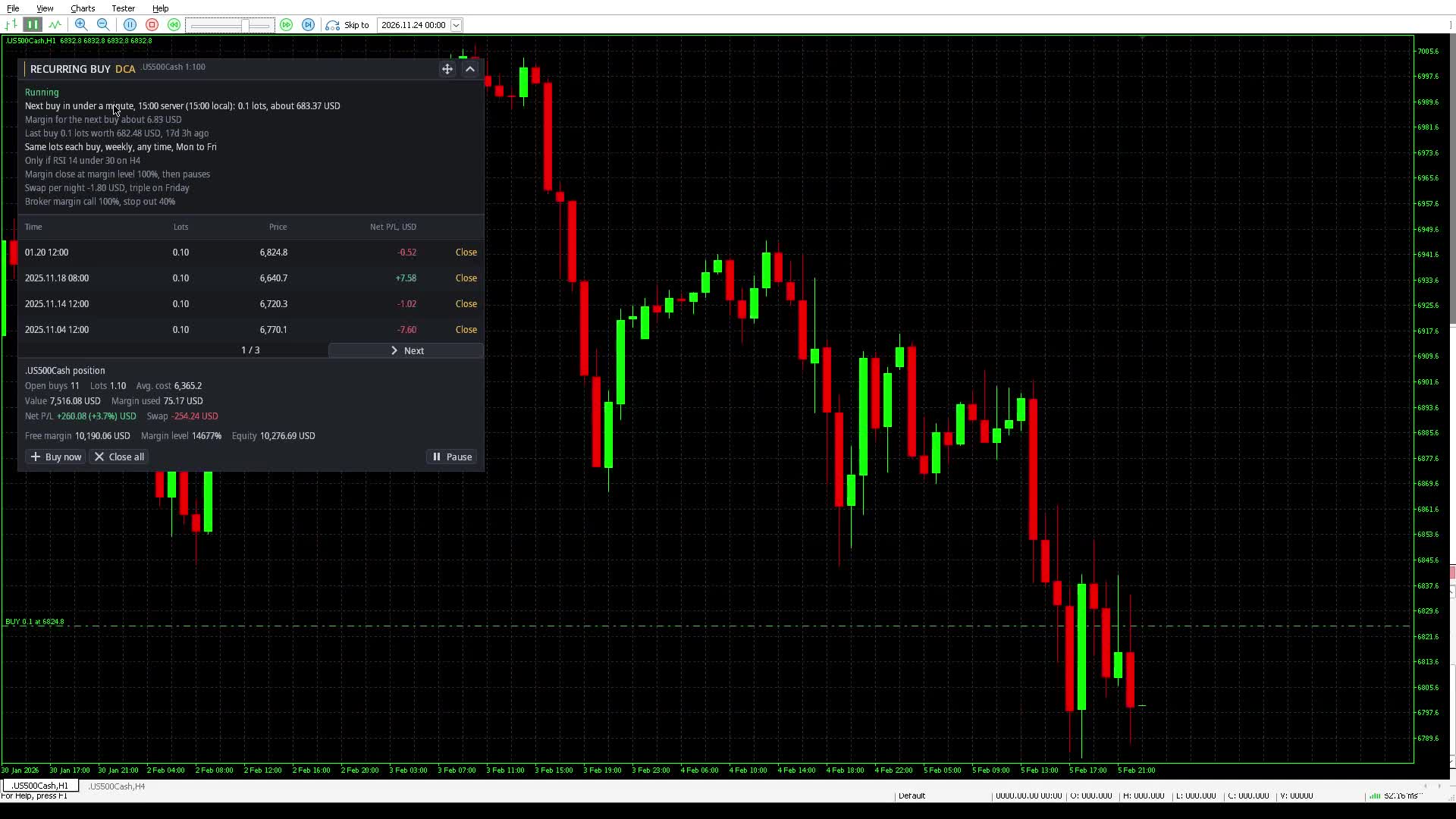
Every N weeks. At 2, a weekly plan buys every other week. The weeks between pass without a missed buy alert, and the next buy line counts down to the next week it buys.
Pause. A buy time that passes while paused is used up. Resume waits for the next one.
Restarts. A restart or changed input never buys the same day, week or month twice, even if its position closed since.
Weekends and crypto. With the default Monday to Friday, a daily plan does not buy at weekends, even when the broker quotes the symbol. For a daily buy on a crypto CFD quoted at weekends, turn on Buy on Saturday and Buy on Sunday. The plan line then reads "Same lots each buy, every day at 09:00 server".
A monthly day on a weekend. With a plan on the 1st, Monday to Friday, and the 1st on a Saturday, Next market open buys on the Monday. Skip the missed buy has no buy that month and no missed buy alert, because a day off is not a missed buy.
6. How the buy condition decides
The condition is read on completed candles of the condition timeframe, whatever the chart shows. What each Buy condition checks, on the last completed candle:
| Buy condition | Buys when |
|---|---|
| None, buy every time | always; the schedule alone decides |
| RSI 14 under 30 | the 14-period RSI is under 30 |
| RSI 14 under 50 | the 14-period RSI is under 50 |
| Price under the 20 SMA | the close is under the 20-period simple moving average |
| Price under the 50 SMA | the close is under the 50-period SMA |
| Price under the 200 SMA | the close is under the 200-period SMA |
| Price over the 200 SMA | the close is over the 200-period SMA |
| Price under the daily VWAP | the close is under the VWAP that restarts each day; Condition timeframe H1 or H4 only |
| Price under the weekly VWAP | the close is under the VWAP that restarts each week; any timeframe but W1 |
| Price under the monthly VWAP | the close is under the VWAP that restarts each month |
| Last candle closed down | the close is under the previous candle's close, whatever the candle's color: a green candle that gapped down counts, a red one that closed above the previous close does not |
| Price fell by at least X% | the close is at least Percent lower than the close Lookback candles before |
| Price rose by at least X% | the close is at least Percent higher than the close Lookback candles before |
| Another symbol over a level | the other symbol's close is over Level |
| Another symbol under a level | the other symbol's close is under Level |
| Another symbol fell by at least X% | the other symbol's close is at least Percent lower than its close Lookback candles before |
| Another symbol rose by at least X% | the other symbol's close is at least Percent higher than its close Lookback candles before |
Percent and Lookback count only for the four "fell/rose by" choices, Other symbol for the four "Another symbol" choices, and Level only for "over a level" and "under a level". The panel line spells the check out: "Only if RSI 14 under 30 on H4", "Only if price fell 5% over 5 D1 candles", "Only if VIX over 25 on D1".
With Next market open, the expert checks the last completed candle at the buy time, then each new one until the condition holds or the next buy's day comes. With a daily plan at 09:00:
- RSI 14 under 30 on D1 buys at 09:00 when yesterday's daily candle closed with RSI under 30. No new daily candle completes that day, so the buy happens at 09:00 or not at all.
- RSI 14 under 30 on H1 checks the 08:00 candle at 09:00, then each hourly candle until midnight.
With Skip the missed buy, only the candle completed before the buy time counts. With the buy hour at -1, the plan buys the first time the condition holds in that day, week or month.
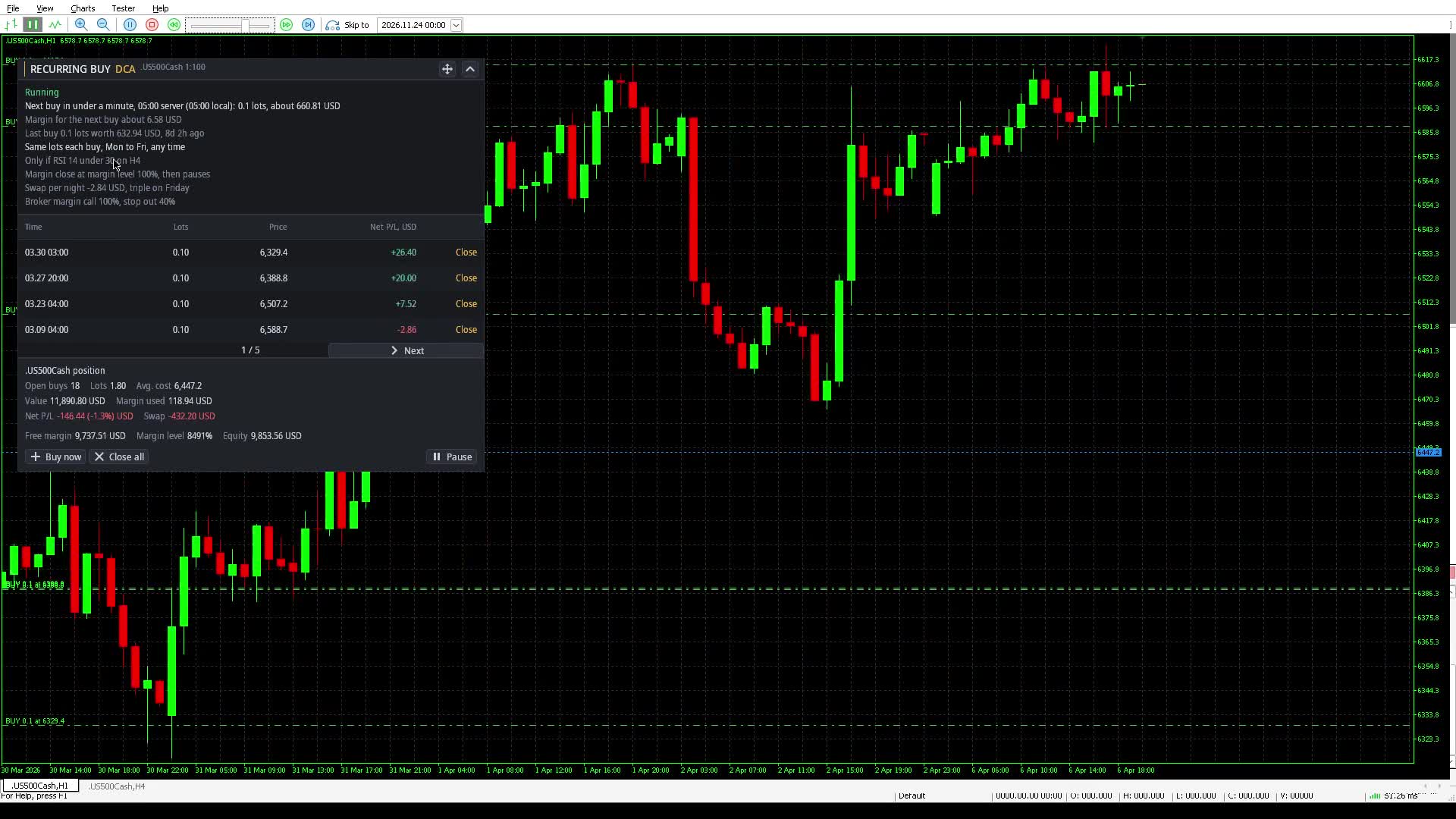
While a buy waits for its condition, the state line stays "Running" and the next buy line reads "Next buy in under a minute", because the buy is already due. If the buy never happens, the missed buy alert says "Last reason: Waiting for the buy condition."
With too few candles, the state line says "Not enough history for the buy condition" in red. Open a chart of the symbol (for "Another symbol", that symbol) on the condition timeframe once to load them.
Another symbol. These read a different symbol's candles, such as gold falling at least 3% over 5 daily candles. Type the name as Market Watch shows it, suffix included. If the broker lacks it, the expert stays with "Inactive: The buy condition's symbol ... is not available on this broker.", alerts once and retries every minute.
7. Alerts
Each alert goes to the channels you turned on and starts with "Recurring Buy DCA:"; in an email that is the subject. Every scheduled buy sends one:
> EURUSD bought 0.01 lots worth 1,080.10 USD at 1.08010. Spread 8 points, slippage 1 points. Average 1.07820, money bought 5,400.50 USD.
Money bought adds up the position value of every buy the plan made, at the price it was bought, closed buys and Buy now buys included. It is a size, not a cost: on margin, far less than this left your account. Buy now sends no alert.
The problem alerts:
- A due buy did not go through: "EURUSD: the scheduled buy did not go through. Not enough free margin for 0.05 lots. It tries again while the buy is due." After a broker refusal it names the reason and the retry time. Once per cause: a figure in the reason moving while the buy stays due, or the expert retrying the same refusal, sends nothing new. A closed market and the routine waits (condition, spread, fresh prices) send none.
- The amount per buy cannot buy the symbol: "EURUSD: the next buy cannot go through. ..." with the minimum lot, the maximum lot or the free margin as the reason (section 3). Once per cause.
- A same money buy well under the position value per buy, because lots round down to the step (the text is in section 3). Once per cause.
- A floor: "EURUSD: buying is stopped. Margin level 190% is under 200%.", and "EURUSD: the account is back over the floor, buying goes on." when it clears.
- A block: "EURUSD: buying is blocked. Algo Trading is off, turn it on." Once per block.
- A failed start: "EURUSD: Recurring Buy DCA is not buying. ... It tries again every minute." Once per reason.
- The margin close could not close a buy: "EURUSD: the margin close could not close a buy: ... It tries again." Once per cause.
These come every time the event happens:
- The margin close: "EURUSD: the margin level fell to 98% (margin close at 100%), so 2 buy(s) were closed, least profitable first; 38 stay open. Buying is paused. ..."
- "EURUSD: a scheduled buy passed without buying. Last reason: Waiting for the buy condition." It comes when the next scheduled time arrives, a day off included, so weeks later on a monthly plan. It comes only for a buy time the expert saw come due while it ran; a buy time missed with the terminal off, or with a restart before the next one, sends none. A pause sends none.
- "EURUSD: 1 position(s), 0.01 lots, were closed outside Recurring Buy DCA. Closed P/L of the plan: 3.20 USD.", or "EURUSD: 0.02 lots of the plan's position were closed outside Recurring Buy DCA. ..." when part of a position was closed.
- "EURUSD: the order whose result was unknown filled, 0.01 lots worth 1,080.10 USD. The buy counts.", or "EURUSD: the order whose result was unknown never showed up. Its 1,080.10 USD was taken off the money bought." when no position showed up by the next buy time (one hour for Buy now).
- "EURUSD: the buy time 03:00 server is outside the symbol's trading hours on every buying day. Each buy waits for the next open.", at every start, so every input change sends it again.
Summary alert reports at 08:00 server time or later, daily or on Mondays: "EURUSD: 5 open buys, 0.05 lots worth 5,400.00 USD, net P/L 6.90 USD, money bought 5,400.50 USD. Next buy 2026.11.25 09:00 server time." With the terminal off on a Monday, that week has no weekly summary. A restart after 08:00, such as an input change, sends it again that day. No summary comes while the plan is Inactive.
Message boxes. Refused inputs and a margin floor at or under the margin call level show in a message box at start, and an alert that could not go out (Push or Email the terminal is not set up for) shows in one when it is sent (troubleshooting post). While a message box is open, the expert does nothing, the margin close included, until you click OK.
Push and email need the terminal set up, in Tools, Options:
- Push: find the MetaQuotes ID in the phone app's Messages section, then on the Notifications tab tick "Enable Push Notifications" and enter it. A push holds 255 characters, so a long alert arrives cut.
- Email: on the Email tab, tick Enable and fill in your SMTP settings.
8. Running on a VPS
The MQL5 virtual hosting has no panel, and nobody sees its Alert window. Before you migrate:
- Turn on Push or Email and set it up in your terminal (section 7).
- Turn on Summary alert, Daily, so a silent day means something is wrong.
- The VPS runs the inputs you migrate; changing them later means migrating again.
After the migration, your own terminal turns off automated trading. Leave it off, or both terminals buy.
Migrating again with a changed input also ends a margin close pause. You can still close a position from any terminal or the phone app, and the expert sends the "closed outside Recurring Buy DCA" alert.
9. Swap
Swap grows with the lots you hold, not with the margin: the margin ratio does not change it, so a high ratio account pays the same swap on the same position.
- One night, usually Wednesday on currency pairs, counts three times. The panel names that day.
- Many brokers charge crypto CFDs every night, weekends included. Check the long swap in the specification.
- As a yearly share: swap per night x 365 / position value. 0.14 USD a night on 1,080 USD is about 4.7% a year. On the broker I recorded the tutorial with, a long US 500 index CFD cost about 18% a year.
- Swap grows with the plan: 50 open buys at 0.14 USD a night pay 7.00 USD a night, over 2,500 USD a year.
"Swap per night -0.70 USD, triple on Wednesday" is one night for the open lots at the current rate. It shows only while buys are open and the broker's swap type is one the panel can work out. The position block's Swap is what the buys paid so far, included in Net P/L.
10. The Strategy Tester

- With a buy time, set the tester's timeframe to M1. A buy lands on the first tick after its time, so a longer timeframe lands it late; the log warns. With Skip the missed buy, a buy whose first tick comes after its minute is not bought at all.
- With a buy condition, use a tester timeframe no longer than the condition timeframe.
- Each run starts clean, never paused. Alerts do nothing in the tester.
- A run buys once on its first tick, through the same checks as Buy now, then follows the schedule. If the amount per buy is under the symbol's minimum lot, that first buy is one minimum lot. "Buy once at the start of a test" turns that off, for a test that should show the schedule alone.
Every run ends with a log report of the plan's result, balance, equity, worst drawdown and missed buys by reason.
Optimization result ranks runs by Gain % on money bought (the default), Value over money bought (the open buys' value plus the closed buys' cost and closed P/L, over the money bought) or Gain over worst equity drawdown.
Deposit each buy's money (MetaTrader 5) adds each buy's position value to the test account, as if you paid each buy in from outside, so a long test does not run out of money.
The report shows what this plan would have bought on past prices. It says nothing about future prices.
11. MetaTrader 4 differences
- The toolbar button is AutoTrading, and the Common tab option is "Allow live trading". The state texts are "AutoTrading is off, turn it on" and "Allow live trading is off in the expert's Common tab".
- "Deposit each buy's money" and dividends are MetaTrader 5 only.
- The Strategy Tester refuses the "Another symbol" conditions.
- Programs get only the history the Account History tab shows, so the "closed outside Recurring Buy DCA" alert's P/L and a rebuilt plan count only that period.


