First Five Breakout — user guide: US100 symbol names, session times and spread

First Five Breakout trades one idea on one market: a breakout of the first 5 minutes after the New York cash open, on the Nasdaq 100 index CFD. This guide explains how it works, how it finds the New York open on your broker's clock, and what to check on your broker before you run it: symbol name, spread, lot size and time zone.
How it works
- Opening range. At 09:30 New York time the EA measures the high and low of the first 5 minutes.
- Entry. It places a buy stop at the range high and a sell stop at the range low. When one is filled, the other is deleted. If price is already at or close to a level when the range ends (within a quarter of the range), it can enter at market instead.
- Stop loss. The stop sits at the opposite side of the range. There is no take profit by default.
- Exit. The trade runs until the stop is hit or until 15 minutes before the cash close (15:45 New York). Then every position is closed. Nothing is held overnight, so no swap is paid.
- Position size. The lot is calculated so that a stop-out loses about 0.3% of equity (default).
At most one trade per symbol per day. If neither order is triggered within 180 minutes after the open, the orders are deleted and there is no trade that day. In the 2018–2026 test this gave about one trade per trading day. No grid, no martingale, no averaging, no hedging.
Setup
- Symbol: the Nasdaq 100 CFD of your broker. Attach the EA to that chart. It uses the chart symbol, unless you fill in Symbols_List .
- Timeframe: any. The EA reads M1 data internally, so the chart timeframe does not matter. M5 is fine.
- One chart only. Allow algo trading and make sure the symbol is in Market Watch.
- If you run other EAs on the same account, give each a different Magic_Number .
- Run it on a VPS or a computer that stays on during the New York session.
US100 symbol names
Brokers name the Nasdaq 100 differently: US100, NAS100, USTEC, NDX100, US100.cash, USTECH100, US Tech 100 and others. Use the one your broker lists.
The EA decides which exchange session to use from the symbol name ( Market_Session = Auto). For the Nasdaq 100 it looks for these parts in the name: US100, NAS, NDX, USTEC, NQ (other US index names such as US500, SP500, US30 or DJ also get the New York session; German and other European index names get the Frankfurt or London session). Case does not matter.
What this means:
- Names like US100, NAS100, USTEC, NDX100, US100.cash and USTECH100 are recognised.
- If your broker's name contains none of these (for example a name with spaces such as "US Tech 100"), the EA does not recognise it. For an unrecognised name it falls back to the London session, which is wrong for the Nasdaq. In that case set Market_Session to New York 09:30-16:00 by hand.
- Check the Experts log when the EA starts. It prints the session it chose, contract size, minimum lot and lot step for the symbol. Read that line.
How the EA finds the New York open
Live trading. The EA compares the broker's server time with GMT, so it knows your broker's offset on its own. It then applies the US daylight saving rules to get the New York time. You do not need to set anything. Both the US and the European clock changes are followed.
Strategy Tester. The tester has no live server-time offset, so the EA uses two inputs instead:
- Tester_GMT_Offset (default 2): your broker's GMT offset in winter.
- Tester_DST (default US daylight saving): which daylight saving rule the broker's server follows. Options: US daylight saving, European daylight saving, none.
The defaults model a broker on GMT+2 in winter and GMT+3 in summer, with the clock change on the US dates. Not every server works like this. The broker I test on (Admirals) moves its server clock on the European dates. If your broker does the same, choose the European option; if its server has no daylight saving, choose none. With the wrong rule, the tester builds the 5-minute range one hour off in the weeks when the US and Europe are out of step: in 2026, 9–27 March and 26–30 October.
The test results below were run with the European setting, which matches the server of my test broker. (My first published figures had used the US default; I re-ran them on 23 November 2026 and the numbers below are the corrected ones.) Live trading is not affected either way, because there the EA reads the broker's offset from the terminal.
How to check your broker: look at the last EURUSD bar on a Friday. The FX week closes at 17:00 New York time. On a GMT+2/+3 server it is the 23:55 M5 bar in a normal week. If on Friday 13 March 2026 the last bar is 22:55, the server follows the European dates; if it is still 23:55, the US dates.
Inputs that matter
- Risk_Percent (0.3): risk per trade as % of equity. Lower it (for example 0.15) for smaller drawdowns. Do not raise it far to speed things up.
- Max_Min_Lot_Risk (2.0): only used when the calculated lot is below the broker's minimum. See the lot section.
- Max_Lots (10.0): upper limit for one trade.
- Max_Spread_Pct (50.0): skip the day if the spread is above this % of the opening range. 0 turns the filter off.
- Market_Session (Auto): set it to New York by hand if your symbol name is not recognised.
- Range_Minutes (5): length of the opening range.
- Stop_Range_Mult (1.0): stop distance as a multiple of the range. 1 = opposite side.
- Take_Profit_R (0.0): take profit as a multiple of the stop distance. 0 = off.
- Entry_Window_Min (180): minutes after the open during which a breakout can still be entered.
- Exit_Before_Close (15): minutes before the cash close when positions are closed.
- Symbols_List (empty): empty = chart symbol. A comma list trades several symbols from one chart.
- Tester_GMT_Offset , Tester_DST (2, US): Strategy Tester only. See above.
I recommend leaving the strategy inputs ( Range_Minutes , Stop_Range_Mult , Take_Profit_R , Entry_Window_Min , Exit_Before_Close ) at their defaults. The tests were done with these values.
Stress_Cost_Per_Lot is for the Strategy Tester only. It does not change live trading.
Two set files are attached to this post: FirstFiveBreakout_US100_default_0.3.set (0.3% risk) and FirstFiveBreakout_US100_conservative_0.15.set (0.15% risk). Load one from the EA's Inputs tab. The only difference is the risk per trade.
Other indices (S&P 500, Dow Jones, DAX) can be selected, but in my tests they were close to break-even after costs. I do not recommend them.
Spread and costs
The EA enters at the open, when the spread is often wider than later in the day. Entry is a stop order that fills at the market price, so slippage is possible.
- Spread filter. If the spread at the end of the opening range is above 50% of the range ( Max_Spread_Pct ), the day is skipped. A skipped day is not retried.
- No swap. Positions are closed before the cash close, so you do not pay overnight swap.
- Commission. Some brokers charge a commission on index CFDs. Check it. The edge in the tests is modest, so costs matter.
- Stops level and freeze level. The EA keeps the stop at least that far from the price.
Check your broker's typical spread on the Nasdaq 100 at 09:30 New York time. I did not test other brokers, so I have no figures for them.
Minimum lot and contract size
Index CFD contracts differ between brokers: the value of one point for one lot and the minimum lot are set by each broker. Check them in the symbol specification.
At the broker I tested (Admirals, US100), the minimum lot was 0.02. Over 365 days (June 2025 to November 2026), the stop at the minimum lot was 1.52 USD at the median and 2.81 USD at the 90th percentile. No day was skipped on accounts from 250 to 2,000 USD. At a broker with a larger contract or minimum lot, the stop in money is larger, and small accounts will skip more days.
How the EA handles lot size:
- It calculates the lot from the stop distance and the broker's own contract data, so that a stop-out loses Risk_Percent of equity.
- It rounds the lot down to the broker's lot step.
- If the result is below the minimum lot, it uses the minimum lot only if the loss at the stop is within Max_Min_Lot_Risk (2%) of equity. Otherwise it skips the day and prints "lot below broker minimum or margin insufficient, day skipped" in the log.
- If free margin is not enough, it reduces the lot step by step. Both orders can be pending at once, so each order may use at most 45% of free margin.
If you see many skipped days on a small account, do not just raise Max_Min_Lot_Risk . That is the same as accepting a larger loss per trade.
US holidays, early closes and daylight saving
- Weekends are skipped.
- US holidays. The EA has no holiday calendar. If there is no price data for the opening minutes, it retries for about 5 minutes and then skips the day.
- Early closes. The US exchanges close early on a few days a year. The EA has no calendar for these days either. It always closes at 15 minutes before 16:00 New York. Check your broker's trading hours for the index on those days.
- Daylight saving. In live trading the New York open is recalculated every day with the US daylight saving rules, so the weeks when the US and Europe change clocks on different dates are handled. In the tester, see the two broker-time inputs above.
- Broker hours. Make sure your broker's index CFD is open at 09:30 New York time and until 15:45. Some brokers have a daily break or different hours.
What to expect
These are backtest results, not live results and not a promise of future performance. Admirals data, US100, 10,000 USD deposit, 0.3% risk, default inputs, broker daylight saving set to European:
- 2018–2026, 1-minute OHLC: +14,126 USD, profit factor 1.18, 2,279 trades, maximum equity drawdown 12.2%.
- 2025–2026, real ticks: +641 USD, profit factor 1.06, 478 trades, maximum equity drawdown 10.1%.
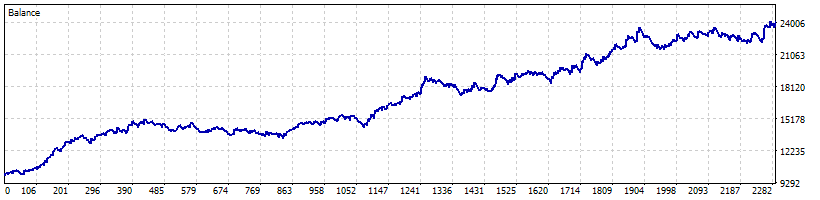
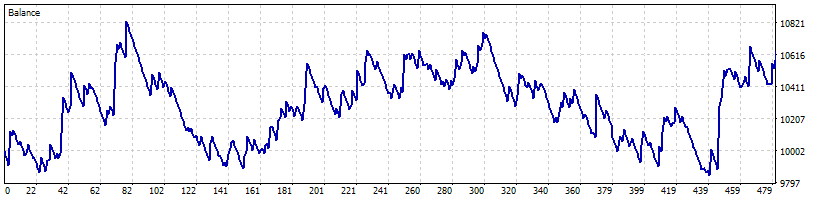
Eight of nine calendar years were positive in the 1-minute test; 2020 was negative. Changing the main inputs by ±20% kept all variants positive (profit factor 1.12–1.21), and so did an extra cost of 2 USD per lot.
Weak points:
- The edge is modest. Real-tick results were weaker than the 1-minute results. The 1-minute model is optimistic around the open, where prices move fast.
- Real ticks for 2018–2024 were not tested. Only 2025–2026, and on real ticks 2026 so far is about flat (2025 +642 USD, 2026 −1 USD).
- Drawdown. The maximum equity drawdown was 12.2% at 0.3% risk; a higher risk setting raises it roughly in proportion.
- Losing periods. There are losing months and losing years.
- I tested one broker only. Your spread and execution at the open will be different.
Judge the EA over many months, not days.
FAQ
The EA placed no trade today. Is it broken?
Probably not. A day is skipped when the spread is above 50% of the opening range, when the minimum lot would risk more than the 2% limit, when there is no price data for the opening minutes (for example a US holiday), or when algo trading is off. If neither order is triggered within 180 minutes after the open, the orders are deleted. Check the Experts log for the "day skipped" message.
My broker calls the index NAS100 / USTEC / US100.cash / US Tech 100.
Attach the EA to that chart. If the name contains US100, NAS, NDX, USTEC or NQ, the New York session is chosen automatically. If not (for example "US Tech 100"), set Market_Session to New York; otherwise the EA falls back to the London session. The Experts log shows which session was chosen.
The tester results look wrong or the trades start at odd times.
Check Tester_GMT_Offset and Tester_DST against your broker's server time. Live trading does not use them.
Which timeframe should I use?
Any. The EA works from M1 data. The chart timeframe does not change the result.
Can I use it on the S&P 500, Dow Jones or DAX?
It will run, but in my tests those indices were close to break-even after costs. I do not recommend them.
Before you buy
Download the free demo and run it in the Strategy Tester on your broker's Nasdaq 100 symbol, model "Every tick based on real ticks" if available (the 1-minute OHLC model is faster but more optimistic). Then run it on a demo account at your own broker and compare the spread and fills at the open. Leveraged index CFDs carry a high risk of loss. Choose a risk level you can afford to lose. If something doesn't work as described, message me.
Product page: https://www.mql5.com/en/market/product/208706