Daily loss lock in MQL5: counting the trading day like a prop firm and closing everything in time

Introduction
Most trading accounts are not lost to a bad strategy. They are lost to one bad day: a position that is too large, a stop loss moved further away, a news spike, a revenge trade after a loss. Prop firms turn this into a hard rule. A typical challenge ends the moment the account loses 5% in one day or 10% in total, and many traders who trade their own money set themselves the same kind of limit, because they know how a bad day feels from the inside.
MetaTrader 5 has no built-in setting for this. The terminal shows balance and equity, but nothing stops trading when the day goes badly. An Expert Advisor can do it, and many try, but the simple versions fail in a few typical ways: they count the trading day differently from the rule, they react only to ticks of their own chart, they try to close at the exact limit instead of before it, and they forget the lock after a terminal restart.
In this post we build a compact account-level loss lock, DailyLossLock.mq5 (attached), and go through each of these points. The EA watches the equity of the whole account, closes every position and pending order shortly before a daily or maximum loss limit is reached, and keeps trading locked until the day resets. At the end we test it in the Strategy Tester with deliberately risky trades on EURUSD and gold, and look at what the tests show, including one result that changes how the daily limit should be set.
The post is organized as follows:
- Why simple loss limits fail
- How the trading day is counted
- Watching the equity of the whole account
- Closing everything reliably
- Keeping the lock until the reset
- Testing in the Strategy Tester
- Possible extensions
- Conclusion
Why simple loss limits fail
Before writing code, it is worth listing how a loss limit usually breaks. Each item below is a real mistake that is easy to make, and each one is handled by a specific part of the EA. The list also works as a checklist for any risk tool you already use.
- Checking the balance instead of the equity. The balance changes only when a position is closed. A trade that is 600 USD in loss leaves the balance untouched, so a check on the balance sees nothing until it is too late.
- Checking only the own chart. OnTick() runs on ticks of the chart symbol. If the EA sits on EURUSD and the loss is in a gold position, the EA may not run at all while the loss grows.
- Counting the limit from the current balance. 5% of 10,000 is 500, but 5% of 9,000 is only 450. Most rules use the initial balance, and a lock that uses the current balance becomes stricter or looser than the rule as the account changes.
- Resetting at the wrong time. The rule's day may start at midnight of a time zone that is not the trade server's. A reset that is two hours off moves two hours of losses into the wrong day.
- Acting exactly at the limit. Closing takes time and the closing price includes spread and slippage. A lock that starts closing at the floor ends below it.
- Forgetting pending orders. A buy stop that is still waiting can open a new position after the lock has closed everything else.
- Forgetting the lock. If the state lives only in variables of the EA, removing the EA and attaching it again, or a restart of the terminal, unlocks trading in the middle of a bad day.
How the trading day is counted
Before we can protect a daily limit, we must count the day exactly the way the rule does. Three questions decide it, and the answers differ between firms and between personal rules, so they become input parameters:
- When does the day start? Usually at midnight of a fixed time zone. The EA uses the trade server time, because that is what TimeCurrent() returns; set the reset hour to the server hour that matches the rule.
- What is the day measured from? Either the balance at the reset, or the higher of balance and equity at the reset. The second variant matters when trades are open over the reset: profit that was open at that moment also counts as the starting point. The tests below show how big this difference can be.
- What is the limit a percentage of? Most rules use the initial balance of the account, not the current one. A 5% daily limit on a 10,000 account is then always 500, even after the account has grown.
Here are the input parameters of the EA. Each of them answers one of the questions above, or controls the safety buffer and the test mode that we will use later:
//--- input parameters
input double        InpDailyPct   = 5.0;              // Daily loss limit, % of the initial balance (0 = off)
input double        InpMaxPct     = 10.0;             // Maximum loss limit, % of the initial balance (0 = off)
input double        InpInitial    = 0;                // Initial balance (0 = balance at the first start)
input ENUM_DAY_BASE InpDayBase    = DAY_BASE_BALANCE; // Daily limit is measured from
input int           InpResetHour  = 0;                // Day reset hour, server time (0-23)
input double        InpBufferPct  = 0.5;              // Act this % of the initial balance before a limit
input bool          InpTesterDemo = true;             // Strategy Tester only: open risky demo trades
input string        InpCsvName    = "DailyLossLock_equity.csv"; // Strategy Tester only: equity log file (Common\Files)
A worked example makes the numbers concrete. An account starts with 100,000. The daily limit is 5% and the maximum limit is 10%, both of the initial balance. On a given day the balance at the reset is 103,000. The daily floor is 103,000 - 5,000 = 98,000 and the maximum floor is 100,000 - 10,000 = 90,000. With a buffer of 0.5% (500), the EA locks at an equity of 98,500. If the day had started with an open profit of 2,000 and the rule uses the higher of balance and equity, the base is 105,000 and the daily floor is 100,000.
The time zone deserves a second look. Many rules reset at midnight of Central European time, while trade servers often run on GMT+2 or GMT+3 and switch with daylight saving time on their own dates. The difference between the server and the rule can therefore change twice a year. The simplest reliable approach is to check the server time against the rule's reset once, write the server hour into the input, and check it again when daylight saving time changes in Europe or in the United States.
The reset time of the current day is simple to compute:
datetime DayStart(const datetime time)
  {
   MqlDateTime t;
   TimeToStruct(time, t);
   t.hour = InpResetHour;
   t.min  = 0;
   t.sec  = 0;
   datetime start = StructToTime(t);
   return(start > time ? start - 86400 : start);
  }
The harder part is the balance at the reset. If the EA was running at that moment, it could just remember the value. But the terminal may have been closed, or the EA may be attached in the middle of the day. We therefore rebuild it from the deal history: the balance now, minus everything booked since the reset.
double BalanceAtReset(const datetime from)
  {
   double booked = 0;
   if(HistorySelect(from, TimeCurrent() + 60))
      for(int i = HistoryDealsTotal() - 1; i >= 0; i--)
        {
         ulong ticket = HistoryDealGetTicket(i);
         long  type   = HistoryDealGetInteger(ticket, DEAL_TYPE);
         if(type == DEAL_TYPE_BALANCE || type == DEAL_TYPE_CREDIT || type == DEAL_TYPE_BONUS)
            continue;
         booked += HistoryDealGetDouble(ticket, DEAL_PROFIT) + HistoryDealGetDouble(ticket, DEAL_SWAP) +
                   HistoryDealGetDouble(ticket, DEAL_COMMISSION) + HistoryDealGetDouble(ticket, DEAL_FEE);
        }
   return(AccountInfoDouble(ACCOUNT_BALANCE) - booked);
  }
Note the deal type filter. The first version of this function subtracted every deal, and the Strategy Tester showed the mistake at once: the initial deposit is a deal of type DEAL_TYPE_BALANCE, so on the first day the balance at the reset came out as zero and the daily floor as -300. The same would happen on a live account after a deposit or a withdrawal. Deposits, withdrawals and credit are not trading results, so they stay in the base.
The equity at the reset cannot be rebuilt from history, because open profit is not booked anywhere. The EA stores it when it sees the day change, and falls back to the balance at the reset when it was not running at that moment. On a quiet market the first check of a new day can come a little after the reset: on gold, whose session opens an hour after midnight on many servers, the tests below show the unlock at 01:00.
//--- a new trading day
   datetime start = DayStart(now);
   if(start != ExtDayStart)
     {
      //--- the equity now is the equity at the reset only if we were already running
      ExtDayEquity = ExtDayStart != 0 ? equity : 0;
      ExtDayStart  = start;
      StateSet("dayStart", (double)ExtDayStart);
      StateSet("dayEquity", ExtDayEquity);
      if(ExtLock == LOCK_DAILY && now >= ExtLockUntil)
         SetLock(LOCK_NONE, 0, "the day has reset, trading is unlocked");
} 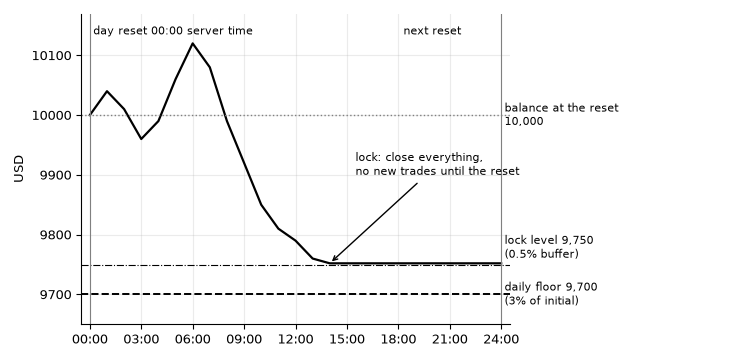
Figure 1. The daily floor (3% of a 10,000 initial balance below the balance at the reset) and the lock level 0.5% above it
Watching the equity of the whole account
With the day defined, the two floors follow. The daily floor is the base of the day minus the daily limit; the maximum floor is the initial balance minus the maximum limit. Both are compared with the equity of the account, which already includes every open position on every symbol, opened by any EA, by hand or from the mobile app. One EA on one chart is therefore enough for the whole account.
//--- the two equity floors
   double dayBalance = BalanceAtReset(ExtDayStart);
   double dayBase    = (InpDayBase == DAY_BASE_HIGHER && ExtDayEquity > 0) ? MathMax(dayBalance, ExtDayEquity) : dayBalance;
   double buffer     = ExtInitial * InpBufferPct / 100.0;
   double dailyFloor = InpDailyPct > 0 ? dayBase - ExtInitial * InpDailyPct / 100.0 : 0;
   double maxFloor   = InpMaxPct > 0 ? ExtInitial * (1.0 - InpMaxPct / 100.0) : 0;
The EA must check the account even when its own chart is quiet. A one-second timer does it, and in the Strategy Tester, where timer events are less frequent than ticks, the check also runs on every tick. Both handlers call the same function, so the logic exists only once:
//| The timer watches the account even when this symbol has no ticks |
//+------------------------------------------------------------------+
void OnTimer()
  {
   Check();
  }
//+------------------------------------------------------------------+
//| In the tester the timer is not enough on its own                 |
//+------------------------------------------------------------------+
void OnTick()
  {
   Check();
   TesterDemo();
  }
//+------------------------------------------------------------------+
The second detail is that the EA acts before the floor, not at it. Closing positions takes time and the closing price is rarely the price that triggered it: there is spread, slippage and sometimes a requote. If we waited for equity to touch the floor, the closing deals would push it below. The buffer input (0.5% of the initial balance by default) is the safety margin.
//--- engage a lock before a floor is reached
   if(ExtLock != LOCK_MAX && maxFloor > 0 && equity <= maxFloor + buffer)
      SetLock(LOCK_MAX, 0, StringFormat("equity %.2f is near the maximum loss floor %.2f", equity, maxFloor));
   else
      if(ExtLock == LOCK_NONE && dailyFloor > 0 && equity <= dailyFloor + buffer)
         SetLock(LOCK_DAILY, ExtDayStart + 86400, StringFormat("equity %.2f is near the daily loss floor %.2f", equity, dailyFloor));
//--- while locked, nothing may stay open
   if(ExtLock != LOCK_NONE)
      CloseEverything();
How large should the buffer be? A rough estimate is the money that the open positions can lose between the trigger and the fills: the sum over all positions of volume x tick value x the number of ticks the price can move meanwhile, plus the spread. With 2 lots of EURUSD, a tick value of 1 USD per 0.00001 and lot, and an allowance of 20 points for spread and slippage, that is 2 x 20 = 40 USD per position side. On gold during news the same allowance can be several times larger. In our tests the price was, in the worst case, already 17 USD past the lock level when the next tick arrived, out of a buffer of 50 USD.
Note also the order of the two checks. The maximum lock is tested first and can replace a daily lock, because it is the stronger of the two: it never ends. A daily lock is engaged only if no lock is on yet.
Closing everything reliably
When the lock engages, every position is closed first, because positions carry the risk, and then every pending order is deleted, so that nothing can open later. Among the positions, the one with the biggest loss goes first: if the market keeps moving while we close, the largest source of further loss is gone earliest. CTrade::PositionClose() with a ticket works on both hedging and netting accounts, and the filling mode is set per symbol, because a position on another symbol may need a different one.
void CloseEverything()
  {
//--- positions first, because they carry the risk; the biggest loss goes first
   ulong tickets[];
   SortedByProfit(tickets);
   for(int i = 0; i < ArraySize(tickets); i++)
     {
      ulong ticket = tickets[i];
      if(!PositionSelectByTicket(ticket))
         continue;                     // closed in the meantime
      string symbol = PositionGetString(POSITION_SYMBOL);
      ExtTrade.SetTypeFillingBySymbol(symbol);
      if(!ExtTrade.PositionClose(ticket))
         Retry("close position", ticket, symbol);
     }
//--- then pending orders, unless the price is inside the freeze level
   for(int i = OrdersTotal() - 1; i >= 0; i--)
     {
      ulong ticket = OrderGetTicket(i);
      if(ticket == 0)
         continue;
      string symbol = OrderGetString(ORDER_SYMBOL);
      if(InsideFreezeLevel(symbol, OrderGetDouble(ORDER_PRICE_OPEN)))
         continue;                     // the server would refuse; the next check tries again
      if(!ExtTrade.OrderDelete(ticket))
         Retry("delete order", ticket, symbol);
     }
  }
The ordering helper collects the tickets and sorts them by profit. An insertion sort is enough: an account rarely has more than a few dozen positions, and the function runs only while a lock is on.
void SortedByProfit(ulong &tickets[])
  {
   int total = PositionsTotal();
   double profits[];
   ArrayResize(tickets, total);
   ArrayResize(profits, total);
   int n = 0;
   for(int i = 0; i < total; i++)
     {
      ulong ticket = PositionGetTicket(i);
      if(ticket == 0)
         continue;
      double profit = PositionGetDouble(POSITION_PROFIT) + PositionGetDouble(POSITION_SWAP);
      //--- insertion sort: the lists are short
      int j = n;
      while(j > 0 && profits[j - 1] > profit)
        {
         profits[j] = profits[j - 1];
         tickets[j] = tickets[j - 1];
         j--;
        }
      profits[j] = profit;
      tickets[j] = ticket;
      n++;
     }
   ArrayResize(tickets, n);
  }
Two kinds of failure are normal and must not stop the procedure:
- Freeze level. A pending order whose price is inside the symbol's freeze level cannot be deleted; the server refuses the request. The EA skips such orders and tries again on the next check.
- Market closed, requotes, timeouts. A position on a symbol whose session is closed cannot be closed until the session opens. Requotes and price changes are temporary. Instead of a busy retry loop that blocks the EA, every failed request is simply repeated by the next timer event.
bool InsideFreezeLevel(const string symbol, const double price)
  {
   double point  = SymbolInfoDouble(symbol, SYMBOL_POINT);
   double freeze = SymbolInfoInteger(symbol, SYMBOL_TRADE_FREEZE_LEVEL) * point;
   if(freeze <= 0)
      return(false);
   double bid = SymbolInfoDouble(symbol, SYMBOL_BID), ask = SymbolInfoDouble(symbol, SYMBOL_ASK);
   return(MathAbs(price - bid) <= freeze || MathAbs(price - ask) <= freeze);
  }

void Retry(const string what, const ulong ticket, const string symbol)
  {
   uint code = ExtTrade.ResultRetcode();
//--- a closed market or a requote is not an error: the timer repeats the request
   if(code == TRADE_RETCODE_MARKET_CLOSED || code == TRADE_RETCODE_REQUOTE || code == TRADE_RETCODE_PRICE_CHANGED ||
      code == TRADE_RETCODE_PRICE_OFF || code == TRADE_RETCODE_TIMEOUT)
      return;
   PrintFormat("DailyLossLock: could not %s #%I64u %s: %u %s", what, ticket, symbol, code, ExtTrade.ResultRetcodeDescription());
  }
A retry loop with Sleep() inside OnTimer() is a common alternative, but it has a cost: while the EA sleeps, it does not watch the account, and a closed market can keep it sleeping for hours. Letting the next timer event repeat the request keeps the EA responsive, and the journal stays readable because expected failures are not printed.
Keeping the lock until the reset
Closing everything once is not enough. Another EA may open a new position a second later, or the trader may open one from the phone. While the lock is on, CloseEverything() runs at every check, so any new trade on the account is closed at once. A daily lock ends at the next reset; a maximum lock never ends, because the account has reached its final floor.
Changing the state goes through one function. It saves the state, writes the reason into the journal, and on a live account raises an alert in the terminal and sends a push notification to the MetaTrader app on the phone, if notifications are enabled in the terminal settings. A trader who is away from the computer learns about the lock at once, which is often the moment to stop and step back.
void SetLock(const int lock, const datetime until, const string why)
  {
   ExtLock      = lock;
   ExtLockUntil = until;
   StateSet("lock", lock);
   StateSet("lockUntil", (double)until);
   if(lock != LOCK_NONE)
      ExtLocks++;
   Print("DailyLossLock: ", why);
   if(lock != LOCK_NONE && !ExtTester)
     {
      Alert("DailyLossLock: trading locked - ", why);
      //--- a push message to the MetaTrader app on the phone (Tools - Options - Notifications)
      if(TerminalInfoInteger(TERMINAL_NOTIFICATIONS_ENABLED))
         SendNotification("DailyLossLock: trading locked - " + why);
     }
  }
The lock must also survive a restart of the terminal or of the EA. Otherwise the easiest way around it would be to remove the EA and attach it again. The state is kept in terminal global variables, one set per account login, and restored in OnInit():
//--- restore the state, so a restart of the terminal never unlocks trading
   ExtInitial   = InpInitial > 0 ? InpInitial : StateGet("initial", AccountInfoDouble(ACCOUNT_BALANCE));
   ExtDayStart  = (datetime)(long)StateGet("dayStart", 0);
   ExtDayEquity = StateGet("dayEquity", 0);
   ExtLock      = (int)StateGet("lock", LOCK_NONE);
   ExtLockUntil = (datetime)(long)StateGet("lockUntil", 0);
   StateSet("initial", ExtInitial);
double StateGet(const string key, const double def)
{
return(GlobalVariableCheck(ExtPrefix + key) ? GlobalVariableGet(ExtPrefix + key) : def);
} Global variables are saved by the terminal and survive a restart. They do not survive a different computer, a deleted terminal folder or a second terminal on the same account. If you trade one account from several terminals, run the lock in one of them, and keep in mind that it can close trades opened in the others. A lock that must be impossible to bypass needs a check on the server side, which is outside what an EA can do.
Testing in the Strategy Tester
A loss lock is hard to test on a live account, because we would have to lose money on purpose. The Strategy Tester does it safely. With the input Strategy Tester only: open risky demo trades enabled, the EA opens one trade at a time in a random direction, risking 2% of the balance with a wide stop loss and no take profit. Losing days are guaranteed, and the lock has to stop them. The demo trades are the opposite of a strategy: their only job is to stress the lock.
All runs: every tick based on real ticks, H1, 1 January to 30 April 2026, deposit 10,000 USD, daily limit 3%, maximum limit 10%, buffer 0.5% (50 USD). In tester mode the EA counts every check at which the equity was below a floor, and writes the lowest equity of each hour to a CSV file for the charts.
| Run | Daily locks | Maximum lock | Checks below a floor | Closest trigger to a floor | Final balance |
|---|---|---|---|---|---|
| EURUSD, base = balance at reset | 2 | 0 | 0 | 48.65 USD | 11292.75 |
| XAUUSD, base = balance at reset | 3 | 1 | 0 | 49.08 USD | 9049.88 |
| XAUUSD, base = higher of balance and equity | 59 | 1 | 0 | 33.06 USD | 9048.91 |
In none of the three runs was the equity below a floor at any check, on any tick. The column Closest trigger to a floor shows how much room was left when a lock fired: normally just under 50 USD, because the lock fires as soon as equity enters the buffer. In the fastest case on gold the next tick arrived already 17 USD inside the buffer. That is the reason for the buffer, and on a real account with real slippage it should be sized with the estimate given above.
The first gold run shows the sequence of a bad week: three daily locks in a row, then the maximum lock. Each daily lock ends at the next reset, and each new day starts from a lower base:
| Server time | Event |
|---|---|
| 2026.01.02 03:00 | equity 9749.08 near the daily floor 9700.00 |
| 2026.01.05 01:00 | day reset, trading unlocked |
| 2026.01.05 03:31 | equity 9498.80 near the daily floor 9449.08 |
| 2026.01.06 01:00 | day reset, trading unlocked |
| 2026.01.06 03:00 | equity 9248.70 near the daily floor 9198.80 |
| 2026.01.07 01:00 | day reset, trading unlocked |
| 2026.01.09 16:36 | equity 9049.88 near the maximum floor 9000.00 |
The comparison between the two gold runs is the most useful result of the tests. In the first run the daily limit is measured from the balance at the reset. From 7 January a demo trade ran into a large open profit, and the equity rose above 12,100 on 8 January while the balance stayed at 9,249. Then the profit disappeared: by the afternoon of 9 January the equity was down to 9,050, about 3,000 lower in a little more than a day, ten times the daily limit, and no daily lock fired. Measured from the balance at the reset, those days had lost nothing until the equity fell below 9,249. Only the maximum floor stopped it.
In the second run the daily limit is measured from the higher of balance and equity at the reset. The floor follows the open profit up, and the lock closes the position after a 3% drop from the start of the day, keeping most of the profit. After the first lock the two runs see different random trades, so the final balances are not a fair comparison of results; what the chart compares is how each floor reacts to open profit.
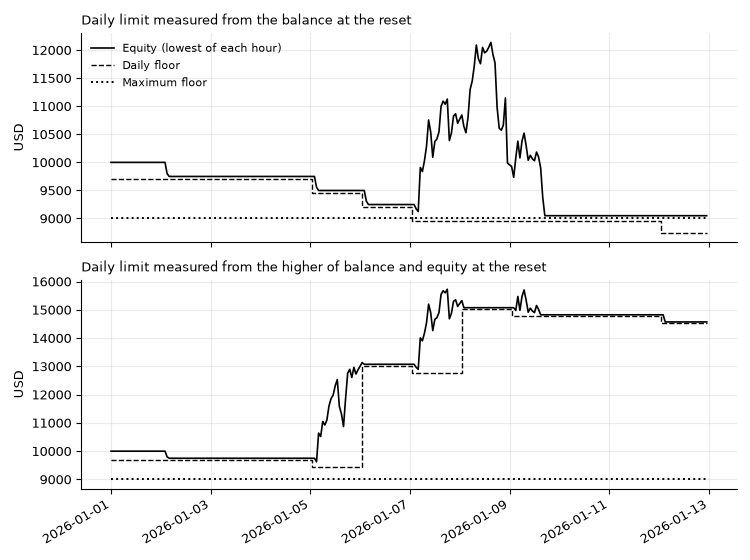
Figure 2. Gold, January 2026: the daily floor measured from the balance at the reset (top) and from the higher of balance and equity at the reset (bottom)
The second run also shows the limit of a daily lock. It ended the period at the maximum lock as well, after a long series of small losing days: each day stopped at -3%, but nothing stopped the days from following each other. A daily limit protects against one bad day, not against a bad month. That is the job of the maximum limit, and for a personal account it is worth adding a weekly limit, as mentioned in the extensions below.
The EURUSD run shows a calmer picture. Two daily locks in late January stopped a losing streak, the account recovered, and no further lock was needed until the end of April:
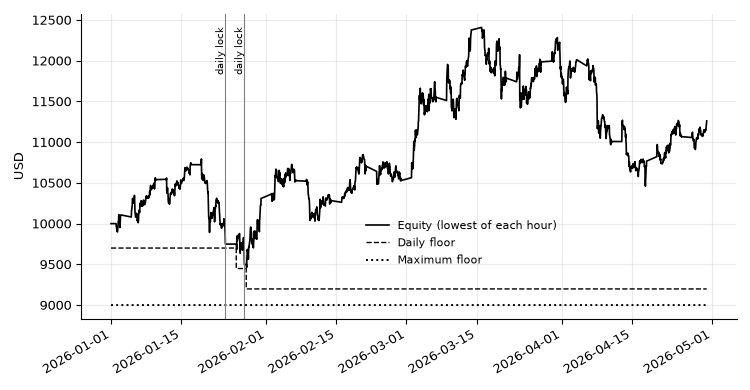
Figure 3. EURUSD, January to April 2026: lowest equity of each hour, the daily floor and the maximum floor
The tester has limits that matter for this kind of EA. Its slippage is gentler than a real market during news, and a price gap over the weekend can jump straight over the buffer: if Monday opens below the floor, no EA can close at the floor price. Positions held over the weekend or over major news are therefore the real risk for any loss limit, and a lock reduces it but cannot remove it.
Possible extensions
The EA is deliberately small, so that every part can be read and checked. Several extensions are useful in practice and fit into the same structure:
- A weekly limit. The same idea as the daily limit with a reset on Monday. It answers the slow losing streak seen in the gold test.
- A per-trade cap. Close a single position when its loss reaches a fixed share of the account, before it can use up the whole daily room on its own.
- A profit target lock. Some rules and many traders stop for the day after a good result. It is the same lock with the comparison reversed.
- A news lock. Using the economic calendar functions of MQL5, block new trades for a few minutes around high-impact events, when gaps and slippage are largest.
- Time zone handling. Instead of a reset hour in server time, compute the offset between the server and the rule's time zone from TimeGMT() and the daylight saving rules of that zone.
Conclusion
An account-level loss lock is a small program, but each of its parts has a trap. The checklist we arrived at:
- Count the day the way the rule does: reset hour, balance or higher of balance and equity, % of the initial balance
- Rebuild the balance at the reset from the deal history, and keep deposits and withdrawals out of the result
- Prefer the higher of balance and equity as the daily base if open profit should be protected; with the balance as the base, a day can give back far more than the daily limit
- Watch the equity of the whole account on a timer, not only the ticks of one chart
- Act before the floor, with a buffer sized for spread and slippage
- Close positions first, the biggest loss first, then pending orders; skip what the freeze level forbids and repeat on the next check
- Treat a closed market, requotes and timeouts as normal, not as errors
- Keep closing new trades while the lock is on, from any EA, by hand or from the phone
- Save the lock in global variables so that a restart does not unlock trading
- Test it with deliberately losing trades, and remember that gaps can jump over any buffer
The attached DailyLossLock.mq5 implements all of these points. Attach it to any chart of the account, set the limits to match your rules, and keep a stop loss on every trade: the lock is the last line of defence, not the first.
Attached file
| File | Description |
|---|---|
| DailyLossLock.mq5 | Expert Advisor: account-level daily and maximum loss lock with a Strategy Tester mode that opens risky demo trades to test the lock |
Ready-made version
If you would rather not build and maintain it yourself, TrueRisk Account Guard does this job for the whole account: it closes everything before you break your daily or maximum loss limit and keeps trading locked until the reset. MT5: https://www.mql5.com/en/market/product/200814, MT4: https://www.mql5.com/en/market/product/201397. Free 14-day demo trials of the TrueRisk tools: https://www.mql5.com/en/blogs/post/777318.


