
LONG (BUY) SETUP
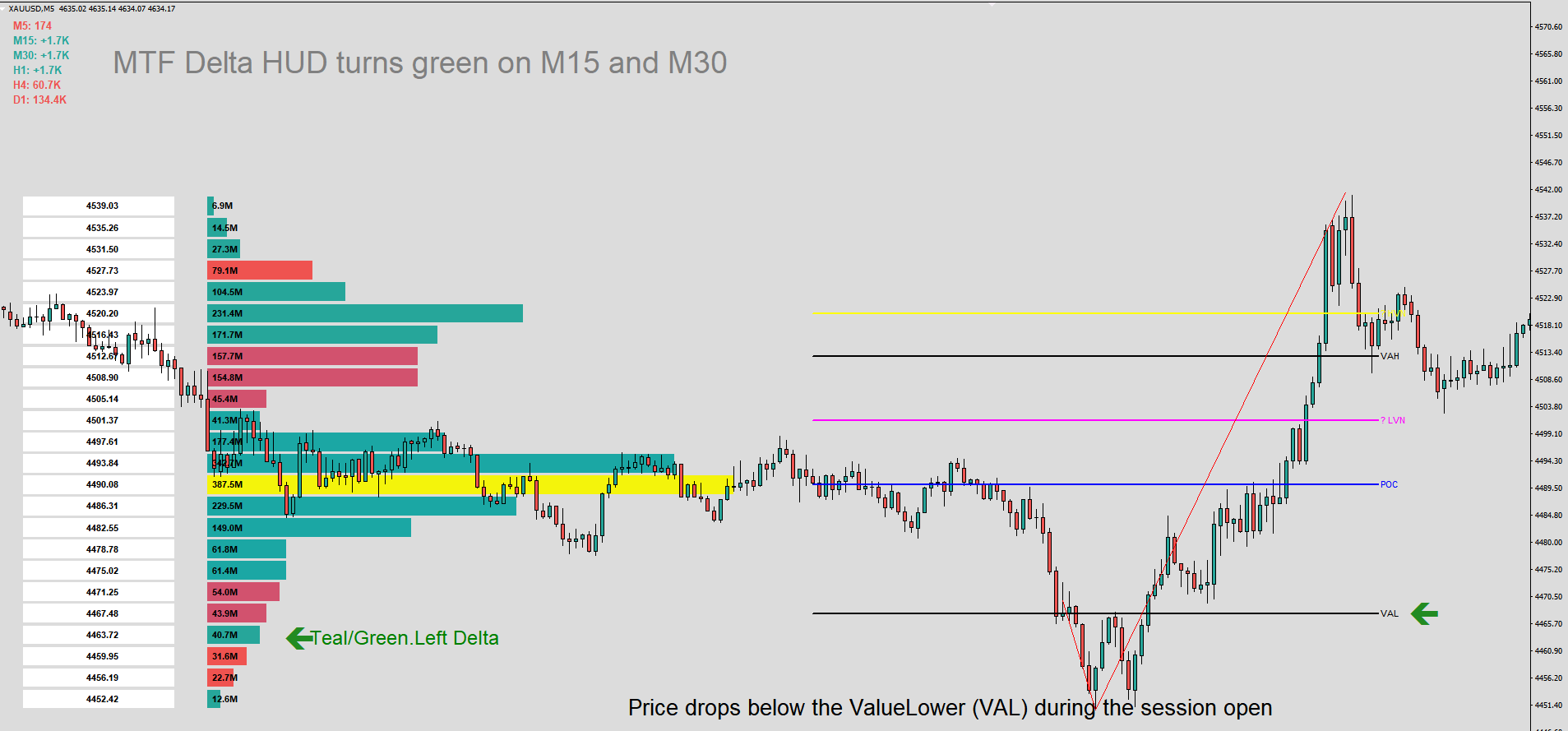
Context: Price drops below the Value Area Low ( VAL) during the session open.
Trigger: Price quickly re-crosses back ABOVE VAL into the shaded Value Area.
Confirmation:
The Left Delta bar at the bottom changes to Teal/Green (buyers stepping in).
MTF Delta HUD turns green on M15 and M30.
Execution:
Entry: Buy market order as soon as a candle closes back inside VAL.
Stop Loss: 2–3 pips below the swing low made outside VAL.
Take Profit 1: Daily POC (Blue line).
Take Profit 2: Opposite VAH (Value Area High).
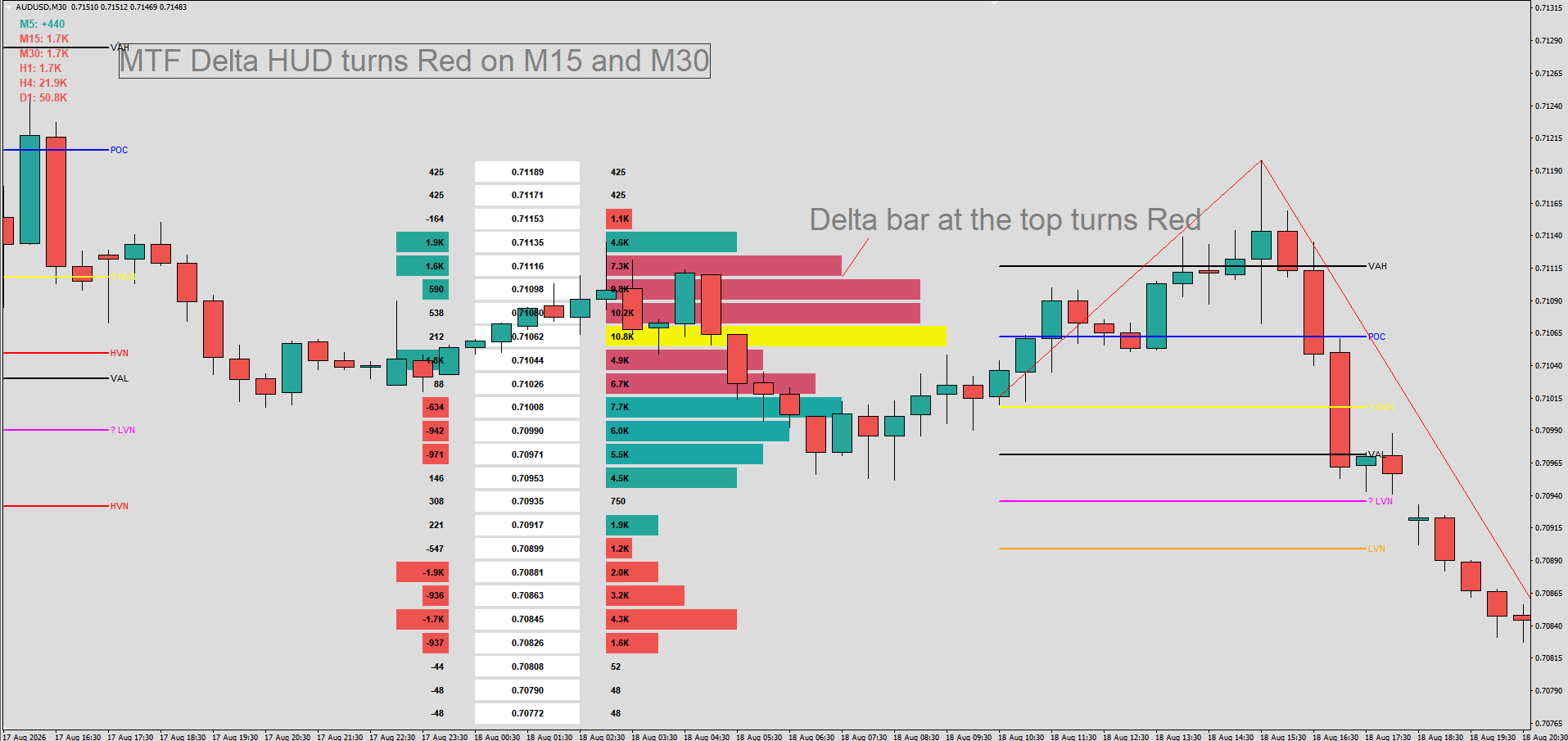
Context: Price pushes above Value Area High ( VAH) during the session open.SHORT (SELL) SETUP
Trigger: Price fails to sustain higher prices and falls back BELOW VAH into the shaded Value Area.
Confirmation:
Left Delta bar at the top turns Red (sellers absorbing buyers).
MTF Delta HUD turns red on M15 and M30.
Execution:
Entry: Sell market order as soon as a candle closes back inside VAH.
Stop Loss: 2–3 pips above the swing high made outside VAH.
Take Profit 1: Daily POC (Blue line).
Take Profit 2: Opposite VAL (Value Area Low).
LONG (BUY) SETUP
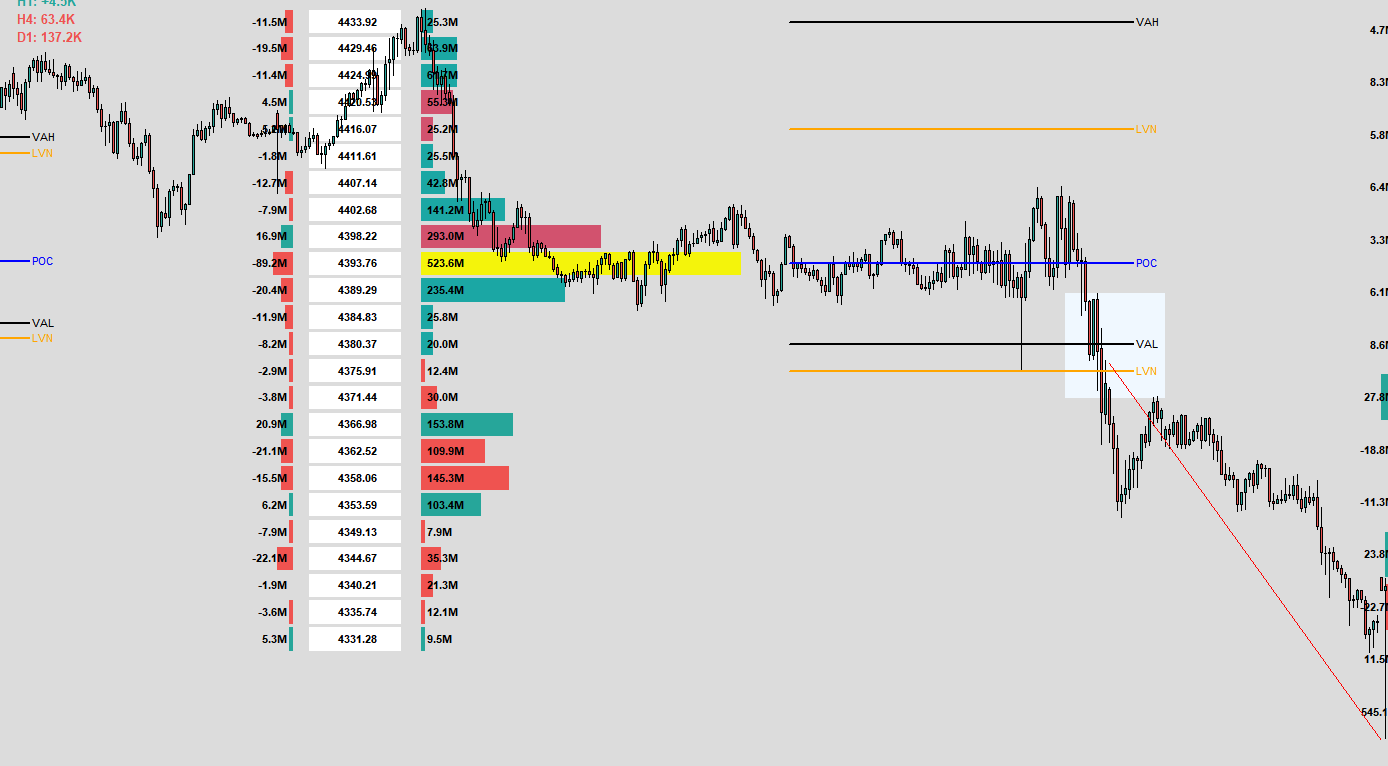
Context: Price breaks strongly above VAH.
Trigger: Price pulls back to retest VAH from above.
Confirmation: Price wicks off VAH without closing back inside the shaded area; MTF Delta on H1/H4 is Green.
Execution:
Entry: Buy on the rejection bounce at VAH.
Stop Loss: Just below the highest ★ HVN inside the Value Area.
Take Profit: Next major historical HVN from the Sidebar Profile.
SHORT (SELL) SETUP
Context: Price breaks strongly below VAL.
Trigger: Price pulls back to retest VAL from below.
Confirmation: Price wicks off VAL without closing back inside the shaded area; MTF Delta on H1/H4 is Red.
Execution:
Entry: Sell on the rejection bounce at VAL.
Stop Loss: Just above the lowest ★ HVN inside the Value Area.
Take Profit: Next major historical LVN/HVN target from the Sidebar Profile.
Context: Fast drop into the current session POC or a ★ HVN.LONG SCALP (BUY)
Trigger: Price hits the level, creates a lower wick, and the split profile shows extreme Red delta that fails to push price lower (Buyers absorbing selling).
Confirmation: M5 bar closes bullish; MTF Delta on M5 switches to Green.
Execution:
Entry: Buy immediately upon candle close.
Stop Loss: 5–10 pips (just behind the POC / HVN node).
Take Profit: The next upper price node or +10–15 pips (1:2 Risk/Reward).
Context: Fast rally into the current session POC or a ★ HVN.SHORT SCALP (SELL)
Trigger: Price hits the level, creates an upper wick, and the split profile shows extreme Green delta that fails to push price higher (Sellers absorbing buying).
Confirmation: M5 bar closes bearish; MTF Delta on M5 switches to Red.
Execution:
Entry: Sell immediately upon candle close.
Stop Loss: 5–10 pips (just above the POC / HVN node).
Take Profit: The next lower price node or +10–15 pips (1:2 Risk/Reward).
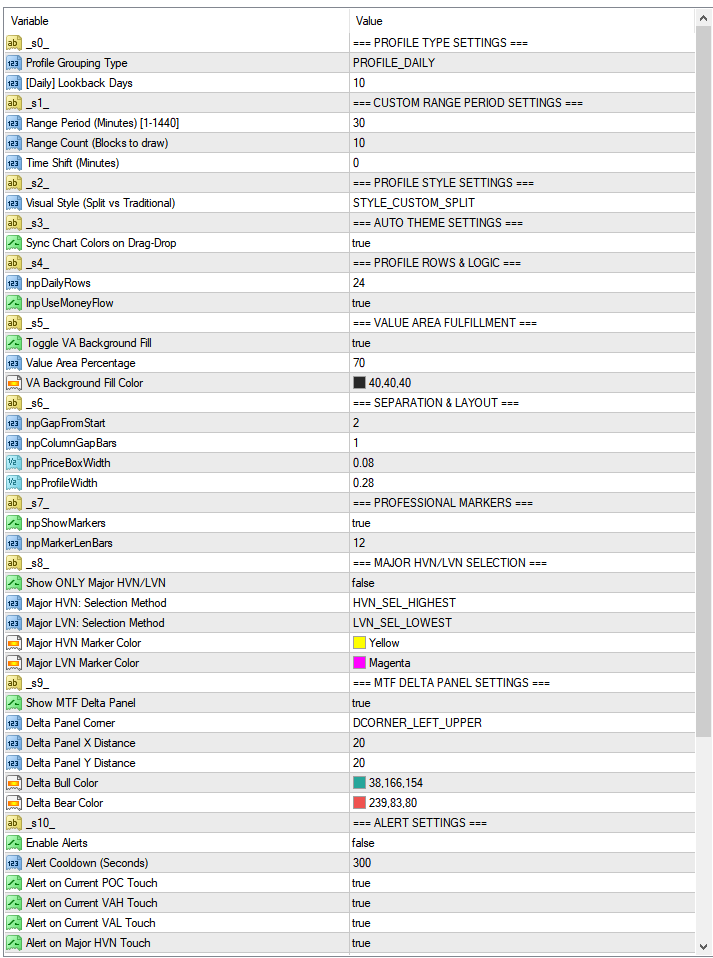
Short & To-The-Point Descriptions
1. Profile Type Settings
InpProfileType: Switches profile grouping mode between standard Daily blocks (PROFILE_DAILY) or custom time blocks (PROFILE_CUSTOM).
InpLookbackDays: Sets how many days into the past to calculate and draw profiles when using Daily mode.
2. Custom Range Period Settings
InpRangePeriodMinutes: Length of each custom profile block in minutes (e.g., 30 for 30-min profiles, 240 for 4-hour profiles).
InpRangeCount: Total number of custom historical blocks to calculate and display.
InpTimeShiftMinutes: Shifts the start time of custom range blocks forward or backward (useful for session alignments like London/NY open).
3. Profile Style Settings
InpProfileStyle: Layout mode — STYLE_CUSTOM_SPLIT shows center price boxes with delta on left and total volume on right; STYLE_TRADITIONAL_HISTO shows a classic single-sided volume histogram.
4. Auto Theme Settings
InpAutoTheme: When enabled (true), automatically modifies chart background, grid, and candle colors to match the built-in clean light theme upon loading.
5. Profile Rows & Logic
InpDailyRows: Vertical price resolution (number of horizontal price bins/slices per profile block).
InpUseMoneyFlow: When true, multiplies tick volume by price (Volume × Close) to calculate Money Flow; when false, uses raw tick volume.
6. Value Area Fulfillment
InpShowVAFill: Turns the background highlight/shading on/off behind the Value Area bars.
InpVATargetPct: The target percentage of total volume used to establish the Value Area (default: 70%).
InpVAFillColor: Background color applied to the Value Area rows.
7. Separation & Layout
InpGapFromStart: Horizontal spacing between the start of the time block and the start of the profile visuals.
InpColumnGapBars: Spacing between individual columns (price boxes, delta bars, and volume bars).
InpPriceBoxWidth: Relative horizontal width of the price label boxes in split mode.
InpProfileWidth: Maximum relative width allocated to the volume histogram bars.
8. Professional Markers
InpShowMarkers: Toggles horizontal indicator lines and text tags for POC, VAH, VAL, HVN, and LVN.
InpMarkerLenBars: Visual length (in bar duration) of marker lines drawn to the right of the profile.
9. Major HVN/LVN Selection
InpShowOnlyMajorHVN_LVN: When true, hides minor volume nodes and displays only the single most significant HVN and LVN.
InpMajorHVNSelect: Selection method for Major High Volume Node (pick by highest peak volume or closest to POC).
InpMajorLVNSelect: Selection method for Major Low Volume Node (pick by lowest valley volume or closest to POC).
InpMajorHVNColor: Color of the Major High Volume Node marker line and text (★ HVN).
InpMajorLVNColor: Color of the Major Low Volume Node marker line and text (★ LVN).
10. MTF Delta Panel Settings
InpShowMTFDelta: Displays an on-screen dashboard showing current bar volume delta across 6 timeframes (M5 to D1).
InpDeltaPanelCorner: Screen corner position for the panel (Top-Left or Top-Right).
InpDeltaPanelX: Horizontal pixel offset distance from the selected chart corner.
InpDeltaPanelY: Vertical pixel offset distance from the selected chart corner.
InpDeltaBullColor: Text color for positive/bullish delta values.
InpDeltaBearColor: Text color for negative/bearish delta values.
11. Alert Settings
InpEnableAlerts: Master on/off switch for price touch alerts on the current active profile block.
InpAlertCooldownSec: Minimum time interval (in seconds) between consecutive alerts to prevent alert spamming.
InpAlertOnPOC: Triggers an alert when live price touches the current Point of Control (POC).
InpAlertOnVAH: Triggers an alert when live price touches Value Area High (VAH).
InpAlertOnVAL: Triggers an alert when live price touches Value Area Low (VAL).
InpAlertOnMajorHVN: Triggers an alert when live price touches the Major HVN.
InpAlertOnMajorLVN: Triggers an alert when live price touches the Major LVN.
InpAlertPopup: Sends standard MT4 pop-up window alerts.
InpAlertPush: Sends push notifications to connected MT4 mobile apps.
InpAlertSound: Audio file name to play on alert (leave empty to disable sound).
InpAlertEmail: Sends an alert email via configured MT4 email settings.
12. Sidebar Settings
InpShowSidebar: Displays a fixed composite volume profile on the right side of the screen over the entire lookback window.
InpSidebarRows: Vertical resolution (number of rows) for the sidebar profile.
InpSidebarWidth: Width scale of the sidebar profile relative to chart view.
InpSidebarOffsetBars: Horizontal shift (in bars) to move the sidebar left or right from the right margin.
InpSidebarCol: Color reference for sidebar styling.
13. Appearance
HERE MT4 HERE MT5
InpFontSize: Global font size for numeric labels, price boxes, and volume text inside the profiles.