- Telegram Dashboard Monitor Lite Link: https://www.mql5.com/en/market/product/163377
- Telegram Dashboard Monitor Pro Link: https://www.mql5.com/en/market/product/164099
1. Control Panel Usage
The EA creates a user-friendly panel on your chart:
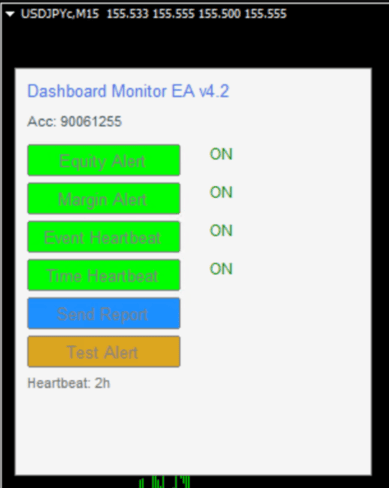
Button Functions:
- Equity Alert: Toggle equity drop warnings
- Margin Alert: Toggle margin level warnings
- Event Heartbeat: Toggle connection/event alerts
- Time Heartbeat: Toggle periodic status updates
- Send Report: Manual daily report
- Test Alert: Send test message to Telegram
Color Indicators:
- Green (ON): Feature is active
- Red (OFF): Feature is disabled
2. Troubleshooting
| Issue | Solution |
| No Telegram messages | 1. Check bot token & chat ID |
| WebRequest Error 4060 | Enable "Allow WebRequest for listed URL" in MT4 settings |
| EA not loading | Ensure DLL imports are allowed in MT4 settings |
| Duplicated alerts | Anti-spam protection limits to 3 alerts per 5 minutes |
| Panel not visible | Click any object on chart and press Ctrl+B to show all objects |
| Weekend alerts | Heartbeat is disabled on weekends (Saturday/Sunday) |
Quick Test:
- Click "Test Alert" button on panel
- Check Telegram within 10 seconds
- If received, all systems are working!