Move To Breakeven

The main purpose of this expert advisor is to protect your hardly gained profits.

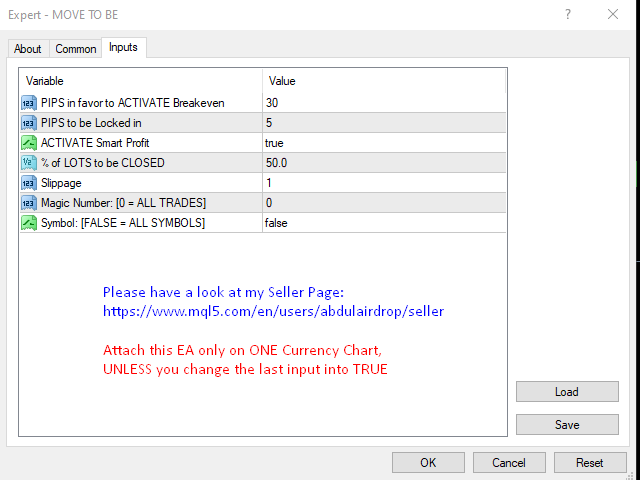
Once the market goes in your favor, with amount of specified pips [configured via EA inputs], the EA will do the following:

  1. Move the Stop-loss of the profitable positions to Breakeven.
  2. Lock in some profits, i.e put the SL above/below your entry with specified pips 
  3. Will close part of position, % of lots, once the EA was triggered. 

By default, the "Move to Breakeven EA" will modify all opened positions on the terminal. You just need to attach it on ONE CHART ONLY. 

However, you can adjust the EA settings to RESTRICT its work as follows:

  • Monitor only trades on Symbol where the EA attached to their chart. 
  • Monitor only trades with specific Magic Number.

Features/Notes:

  • The "Move to Breakeven EA" will do it's job even though there was no SL was set in the first place. All what it needs is the market goes in your favour with specified pips. Great!

  • As its name indicates (Move to BE), this process will be done ONLY ONCE for each open position.   

推荐产品
This MT4 Expert Advisor (EA) is a   multi - timeframe trend - based trading assistant   with visualized UI and automated trading logic. Its core functions are as follows: Trend Analysis & Visualization Analyzes market trends by integrating multiple technical indicators including EMA (21/55), ADX (14), MACD (12/26/9), RSI (14) and volume data across different timeframes. Generates Chinese - language trend comments (e.g., "Bullish momentum surges" or "Bearish dominance prevails") and displays the
AllHere is a plug-in for Control-adora that works as information panel. Its main function is to show you all the Control-adora elements placed in the chart, like the Control-adora's orders or the exit lines. On the lower left corner, AllHere shows a collection of buttons classified by color (you can set them in the indicator's properties) for several elements used in Control-adora system: Stop loss indications (stop loss Arrows) Exit lines Above (Above trend lines) Exit lines Below (Below trend
FREE
WOW Dash Lucky Bunny
Nirundorn Promphao
I will support only my client. สำหรับลูกค้า M5 timeframe with zigzag upward and downward Strategies Parameters General Trade Settings Money Management  Lot : Fixed (can change) Strategies  - M5 Strategies it is fixed with MA, Bollinger band, Candlestick Levels Close Functions  - M5 Strategies MagicNumber  - individual magic number. The EA will only manage position of the chart symbol with this magic number. NextOpenTradeAfterSeconds  - 60 seconds is default, can change it MaxSpread  - upto cur
Move to Breakeven Limited
Abdulfattah Yahya Mohammed Alhazmi
The main purpose of this expert advisor is to protect your hardly gained profits. Once the market goes in your favor, with amount of specified pips [configured via EA inputs], the EA will do the following: Move the Stop-loss of the profitable positions to Breakeven. Lock in some profits, i.e put the SL above/below your entry with specified pips  Will close part of position, % of lots, once the EA was triggered.  By default, the "Move to Breakeven EA" will modify all opened positions on the termi
FREE
Pure Gold Sniper GS7 – MT4 Expert Advisor The Pure Gold Sniper GS7 is a fully automated Expert Advisor designed exclusively for trading Gold (XAUUSD). It combines a proprietary blend of built‑in ( MACD ) and custom‑generated indicators to identify high‑probability trading opportunities. Available now : XAUUSD settings on a 1 min TF FX Pairs: I shall update the details for trading currency pairs with recommended settings soon. Key Features: Advanced entry logic using multiple internal signals  In
Algo v3 ea robot
Sharif Khatib Said
1 (1)
ALGO V3 EA is developed with over a year of intense research and testing. This expert advisor employs multi-timeframe volatility measurements, analyses intentions of market participants and anticipate price movements before they occur with help candlestick patterns, and supply & demand analysis for accurate entries that are highly reactive to market price movements of Gold, breaking out at critical price levels. Gold Mana is proven to be resilient for more than 3 years with stable trading throug
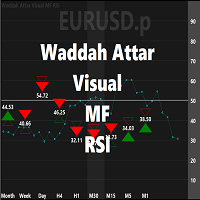
Waddah Attar Visual MF RSI this App show you RSI values and status for all frames in one chart . Filled Triangle means current RSI Value . Framed Triangle means previous RSI Value . Up Arrow and Green Color means the direction of RSI is up . Down Arrow and Red Color means  the direction of RSI is down . when you move mouse cursor on frame column .. the full RSI chart will drawn . you can change RSI Period in the app properties .. the default is 14 . thanks and good luck .
FREE
This  is utility for Closing All trades or Closing All Buy Trades Or Closing All Sell Trades based on button clicked. Advantages and features of  Product is as follows Closes trades very fast  customised based on traders frequently encountered situation .This is very simple utility  which can be used by beginner or  advanced trader . Trader just need click   button like "Close All" "Close Buy" Or "Close Sell" and their request is executed.
Artemis Prop Guard Pro Artemis Prop Guard Pro is a professional risk-control utility for MT4, built for manual traders who want a disciplined, rule-based trading environment. It does not generate signals, predict market direction, or automate strategy logic. Its sole purpose is protecting account equity from avoidable rule breaks, over-risking, emotional trading, and unmanaged exposure. Why account discipline matters Most traders do not lose accounts in a single trade. They lose them through a c
FREE
Telegram Sender — MetaTrader to Telegram Trade Alerts Telegram Sender   is a powerful MetaTrader utility that instantly sends trading alerts from your MT4/MT5 platform directly to Telegram. Stay connected to the market anywhere, anytime, without constantly watching your charts. Designed for traders who value speed, automation, and convenience, Telegram Sender delivers real-time notifications for signals, order activity, and market events straight to your phone or Telegram group. Key Features In
Dear Trader It is my pleasure to introduce to you my tool called the " Forex Sniper Indicator" . The major aim of this tool is to help serious traders and investors in all type of Financial Markets to catch price next movement right at the moment the price direction is about to change. This tool can be used to snipe the price direction in both down trend, uptrend and ranging markets. This tool can be used as the stand alone tool though it may be combined with other tools as well. My goal is to h
Breakout Monster Mini
Abdulfattah Yahya Mohammed Alhazmi
5 (3)
It is a very profitable EA, to trade trends breakout, and manage trades, takeprofit, stoploss, move to breakeven, and trailing stop. I work with this EA, and the reversal/pullback version since 2014.  This is a demo   version of the full   Breakout Monster EA . It works on Real and Demo accounts. Demo version restrictions: Money Management is disabled. Lot size is restricted to 0.01 lots only (Or the minimum allowed by broker). Numerical, SL and TP set to 100 pips. They cannot be modified in
FREE
MNFM Manual Entry MT4
Khalid Abdullah M Altuwaijri
MNFM Manual Entry MT4 is a compact manual trading utility for MetaTrader 4. Set the lot size in the dashboard and click BUY or SELL to send one market order on the current chart symbol. Each order is opened with Magic Number 0 and the comment “MNFM Manual Entry”. The dashboard displays open buy and sell net results and counts positions with Magic Number 0. This utility does not open trades automatically. It does not place pending orders, read news, or manage stop loss, take profit, trailing sto
FREE
Boleta Aguias Traders
Vagner Guimaraes Da Silva
Buy Limit, Sell Limit Pending Orders. With the Aguias Traders Order, you can set Takeprofit and Stoploss together with the pre-defined Lot as an OCO order, plotting the price of Buy Limit and Sell Limit orders. It has a confirmation function, when clicking on the chart, the first click marks the price, the second click confirms the location, the third click sends the order, with this method, you avoid sending unnecessary orders. A simple and easy way to plot orders quickly.
AutomaticEquityManager
Jaroslav Rajcher
5 (1)
Description: Automatic Equity Manager EA manages the whole account equity. You need to set it up on its own chart. ----------------------------------------------------------------------------------------------------------------------------------------- Parameters: EquityGainPercent = 3 (This automatically closes all trades when your equity shows a gain of X percent.) ---------------------------------------------------------------------------------------------------------------------------------
FREE
Close at time
Yaotang Liu
5 (2)
Close at time is a very useful EA to close specific positions at specific time. It also provides additional condition to setup. Close specific positions at time. Close specific positions which currently profits. Close specific long positions only. Close specific short positions only. Close specific pending orders. It is useful to support your trading strategies. Parameters description magic : Target magic number to close. close_time_hr: Hour to close. (MetaTrader 4 terminal time) close_time_min
FREE
ZuperButtons Mix
Manuel Francisco Gaitan
El ZuperButtons Mix es un Expert Advisor diseñado para traders de scalping e intradía que requieren alta exactitud en la ejecución manual. El programa   NO EJECUTA   transacciones.  A diferencia de un panel de gestión global, esta consola está optimizada para la interacción directa con el instrumento activo en pantalla. Su función principal es convertir la gestión manual en un proceso fluido y veloz, centralizando en una botonera interactiva todo el control necesario para operar con disciplina y
You can try this EA in the strategy tester, or you can try this demo version:  https://www.mql5.com/en/market/product/46367 Trade Manager This assistant automates various aspects of order handling in MT4. The assistant allows you to plan a trading strategy defining Entry Levels, Stop Loss, Take Profit, execution of orders on one level, partial closes, Break Even, etc. Basic characteristics Trades calculation 3 basic lines are drawn that define the entry level, SL and TP. You can move this line
Breakout Monster Expert Advisor
Abdulfattah Yahya Mohammed Alhazmi
For The English Manual you can contact me. The Most advanced and comprehensive EA to trade Trend Breakout The “Breakout Monster EA” trades breakouts when the current price of the currency pair breaks a predefined horizontal level or trendline on the currency pair's chart. The opening of the position can be immediate after breaking the drawn trendline OR after closing the candle above/below this trend, provided that all technical and non-technical filters, defined by the trader through the exp
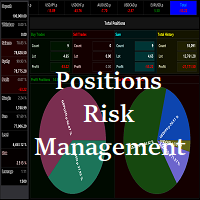
Waddah Attar Easy Positions Risk Management This EA gives you a full ability to close one position or close all positions . Close buy or sell trades in any position . Close profit or loss position . by clicking on a command button on the chart with confirmation message . Show you  a full information about your positions like : count - lots - average price - points - profit -  profit % - used margin for this position and the risk percent . and also the scrolled table of trades that position has
FREE
RR Partial Close
Richard Reyes
5 (1)
This EA can not be used with the strategy tester. To test it you can try this demo version:  https://www.mql5.com/en/market/product/41143 This EA does partial close to your positions every certain pips, and can move your Stop Loss to Break Even (Open Proce + 1 pip) when one of the partial close is made. The EA handles all trades of the chart symbol. It can be used with any pair or instrument on MT4. This EA will remember the state of the trades if MT4 is closed. Inputs Step pips  :  Indicates
Safe Leverage Platinum 专业级资金管理与风险控制系统(MT4) 全新 Platinum 版本 —— 不只是升级,而是全面革新 Safe Leverage Platinum 并非 Safe Leverage Pro 的简单升级版本,而是经过重新设计与优化的专业级交易风险管理系统。 在保留原有稳定性的基础上,加入更多自动化功能、更高等级的资金管理机制以及更智能的订单控制逻辑,为专业交易者提供更高效、更安全、更便捷的交易体验。 Platinum 核心升级 智能 1:1 杠杆控制系统 根据账户资金自动计算最佳持仓规模。 有效降低过度杠杆风险, 减少爆仓及追加保证金的可能性, 让账户更加稳定。 全新 Profit Protection 引擎 自动监控账户盈利。 达到设定目标后: 自动锁定利润 自动平仓 可选择: • 仅管理本 EA 的订单 或 • 管理整个账户所有订单(包含手动订单) 真正做到无人值守。 Advanced SL / TP Management 更智能的止损止盈系统。 支持: • 自动设置 SL • 自动设置 TP •
The BufferPro Automator EA is a versatile and powerful trading tool designed to automate your trades based on custom signal indicators using buffer inputs. It offers flexibility through several advanced features such as trailing stops, break-even levels, and customizable closing options. With the ability to fine-tune trade execution and risk management, this EA ensures that you maintain control over your strategy while benefiting from automated precision. Feel free to use your own custom indicat
Order Block Draw MTF
Jorge Delgado Segura
4 (1)
Just $30 for six months!!!. This will draw Order Blocks just by clicking on a candle with different colors for different timeframes. It will use the body or the wicks. It can also draw the mean threshold of the candle open/close or high/low. As a drawing tool, it is not active all the time after adding it to the chart. Activate by pressing 'b' twice on the keyboard within a second. If activated but then decided not to draw, deactivate by pressing 'b' once.  Box color depends if candle is abov
IMPORTANT NOTE : This is a dashboard indicator and will not work on strategy tester. Multi-Symbol Trend Scanner - Professional Market Analysis Tool Overview The   Multi-Symbol Trend Scanner   is a sophisticated trading dashboard that provides real-time market analysis across multiple financial instruments simultaneously. Designed for both novice and professional traders, this powerful indicator displays crucial market data in an intuitive, table-aligned format that's easy to interpret at a glan
MaxProfitDz v4
Hafis Mohamed Yacine
MaxProfitDZ Expert adviser MaxProfitDz v1.4     Recommendations Symbol: ALL PAIRS ..i Recommended    EURUSD. Time Frame:1M. Brokers: ALL brokers .  low spread/commission, 1:500 leverage Minimum Deposit Recommended :   $500 USD  Lot Size for 500$   : 0.01  Use a broker with good execution and with a spread of 0.1-2 points. A very fast VPS is required Parameters EA TrendON=true (Read the  note ) MMType = 2 LotMultiplikator = 1 LotConst_or_not = TRUE Take profit :5-10 pips  for accounts with five
Este Robot te permite establecer cualquier tipo de orden, ya sea pendiente o de mercad, compra o venta. Usando simpre un riesgo definido, ya sea un procentaje del dinero total de la cuenta, una cantidad fija, un volumen fijo o un número de lotes fijo por cada dolar, y ajusta el Stoploss y el Volumen de la operación. Una herramienta indispensable que te permitira controlar tus perdidas y mejorar tu rendimiento el mercado.
MNFM Performance Monitor MT4
Khalid Abdullah M Altuwaijri
MNFM Performance Monitor MT4 A read-only dashboard for comparing trading results by order magic number and symbol. It does not open, modify or close orders, and does not provide trading signals. Features - Closed-ticket net profit after commission and swap. - Current floating profit including recorded commission and swap. - Views by magic number, symbol and open market-order exposure. - Rolling 7-day and 30-day periods, or all loaded history. - Closed-ticket win rate, profit factor and longest
FREE
ToTheMoon MT4
Daniel Moraes Da Silva
5 (1)
ONE OF THE FEW ROBOTS WITH A SIGNAL HISTORY OF MORE THAN 3 YEARS AND AMONG THE TOP 10.   LINK TO MY ROBOTS AND SIGNAL PRESETS: In my profile there is a link to download the PRESETS that I use in my SIGNALS, you can download and Backtest for free, there are explanations in the my WebSite. https://www.mql5.com/en/users/tec_daniel   LINK TO OTHER ROBOT VERSIONS: MT4:  https://www.mql5.com/en/market/product/97963 MT5:  https://www.mql5.com/en/market/product/97962   SOME EXAMPLES OF SIGNALS ON “mql5.
ActInside
Sergio D. Rocha
This indicator is a plug-in for Controladora Expert Adviser , which allows you to set a specific area, and the Controladora will open a buy or a sell, if the candle closes inside this area. To make it work in a chart with the Controladora installed, add the Act Inside indicator, then add a rectangle shape into the chart and re-size it to cover only the area where the close of a candle should be in order to send the buy or sell order. Rename the rectangle as AI and in it's description write buy,
FREE
该产品的买家也购买
欢迎来到 Trade Manager EA——这是一个终极风险管理工具,旨在使交易变得更直观、精准和高效。它不仅仅是一个下单工具,而是一个用于无缝交易计划、仓位管理和风险控制的全面解决方案。不论您是新手交易员、资深交易员,还是需要快速执行的剥头皮交易员,Trade Manager EA 都可以满足您的需求,适用于外汇、指数、大宗商品、加密货币等各种市场。 借助 Trade Manager EA,复杂的计算已成过去。只需分析市场,在图表上用水平线标记入场、止损和止盈,设置您的风险水平,Trade Manager 就会立即计算出理想的头寸规模,并实时显示以点、账户货币计价的止损和止盈。每笔交易都得以轻松管理。 主要功能: 头寸规模计算器 :根据定义的风险瞬间确定交易规模。 简单的交易计划 :在图表上用可拖动的水平线直接计划交易,设置入场、止损和止盈。 实时显示 SL 和 TP :以账户货币、点或分显示止损和止盈,便于分析。 高级保护工具 盈亏平衡选项 : 基本盈亏平衡 :当您的交易达到设定水平时自动保护利润。 多级盈亏平衡 :设置多达 4 个级别以逐步保护利润。 尾随止损选项 : 基本尾随
Exp COPYLOT CLIENT for MT4
Vladislav Andruschenko
4.69 (65)
MetaTrader 4 专业交易复制器 快速、专业、可靠的 MetaTrader 4 交易复制器。 COPYLOT 可在 MetaTrader 4 与 MetaTrader 5 终端之间复制外汇交易,并为不同账户类型和交易场景提供灵活的同步方案。 COPYLOT MT4 版本支持: MetaTrader 4 → MetaTrader 4 MetaTrader 5 Hedge → MetaTrader 4 MetaTrader 5 Netting → MetaTrader 4   MT5 版本 完整说明 + DEMO + PDF 如何购买 如何安装 如何获取日志文件 如何测试与优化 Expforex 的全部产品 您也可以使用 MetaTrader 5 版本,在 MetaTrader 5 → MetaTrader 5 和 MetaTrader 4 → MetaTrader 5 之间进行复制: COPYLOT CLIENT for MT5 COPYLOT 是一款专业级交易复制器,可稳定运行于 2、3 甚至 10 个终端之间。 支持从模拟账户和投资者密码账户进行复制 可同时运行在多个终端上
Trade Assistant MT4
Evgeniy Kravchenko
4.43 (197)
它有助于计算每笔交易的风险,容易安装新的订单,具有部分关闭功能的订单管理, 7 种类型的追踪止损和其他有用的功能。 附加材料和说明 安装说明 - 应用程序说明   线条功能  - 在图表上显示开仓线、止损线、止盈线。 有了这个功能,就可以很容易地设置一个新的订单,并在开仓前看到它的附加特性。   风险管理  - 风险计算功能在考虑到设定的风险和止损单的大小的情况下,计算新订单的成交量。它允许你设置任何大小的止损,同时观察设定的风险。 批量计算按钮 - 启用 / 禁用风险计算。 在 " 风险 " 一栏中设置必要的风险值,从 0 到 100 的百分比或存款的货币。 在 " 设置 " 选项卡上选择风险计算的变量: $ 货币, % 余额, % 资产, % 自由保证金, % 自定义, %AB 前一天, %AB 前一周, %AB 前一个月。   R/TP 和 R/SL - 设置止盈和止损的关系。 这允许你设置相对于损失的利润大小。 例如, 1 : 1 - 这决定了 TP = SL 的大小。 2 : 1 - 这意味着 TP 是 SL 的两倍。 RR - 它禁用比率。   订单管理 该面板支持市场
Local Trade Copier EA MT4
Juvenille Emperor Limited
4.96 (111)
Local Trade Copier EA MT4 是一款快速、灵活的交易复制工具,用于在同一台 Windows 电脑或 Windows VPS 上的多个 MetaTrader 4 账户之间复制和管理交易。 它将本地交易同步与 Receiver 端的手数管理、风险管理、交易过滤、品种映射、交易管理和账户保护功能结合在一起。 只需约 1 分钟 即可完成 Transmitter 和 Receiver 终端的设置,并可在同一经纪商或不同经纪商的账户之间复制手动交易或 EA 交易。在合适的条件下,本地 MetaTrader 终端之间的交易信息可以在 0.5 秒以内 完成同步。实际交易执行速度取决于经纪商延迟、网络状况、电脑/VPS 性能以及终端负载。 购买前先试用免费演示版 您可以在 MT4 模拟账户上测试 功能完整的 Local Trade Copier EA MT4 免费演示版 ,每次可使用 4 小时 : 下载 Local Trade Copier EA MT4 免费演示版 将下载的文件放入: MT4 → 文件 → 打开数据文件夹 → MQL4 → Experts 然后重新启动 MT
The product will copy all telegram signal to MT4   ( which you are member  ) , also it can work as remote copier.  Easy to set up, copy order instant, can work with almost signal formats, image signal, s upport to translate other language to English Work with all type of channel or group, even channel have "Restrict Saving Content", work with  multi channel, multi MT5 Work as remote copier: with signal have ticket number, it will copy exactly via ticket number. Support to backtest signal. How to
News Filter EA: Advanced Algo Trading Assistant News Filter EA is an advanced algo trading assistant designed to enhance your trading experience. By using the   News Filter EA , you can integrate a Forex economic news filter into your existing expert advisor, even if you do not have access to its source code. In addition to the news filter, you can also specify   trading days   and   hours   for your expert. The News Filter EA also includes   risk management   and   equity protection   features
TradePanel MT4
Alfiya Fazylova
4.84 (95)
交易面板是一款多功能交易助手。该应用包含超过50种手动交易功能,并允许您自动执行大多数交易任务。 应用程序说明 : https://www.mql5.com/zh/blogs/post/761102 用于模拟账户的应用程序试用版: https://www.mql5.com/zh/blogs/post/762579 如何安装应用程序: https://www.mql5.com/zh/blogs/post/762580 如何在可视化模式下测试应用程序: https://www.mql5.com/zh/blogs/post/770278 如何在VPS MetaTrader上安装应用程序: https://www.mql5.com/zh/blogs/post/770196 贸易. 只需单击一下即可执行交易操作: 打開掛單和頭寸,並自動計算風險。 一鍵打開多個訂單和頭寸。 打開訂單網格。 按組別關閉掛單和頭寸。 反轉頭寸方向(關閉買入>打開賣出,關閉賣出>打開買入)。 鎖定頭寸(通過開啟缺少的頭寸,使買入和賣出頭寸的數量相等)。 一鍵部分關閉所有頭寸。 將所有頭寸的止盈和止損設置在同一價格水平。
Telegram to MT4 Coppy
Sergey Batudayev
4.09 (11)
Telegram 到 MT4: 终极信号复制解决方案 使用 Telegram 转 MT4 简化您的交易流程,这款先进的实用程序旨在将交易信号直接从 Telegram 频道和聊天复制到您的 MetaTrader 4 平台,无需 DLL 文件。这款强大的解决方案确保信号执行的无缝衔接,拥有无与伦比的精度和丰富的自定义选项,从而节省您的时间并提高您的效率。 [ Instructions and DEMO ] 主要特点 直接 Telegram API 集成 通过电话号码和安全码进行身份验证。 使用用户友好的 EXE 桥轻松获取和管理聊天 ID。 添加、删除和刷新多个频道/聊天以同时复制信号。 使用高级过滤器进行信号解析 跳过包含自定义例外词(例如“报告”、“摘要”)的不需要的信号。 支持灵活的 SL 和 TP 格式:价格、点数或点数。 当信号指定点而不是价格时自动计算入场点。 订单定制和灵活性 使用多种模式定制订单规模:固定手数、动态手数(% 风险)或特定符号手数。 使用信号数据或自定义参数调整 SL/TP。 配置滑点、挂单到期和重试设置以实现完美执行。 综合符号管理 排除特定符号或匹配自定义
CloseIfProfitorLoss with Trailing
Vladislav Andruschenko
4.88 (32)
Close If Profit or Loss with Trailing for MetaTrader 4 — 按总盈利或总亏损自动平仓 这是一款适用于 MetaTrader 4 的实用型交易管理工具。当总盈利或总亏损达到您设置的水平时,EA 可以自动关闭选定的持仓。 Expert Advisor 会监控当前交易,计算浮动盈亏,并可使用利润跟踪功能,帮助交易者比手动操作更快地管理风险和锁定结果。 MetaTrader 4 仍然被大量手动交易者、剥头皮交易者、网格交易者和 EA 用户使用。但 MT4 本身没有一个方便的内置工具,可以按一组订单的总结果来自动平仓。这个工具正是为了解决这个问题。 Close If Profit or Loss with Trailing 可用于手动交易,也可以与其他 Expert Advisors、网格系统、加仓策略、恢复策略和多品种交易一起使用。您设置规则,EA 负责监控结果,并在条件达到时执行平仓。 MT5 版本 | 完整说明 + DEMO + PDF | 如何购买 | 如何安装 | 如何获取日志文件 | Expforex 的所有产品 为什么 MT4
Trade copier MT4
Alfiya Fazylova
4.62 (37)
Trade Copier 是一种专业实用程序,旨在复制和同步交易账户之间的交易。 复制发生从供应商的帐户/终端到收件人的帐户/终端,安装在同一台计算机或 vps 上。 在购买之前,您可以在演示帐户上测试演示版本。 演示 这里 。 完整说明 这里 。 主要功能和优点: 支持复制MT4>MT4、MT4>MT5、MT5>MT4,包括МТ5 netting账户。 供应商和收件人模式在同一产品中实现。 简单直观的界面,允许您直接从图表中实时控制复制。 连接中断或终端重新启动时不会丢失设置和位置。 允许您选择要复制的符号,也可以替换接收者的符号,例如 EURUSD> USDJPY。 允许为每个符号设置个性化的复制设置。 支持回拷贝。 能够仅复制某些订单。 允许您设置开仓交易价格的最大差异和最大时间延迟。 正确复制部分订单关闭的执行。 计算复制手数的几种方法。 同步止盈和止损。有几种方法可以计算它们的位置。 支持通过执行在“Market account”上工作,其中 SL / TP 仅在开仓后设置。 如何使用简单的设置复制交易 将供应商终端和接收终端安装在同一台计算机或 VPS 上。 在供应商终端上
DoIt Trade Manager - Risk Panel and EA Position Manager for MT4 Finding an entry is only half the job. Many execution mistakes happen in position sizing, partial exits, breakeven, trailing and account protection. DoIt Trade Manager puts the complete workflow on the chart. Plan the risk before entry, execute the order and apply consistent management rules to your manual trades and selected positions opened by other EAs. Full setup guide + how the free version works and where PRO starts :  https:/

Trade Indicator Assistant is a powerful MT4 utility designed to turn indicators into automated trading systems. Its main feature is the ability to automatically detect an indicator’s   BUY and SELL signal buffers , without requiring you to know the buffer numbers, search through indicator settings, or modify the indicator source code. Bonus Indicator: After purchasing Trade Indicator Assistant, contact me to receive Trade Signal Pro completely free as a bonus indicator. [Download Demo Version]
PZ Trade Pad Pro MT4
PZ TRADING SLU
3.67 (3)
这是一个可视化的交易面板,可帮助您轻松进行交易管理,避免人为错误并增强交易活动。它结合了易于使用的视觉界面以及完善的风险和位置管理方法。 [ 安装指南 | 更新指南 | 故障排除 | 常见问题 | 所有产品 ] 易于使用 从图表轻松交易 精确的风险管理交易,无忧 保本是重中之重 让利润不受您的关注 尽快享受无风险交易 所有已开通交易的自动追踪止损 交易开始后立即设置初始止损 进行交易后,EA将执行以下任务: 初始止损/获利被自动放置 它会尽快锁定自由行(可选) 它将止损首次移动到盈亏平衡点(可选) 它使用您所需的方法跟踪止损,直到止损为止 其他很酷的功能是: 出色的终端活动报告 单一但功能强大的尾随止损方法 干净的图表界面 没有输入参数 我进行交易后会怎样? 这是您进行交易后EA的操作: 它放置初始止损并获利订单。 尽快搭便车并确保保本。默认情况下,这是通过在达到盈亏平衡点时关闭50%的交易来完成的,默认情况下为5点。这意味着,如果您日后被淘汰,您将一无所获(可选)。 盈亏平衡后,跟踪止损开始运行。 它跟踪止损,直到止损为止,让利润运行。 尾随止损如何运作? 追踪止损表示为所管
The program is use to copy trading from MT4   to MT4 and MT5  on same Windows   PC or VPS .   Now you can easy copy trades to any MT4 account or MT5 account. Instants copy, speed smaller 0.1 seconds, easy to setup. Need run EA as Signal provider on one MT4 account, other MT4 / MT5 will run EA as Trade copier. You can download and try demo version on demo account Copi Trade MT4 demo   version   here   Copi Trade MT5 demo   version  here  
Trade Manager Pro MT4
Bryan Djoufack Nguessong
这是一个使你的交易更容易的工具,它将耗时的任务如订单管理和风险管理放在一个或几个点击上。 功能介绍 风险管理  根据风险字段中指定的%或$的风险自动计算手数,并让您通过放置SL TP等线来输入,并显示实时风险回报。 TrueRisk,所以在计算外汇对的手数时,它包括了佣金,所以当你指定1%时,你的风险是1%,所有的交易费用是1%,或者不是,你自己选择。 大宗交易处理程序,让你在一次点击中输入超过一个符号每个头寸最大交易量的10倍,而不是自己慢慢打开每个头寸。(必须不超过符号规格中提到的交易量限制或超过显示的每个头寸最大交易量的10倍)。 输入指数或其他资产,即使自动计算的手数不尊重四舍五入的手数。(1, 0.1 和 0.01 手的步数处理) 交易管理  只需点击一下 ,你就可以。 设置收支平衡的开仓,包括佣金和点差或不包括,由您选择。 通过在文本字段中指定SL或TP的新价格来批量改变已建仓位的SL或TP,并根据输入的新SL和TP价格来设置买入或卖出。 批量关闭头寸,而不是单独缓慢地关闭它们。 批量删除限价单。 AUTO BE功能,让您设置AUTO BREAKEV
Trading History MT4
Siarhei Vashchylka
5 (9)
Trading History - A program for trading and money management on the history of quotes in stratagy tester. It can work with pending and immediate orders, and is equipped with trailing stop, breakeven and take profit functions. Very good for training and testing different strategies. Manual (Be sure to read before purchasing) Advantages 1. Allows you to test any trading strategy in the shortest possible time 2. An excellent simulator for trading training. You can gain months of trading experience
Shepherd Safety EA
AW Trading Software Limited
4.92 (13)
AW Shepherd Safety EA 是一款用于管理已开仓位的智能交易系统。首单由交易者通过面板开出,之后由智能交易系统自行管理篮子:结合趋势过滤加开补仓单,按 TakeProfit、追踪或止损平掉该方向的订单,并在图表上显示平仓水平。 买单和卖单分开管理,两个方向可以同时持仓。补仓单并非价格走过设定间距就开出,而是要等 Parabolic SAR、两条 MA 或K线颜色显示价格朝持仓方向反转之后才开出。手动开出的仓位或由其他智能交易系统开出的仓位,只要 Orders Magic number 一致,智能交易系统同样会接管。 智能交易系统如何管理仓位: 1 交易者点击 Open Buy 或 Open Sell 按钮开出首单,手数取自 Order Size 字段。 2 当价格逆向移动达到 Minimal step between recovery orders 且趋势过滤显示反转时,智能交易系统开出补仓单,手数按 Type of increase orders 计算。 3 目标从该方向全部订单的盈亏平衡价起算:每加一张补仓单,盈亏平衡价都会向当前价格靠近。 4 该方向按 Type
Trade Assistant Pro 36 in 1
Makarii Gubaydullin
4.76 (21)
多功能交易工具:手数计算器、网格订单、风险回报比、交易管理、供需区、价格行为分析等 演示版   |   用户手册 交易助手 不能在策略测试器中运行:您可以下载 演示版 来测试此 实用工具 。 如有任何问题 /改进想法/发现错误 ,请 联系我 如需MT5版本,请点击 此处 简化、加速并自动化您的交易 流程 。通过此 仪表板 扩展标准终端功能。 交易面板 适用于任何交易品种:外汇、股票、指数、加密货币等。 1. 开立新交易 :手数/风险/风险回报比计算:手动交易的风险管理 手数计算器(基于风险规模计算交易量) 风险计算器(基于手数计算风险金额) 风险回报比 网格订单: + 动态间距选项和分割手数选项 订单激活触发器,+ 买入止损限价/卖出止损限价:MT4也可用 虚拟止损,虚拟止盈(隐藏止损,隐藏止盈:经纪商不可见) 智能止损/入场价位:如果K线收盘价超越此价位(避免错误触发) 隐藏订单(虚拟订单) 计划订单:即使市场休市也可下单(周末计划器) 附加多级止盈(多重获利了结) OCO订单(一单取消另一单),具有不同ID 交易可视化 + 图表上调整 以买入价(Bid)设置的止损/入场价位:避
RS Trade Copier - 超快 本地跟单系统,配备 真正的 图形界面。别再手动输入账号了。告别200多个晦涩的参数设置。 一款可靠且灵活的工具,用于在 MT4 和 MT5 多个终端之间复制交易操作。适合专业交易员、信号服务商以及个人投资者使用。能够以高精度和低延迟将一个或多个信号源(Provider)的 交易操作同步 到一个或多个接收端(Client)。支持简单自动配置和高级手动设置。不会干扰手动或其他 EA 开的订单。完全 在 MT4 本地运行 ,无需第三方服务器。 RS Trade Copier 与其他解决方案的对比 RS Trade Copier 其他解决方案 设置 可视化分步向导。 设置大约需要 1 分钟。 200 多个晦涩的输入参数。 设置大约需要 20 分钟。 速度 异步交易操作。* 批量平仓 50 个头寸仅需 ~1 秒。 缓慢的顺序执行。 批量平仓 50 个头寸需要约 25 秒。 界面 真正的图形界面,支持 11 种语言的工具提示。 无需手册即可上手。 EA 属性中“输入参数”选项卡下的长长参数列表。 需要阅读所有文档。 批量操作 完全支持。 接收端上的批量平仓
Telegram to MT4 Multi-Channel Copier   可将您 Telegram 和 Discord 频道中的交易信号自动复制到 MetaTrader 4。无需机器人、无需浏览器扩展、无需手动复制。信号一到 Telegram 或 Discord,EA 几秒内就在您的终端开仓。 在复制某个频道之前,内置回测器还能告诉您该频道在您的账户上会有怎样的表现。 产品包含两个组件:一个监听您 Telegram 频道的 Windows 应用程序,以及在 MT4 终端执行信号的本 EA。同时提供 MT5 版本   点此 . 购买前先试用:   应用程序可免费下载。连接您自己的频道,查看每条信号的读取结果。Backtest 选项卡和实际交易需要已购买或已租用的 EA。本页面的免费演示版只能在策略测试器中运行,而策略测试器无法读取 Telegram 和 Discord。 设置指南与应用下载:   https://www.mql5.com/zh/blogs/post/779480 了解如何 回测任何 Telegram 信号频道 。 当前价格将来会上调。 工作原理 应用通过您自己的 Te
Rhino Chart Drawing Tools 为 MetaTrader 4 提供类似 TradingView 的绘图工作流程。包含 54 种绘图工具 、可自定义工具栏、收藏夹、快速样式设置、对象设置、模板和对象管理器。 用户手册: 如何使用本产品 免费演示版本: 下载演示版本 MetaTrader 5 版本: Rhino Drawing Tools for MT5 绘图工具 类别 对象列表 线条 趋势线、射线、延长线、水平线、垂直线、水平射线、十字线、趋势角度、箭头、路径、折线和信息线。 通道 平行通道、回归通道、水平通道、分离通道和斐波那契平行通道。 斐波那契 回撤、扩展、通道、速度扇形和时间周期。 江恩 江恩箱和江恩扇。 形状 矩形、旋转矩形、椭圆、圆形、三角形和折线。 标注 文本、备注、标注框、价格标签、指示牌、旗帜和箭头标记。 形态 XABCD、ABCD、Cypher、头肩形、三角形、三驱动、艾略特推动浪和艾略特调整浪。 投影 多头仓位、空头仓位、预测、价格范围、日期范围以及日期和价格范围。 画笔 自由画笔和荧光笔。 时间和价格坐标 绘图对象使用 时间和价格 坐标保存
MT4 至 Telegram 信号提供者 是一款易用、可完全自定义的工具,它使发送信号到 Telegram 成为可能,将您的账户变成信号提供者。 消息的格式 可以完全自定义! 但是,为了简便使用,您也可以选择一个预设模板,并能够启用或禁用消息的特定部分。 [ 演示 ]  [ 手册 ] [ MT5 版本 ] [ Discord 版本 ] [ Telegram 频道 ]  New: [ Telegram To MT5 ] 设置 可通过 用户指南 获取逐步说明。 无需了解 Telegram API;开发者提供所需的一切。 主要特性 自定义发送给订阅者的订单详情的能力 您可以创建分层订阅模型,例如铜牌、银牌、金牌。金牌订阅可获得所有信号等。 按订单号、符号或备注过滤订单 包括执行订单的图表的屏幕截图 在发送的屏幕截图上绘制已关闭的订单,以便额外验证 推迟发送新订单消息的可能性,以便在发送前对位置进行调整 订单详情的全透明度: 新的市场订单 *附带屏幕截图 订单修改(止损、获利点) 已关闭订单 *附带屏幕截图 部分关闭订单 ** 新的挂起订单 修改的挂起订单(进场价格) 挂起订单激活(
Multi Account Local Trade Copier 是一款快速的 MetaTrader 本地跟单工具:在同一台 Windows 电脑或 VPS 上的 MT4/MT5 终端之间复制交易,从一个主账户复制到多个接收账户 —— 您自己的真实、模拟和自营公司账户,同一经纪商或不同经纪商均可。它是 事件驱动 的:主终端在每笔交易发生的瞬间立即发布,接收端会 测量并记录每一笔复制的真实延迟 — 通常为 50-150 毫秒 。无 DLL,无网络桥接,无配置文件。 分步设置指南: Multi Account Local Trade Copier — 设置指南 一个 EA,两种模式 在源终端上以 MASTER 模式挂载,在每个目标终端上以 RECEIVER 模式挂载。使用 Master ID = AUTO 时,接收端会自动找到活跃的主终端:拖入图表即可。一个主终端可以供给 无限个接收端 ,一个终端可以运行多个接收端,甚至同一个终端可以同时充当主终端和接收端。 每个接收端都有自己独立的设置 :一个按风险 % 复制,另一个按余额比例,另一个反向复制 — 资金管理始终在接收端完成。与 Multi
该指标具有三个主要工具:放大镜(缩放图表)、标尺(时间和价格刻度)和十字准线。 您可以用鼠标移动它并自定义不同的显示格式,自定义每个元素的大小和颜色。 放大镜(缩放图表)允许您显示任何时间范围和不同比例的蜡烛。 默认热键:“Q”- 更高的时间范围,“A”- 更低的时间范围,“W”- 减小蜡烛尺寸,“S”- 增加蜡烛尺寸,“Z”- 显示/隐藏缩放图表 您可以在评论页面找到最新的演示。 → 演示版仅适用于 USDJPY 货币对 . 时间刻度根据时间周期标记图表。 您可以设置时移,以便您可以在刻度上看到您的当地时间,而不是经纪商的时间(因此它会在图表上显示您的当地时间,而不是 MT 时间)。 时间格式可以设置为 24 小时制或 12 小时制。 热键“T”- 显示/隐藏时间刻度。 价格刻度垂直标记图表。 您可以设置显示数字和四舍五入价格的格式。 热键“P”- 显示/隐藏价格等级。 十字线可以显示价格、时间、柱数、点数、百分比、根据指定手数计算的利润(按手数计算的利润)、根据指定金额计算的手数(按风险手数)。 热键“C”- 显示/隐藏十字准线。 如果金额计算不正确,请尝试启用“如果符号货
Automatic Trailing Stop Based on Take Profit Percentage with Profit Lock EA MT4   Lock in your profits and "let your winners run" past your 100% take profit target with this EA.  This Expert Advisor automatically adjusts your Stop Loss based on up to 4 user-defined Take Profit Target Percentages, locking in your profit.  If price pushes past your 100% take profit target, the EA will automatically trail the price by user-defined pips, so you won't miss that runaway train again.   EA Features The

Exit Manager
Victor Christiaanse
5 (2)
Close every trade at the right moment, automatically. Most traders spend their energy on the entry and then close too early, too late, or on a feeling. Exit Manager takes the exit off your hands. Open a trade the way you always do, by hand or with any Expert Advisor, and Exit Manager watches it and closes it, fully or partly, when the indicator signal you chose appears. You can see it working on the chart. A clean panel on your chart shows, for every open trade, which rule will close it next, ho
Exp Averager
Vladislav Andruschenko
4.82 (22)
MetaTrader 4 用 Averager —— 专业的持仓均价管理与交易篮子恢复系统 这是一款为回撤中的持仓而打造的专业 Expert Advisor,核心任务不是寻找入场点,而是通过均价管理、追加开仓和整组仓位控制,帮助交易者更从容地处理亏损仓位与价格回撤。 Averager 并不是一个独立的自动交易系统,它不会像完整策略那样自动寻找市场信号并主动交易。它的价值在于:当你已经有持仓之后,它可以按照你的设定,对整组交易进行更聪明、更系统化的管理。 如果你希望在 MetaTrader 4 中获得一套更成熟的交易恢复逻辑,让仓位管理不再只是简单补单,而是围绕平均价格、统一止盈和整组追踪进行完整控制,那么这款产品正是为此而设计。 MT5版本 | 详细描述 + DEMO + PDF | 如何购买 | 如何安装 | 如何获取日志文件 | 如何测试和优化 | Expforex 的所有产品 为什么选择 Averager 针对回撤仓位进行均价管理 支持 顺势追加开仓 与 逆势均价开仓 整组仓位统一追踪止损 自动重算平均价格与整组共同退出点 支持灵活控制距离、手数增长和最大仓位数量 非常适合配合
神速EA跟单(TradeMirror)是一款MT4/MT5平台的订单复制软件。 使用教程 请点击 神速EA跟单使用教程 链接以查看更多使用教程 为什么选择神速EA跟单 我们深知对于金融软件而言安全、稳定和隐私的重要性,因此我们在细节处对这三大要素进行了额外的加固: 提供用户友好的图形界面,操作简单易用 注重隐私安全,适合对订单分发有隐私要求各种金融场景 精准复制订单,毫秒级分发 支持全平台,MT4/MT5全面覆盖 智能感知系统状态,邮件通知守护交易安全 核心功能列表 对于跟单软件而言,功能并不是越多越好的,因此经过严谨的需求分析,我们对程序进行了精简,并最终保留了如下核心功能: 多重连接 邮件通知 手数缩放 信号过滤 反向跟单 重置止盈/止损 免费演示 在购买Trademirror之前,你总是可以尝试免费演示。 点击本页面上的免费演示按钮 点击是的,我有Metatrader 4/5 允许浏览器打开Mt4/5 在Mt4/5中,找到专家顾问/市场/TradeMirror,打开它并点击测试 启用复盘显示(否则你将看不到GUI界面)。 点击开始 现在你可以在可视化图表上看到TradeMirro
Unlimited Trade Copier Pro is a tool to copy trade remotely to multiple MT4, MT5 and cTrader accounts at different computers/locations over internet. This is an ideal solution for you if you are a signal provider and want to copy your trades to other receivers globally on your own rules. One provider can copy trades to multiple receivers and one receiver can get trade from multiple providers as well. The provider can even set the subscription expiry for each receiver, so that receiver will not b
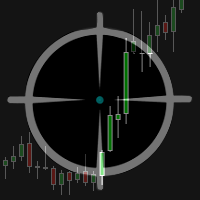
The Multicharts Crosshair draws a cross hair in any linked chart. The indicator can be used for comparison of symbol price levels in different time frame or to compare candles of different instruments in the same time frame How it works: It can works from every linked charts where the indicator is installed towards the others or from the chart where is istalled towards the following linked charts . It can be shown just pressing a the key of keyboard. After installing the indicators in the char
作者的更多信息
Breakout Monster Mini
Abdulfattah Yahya Mohammed Alhazmi
5 (3)
It is a very profitable EA, to trade trends breakout, and manage trades, takeprofit, stoploss, move to breakeven, and trailing stop. I work with this EA, and the reversal/pullback version since 2014.  This is a demo   version of the full   Breakout Monster EA . It works on Real and Demo accounts. Demo version restrictions: Money Management is disabled. Lot size is restricted to 0.01 lots only (Or the minimum allowed by broker). Numerical, SL and TP set to 100 pips. They cannot be modified in
FREE
Reversal Monster Mini
Abdulfattah Yahya Mohammed Alhazmi
The Most advanced and comprehensive EA to trade Trend Reversals/Pullbacks It is a very profitable EA, to trade trends breakout, and manage trades, takeprofit, stoploss, move to breakeven, and trailing stop. The   “Reversal Monster EA”   trades Reversal/Pullbacks when the current price of the pair pullback to a predefined horizontal level or trendline on the currency chart. The opening of the position can be immediate after pullback to the drawn trendline or after closing the candle below/above
FREE
Move to Breakeven Limited
Abdulfattah Yahya Mohammed Alhazmi
The main purpose of this expert advisor is to protect your hardly gained profits. Once the market goes in your favor, with amount of specified pips [configured via EA inputs], the EA will do the following: Move the Stop-loss of the profitable positions to Breakeven. Lock in some profits, i.e put the SL above/below your entry with specified pips  Will close part of position, % of lots, once the EA was triggered.  By default, the "Move to Breakeven EA" will modify all opened positions on the termi
FREE
Breakout Monster Expert Advisor
Abdulfattah Yahya Mohammed Alhazmi
For The English Manual you can contact me. The Most advanced and comprehensive EA to trade Trend Breakout The “Breakout Monster EA” trades breakouts when the current price of the currency pair breaks a predefined horizontal level or trendline on the currency pair's chart. The opening of the position can be immediate after breaking the drawn trendline OR after closing the candle above/below this trend, provided that all technical and non-technical filters, defined by the trader through the exp
Reversal Monster EA
Abdulfattah Yahya Mohammed Alhazmi
The Most advanced and comprehensive EA to trade Trend Reversals/Pullbacks It is a very profitable EA, to trade trends pullback, and manage trades, takeprofit, stoploss, move to breakeven, and trailing stop. The “Reversal Monster EA” trades Reversal/Pullbacks when the current price of the pair pullback to a predefined horizontal level or trendline on the currency chart. The opening of the position can be immediate after pullback to the drawn trendline or after closing the candle below/above th
筛选:
无评论
回复评论